
Summary
HTML5 ad automation means taking one master creative and producing every required size, language, and platform variation as ready-to-serve HTML5 files, without re-designing each one by hand. The right tool turns weeks of production into hours, keeps every variation on-brand, and outputs files that work natively on Google Ads, Meta, DV360, and the major SSPs. Viewst is one of the platforms purpose-built for this workflow.
What HTML5 ad automation actually is
HTML5 ads are the standard format for animated, interactive display advertising across programmatic networks. They are lightweight, support animation and interactivity, and serve cleanly across desktop and mobile. Automating their production sits at the heart of any modern creative automation platform.
The problem is that every campaign needs dozens of versions. Different sizes for IAB standards (300x250, 728x90, 160x600, 320x50, and ten others). Different languages for international rollouts. Different offers for A/B testing. Different platforms with different file size limits.
Doing this by hand means a designer opens each size in a tool like Google Web Designer or Animate, manually resizes elements, re-times animations, exports, tests, fixes, and uploads. For a single campaign with 12 sizes and 4 languages, that is 48 versions. At a realistic pace, that is a week of production work for one designer.
Automation collapses that week into an afternoon. You build one master, define the variations, and the tool produces every output.
What good HTML5 ad automation does
A serious automation platform handles five things:
Master creative to multi-size export. You design once, the tool resizes intelligently. Elements scale, reposition, and adapt to the canvas. Animations re-time automatically.
Brand asset locking. Logos, fonts, palettes, and approved copy are locked at the brand level. Variations cannot drift off-brand.
Dynamic content insertion. Headlines, offers, product images, and CTAs can be swapped through a feed or a spreadsheet. One creative becomes a thousand personalized variations.
Native HTML5 output. The export is a clean, lightweight HTML5 bundle that meets the file size limits for Google Ads, Meta, DV360, Yandex, and the major DSPs.
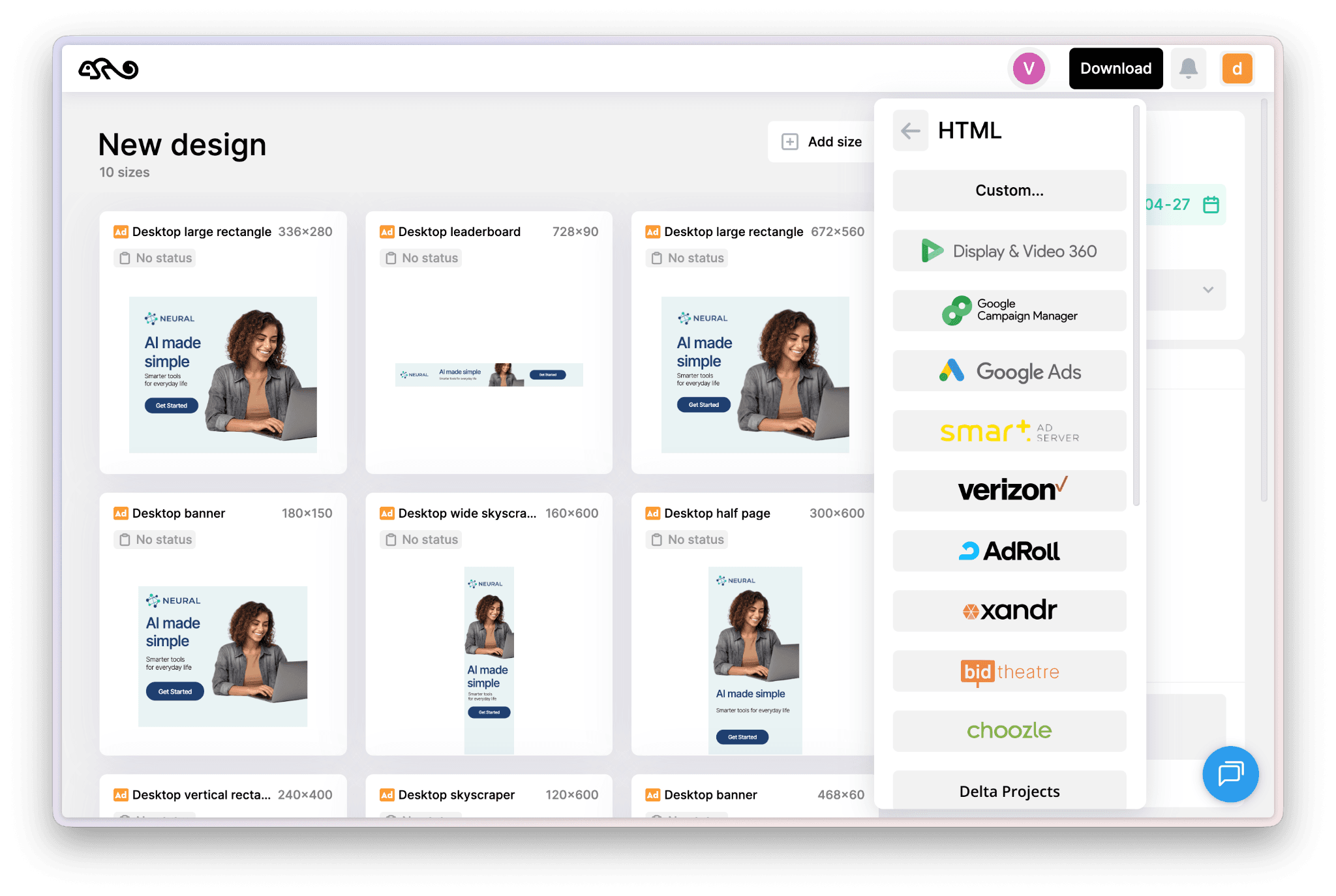
Preview and QA in one place. All sizes preview in a single dashboard. Approval and feedback live in the tool, not in 47 email threads.
When you should automate (and when you should not)
Automation pays off when:
You are producing more than 10 variations per campaign. You are running campaigns across more than 3 networks. You have a brand system that needs to stay consistent. You are testing offers, creative, or copy at any meaningful scale. Your designers are spending more than 20% of their time on production work. Teams running modern campaigns now routinely need to produce hundreds of display ad variations per launch, which is where automation stops being optional.
Automation is overkill when:
You run one ad a quarter. You have no brand system. You are a freelancer building one-off campaigns and you genuinely enjoy the production work.
For everyone else, the math is straightforward. A designer's time costs more than the platform. The platform pays for itself in the first campaign.
How HTML5 ad automation platforms actually work
The workflow has four steps.
1. Build the master. A designer creates one canonical version of the creative in the platform's editor (or imports it from Figma or Sketch). Animations, layers, and brand elements are defined here. Teams that already design in Figma will want to read the specific workflow for converting Figma designs into HTML5 ads automatically.
2. Configure variations. You select the sizes, languages, and dynamic content variants you need. Modern platforms include preset IAB size kits plus custom sizes.
3. Generate and review. The platform produces every variation. Designers review, tweak any size that needs manual love, and approve.
4. Export and serve. Files export as native HTML5 packages ready to upload to Google Ads, DV360, Meta, or any DSP that accepts HTML5.
The whole loop, for a campaign with 30 to 50 variations, can run in an afternoon instead of a week.
What to look for when choosing a tool
Five criteria, in priority order:
Output quality. The exported HTML5 files must serve cleanly on every major network. Test this. Generate a campaign, upload it to Google Ads, and check the load. If the platform produces bloated or broken HTML5, nothing else matters.
Brand control. Can you lock fonts, colors, logos, and copy at the workspace level? If junior team members can override brand standards in three clicks, the platform will eventually embarrass you.
Multi-size intelligence. When you resize from 300x250 to 728x90, the tool should adapt the layout intelligently. Tools that just stretch elements produce ugly ads.
Workflow integration. Does it connect to Figma or Sketch for design import? Does it have an approval workflow? Can it export to your specific DSP?
Pricing model. Per-seat pricing works for small teams. Per-campaign or per-export pricing burns budget fast at scale. Look at the Viewst pricing model and compare it directly to alternatives like Viewst vs Creatopy before committing.
Where Viewst fits
Viewst is built specifically for this workflow. The platform turns one master creative into native, editable, animated HTML5 ads across every size, audience, and platform you need. Brand assets are locked at the workspace level, exports are clean HTML5 ready for the major networks, and the variation generation is built around the assumption that you are scaling production, not designing one-offs.
The free trial lets you build a real campaign and export it to your actual ad server, so you can validate output quality before committing. Start a free Viewst trial.
Common mistakes when automating HTML5 ad production
Trying to automate a campaign before the brand system is locked. If your brand guidelines live in a PDF nobody reads, automation will scale the inconsistency. Lock the brand first.
Picking a tool based on the editor instead of the export. A pretty editor with broken HTML5 output is useless. Always validate the exported file quality.
Underestimating the migration cost. Moving from a manual workflow takes 2 to 4 weeks of process change. Plan for it.
Letting AI generate brand-facing concepts. Use automation to scale human-designed creative. Concepts should still come from your team. AI-generated banner concepts at scale produce visual noise, not performance.
Frequently asked questions
What is the difference between HTML5 ad automation and dynamic creative optimization (DCO)?
Automation produces the variations. DCO chooses which variation to serve in real time based on audience data. The two work together. You automate the production of the creative pool, then DCO serves the right version to the right person. You need a creative pool before DCO can do anything useful.
Can I import Figma designs into an HTML5 ad automation tool?
Yes, the major platforms (Viewst included) support Figma import in some form. The fidelity varies. Test it on a real design before you commit.
Do HTML5 ad automation tools support video?
Most modern platforms support both animated HTML5 and short-form video output from the same master. This is where the workflow gets genuinely powerful, because one concept can fan out across display and social video.
Are these tools usable by non-designers?
Yes, with caveats. A platform with strong brand guardrails lets marketers and account managers produce variations safely. But the original master still needs to be built by someone who can design.
How fast can a team move from manual HTML5 production to automated?
Most teams hit productive use within two weeks. Full workflow migration takes about a month. The first automated campaign typically ships at roughly 5 to 10 times the speed of the manual equivalent.
Bottom line
If your team is producing display ads at any meaningful scale, HTML5 ad automation is no longer optional. The economics do not work without it. The right platform turns production from a constraint into a capability, frees designers for actual creative work, and makes it realistic to test, iterate, and personalize at the speed the market demands.
Try Viewst free and run one real campaign through it. That is the only way to evaluate this category honestly.

Victoria is the CEO at Viewst. She is a serial entrepreneur and startup founder. She worked in Investment Banking for 9 years as international funds sales, trader, and portfolio manager. Then she decided to switch to her own startup. In 2017 Victoria founded Profit Button (a new kind of rich media banners), the project has grown to 8 countries on 3 continents in 2 years. In 2021 she founded Viewst startup. The company now has clients from 43 countries, including the USA, Canada, England, France, Brazil, Kenya, Indonesia, etc.
In this article
" height="11.060000000000002px" id="wzBCZ87AK" transform="translate(6.47 2.47)" width="6.590000000000003px"/></g></svg>)