
Figma Is Exceptional. And It Is the Wrong Tool for This Job
Figma is probably the best interface design tool ever built. The collaboration model changed how design teams work. The component system is elegant. The prototyping capability is underrated. For product design, UX work, brand identity, and general visual design, Figma is the right answer for most teams.
Display ad production is a different job. It has specific technical requirements that Figma was not built to meet: HTML5 export, animation timelines, IAB size compliance, ad-network packaging, feed-driven variant generation, and the ability to produce a hundred on-brand sizes from a single master creative without rebuilding anything manually.
Figma cannot do most of that. And the teams that try to use it for ad production end up with the same problem: designers doing production work instead of creative work, slow turnaround times, inconsistent outputs, and a growing backlog that no amount of headcount fixes.
Viewst is the tool built for the job Figma cannot do.
Quick Comparison
Capability
Viewst
Figma
HTML5 Ad Export
Yes — network-ready with click-tag support for Google Ads, DV360, and more
No — exports PNG, JPG, SVG, PDF only
Animation for Display Ads
Full keyframe timeline; per-layer timing, sequencing, and easing control
Prototyping transitions only — not suitable for ad animation
Multi-Size Ad Production
Create once, auto-sync to all IAB sizes simultaneously
No auto-resize for ads — manual rebuild per format
Ad-Network Compliance
Network-specific export packages; click tags; spec validation built in
No ad-network compliance tooling
Feed-Based Variant Generation
CSV and URL feed automation for unlimited data-driven variants
Not available natively
Brand Template Permissions
Per-layer lock and permissions — control what teams can and cannot edit
Component libraries; relies on designer discipline, not system enforcement
Figma Import
Yes — Figma plugin for direct import of layered designs
Not applicable
Creative Analytics
Creative-level performance with ad-account sync (Premium)
Not available
Production Speed for 20 Ad Sizes
Seconds — auto-generated from one master
Hours — manual rebuild for each format
Pricing
From $110/month per seat; built for production volume
From $15/month per seat; built for design collaboration
Why the Best Design Teams Still Can't Use Figma for Ad Production
Figma cannot export HTML5
This is the fundamental constraint. Programmatic display advertising, Google Ads campaigns, DV360 buys, and most ad networks require HTML5 creative. Figma exports static files. The workflow that fills the gap — design in Figma, hand off to a developer or a motion designer, export from After Effects or Animate, deliver to ad ops — takes days and costs money at every handoff. Viewst eliminates every step in that chain. The designer produces the final deliverable directly.
Figma has no animation timeline
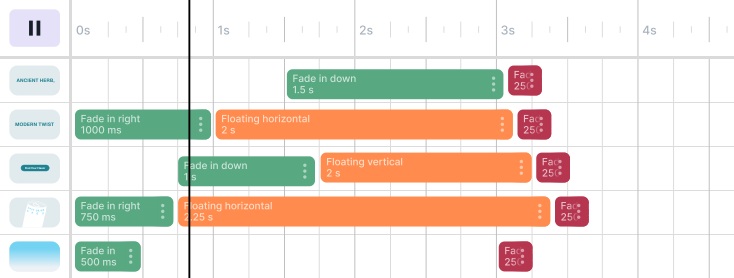
Figma's prototyping panel creates transitions between frames. This is excellent for communicating design intent in a product context. It is not an animation tool for display advertising. Viewst's animation timeline gives designers keyframe control over every element in the design: motion path, timing, easing, delay, sequence, and per-layer choreography. The result is HTML5 animation that meets ad-network specifications and actually performs.
Resizing in Figma is manual labor
A standard display campaign requires creative in 10 to 15 IAB standard sizes: leaderboard, medium rectangle, half page, skyscraper, mobile banner, and more. In Figma, each size requires a separate frame, and adapting the layout from a 970x250 leaderboard to a 300x250 medium rectangle is a manual process. Every element needs to be repositioned. Every text block needs to be refit. Every image needs to be cropped. Multiplied across 15 sizes and 3 creative concepts, that is a full day of production work before a single asset goes live.
Viewst's multi-size sync takes one master design and auto-adapts structure, spacing, and element hierarchy across every required format simultaneously. Fifteen sizes in seconds. Changes to the master propagate to all sizes automatically.
Figma's brand controls rely on designer discipline
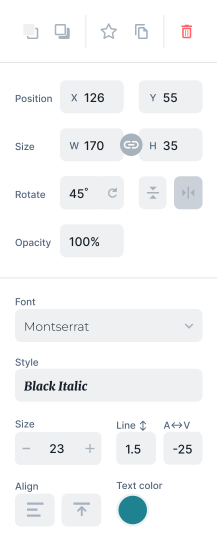
Figma's component libraries and styles are powerful. But they are design tools, not governance systems. A designer can override a component. They can detach from a library. They can use the wrong color. The system does not prevent it. Viewst's per-layer template permissions do. When a Creative Director locks an element in a Viewst template, it cannot be changed by downstream users regardless of their intentions. Brand consistency is enforced by the system, not assumed from human behavior.
There is no path from Figma to ad network without another tool
The Figma-to-live-ad workflow requires at minimum: export from Figma, build animation in a separate tool, package for the target ad network, add click tags, validate against network specs, upload to the ad server or DSP. Viewst compresses all of that into a single workflow. Design, animate, multi-size, export with click tags and network packaging, push to Meta or DV360 directly. One tool, one workflow, one team.
When to Keep Using Figma
Figma is still the right tool for originating creative concepts. Designing the master layout, establishing the visual language, creating the brand elements, building the first-draft composition — Figma excels at all of this. It is an ideation and design tool. Viewst is a production tool.
The highest-performing creative teams use both: Figma for concepting and design, Viewst for production at scale. Viewst's Figma plugin imports layered designs directly into the production environment, preserving every element for editing, animation, resizing, and export. The handoff is frictionless. Designers work where they are most creative. Production happens where it is most efficient.
The Real Cost of Using Figma for Ad Production
Most creative teams do not calculate the actual cost of their Figma-based ad production workflow. They track the Figma license. They do not track the developer hours for HTML5 conversion, the motion designer fees for animation, the production agency markup for resizing, the campaign delays from slow turnaround, or the brand inconsistencies that accumulate when ad production is manual and distributed.
When those costs are totaled, Viewst is not more expensive than Figma for ad production. Viewst replaces a workflow that costs significantly more than a software subscription.