
Creative automation tools for display advertising: Top‑rated ad tools for enterprise creative teams
Meta description: Top‑rated creative automation tools for display advertising. Learn how to pick an HTML5 ad builder for agencies and enterprise teams.
Enterprise creative teams are under pressure to produce more digital ads than ever.
Demand for content has at least doubled in the last two years according to Adobe’s 2026 survey of creatives, and nearly 3 in 4 leaders expect to invest in tools to handle the load.[^adobe2026] At the same time, U.S. internet ad revenue hit $258.6 billion in 2024, up 14.9% year‑on‑year, underscoring how critical digital advertising is for growth.[^iab2024]
In that environment, creative automation tools for display advertising and an HTML5 ad builder for agencies are no longer nice‑to‑have. They are production infrastructure.
This guide explains how to evaluate the best software for creating and managing display ads, compares leading platforms, and clarifies where Viewst fits as an HTML5‑native ad production studio.
Disclosure: This guide is published by Viewst. The comparative sections aim to be vendor‑agnostic and are based on publicly available data and research as of May–September 2026. Always verify details against current vendor documentation.
Methodology: how we selected and compared ad creator platforms
To keep this pillar useful and reproducible, here’s exactly how platforms were selected and evaluated.
Timeframe and sources
Research window: May–September 2026.
Primary sources:
G2 category pages and vendor listings for Digital Advertising, Creative Management Platforms, and related tools (ratings and review counts as of May 2026).[^g2cmp]
Vendor documentation and product pages (for HTML5 support, APIs, export formats, and workflow features).
Official ad‑server documentation (e.g., Google Campaign Manager 360 HTML5 specs, retrieved August 2026).[^cm360]
Industry research from IAB, Adobe, McKinsey, Smartly.io, and others for context on demand, AI adoption, and workflow pressures.[^iab2024][^adobe2024][^adobe2026][^mckinsey2024][^smartly2026]
Selection criteria
Tools had to meet at least three of these conditions:
HTML5 or banner‑first focus: native HTML5 ad support, not just social/video.
Enterprise workflows: multi‑user, multi‑brand, or multi‑market usage with review and governance.
Automation features: bulk resizing, localization, variant generation, or templating at scale.
Evidence of adoption: a meaningful G2 presence (rating + reviews) or clear enterprise positioning.
Platforms covered include (alphabetically):
Bannerflow
Bannerwise
Celtra
CHILI GraFx
Hunch
Smartly.io
Storyteq
The Brief
Viewst
This is not an exhaustive list. Instead, it focuses on HTML5 ad builders and creative automation platforms for display advertising that are commonly evaluated by enterprise creative teams.
Why HTML5 ad builders and production workflows matter for display advertising
HTML5 display ads are not just images; they are mini web pages.
The IAB notes that HTML5 ads typically package multiple files (HTML, CSS, JS, images, video), and must be optimized for load performance across devices.[^iabhtml5] Google Campaign Manager 360 (CM360) similarly treats HTML5 creatives as ZIP or ADZ bundles with defined constraints:
Up to 100 files per bundle
Maximum uploaded bundle size of 9.5 MB
At least one clickTag in the primary HTML file (to enable tracking)
Support for multiple backup images and polite loading behavior[^cm360]
(Specs verified against CM360 developer documentation as of August 2026.)
That complexity changes what “best ad design software for creative agencies” means. The real bottleneck is rarely the first design. It’s the production pipeline:
Resizing dozens of banners and rich media units
Localizing copy into many languages
Adapting creative for multiple networks and formats
Ensuring HTML5 output passes ad‑server validation
Creative automation platforms for display advertising address those bottlenecks by combining:
HTML5‑native output that’s ready for CM360, DV360, The Trade Desk, and other ad servers
Bulk resizing and localization workflows
Review and approval connected to the creative itself
Brand governance to keep variants consistent
Enterprise buyers increasingly evaluate tools on this production infrastructure rather than just their design UI.[^g2infra]
Best software for creating and managing display ads: evaluation criteria
Before comparing vendors, it helps to define what “best” means for an enterprise creative operations leader.
1. HTML5‑native ad production
Key questions:
Does the tool output structured HTML5 with editable layers, not just flat images or GIFs?
Can it enforce ad‑server constraints (file size, polite loading, click tags)?
Are fallback images and different export profiles supported (e.g., CM360 vs. DV360 vs. The Trade Desk)?
This matters because ad servers have specific rules. CM360, for example, enforces bundle size and clickTag requirements.[^cm360] The IAB emphasizes that improperly packaged HTML5 ads can slow pages or break in some environments.[^iabhtml5]
2. Bulk resizing HTML5 ads and variant generation
Scale is the central problem.
Adobe reports that content demand has at least doubled in the last two years, and creatives now use AI on more than 40% of projects to cope.[^adobe2026] Smartly.io found that 41% of marketers still need 3–4 weeks to launch a digital campaign, while only 3.6% can go live in under a week.[^smartly2026]
Your ad creator should:
Resize a master creative into many formats automatically
Generate variants by language, market, and offer from shared templates
Maintain a single source of truth for layout and animation
3. Localization and brand governance
High‑volume display advertising is often multi‑market.
Look for:
Support for multiple languages (90+ in some tools)
Controlled text fields and character limits
Brandbooks or style systems that lock in fonts, colors, and logos
Permissions that separate template authors from field‑level editors
This aligns with IAB’s trend where review, approvals, and governance are now core product features for creative platforms.[^iabgov]
4. Review, approval, and collaboration
Enterprise teams rarely ship ads without:
Legal review
Brand sign‑off
Regional approvals
Your ad production workflow software should:
Embed comments and status inside the creative
Provide animated previews and version history
Connect approvals to specific variants and bundles
5. AI tools for ethical display ad design
AI is mainstream in production:
McKinsey reports 65% of organizations regularly use generative AI as of early 2024.[^mckinsey2024]
Adobe’s 2024 report says 78% of employees saw improved efficiency from gen AI.[^adobe2024]
Adobe’s 2026 survey notes that nearly 9 in 10 creatives say AI makes their work better.[^adobe2026]
But Smartly.io warns that 3 in 4 marketers worry AI makes brands look the same, and 86% have seen AI outputs resemble competitors’ content.[^smartly2026]
When you evaluate AI tools for ethical display ad design, consider:
Does the tool keep humans in control of final layouts and animation?
Can you audit AI‑generated assets and maintain provenance?
Does the vendor align with IAB’s AI Transparency and Disclosure Framework (January and August 2026 updates)?[^iabai]
6. Integrations, APIs, and reliability
Enterprise buyers on G2 increasingly rate ad tech on:
API coverage and integration into existing stacks
Internationalization and multi‑locale support
Platform uptime and reliability[^g2infra]
Ask vendors for:
Documented APIs for automation and integration
SLA or uptime guarantees
Reference architectures for connecting creative and media workflows
Comparative overview: leading creative automation platforms for display
This section gives a high‑level comparison of selected platforms based on publicly available information as of May 2026.
Note: Features can change quickly. Always confirm specifics directly with vendor documentation or sales teams.
Snapshot: creative automation platforms for display advertising
Below is a simplified feature checklist for some commonly evaluated platforms.
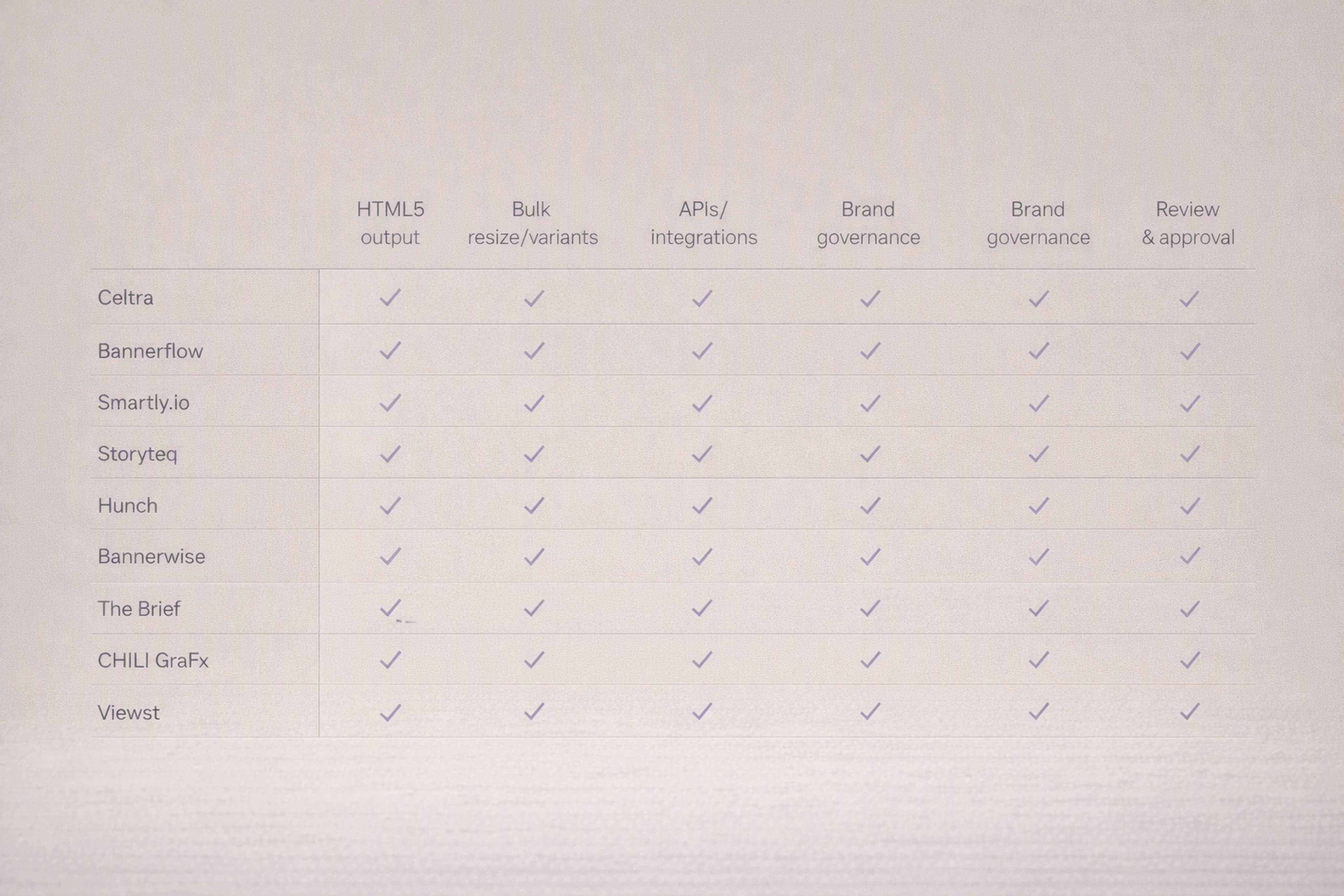
Platform | G2 rating & reviews (approx., May 2026) | HTML5 ad output | Bulk resize / variants | APIs / integrations | Brand governance | Review & approval |
|---|---|---|---|---|---|---|
Celtra | ~4.4/5 (409+ reviews)[^g2celtra] | Yes | Yes | Yes | Yes | Yes |
Bannerflow | ~4.5/5 (193+ reviews)[^g2cmp] | Yes | Yes | Yes | Yes | Yes |
Smartly.io | ~4.4/5 (475+ reviews)[^g2cmp] | Yes (HTML5 + social) | Yes | Yes | Yes | Yes |
Storyteq | ~4.4/5 (134+ reviews)[^g2cmp] | Yes | Yes | Yes | Yes | Yes |
Hunch | ~4.5/5 (51+ reviews)[^g2cmp] | Yes (focus on dynamic & social) | Yes | Yes | Yes | Yes |
Bannerwise | ~4.5/5 (61+ reviews)[^g2cmp] | Yes | Yes | Yes | Yes | Yes |
The Brief | ~4.6/5 (37+ reviews)[^g2cmp] | Partial / templated | Yes | Limited / evolving | Yes | Yes |
CHILI GraFx | ~4.2/5 (12+ reviews)[^g2cmp] | Yes | Yes | Yes | Yes | Yes |
Viewst | Not yet widely rated on G2 (enterprise focus) | Yes (HTML5‑native) | Yes | Yes | Yes | Yes |
Interpretation:
Many platforms now claim HTML5 output and resizing as table stakes.
Differences emerge in how deeply they integrate with ad servers, the granularity of control designers retain, and how AI is woven into production rather than bolted on.
Platform categories: where each tool tends to shine
The category is fragmenting by use case. The “best ad maker for HTML5 banners” depends on your bottlenecks.
1. HTML5‑native ad production studios
Typical strengths:
Structured HTML5 output with editable layers
Strong control over animation and interactions
Focus on display, retail media, and programmatic placements
Examples (alphabetically):
Bannerflow – Heavily emphasizes localization, translation, and dynamic display ads; autoscaling and variant management across markets.[^bannerflow]
Bannerwise – Promotes multilingual support (90+ languages), autoscaling of banners, and HTML5‑ready exports.[^bannerwise]
Viewst – Built around a master creative that can be turned into many HTML5 variants, with AI assisting resizing, animation, and localization while keeping elements editable.[^viewst]
2. Creative management platforms (CMPs) with multi‑channel focus
These tools often span display, video, and sometimes social.
Celtra – One of the earlier CMPs; strong in enterprise display and video creative, with templates, automation, and governance.
Storyteq – Emphasizes instant versioning by market, channel, and language; strong in multi‑channel campaign distribution.
CHILI GraFx – Focuses on smart templates and automatic resizing/reformatting, with variable‑driven content.
3. Cross‑channel creative + media platforms
These tools blur the line between creative production and media activation.
Smartly.io – Combines creative, media, and intelligence suites. Supports HTML5 ads, dynamic creative optimization (DCO), predictive creative scoring, and cross‑channel activation.[^smartlydocs]
Hunch – Focuses on localized, personalized campaigns across social and display; strong in templated creative for performance marketing.
4. Briefing and workflow‑first tools
Some platforms emphasize intake, briefs, and workflows rather than the design canvas.
The Brief – Positions around managing creative briefs, approvals, and coordination. It may connect into other creative tools rather than being a full HTML5 studio.
For enterprise buyers, a common pattern is to combine a strong HTML5 production studio with a media or CMP layer, ensuring both creative control and efficient activation.
Sponsored spotlight: where Viewst fits among ad creator tools
This section is explicitly sponsored and describes Viewst’s positioning relative to the broader market.
Viewst in one line
Viewst is an AI ad production platform that turns ideas and existing designs into finished, editable, animated, HTML5 ad‑ready campaigns at scale.[^viewst]
Key differentiators
HTML5‑native, editable output
Viewst produces structured HTML5 files with editable layers.
Every element (text, images, shapes, animation timelines) remains accessible for adjustments and future updates.
Ad bundles are prepared with clickTag support, file‑size awareness, and fallbacks aligned with major ad servers.[^viewst]
AI built for production, not just concepts
Viewst’s AI features sit inside the production workflow:
AI Designer – Helps turn a prompt or existing design into a first layout.
Smart Resize – Adapts a master creative into many sizes while preserving hierarchy.
Image Deflatening – Helps convert flattened assets (like exports from other tools) into editable layers where possible.
Instant Animator – Applies animation patterns that designers can later refine.
The principle: AI handles the repetitive mechanics; designers keep creative control.
One master creative across every format
Teams design and approve a single master creative direction.
Viewst then applies that direction across formats, placements, languages, and offers.
Designers can step in at any point to tweak specific sizes without losing connection to the master.
Brand systems and governance baked in
Brandbooks capture fonts, color systems, logo treatments, and layout rules.
Reusable assets and shared components ensure consistency across campaigns.
Permissions and roles differentiate between template builders, editors, and approvers.
Integrated review, approval, and delivery
Animated previews and comments live alongside the creative.
Statuses and approvals are trackable at both campaign and variant level.
Exports respect real‑world constraints (e.g., CM360 bundle settings, network‑specific profiles).
Where Viewst is a strong fit
Viewst is built for:
Creative and advertising teams producing continuous, high‑volume HTML5 display and retail media campaigns
Agencies and enterprise marketers who already use Adobe and other design tools but need a dedicated HTML5 ad builder for agencies and in‑house teams
Organizations where speed, consistency, and creative control are equally important
If your main bottleneck is turning approved concepts into many high‑quality HTML5 ads, Viewst competes directly with other HTML5‑native production studios and CMPs, offering AI acceleration while protecting designer control.
How to choose the right ad creator for enterprise production
Here is a practical, step‑by‑step process for creative operations leaders.
Step 1: Map your primary bottleneck
Common bottlenecks:
HTML5 production: building and animating banners for many formats.
Localization: turning one campaign into dozens of markets.
Governance: keeping freelance and regional edits on brand.
Speed to launch: reducing 3–4 week timelines down to days.[^smartly2026]
Pick the top one or two. Let those drive your shortlist.
Step 2: Build a requirements checklist
Use this as a starting point:
Must‑have:
HTML5 output compliant with major ad servers
Bulk resizing and multi‑variant support
Integrated review and approvals
Brand governance (templates, style systems, permissions)
Nice‑to‑have:
AI assistance for layout, resizing, animation
APIs for automation
Direct integrations with your ad servers or DSPs
Step 3: Run a real‑world pilot
To evaluate reliable tools for advertising design, pilot with a live campaign, not a toy project.
Pick an upcoming or recent campaign.
Require vendors to:
Rebuild your master creative in their system.
Generate a full size set (e.g., 10–20 standard sizes).
Localize into 3–5 languages.
Deliver CM360‑ready HTML5 bundles.
Measure:
Time from brief to export
Number of manual steps required
Number of changes designers can make directly without re‑exporting from Photoshop/Figma
Step 4: Evaluate AI impact and brand safety
Given that 95% of marketers in Smartly.io’s 2026 survey are testing AI in creative production,[^smartly2026] you likely will, too.
For each platform, ask:
Can AI outputs be edited and overridden easily?
Does the tool support AI transparency workflows aligned with the IAB’s AI framework (e.g., documenting AI contributions where material)?[^iabai]
How does the vendor mitigate the risk of brand sameness?
Step 5: Align with your broader stack
Finally, check how the tool connects to:
Your design tools (Adobe, Figma)
Your project management stack
Your ad servers and DSPs
The goal is to make your new ad creator part of an end‑to‑end production infrastructure, not another isolated app.
FAQ: creative automation tools for display advertising
What are the best AI tools for creating display ads?
The best AI tools for creating display ads combine generative assistance with strong production controls.
Platforms like Celtra, Smartly.io, Storyteq, and Viewst embed AI into layout, resizing, and animation workflows rather than just generating mockups.[^g2celtra][^smartlydocs][^viewst]
When choosing between them, focus on:
How editable the AI output is
Whether HTML5 exports pass ad‑server checks
How AI features align with your brand governance and the IAB AI transparency framework[^iabai]
How to localize and resize ads at scale?
To localize and resize ads at scale, you need a combination of master templates and automation:
Build a master creative with clear text fields and layout rules.
Use a creative automation platform that supports bulk resizing HTML5 ads and multilingual text.
Connect translation workflows to your templates so that language changes don’t break layouts.
Tools like Bannerflow, Storyteq, Bannerwise, and Viewst explicitly advertise localization and autoscaling features for display ads.[^bannerflow][^storyteq][^bannerwise][^viewst]
What is the best ad design software for creative agencies focused on HTML5 banners?
The best ad design software for creative agencies producing HTML5 banners is usually an HTML5‑native ad production studio or CMP that integrates with Adobe and your media stack.
Options include:
Bannerflow, Bannerwise, Celtra, Storyteq, CHILI GraFx, and Viewst for banner‑first workflows.
Smartly.io or Hunch if you also need tight integration with social and media activation.
The right choice depends on whether your bottleneck is HTML5 production, multi‑channel orchestration, or creative + media alignment.
How do AI tools for ethical display ad design handle transparency?
AI tools for ethical display ad design should:
Log which assets or elements were AI‑generated or AI‑assisted.
Allow you to review and edit AI outputs before publishing.
Support workflows aligned with the IAB AI Transparency and Disclosure Framework, which encourages risk‑based, materiality‑driven disclosure of AI usage in advertising (updated in August 2026).[^iabai]
When evaluating vendors, ask how they track AI contributions and what controls are available to protect brand integrity.
Why is HTML5‑native ad production so important now?
HTML5‑native ad production matters because modern display ads are interactive mini web pages.
IAB guidelines emphasize packaging and performance, while Google CM360 imposes specific file and clickTag requirements.[^iabhtml5][^cm360]
Without an HTML5‑native workflow, teams often rely on manual rebuilding or agencies for every change, which slows campaigns and increases costs. HTML5 ad builders let you update and reuse creatives across formats and campaigns without starting from scratch.
Enterprise creative teams today compete on speed, consistency, and differentiation.
The right creative automation tools for display advertising help you turn ideas into campaigns faster, without sacrificing creative control or brand integrity. Whether you choose Viewst or another HTML5‑native ad creator, treat your next ad tool not just as design software, but as core production infrastructure for your advertising.
[^iab2024]: IAB, "Internet Advertising Revenue Report: Full-Year 2024," published 2025, reporting U.S. internet ad revenue of $258.6B in 2024 (+14.9% YoY).
[^iabhtml5]: IAB, "HTML5 for Digital Advertising" guidelines, accessed August 2026, describing HTML5 ads as "mini web pages" requiring multiple file types and careful packaging.
[^cm360]: Google Campaign Manager 360 Help, "HTML5 creatives," accessed August 2026, stating support for HTML5 creatives as ZIP/ADZ bundles with up to 100 files, max 9.5 MB, and clickTag requirements.
[^g2infra]: G2, "Digital Advertising" and related category overview pages, accessed May 2026, highlighting enterprise buyers’ focus on scalability, internationalization, integrations, workflow, and reliability.
[^adobe2024]: Adobe, "State of Creativity" report, 2024, noting 83% of decision makers saw workload changes and 78% of employees reported efficiency gains from generative AI.
[^adobe2026]: Adobe, "Creatives say AI is helping them meet growing demand for content," April 17, 2026, reporting content demand has at least doubled over two years, creatives use AI on more than 40% of projects, and nearly 9 in 10 say AI improves their work.
[^mckinsey2024]: McKinsey, "The state of AI in early 2024," June 2024, reporting 65% of survey respondents said their organizations regularly use generative AI.
[^smartly2026]: Smartly.io, "Digital Advertising Trends 2026" report, accessed May 2026, citing 46% use AI to scale creative, 33% use AI across creative/media/measurement, 95% testing AI for creative production, 41% need 3–4 weeks to launch campaigns, 3.6% can launch in under a week, and 3 in 4 worry AI makes brands look the same while 86% have seen AI outputs resemble competitors.
[^g2cmp]: G2 Creative Management Platform listings, accessed May 2026, showing approximate ratings and review counts: Bannerflow ~4.5/5 (193+), Smartly ~4.4/5 (475+), Storyteq ~4.4/5 (134+), Hunch ~4.5/5 (51+), Bannerwise ~4.5/5 (61+), The Brief ~4.6/5 (37+), CHILI GraFx ~4.2/5 (12+).
[^g2celtra]: G2 Celtra vendor page, accessed May 2026, showing rating ~4.4/5 with 409+ reviews.
[^bannerflow]: Bannerflow website, product pages accessed May 2026, emphasizing localization/translation, dynamic ads, and autoscaling.
[^bannerwise]: Bannerwise website, product pages accessed May 2026, referencing support for 90+ languages and autoscaling display creatives.
[^storyteq]: Storyteq website, accessed May 2026, highlighting instant versioning by market, channel, and language.
[^smartlydocs]: Smartly.io documentation, "Introduction to Smartly," accessed May 2026, describing creative, media, and intelligence suites and HTML5/DCO capabilities.
[^iabgov]: IAB and vendor documentation (including Viewst, Bannerflow, Storyteq, CHILI), accessed May–August 2026, reflecting emphasis on approvals, brandbooks, and governance.
[^iabai]: IAB, "AI Transparency and Disclosure Framework," initial release January 2026 and update August 2026, outlining risk‑based, materiality‑driven disclosure practices for AI in advertising.
[^viewst]: Viewst website, product and features pages, accessed May–September 2026, describing AI Designer, Smart Resize, Image Deflatening, Instant Animator, HTML5‑native output, and integrated review/approval.

Victoria is the CEO at Viewst. She is a serial entrepreneur and startup founder. She worked in Investment Banking for 9 years as international funds sales, trader, and portfolio manager. Then she decided to switch to her own startup. In 2017 Victoria founded Profit Button (a new kind of rich media banners), the project has grown to 8 countries on 3 continents in 2 years. In 2021 she founded Viewst startup. The company now has clients from 43 countries, including the USA, Canada, England, France, Brazil, Kenya, Indonesia, etc.
In this article
" height="11.060000000000002px" id="wzBCZ87AK" transform="translate(6.47 2.47)" width="6.590000000000003px"/></g></svg>)