
Why Rich Media Ad Production Needs New Rules
Rich media used to mean "anything that moves." Today, it means:
Interactive HTML5 ads users can engage with
Strict performance budgets from Google, The Trade Desk, Amazon, and others
Accessibility and UX requirements that are non-negotiable
If you’re running high-volume display campaigns, you don’t just need great ideas. You need a production workflow that can enforce motion, load-time, and UX standards at scale.
This guide walks through rich media ad best practices and shows how an integrated production studio like Viewst makes those standards real in day-to-day banner production.
What Counts as Rich Media Today?
The IAB defines rich media as ads users can interact with, not just animated banners. In practice, "rich" now means:
Interaction – hover states, expand/collapse, video, sliders
Performance budgets – strict limits on load weight, animation length, cookies, and HTTP calls
Publisher safety – creatives that won’t be unloaded by Chrome or rejected by ad servers
For example:
Google rich media guidance recommends:
First load under 200 KB
Total ad size under 500 KB after polite loading
Animation/video stopping after 30 seconds
DV360 caps:
Total download at 5 MB
25 cookies and 100 HTTP calls per ad
The Trade Desk specs:
Initial load 300 KB (with 200 KB recommended)
Subload 600 KB
Total file size 5 MB
These aren’t recommendations you can ignore. They define whether your rich media even gets to run.
Motion Design Guidelines for Rich Media Ads
1. Keep Motion Short, Clear, and Purposeful
Most platforms now treat uncontrolled motion as a liability. Google explicitly requires animations and videos to stop after 30 seconds. WCAG 2.2 says anything that auto-moves for more than 5 seconds needs a pause/stop/hide control.
Best practices:
Front-load the message in the first 3–5 seconds
End motion by 15–20 seconds, even if the spec allows 30
Avoid endless loops and frenetic movement
Use motion primarily for:
Drawing attention to key benefits or CTAs
Transitioning between product shots or offer states
Giving feedback on interaction (hover, click)
How Viewst helps:
AI Instant Animator applies consistent, one-click motion across layers
Global controls make it easy to set animation duration and stop rules across all sizes
Designers can create graceful motion once, then propagate it across the full set
2. Respect Reduced Motion and User Comfort
Uncontrolled motion isn’t just annoying. web.dev and WCAG note that parallax, zooming, and autoplay sequences can trigger motion sickness and distraction.
Best practices:
Honor
prefers-reduced-motionwhere possibleProvide a static or low-motion fallback for highly animated concepts
Avoid:
Rapid zooms and rotations
Flashing or blinking at high frequency
Full-canvas motion when small, localized motion will do
How Viewst helps:
Build motion and static variants from the same master creative
Lock motion presets into templates so teams don’t improvise risky effects
Keep all versions linked to one master, so reduced-motion variants stay in sync with the primary concept
3. Make Motion Work With Accessibility, Not Against It
WCAG treats uncontrolled motion as an accessibility barrier. If you use motion, you must give users control.
Best practices:
Provide a clear pause or close control on rich media with sustained motion
Ensure keyboard access to any controls that start/stop motion
Avoid multiple independent moving elements that each need their own control
How Viewst helps:
HTML5-native output ensures motion, controls, and layers are all editable
Interactive elements can be consistently structured across all variations
Accessibility patterns can be baked into master templates and brandbooks
Load Time and File Size: Performance Budgets You Can’t Ignore
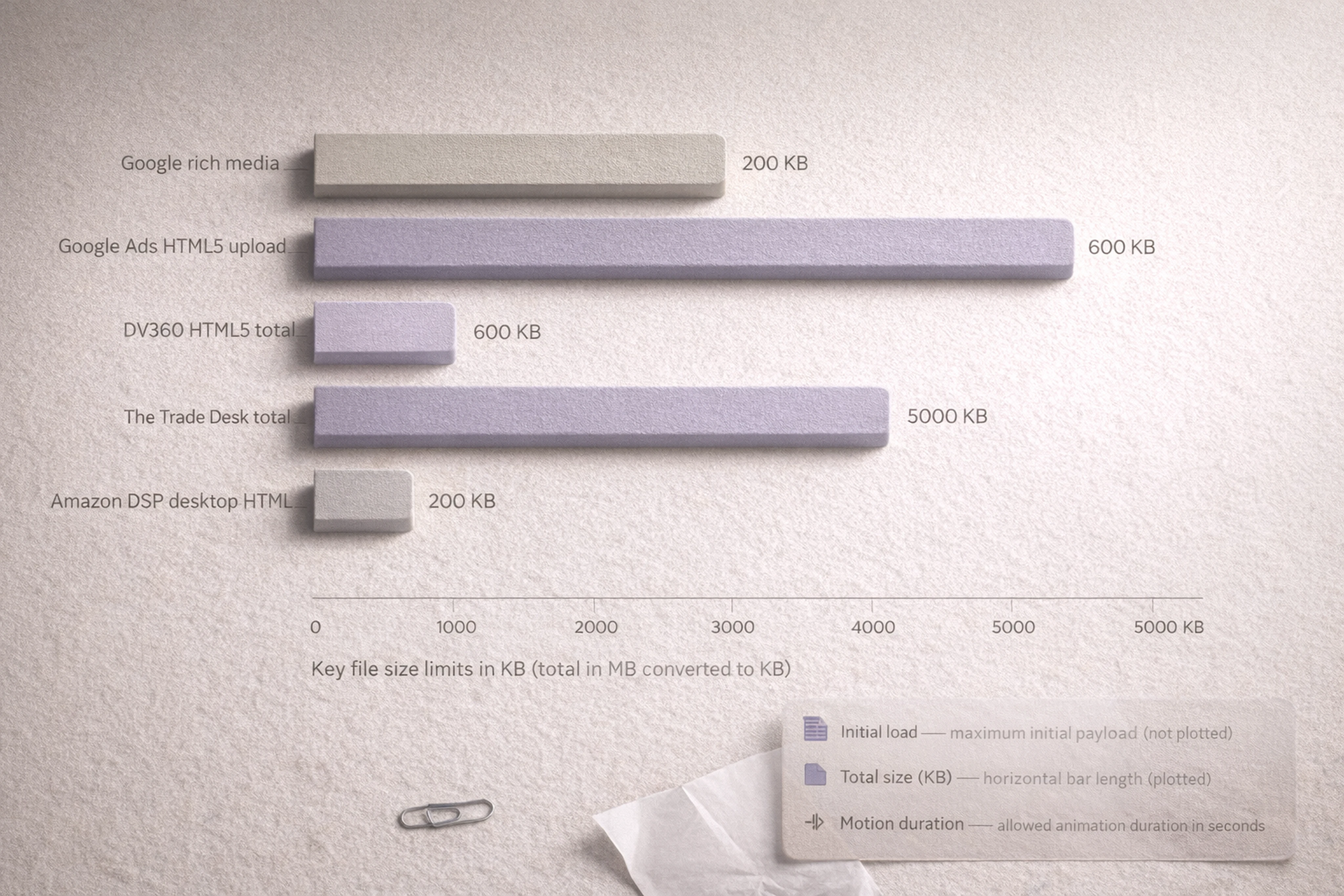
4. Design to Specific Ad Network File Size Limits
Every network has slightly different limits. Ignoring them leads to rejected creatives and last-minute rebuilds.
Key limits to design around:
Google rich media guidance:
First load under 200 KB
Total ad size around 500 KB after polite loading
Google Ads HTML5 upload:
ZIP creatives 600 KB or smaller
Proper HTML/CSS/JS packaging and a single ad-size meta tag
DV360 HTML5:
Total download size 5 MB
Up to 25 cookies and 100 HTTP calls
The Trade Desk HTML5:
Initial load 300 KB, recommended 200 KB
Subload 600 KB, total 5 MB
Amazon DSP static display:
Common desktop HTML banners at 200 KB
Many mobile placements at 40–50 KB
Best practices:
Establish an internal performance budget that is stricter than the platform limits
Separate initial load assets from politely loaded secondary assets
Build in static backups for video and complex motion
How Viewst helps:
Centralized export presets for Google, DV360, The Trade Desk, Amazon, and others
Production-ready HTML5/GIF/MP4 from the same master creative
One governed studio between design (Figma/Adobe) and media (DSPs), so specs are enforced before upload
5. Reduce Animated Ad File Size Without Killing Quality
Rich media doesn’t mean heavy media. Chrome may unload creatives over 4 MB or with excessive CPU usage, even if they technically meet specs.
Best practices:
Optimize images:
Use modern formats where supported
Compress assets aggressively while testing on real screens
Optimize motion:
Prefer CSS transitions and lightweight JS over heavy timelines
Keep GIFs slower than 5 FPS and under 30 seconds of motion (Google’s requirement)
Optimize requests:
Use sprites or combined assets to reduce HTTP calls
Only load libraries you actually use
How Viewst helps:
AI Smart Resize: one master scaled into all sizes without re-exporting assets manually
Image Deflatening: turn flat files into editable designs that can be optimized layer-by-layer
A single HTML5-native environment where designers can see real file sizes and make informed tradeoffs
UX and Accessibility: Making Rich Media Work for More People
6. Treat Accessibility as a Baseline, Not a Nice-to-Have
Accessibility is now mainstream. The CDC reports more than 1 in 4 U.S. adults—over 70 million people—reported a disability in 2022. Ignoring accessibility cuts reach and raises brand risk.
Core WCAG-aligned practices for display ads:
Contrast:
Follow the Section 508 summary of WCAG: 4.5:1 contrast for regular text
3:1 for large text
Legibility:
Avoid ultra-thin fonts at small sizes
Maintain clear hierarchy between headline, body, and CTA
Motion controls:
Provide a way to pause/stop/hide auto-playing motion over 5 seconds
Avoid multiple independent motion controls that overwhelm users
How Viewst helps:
Brandbooks and governance lock in typography, color systems, and contrast standards
All sizes inherit the same governed styling, preventing off-template edits
Designers keep craft quality while automation handles resizes and variants
7. UX Patterns That Improve Engagement Without Breaking Specs
Rich media UX should be simple, obvious, and fast. Users are scrolling; they won’t decode complex interactions.
Best practices:
Clear entry point:
Single, obvious CTA or interaction (hover, click, tap)
Fast feedback:
Immediate visual response to interaction, without hidden delays
Graceful degradation:
Static backup image for video-heavy concepts (aligned with The Trade Desk guidance)
Make sure the core message is clear within 5 seconds, even without sound (Amazon’s video advice)
How Viewst helps:
True WYSIWYG editor — what designers see is exactly what ships to the ad server
Interactive states and animations are previewed in the same environment used for review and approvals
Stakeholder comments live directly inside the banner set, not scattered across screenshots
Scalable Ad Production Workflow: From Master Creative to Compliant Variants
8. One Master Creative as the Source of Truth
The most reliable way to scale rich media is to treat one master as the structural source of truth.
Bannerflow, Celtra, and Smartly all emphasize this "one-to-many" approach.
Viewst does the same, but with HTML5-native control.
Advantages of the master model:
All sizes and variants inherit:
Layout logic
Brand styling
Motion rules
Changes made once propagate everywhere
You reduce the risk of out-of-date or off-brand variations slipping through
How Viewst implements it:
Designers build or import one master HTML5 creative from Figma or Adobe
Smart Resize generates all required sizes from that master
Updates to copy, imagery, or motion sync across the entire set automatically
9. Governance and Validation Inside Production — Not at Trafficking
Specs and accessibility checks shouldn’t be a surprise at trafficking time. They should be baked into production.
Platforms like Google rely on HTML5 validators and strict packaging rules. The Trade Desk and Amazon impose detailed limits on file size and behavior.
Best practices:
Treat production as the enforcement layer for specs and policies
Centralize:
File size limits
Animation duration and stop rules
Accessibility and contrast checks
Automate preflight checks before files leave the production studio
How Viewst helps:
One integrated studio between design and media
Governed templates and brandbooks that encode standards once
HTML5-native output aligned with ad server requirements, reducing reject risk
10. Collaboration Where Creatives Are Actually Made
Feedback and approvals are part of production. When they live in email or chat instead of the production environment, they slow everything down.
Best practices:
Keep comments, previews, and sign-offs in the same place as the creatives
Give stakeholders real interactive previews, not flat screenshots
Encode sign-off criteria:
Motion meets duration and stop rules
File sizes are within budgets
Accessibility standards are met
How Viewst helps:
Built-in collaborative review inside the banner set
Stakeholders see the real HTML5 creative, with true WYSIWYG behavior
Production teams get structured approval flows instead of scattered threads
How an Integrated Production Studio Enforces Standards at Scale
For Heads of Creative, Design Directors, and Creative Operations leads, the challenge isn’t knowing these rules. It’s enforcing them across dozens of campaigns, markets, and partners.
An integrated production studio like Viewst becomes the operational layer that makes that possible:
AI for production, not just generation:
Smart Resize, Image Deflatening, Instant Animator are built around a master creative
Designers stay in control of creative direction while AI removes mechanical work
Brand governance at scale:
Locked brandbooks and templates propagate design systems across all markets and teams
Brand control is maintained even when AI is generating variants
Compliance built in:
File size and motion rules are encoded at the template level
HTML5 output is validated before trafficking
Collaboration inside the production environment:
Comments, approvals, and previews live where banners are actually built
Teams avoid the chaos of screenshots and disjointed links
The result: rich media that is engaging, performant, and accessible, produced at a volume and speed that matches modern media investment — without burning out your designers.
FAQ: Rich Media Ad Production, Motion, and UX
Q1. What are the most important file size limits to design around for rich media?
Focus on:
Initial load under 200–300 KB (Google recommends 200 KB; The Trade Desk allows 300 KB)
Total ad size around 500–600 KB for standard HTML5 display after polite loading
Total download under 5 MB for DV360 and The Trade Desk
Set internal budgets slightly stricter than these to avoid surprises.
Q2. How long can animation run in an HTML5 banner?
Most major platforms, including Google, cap animation and video at 30 seconds. Animated GIFs must run slower than 5 FPS and stop by 30 seconds.
In practice, aim for 10–15 seconds of clear, purposeful motion, with the key message visible within the first 5 seconds.
Q3. How do I make rich media ads more accessible?
Start with three pillars:
Contrast: maintain at least 4.5:1 for regular text and 3:1 for large text
Motion control: provide a pause/stop/hide control for any auto-motion over 5 seconds
Legibility: use readable type, clear hierarchy, and avoid overly busy motion behind text
Lock these standards into your templates and enforce them via a governed production studio.
Q4. What is the best way to scale rich media production without overloading designers?
Use a master creative as the single source of truth, then:
Automate resizes and variants with tools like Viewst’s Smart Resize
Keep brandbooks and styling centralized so designers aren’t reinventing layouts
Integrate review and approvals into the same studio
Designers focus on high-value creative decisions; the studio handles mechanical production.
Q5. How is Viewst different from general design tools or AI image generators?
Viewst sits between design tools and media platforms:
It’s an HTML5-native production studio, not a general design app
It uses AI to remove mechanical work (resizing, basic animation, deflatening), not to replace creative judgment
It outputs ad-network-ready HTML5/GIF/MP4, governed by brandbooks and compliance presets
For teams running high-volume display campaigns, Viewst becomes the infrastructure that keeps rich media fast, compliant, and creatively sane.

Victoria is the CEO at Viewst. She is a serial entrepreneur and startup founder. She worked in Investment Banking for 9 years as international funds sales, trader, and portfolio manager. Then she decided to switch to her own startup. In 2017 Victoria founded Profit Button (a new kind of rich media banners), the project has grown to 8 countries on 3 continents in 2 years. In 2021 she founded Viewst startup. The company now has clients from 43 countries, including the USA, Canada, England, France, Brazil, Kenya, Indonesia, etc.
In this article
" height="11.060000000000002px" id="wzBCZ87AK" transform="translate(6.47 2.47)" width="6.590000000000003px"/></g></svg>)