
Meta title & description (for SEO)
Meta title: Migrating Static Banners to HTML5 – Step‑by‑Step Plan & HTML5 Banner Animation Tools
Meta description: Learn how migrating static banners to HTML5 improves performance. Step‑by‑step HTML5 ad production workflow, motion guidelines, creative automation tools for display advertising, and FAQs for high‑volume teams.
Why migrating static banners to HTML5 should be on your 2026 roadmap
Migrating static banners to HTML5 is no longer a nice‑to‑have. It’s how high‑volume teams keep up with performance demands, brand governance, and channel complexity.
HTML5 is now the practical default for scalable display production across Google’s ecosystem. Google notes that HTML5 works on mobile web and in‑app inventory, and Campaign Manager 360 (CM360) supports zipped HTML5 uploads for rich media and responsive formats.[^google-cm360-2025] Google is also consolidating display campaigns into Demand Gen in June 2026, emphasizing asset‑based, cross‑surface creatives over one‑off static builds.[^google-display-2025]
Meanwhile, U.S. digital ad revenue hit $294.6B in 2025, with display contributing $81.6B (27.7%).[^iab-2025] That scale makes production efficiency and brand consistency operational priorities, not side projects.
This guide lays out a step‑by‑step plan for migrating from static banners to animated HTML5, including:
Concepting motion in a systemized way
Practical motion guidelines and file‑size targets
Choosing HTML5 banner animation tools
Building an HTML5 ad production workflow
Managing change, training, and rollout
Step 1: Define why you’re moving to animated HTML5 (and where it matters)
Before you buy tools or retrain designers, get clear on why you’re migrating static banners to HTML5.
Anchor your business case
Tie the migration to specific, measurable needs:
Channel coverage
HTML5 lets you run responsive display, in‑app placements, and rich formats that static images can’t fully support.[^google-cm360-2025]
Performance & attention
Academic eye‑tracking studies show animated banners generally capture more attention and improve recall versus static banners, although results vary by context.[^sciencedirect-2012]
Creative velocity
Celtra reports 73% of marketers already use generative AI tools for design and production tasks.[^celtra-2024] If you stay static‑only, you’re competing with teams who can generate and adapt HTML5 creatives at scale.
Governance & consistency
Adobe’s enterprise docs and GenStudio flows are built around static and dynamic HTML5 templates with centralized attributes and editable fields.[^adobe-templates-2024][^adobe-genstudio-2024]
Decide where HTML5 adds value first
You don’t need to animate everything.
Prioritize HTML5 for:
Always‑on performance and remarketing campaigns
Multi‑market, multi‑size campaigns with frequent refreshes
Launch campaigns where storytelling, motion, or sequencing matters
Keep static image workflows for:
Simple, one‑off placements
Edge cases with strict creative constraints or legacy platforms
Step 2: Re‑concept your banners as systems, not one‑offs
HTML5 migration works best when you think in systems: one master, many variants.
Move from single banners to modular assets
Modern display products (Google Responsive Display Ads, Adobe GenStudio, Celtra, etc.) assume you’re working with modular assets:
Components, not flats
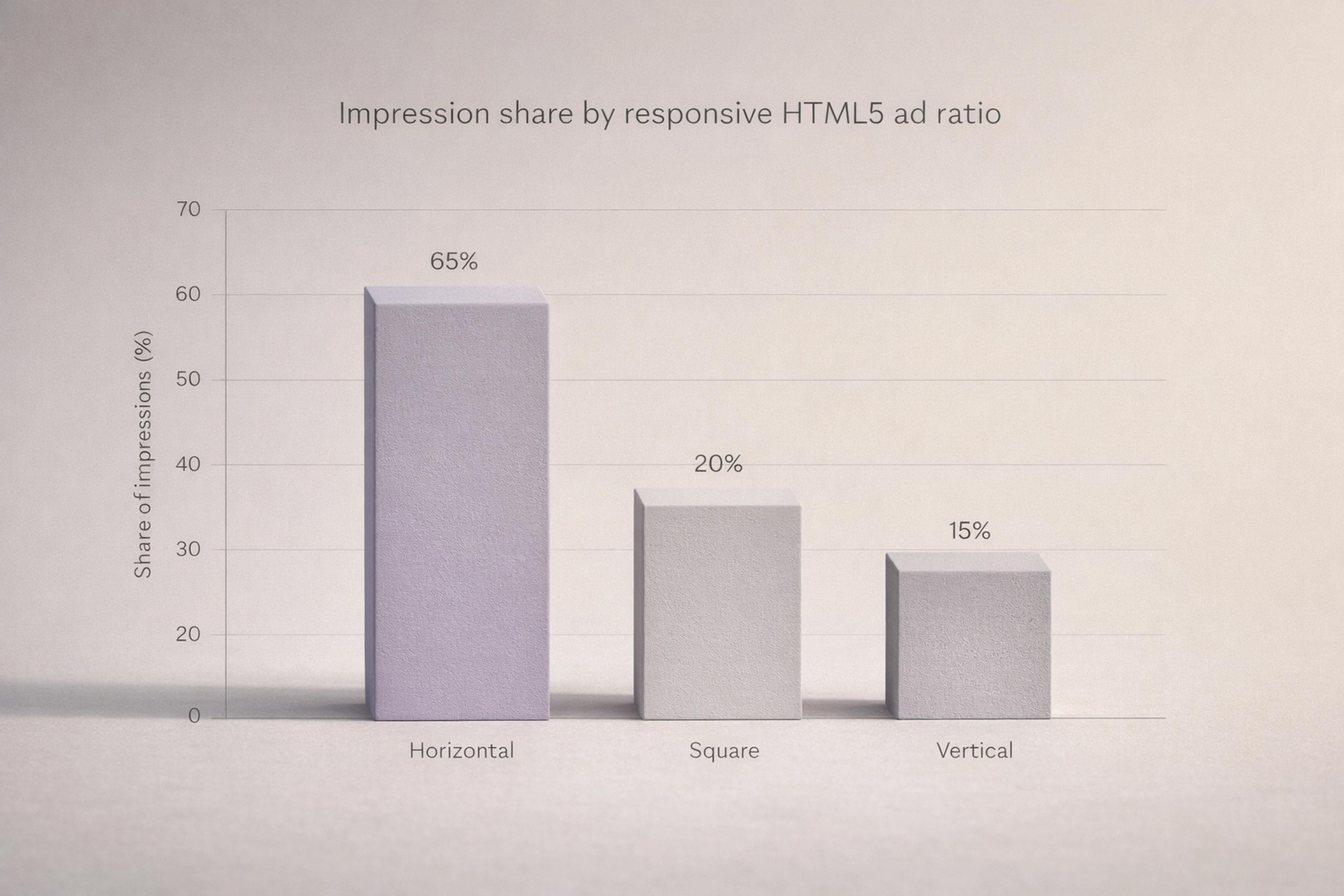
Headlines, descriptions, images, and logos are combined into many permutations. Google’s responsive display ads accept up to 15 images across horizontal, square, and vertical ratios.[^google-rda-2025]
Master creative as source of truth
All sizes and variations derive from a single master structure and style system.
For your team, this means:
Designing one master HTML5 layout per concept
Defining reusable components: logo, main image, headline, subcopy, CTA, legal
Planning how these components reflow across standard sizes (e.g., 300×250, 160×600, 728×90, 300×600, 320×50)
Plan motion at the system level
Instead of animating each banner separately, define a motion spec that applies to the whole set:
Entry sequence (e.g., image in, headline in, CTA pulse)
Maximum duration and loop behavior
Transitions between frames (fade, slide, scale)
Rules for first frame (must be readable and brand‑safe as a static image)
This “motion spec” will drive consistency and make it easier to automate animation later.
Step 3: Motion design guidelines for display ads (disciplined, not flashy)
Animated HTML5 banners work when motion is disciplined. Platforms and users both punish chaotic or heavy animations.
Understand platform constraints
Some key Google rules (confirmed Q2 2026):
Animated GIF duration
Google Ads limits animated GIFs to 30 seconds per loop.[^google-gif-2026]
GIF frame rate guidance
Google advises a maximum of 5 frames per second for animated GIFs to reduce file size and avoid strobing.[^google-gif-2026]
HTML5 uploaded ad size
Uploaded HTML5 creatives in Google Ads must be 600 KB or smaller per ad ZIP.[^google-html5-2026]
CM360 HTML5 limits
CM360 allows HTML5 ZIPs up to 10 MB, with up to 100 files per ZIP, and requires a single HTML entry file.[^cm360-html5-2025]
These rules don’t define a universal “motion envelope,” but they set clear upper bounds for GIFs and packaging.
HTML5 vs GIF frame rates
For GIFs, the 5 FPS guideline is about keeping size and flicker under control.[^google-gif-2026]
For HTML5, you’re not locked to 5 FPS. Instead, think in terms of perceived smoothness vs CPU load:
Aim for 30 FPS animation timelines in your tool, but keep actual motion lightweight (translate, opacity, scale) rather than complex physics.
Test on mid‑range Android/iOS devices and budget laptops. If CPU usage spikes or frames stutter, simplify timelines.
Practical motion envelope (starting‑point numbers)
Treat these as starting points, not laws:
Total animated sequence: 10–15 seconds per loop
Enough time for a 2–3 frame story (intro, offer, CTA) without overstaying.
First frame on screen: 1.5–3 seconds
Give viewers time to read key elements even if motion hasn’t started.
Number of key frames: 2–4
Frame 1: Brand + value proposition
Frame 2: Benefit / feature
Frame 3: Offer + CTA
Frame 4 (optional): Product or social proof
Loop behavior:
Prefer polite looping: 1–3 loops then stop on a clear end frame.
Motion styles:
Favor fades, slides, and subtle scaling over spinning, flashing, or rapid cuts.
Always cross‑check against publisher policies. Google specifically warns against blinking, flashing, or strobing effects that degrade user experience.[^google-gif-2026]
Step 4: Ad file size optimization for HTML5 banners
File weight is one of the biggest operational headaches during migration.
Platform limits (Google Ads & CM360)
Google Ads uploaded HTML5
Max ZIP size: 600 KB.[^google-html5-2026]
Google Ads images for responsive display ads
Max image upload size: 5,120 KB per image.[^google-rda-2025]
CM360 HTML5
Max ZIP size: 10 MB, max 100 files per ZIP.[^cm360-html5-2025]
Practical target budgets
As a rule of thumb for performance environments:
Standard HTML5 banners (Google Ads): Aim for < 400 KB per ZIP
Leaves margin for last‑minute copy tweaks or legal changes.
Rich HTML5 banners (served via CM360): Aim for 1–2 MB per ZIP
Especially for more complex animation, multiple images, or language variants.
How to stay under budget
Optimize images
Use vector graphics where possible.
Compress raster images (JPG/PNG/WebP) to the minimum acceptable quality.
Reuse assets across sizes
Shared sprite sheets or image references in the ZIP (not duplicated per file).
Keep code lean
Avoid heavy JS libraries; rely on CSS transforms and transitions.
Limit fonts
Use one or two web fonts, subset them for specific character ranges.
Step 5: Convert GIF to HTML5 banner (without losing your mind)
Many teams start migration by trying to convert existing animated GIFs to HTML5.
Convert GIF to HTML5 banner – your options
You have three realistic approaches:
Rebuild from source files (preferred)
Use original design files (Figma, PSD, AI) and recreate the animation in an HTML5 tool.
Pros: Clean, editable HTML5 structure; better optimization.
Cons: Requires motion and HTML5 skills.
Semi‑automatic conversion
Some tools detect layers or use AI to "deflatten" flat images into editable designs (e.g., AI image deflatening in specialized production platforms).
Pros: Faster than manual rebuild; can recover structure from existing assets.
Cons: Often needs manual cleanup and re‑rigging of motion.
Embed GIF inside HTML5 (avoid when possible)
Technically an HTML5 wrapper around a GIF.
Pros: Quick workaround.
Cons: No file‑size benefit, limited control, and still subject to GIF rules.[^google-gif-2026]
When to keep GIFs as backup
Use GIF or MP4 fallbacks when:
Certain placements or older browsers cannot render HTML5
CM360 can serve a backup image when the browser or app cannot handle HTML5.[^cm360-responsive-2025]
You need a quick safety net for early HTML5 experiments
But treat GIFs as backward compatibility, not your primary format.
Step 6: Responsive HTML5 ads – best practices
Responsive HTML5 ads are now the norm across major platforms.
Responsive HTML5 ads – best practices
Design for ratios, not just sizes
Horizontal, square, and vertical variants are mandatory. Google allows up to 15 images across these ratios for responsive display ads.[^google-rda-2025]
Prioritize the first frame
Make sure your first frame works as a static ad. Many users see only the first 1–2 seconds.
Lock key brand elements
Logo, primary color, and CTA position should be consistent across sizes.
Plan copy for truncation & wrap
Test headline lengths across narrow and wide sizes; avoid line breaks that break meaning.
Test in real placements
Use Google Ads or CM360 preview tools to see how creatives adapt to different surfaces (sites, apps, YouTube, Gmail).
Step 7: HTML5 banner animation tools – what to use when
There is no single “best software for creating and managing display ads” for every team. You’ll likely use a combination of tools.
HTML5 banner animation tools (comparative overview)
1. Google Web Designer + CM360 / Google Ads[^google-cm360-2025][^google-html5-2026]
Best for:
Trafficking, validation, and compliance inside the Google stack.
Pros:
Free, well‑documented, tight integration with Google Ads and CM360.
Good for packaging HTML5 ZIPs to Google standards.
Cons:
Fragmented with the rest of your design stack.
Not optimized for high‑volume variations or advanced collaboration.
2. Adobe Advertising / GenStudio[^adobe-templates-2024][^adobe-genstudio-2024]
Best for:
Enterprise template governance and dynamic HTML5 workflows.
Pros:
Strong template system; supports static and dynamic HTML5 templates.
GenStudio can generate multiple banner variations with editable copy fields.
Cons:
Requires broader Adobe ecosystem buy‑in.
May be overkill for smaller teams or simple campaigns.
3. Celtra Creative Automation[^celtra-automation-2024]
Best for:
Creative automation and scaling across static, HTML, video, and rich media.
Pros:
Built‑in AI and automated scaling across sizes and formats; unlimited ad variants.
Cons:
Enterprise‑grade pricing and onboarding; needs structured workflows to shine.
4. Bannerflow[^bannerflow-2024]
Best for:
Connected workflows with integrated approvals and publishing.
Pros:
Emphasizes approvals and publishing in one environment.
Template‑driven, with brand governance features.
Cons:
Another dedicated platform to integrate into your stack.
5. Viewst (sponsored example: specialized HTML5 ad production)
This section uses Viewst as a concrete example of a specialized production studio. Apply the same evaluation lens you’d use for any vendor.
Positioning:
HTML5‑native ad production infrastructure for teams under heavy volume and deadline pressure.
Key capabilities:
AI Smart Resize: generate all required sizes from one master.
AI Image Deflatening: convert flat assets into editable designs.
AI Designer: prompt to structured HTML5 banners.
AI Instant Animator: one‑click motion across layers.
True WYSIWYG editor, Figma/Adobe imports, brandbooks, and collaborative review.
Best for:
Agencies and in‑house teams running high‑volume, multi‑market HTML5 campaigns who want production automation while keeping master‑creative control.
Vendor‑agnostic checklist for selecting tools
When evaluating any HTML5 ad build automation platform or creative automation tools for display advertising, check for:
Native HTML5 output (not just MP4s or flat images)
Template & master support (single source of truth across sizes)
AI for production tasks (resize, adapt, localize) rather than full creative replacement
Brand governance (locked brandbooks, fonts, and colors)
Integrated review & approvals inside the tool
Export compatibility with your ad servers and DSPs (Google Ads, CM360, others)
Step 8: Build an HTML5 ad production workflow
Now translate all of this into a repeatable workflow.
A simple HTML5 ad production workflow
Briefing
Define objectives, formats, markets, and motion requirements.
Master design
Create a master layout in Figma/Adobe with componentized content and a motion spec.
HTML5 build
Import master into your HTML5 tool.
Implement motion according to the shared spec.
Scaling & variation
Use automation (or templates) to generate all sizes and language variants.
QA & optimization
Test on mid‑range devices and key browsers.
Validate against size limits (600 KB for Google Ads HTML5 uploads; 10 MB in CM360).
Confirm no policy‑violating motion (flashing, strobing).
Review & approvals
Route previews to stakeholders inside the production environment when possible.
Trafficking & launch
Package creatives as HTML5 ZIPs for CM360/Google Ads or as responsive assets.
Attach fallback images where needed.
Measurement & iteration
Analyze CTR, viewability, and attention metrics.
Use insights to refine motion, sequencing, and messaging.
Step 9: Change management and training for HTML5 design teams
The biggest risk in migrating static banners to HTML5 is not technology—it’s people and process.
Change management basics
Start with a pilot
Pick 1–2 campaigns as pilots: one performance, one brand.
Run static vs HTML5 A/B tests where possible to show impact.
Assign clear roles
Motion design owner
Production lead (or creative operations)
QA and trafficking owner
Document the new workflow
Create a simple playbook: file naming, master templates, motion spec, QA steps.
Training for HTML5 ad design teams
Train across three dimensions:
Concept & motion literacy
How to storyboard banner sequences.
Basics of attention, recall, and motion restraint.
Tool proficiency
HTML5 banner animation tools you adopt (Web Designer, Adobe, Celtra, Viewst, etc.).
Packaging for Google Ads and CM360.
Operational rigor
File size budgets and how to meet them.
Cross‑browser/device testing practices.
Consider short, recurring sessions rather than a single big training. Make success visible by sharing before/after examples and early wins.
Quick answers: FAQ for migrating to animated HTML5
1. What file size should I target for Google Ads HTML5 banners?
Google Ads uploaded HTML5 ads must be 600 KB or smaller per ZIP.[^google-html5-2026]
To stay safe:
Target < 400 KB as a working budget.
Reserve headroom for legal or last‑minute tweaks.
2. How do I test HTML5 creatives in Campaign Manager 360?
To test HTML5 creatives in CM360:[^cm360-html5-2025]
Export your HTML5 creative as a ZIP with:
One HTML entry file
Up to 100 supporting files
Total size under 10 MB
Upload to CM360 as a rich media or HTML5 creative.
Use CM360 preview tools to:
View creatives in different placements and dimensions
Confirm click tags and tracking
Test backup images for environments that don’t support HTML5
3. How do I convert GIF to HTML5 banner in practice?
The most reliable approach is to rebuild from source:
Open your original banner design in Figma/Adobe.
Recreate frames as separate layers or artboards.
Implement motion in an HTML5 tool using those layers.
Optimize images and fonts to meet file size budgets.
If source files are missing, use a tool that can infer layers from a flat GIF or image, then refine manually.
4. What are responsive HTML5 ads best practices?
Responsive HTML5 best practices include:
Designing for horizontal, square, and vertical ratios.
Making the first frame readable as a static ad.
Keeping logo, CTA, and brand colors consistent.
Testing across devices and placements using platform previews.
5. When should I use GIF or MP4 fallback with HTML5 ads?
Use GIF/MP4 fallback when:
You know certain inventory still doesn’t support HTML5.
You need a backup option for early HTML5 adoption phases.
CM360 can serve a backup image when browsers or apps can’t handle HTML5, making it a safe safety net.[^cm360-responsive-2025]
By treating your migration as a structured, multi‑step project—grounded in motion discipline, file‑size rigor, and the right HTML5 banner animation tools—you’ll move from static output to scalable, governed, animated HTML5 production without burning out your team.
[^google-cm360-2025]: Google, "Upload HTML5 creatives," Campaign Manager 360 Help, updated 2025, https://support.google.com/campaignmanager/answer/3285848
[^google-display-2025]: Google, "Display ads creative best practices" and Demand Gen updates, Google Ads Help, updated 2025, https://support.google.com/google-ads/answer/9823397
[^iab-2025]: IAB, "Digital Ad Revenue Climbs to Nearly $300B as IAB Celebrates 30-Year Anniversary," 2026 report on 2025 revenue, https://www.iab.com/news/digital-ad-revenue-climbs-to-nearly-300b-as-iab-celebrates-30-year-anniversary
[^sciencedirect-2012]: J. Sundar & J. Kalyanaraman, "Online advertising: Eye-tracking and recall," Computers in Human Behavior, 2012, https://www.sciencedirect.com/science/article/pii/S0747563211002470
[^celtra-2024]: Celtra, "State of the Industry: How Brands and Agencies Are Optimizing Digital Creative Production," 2024, https://celtra.com/blog/state-of-the-industry-how-brands-and-agencies-are-optimizing-digital-creative-production/
[^adobe-templates-2024]: Adobe, "Manage Ad Templates," Adobe Advertising documentation, updated 2024, https://experienceleague.adobe.com/en/docs/advertising/creative/ad-template-manage
[^adobe-genstudio-2024]: Adobe, "Create Banner Experiences," GenStudio for Performance Marketing User Guide, updated 2024, https://experienceleague.adobe.com/en/docs/genstudio-for-performance-marketing/user-guide/create/banner-experiences
[^google-gif-2026]: Google, "Guidelines for Display Ad Specifications," Google Ads Help, animated GIF policies and specs, confirmed Q2 2026, https://support.google.com/google-ads/answer/1722096
[^google-html5-2026]: Google, "Requirements for HTML5 Ads," Google Ads Help, uploaded HTML5 size and eligibility, confirmed Q2 2026, https://support.google.com/google-ads/answer/1722096
[^cm360-html5-2025]: Google, "HTML5 creative specifications," Campaign Manager 360 Help, updated 2025, https://support.google.com/campaignmanager/answer/3145300
[^cm360-responsive-2025]: Google, "Responsive HTML5 creatives," Campaign Manager 360 Help, updated 2025, https://support.google.com/campaignmanager/answer/4558694
[^google-rda-2025]: Google, "Display ads creative best practices," Google Ads Help, responsive display ad image limits, updated 2025, https://support.google.com/google-ads/answer/9823397
[^bannerflow-2024]: Bannerflow, "Creative Studio Features," product documentation, accessed 2024, https://www.bannerflow.com/features/creative-studio
[^celtra-automation-2024]: Celtra, "Creative Automation Solution," product page, accessed 2024, https://celtra.com/solution/creative-automation/

Victoria is the CEO at Viewst. She is a serial entrepreneur and startup founder. She worked in Investment Banking for 9 years as international funds sales, trader, and portfolio manager. Then she decided to switch to her own startup. In 2017 Victoria founded Profit Button (a new kind of rich media banners), the project has grown to 8 countries on 3 continents in 2 years. In 2021 she founded Viewst startup. The company now has clients from 43 countries, including the USA, Canada, England, France, Brazil, Kenya, Indonesia, etc.
In this article
" height="11.060000000000002px" id="wzBCZ87AK" transform="translate(6.47 2.47)" width="6.590000000000003px"/></g></svg>)