
AI HTML5 Banner Tools: End‑to‑End Guide to Modern Animated HTML5 Ad Production
Modern display advertising is a scale problem.
You’re no longer shipping a handful of banners per campaign — you’re shipping hundreds of animated HTML5 ads across sizes, markets, and segments, often on weekly or even daily cycles.
This guide explains what AI‑assisted HTML5 banner tools are, how they differ from generic ad makers, and how to build an end‑to‑end workflow that goes from one master creative to bulk HTML5 banner production for performance testing.
We’ll use Viewst as a reference model and compare it with other creative automation tools for display advertising.
What Are AI‑Assisted HTML5 Banner Tools?
Definition:
AI‑assisted HTML5 banner tools are specialized HTML5 ad production platforms that turn a single master creative into many native, editable, animated HTML5 banners — while enforcing technical specs, brand rules, and ad‑server requirements.
They sit between:
Design tools like Figma and Adobe Creative Cloud
Media platforms like Google Ad Manager (GAM), Campaign Manager 360 (CM360), and demand‑side platforms (DSPs) such as DV360
These platforms are built for:
Creative and production teams under pressure to ship volume
Agencies running multi‑market campaigns
Performance marketing teams doing constant A/B testing
What Makes Them Different From Generic Ad Makers?
Generic ad makers or design tools (e.g., basic template builders) focus on visuals.
AI HTML5 banner tools focus on production infrastructure:
HTML5‑native output with proper click tags and asset packaging
AI for production tasks (resizing, animation, deflatening) rather than only image generation
Brand governance: locked brandbooks, typography, and color systems
Integrated review and approvals inside the production environment
The Interactive Advertising Bureau (IAB) emphasizes that HTML5 ads must comply with standards around file weight, ad sizes, and functionality (IAB New Ad Portfolio, 2019, iab.com). Generic image tools rarely manage this.
Why This Category Exists: Scale, Spend, and Pressure
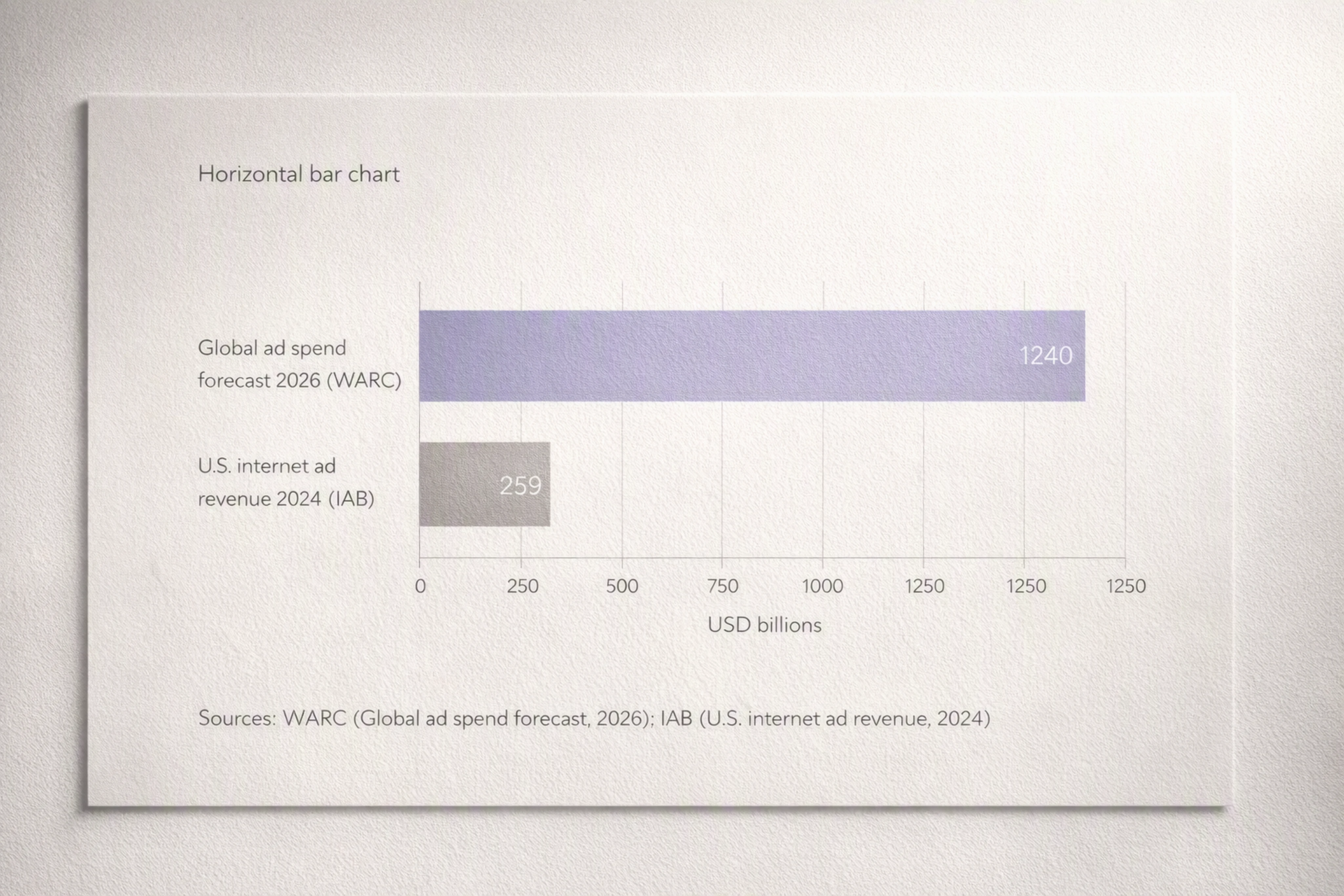
Display production is growing because ad spend is growing.
U.S. internet ad revenue hit $259 billion in 2024, up 15% year‑over‑year, according to the IAB Internet Advertising Revenue Report (2024).
WARC projects global ad spend to reach $1.24 trillion by 2026 (Global Ad Spend Outlook 2024‑25, warc.com).
More spend means:
More formats (web, app, retail media, programmatic)
More personalization and dynamic creative optimization (DCO)
More variants and faster iteration
At the same time, creative teams are already overloaded:
Adobe’s State of Creativity Report (2024) found 83% of decision‑makers saw employee workload change in the last 12 months, and 3 in 4 planned to invest in tools and software to boost productivity (adobe.com).
Adobe’s 2024 survey of creative professionals reported 83% using generative AI; 66% said it improves content quality, and 58% said it increases output quantity (Adobe blog, "Creative pros and generative AI", 2024, blog.adobe.com).
AI HTML5 banner tools emerge as a way to absorb this pressure without ballooning headcount.
Where AI HTML5 Banner Tools Fit Between Design and Media
Think of the workflow as three layers:
Design layer — Figma, Photoshop, Illustrator, After Effects
Production layer — AI HTML5 banner tools (Viewst, Celtra, Bannerflow, etc.)
Media layer — ad servers and DSPs:
GAM (Google Ad Manager)
CM360 (Campaign Manager 360)
DSPs (Demand‑Side Platforms) like DV360, The Trade Desk, etc.
Design Layer: Craft the Master Creative
This is where designers:
Develop initial concepts
Build master layouts in Figma or Adobe
Lock brand systems: typography, color, imagery
Production Layer: Scale, Animate, Govern
AI HTML5 banner platforms handle the friction between craft and media:
Import from Figma/Adobe
AI Smart Resize to all required IAB sizes from one master
AI Instant Animator for one‑click motion across layers
Brandbooks and governance to prevent off‑brand edits
Native HTML5 output with proper bundled assets
Viewst positions this layer as production infrastructure, not design — so designers can spend time on creative judgment, not mechanical resizing.
Media Layer: Serve, Optimize, Report
Ad servers and DSPs require:
Valid HTML5 packages (ZIP/ADZ bundles)
Correct click tags for tracking
File‑size and file‑count limits
For example:
CM360 HTML5 creatives must use ZIP or ADZ bundles with up to 100 files and a maximum ZIP size of 9.5 MB; the primary HTML file must contain at least one click tag (Campaign Manager 360 Help, "About HTML5 creatives", support.google.com, accessed 2026).
Google Ad Manager HTML5 bundles cannot exceed 1 MB total bundle size, and initial file weights must comply with IAB specs (Google Ad Manager Help, "Limits for HTML5 creatives", support.google.com).
Google’s IAB‑aligned fixed sizes include Medium Rectangle 300×250 (150 kB initial / 300 kB subload), Billboard 970×250 (250/500 kB), and others (IAB New Ad Portfolio Fixed Size Specifications, 2019, iab.com).
AI HTML5 banner tools ensure your output respects these constraints.
Key Capabilities of Modern AI HTML5 Banner Tools
Most creative automation platforms for display advertising now converge on several core capabilities.
1. HTML5 Banner Automation and Smart Resize
Goal: Turn one master into many sizes — correctly.
Common features:
AI Smart Resize to IAB standard sizes (300×250, 728×90, 160×600, 970×250, 320×50, etc.)
Layout intelligence to:
Reflow text
Reposition logos
Maintain hierarchy and safe areas
This enables bulk HTML5 banner production in minutes instead of days.
2. AI Instant Animation
Animated HTML5 banners outperform static creatives in many performance campaigns.
Instant animation features typically include:
Preset motion patterns for entrances, exits, loops
Timeline control and easing without manual keyframing
One‑click animation across multiple layers
Viewst’s AI Instant Animator takes static imported assets and adds motion consistently across a set.
3. AI Image Deflatening (Making Flat Assets Editable)
Legacy banners and static images often arrive "flat" — text baked into pixels.
AI image deflatening converts these flat assets into layered, editable designs by:
Detecting text regions and recreating copy as editable text layers
Separating logos and shapes from backgrounds
Rebuilding structure for future scaling and animation
This is essential when teams inherit assets from old campaigns.
4. Brandbooks and Governance
With AI generating and modifying assets at scale, brand control is non‑negotiable.
Governance features:
Locked brandbooks: typography, colors, logo usage
Role‑based access and approvals
Style propagation across all sizes and markets
The IAB’s AI Transparency and Disclosure Framework (2026) signals that governance and provenance are now part of the core production stack (iab.com, 2026).
5. Native Export: HTML5, GIF, MP4
AI HTML5 banner tools are HTML5‑native, but multi‑channel campaigns also require:
HTML5 ads for programmatic display and rich media
GIFs for channels that don’t support HTML5
MP4 videos for social or video placements
Platforms like Viewst provide production‑ready exports for:
CM360 / GAM‑compatible HTML5 bundles
GIF and MP4 for paid social, email, and app stores
Step‑by‑Step: How to Make HTML5 Banners With AI Tools
This is the end‑to‑end workflow from master creative to hundreds of HTML5 variants.
1. Start With a Single Master Creative
Your master creative is the single source of truth.
Best practices:
Build it in Figma or Adobe with:
Clear hierarchy (headline, subhead, CTA)
Safe areas for text and logos
Layer naming conventions
Keep resolution and aspect ratio close to your most important size (e.g., 300×250 or 970×250).
2. Import From Figma or Adobe
In Viewst and similar platforms:
Use the Figma plugin or Adobe import.
Map layers to HTML5 elements (text, images, shapes).
Validate that:
Fonts are correctly mapped
Brand colors are available
Logos and key visuals are intact
3. Set Up Brandbooks and Templates
Before scaling, lock your brand systems.
Actions:
Create a brandbook for each brand or client.
Define:
Typeface families and weights
Color palettes
Button styles and corner radii
Save the imported master as a template.
This ensures creative automation for banner ads doesn’t drift off brand.
4. Use AI Smart Resize to Generate All Required Sizes
Next, run html5 banner automation against your master.
Typical IAB sizes to generate (per IAB New Ad Portfolio, 2019):
Medium Rectangle: 300×250
Leaderboard: 728×90
Skyscraper: 160×600
Billboard: 970×250
Smartphone Banner: 300×50 or 320×50
With Viewst’s AI Smart Resize:
Select the set of sizes you need.
Let AI auto‑reflow text and reposition elements.
Manually tweak exceptions (e.g., extremely tall or narrow formats).
5. Add Motion With AI Instant Animator
Once sizes are ready, animate.
Recommended steps:
Choose motion presets for:
Headlines and product images
Logos and CTAs
Set animation durations respecting ad platform guidelines (often 15–30 seconds total loop).
Keep movement purposeful, not distracting.
This turns static layouts into animated HTML5 banners that still align with brand.
6. Generate Variants for Performance Testing
To generate hundreds of HTML5 ads for A/B and multivariate testing:
Use dynamic fields for:
Headlines
Prices and offers
Product images
Import a CSV or product feed (depending on platform) to create:
Offer variants
Localization (language and currency)
Audience‑specific messages
Platforms like Adobe Firefly Creative Production now support "Banners at Scale" workflows that produce thousands of variants with logs and approvals (Adobe Firefly Creative Production Overview, 2024, helpx.adobe.com).
Viewst applies similar principles for structured HTML5 sets.
7. Run Automated Quality Assurance for HTML5 Banners
Before export, you need automated quality assurance for HTML5 banners.
Check for:
Click tags implemented correctly
File size within IAB and platform limits
Text not truncated or overlapping
Animation not exceeding recommended durations
In CM360, each HTML5 creative must include a click tag function (often clickTag or clickTag1) that the ad server binds to a landing URL (CM360 Help, 2026).
AI tools can detect common issues automatically:
Missing click tags
Oversized files
Inconsistent fonts/colors vs brandbook
8. Export to HTML5, GIF, and MP4
For programmatic HTML5 ad generation, export:
HTML5 ZIP bundles ready for CM360 or GAM
Optional AMPHTML where supported
For other channels:
GIFs for email, some ad networks, and legacy placements
MP4 for social platforms and video inventory
Ensure exports respect:
CM360’s 100‑file / 9.5 MB ZIP limits
GAM’s 1 MB bundle limit and IAB initial/subload recommendations
Creative Automation Platforms for Display Advertising: Comparison & How to Choose
This section compares key creative automation tools for display advertising and helps you pick the right fit.
Snapshot Comparison (Features Matrix)
Viewst
Focus: HTML5‑native production infrastructure
Key features:
AI Smart Resize (one master → many sizes)
AI Image Deflatening (flat to editable)
AI Instant Animator
Brandbooks and governance
Figma/Adobe import
Native HTML5 / GIF / MP4 export
Ideal for: Agencies and in‑house teams with high‑volume display pipelines and strict brand control needs.
Celtra (celtra.com)
Focus: Enterprise creative automation for display and video
Key features:
Template‑based scaling to thousands of variants
Feed‑driven dynamic creative
Workflow from concept to live campaigns
Vendor‑reported scale: 20M+ ads annually and 104B+ impressions (Celtra Solutions Overview, accessed 2026)
Ideal for: Large enterprises with centralized creative operations and complex DCO setups.
Bannerflow (bannerflow.com)
Focus: Online creative management and ad versioning
Key features:
"Create once, scale everywhere" banner sets
Ad versioning and localization
Support for HTML5 display formats
Ideal for: European‑centric brands and agencies standardizing banner workflows.
Smartly.io (smartly.io)
Focus: Creative + media automation for social and display
Key features:
Feed‑based creative variations
Synced creative and media ("Synapse")
QA checks for brand safety and performance
Ideal for: Performance teams running cross‑channel social and display with heavy feed use.
Flashtalking by Mediaocean (formerly Flashtalking/SpotX; flashtalking.com)
Focus: Ad serving and dynamic creative
Key features:
Dynamic creative optimization (DCO)
HTML5 creative support
Strong integration with ad‑serving stack
Ideal for: Brands prioritizing advanced DCO with an integrated serving platform.
Sizmek (by Amazon Advertising)
Focus: Legacy creative/serving, now largely folded into Amazon’s stack
Key features:
Historical strengths in dynamic creative and rich media
Current focus on Amazon DSP and measurement
Ideal for: Organizations already deep in Amazon DSP ecosystem.
How to Choose
Key decision criteria:
Volume and complexity
Need to generate hundreds or thousands of HTML5 ads regularly?
Viewst, Celtra, and Bannerflow emphasize scalable HTML5 production.
Integration with design tools
Figma/Adobe import fidelity is crucial for design‑driven teams.
Viewst invests heavily in Figma/Adobe compatibility and true WYSIWYG.
Governance and brand control
If brand risk is high, prioritize locked brandbooks and role‑based approvals.
Media stack alignment
If your core stack is Google (GAM/CM360/DV360), pick platforms with strong HTML5 packaging support.
If you’re DCO‑heavy, tools like Celtra or Flashtalking may align with your strategy.
AI production features
For AI tools for creating display ads that respect designer control, look for:
Smart Resize
Deflatening
Instant animation
Automated QA
Best Software for Creating and Managing Display Ads (2026)
For 2026, here’s a practical short list of best ad design software for creative agencies and in‑house teams.
Viewst
Best for: High‑volume banner production with HTML5‑native outputs.
Pros:
Purpose‑built for display ad production
Strong AI production tools (resize, deflaten, animate)
Native HTML5 exports for GAM/CM360/DSPs
Cons:
Focused on display; not a general design platform.
Celtra
Best for: Enterprise creative automation with DCO.
Pros:
Proven scale in enterprise environments
Integrated workflow from creative to activation
Cons:
Heavier implementation; best suited to large organizations.
Bannerflow
Best for: European agencies and brands standardizing banners.
Pros:
Clear ad versioning and localization workflows
Cons:
Less U.S.‑centric than some competitors.
Smartly.io
Best for: Performance marketing across social + display.
Pros:
Strong feed and optimization capabilities
QA features tied to performance
Cons:
More social‑first; HTML5 display is part of a broader stack.
Adobe Creative Cloud + Firefly Creative Production
Best for: Teams already all‑in on Adobe.
Pros:
Deep integration with design tools
"Banners at Scale" workflows for bulk production (Adobe Firefly, 2024)
Cons:
Requires thoughtful setup for end‑to‑end HTML5 packaging.
FAQ: Programmatic HTML5 Ad Generation, Bulk Production, and Operational Details
How does programmatic HTML5 ad generation work?
Programmatic HTML5 ad generation means using automation to produce and assemble HTML5 banners at scale for programmatic buying platforms.
Typically:
Creative automation platforms take a master template.
They ingest data from feeds (product catalogs, pricing, offers).
They auto‑generate many HTML5 variants with different combinations of:
Headlines
Images
Prices
CTAs
These are then exported as HTML5 bundles and uploaded into ad servers or DSPs for programmatic delivery.
What is bulk HTML5 banner production?
Bulk HTML5 banner production is the process of generating large sets of HTML5 banners — often hundreds or thousands — from a limited number of master templates.
It relies on:
AI Smart Resize for size proliferation
Template‑based variation (language, offer, audience)
Automated QA and export pipelines
Platforms like Viewst, Celtra, and Adobe Firefly Creative Production are built for this use case.
How are click tags implemented in HTML5 banners?
Click tags are JavaScript variables or functions that ad servers use to track clicks.
In CM360 and GAM:
The primary HTML file must include a click tag (often
clickTagorclickTag1).The interactive element (e.g., the root banner div) calls
window.open(clickTag)or equivalent when clicked.The ad server replaces the click tag value with the landing page URL at serve time.
AI HTML5 banner tools typically:
Auto‑insert click tag code in exported HTML5 bundles
Validate that at least one click tag exists before upload
What browsers and devices must HTML5 banners support?
HTML5 banners should support:
Modern desktop browsers: Chrome, Firefox, Safari, Edge
Mobile browsers on iOS and Android
In‑app WebView environments where applicable
Following IAB guidelines and ad‑server recommendations, you should:
Avoid heavy custom JS frameworks
Keep file weights within IAB and GAM/CM360 limits
Test across major OS/browser combinations before launch
When should I prefer GIF or MP4 instead of HTML5?
Use GIFs or MP4 when:
The target placement doesn’t support HTML5 (some legacy networks, certain email clients).
You need video‑like storytelling in environments tuned for video (social video placements).
Use HTML5 banners when you need:
Interactive elements (hover states, dynamic content)
Precise control over animation and click tracking
Compatibility with ad servers like GAM and CM360
How can I implement automated quality assurance for HTML5 banners?
Automated QA typically includes:
File size checks against IAB and platform limits
Click tag detection and validation
Text overflow detection in each size
Animation duration checks
AI‑driven production platforms run these checks automatically during export and flag:
Overweight files
Missing click tags
Off‑brand fonts/colors compared to brandbooks
Bringing It All Together: Viewst as Production Infrastructure
AI HTML5 banner tools are not about replacing designers — they’re about removing non‑creative suffering from creative work.
Viewst’s approach is to treat banner production as infrastructure:
One master creative as the source of truth
AI handling resizes, deflatening, and animation
Native HTML5 exports that pass GAM/CM360 rules
Governance systems that keep brands safe at scale
For Heads of Creative, Design Directors, and Creative Operations leads, shifting HTML5 production into an integrated platform is how you:
Protect craft time
Increase throughput without adding headcount
Maintain brand consistency across markets and campaigns
The result: creative quality and speed stop being mutually exclusive.

Victoria is the CEO at Viewst. She is a serial entrepreneur and startup founder. She worked in Investment Banking for 9 years as international funds sales, trader, and portfolio manager. Then she decided to switch to her own startup. In 2017 Victoria founded Profit Button (a new kind of rich media banners), the project has grown to 8 countries on 3 continents in 2 years. In 2021 she founded Viewst startup. The company now has clients from 43 countries, including the USA, Canada, England, France, Brazil, Kenya, Indonesia, etc.
In this article
" height="11.060000000000002px" id="wzBCZ87AK" transform="translate(6.47 2.47)" width="6.590000000000003px"/></g></svg>)