
Creative infrastructure for media teams: why your DSP is not enough
Media teams are running more display campaigns than ever, across more formats, more markets, and more platforms.
Yet the tools they rely on most — DSPs and ad servers — were never designed to handle the hard part of this reality: turning one master creative into hundreds of governed, animated, localized HTML5 assets.
That gap is where “creative infrastructure” lives.
In this article, you’ll learn:
What the creative infrastructure layer is
Why DSP and ad server tools alone create bottlenecks
The operational cost of keeping production outside your system
How a dedicated HTML5 ad production platform like Viewst changes the game
The gap between design tools and media platforms
Most organizations have plenty of tools:
Design: Figma, Adobe Photoshop/Illustrator/After Effects
Media: Google Campaign Manager 360, DV360, The Trade Desk, retail media platforms
What’s missing is the system between them.
What actually happens between Figma and your DSP?
A typical campaign workflow looks like this:
Designers build master concepts in Figma or Adobe.
Someone exports static assets.
A specialist (or external studio) rebuilds them as HTML5.
The team manually resizes for 10–30+ formats.
Variations are created for audiences, markets, and messages.
Files are emailed, Slacked, uploaded to shared drives.
Finally, someone uploads creative packages into the DSP or ad server.
Each step introduces:
Delay (waiting on another person or vendor)
Risk (wrong fonts, broken animations, outdated versions)
Waste (senior designers stuck in export-and-resize mode)
This is not a design problem or a media problem. It’s an infrastructure problem.
What is the “creative infrastructure layer” in advertising?
Working definition:
The creative infrastructure layer is the system between design and media that turns one master creative into governed, multi-size, ad-network-ready assets — handling resize, animation, review/approval, versioning, and export.
It connects:
Upstream: design tools (Figma, Adobe)
Downstream: media platforms (CM360, DV360, The Trade Desk, ad servers, retail media)
And it handles the operational work designers and media teams are currently doing by hand.
What a true creative infrastructure layer must do
At a minimum, creative infrastructure for display and HTML5 should:
Start from a master creative
One source of truth that governs all sizes and versions.
Automate resizing and versioning
Generate full banner sets from one asset using AI Smart Resize.
Handle HTML5 as a native format
Editable layers, proper click-throughs, SSL-compliant packages, fallbacks.
Add animation without external tools
Instant, governed motion across layers; no extra After Effects step.
Support brand governance
Locked brandbooks, typography, and color systems.
Centralize collaboration and approvals
Comments, changes, and sign-offs inside the banner set, not in email.
Export directly to where media lives
Production-ready HTML5 / GIF / MP4 assets for any ad server or DSP.
Google’s own ecosystem implicitly acknowledges this separation: Campaign Manager 360 is for trafficking/reporting/verification, while Ads Creative Studio is described as a “web app for creative production” that then sends creatives into DV360.
The fact that they had to build a separate production app is the point: media platforms are not production environments.
Why your DSP and ad server are not enough
DSPs and ad servers are essential. They’re built to:
Buy and optimize media
Traffic and serve ads
Enforce technical requirements (sizes, SSL, file types)
Measure performance
They are not built to:
Design HTML5 banners
Automate multi-size production
Govern brand systems
Manage nuanced creative reviews and approvals
1. Operational bottlenecks, not creative limitations
Adobe’s content supply-chain research shows the real pain is operational:
44% of creatives spend more than half their time on repetitive tasks like resizing assets.
73% of marketers lack integrated review/approval tools — feedback happens in email and chat, not where creatives live.
65% say their resizing automation is only nascent or basic.
89% still rely on manual effort or outsourcing for localization.
These numbers describe the “space” between your design files and your DSP — not what happens inside either.
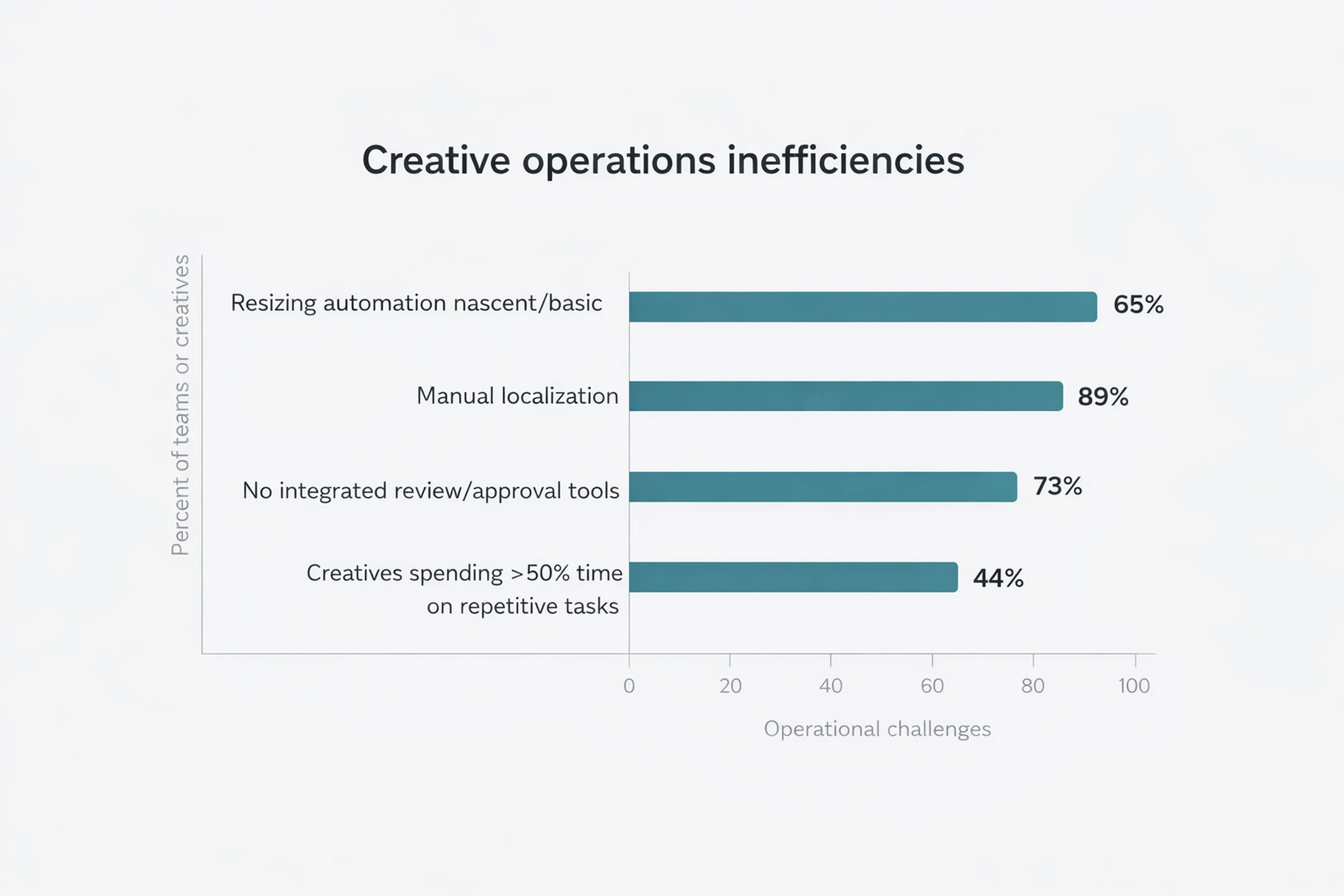
DSPs do nothing to solve this. They receive files once everything is already built.
2. Fragmented workflows and no single source of truth
When you rely on DSPs and ad servers as your main operational tools, you create shadow workflows:
Multiple banner versions scattered across folders and email threads
Designers exporting “just one more size” from Figma for a late request
Media teams unsure which version is approved for which market
Adobe notes that 82% of marketing teams lack a metadata strategy and 90% manually create/tag metadata.
Without a creative infrastructure layer, you end up with:
No structured version control
No reliable mapping from master creative to live assets
No easy way to reuse or adapt past campaigns
3. Review and approval stay outside the production environment
Filestage reports that waiting for feedback is the number-one issue slowing creative teams down, with 9-in-10 account managers and more than 7-in-10 creatives and marketers affected.
At the same time, 73% of marketers say they don’t have integrated tools for reviews and approvals.
With only DSP and ad server tools, feedback happens:
In decks and screenshots
In Slack, email, and comment threads
In duplicated PDFs and static mockups
Nothing ties that feedback to the actual HTML5 assets you end up trafficking.
4. Technical friction with HTML5 standards
HTML5 is still the practical standard for display advertising, but uploading it is often painful.
Google and other platforms require:
Strict adherence to dimensions and allowed sizes
SSL-compliant click tracking
Supported file types and packaging
Proper backup images or fallbacks
All of this is validated at the DSP/ad server level, but those tools don’t help you build correct packages.
Teams improvise with:
In-house templates maintained by a single specialist
External studios that turn around creative overnight
Last-minute fixes in code editors to jam everything through validation
This is fragile, and it does not scale.
Why the bottleneck is operational, not artistic
Most teams do not lack ideas. They lack time.
Across multiple studies, the pattern is clear:
Adobe reports demand for content will grow 2x–5x in the next two years while teams are still stuck with manual work.
Asana’s State of Work Innovation report says 53% of workers’ time is spent on busywork (coordination, status chasing, searching for information).
Smartsheet’s 2025 Pulse of Marketing report finds 87% of marketing and creative professionals believe better tools would help them use time more effectively, and 58% explicitly want automated workflows.
The constraint on your campaigns isn’t idea quality. It’s:
Resizing and versioning
Localization logistics
Fragmented feedback cycles
Manual creative QA for every format and market
This is exactly what a creative infrastructure layer is designed to absorb.
What a dedicated creative infrastructure layer looks like (with Viewst as an example)
Viewst is an HTML5-native ad production platform built to sit between your design tools and media stack.
It treats banner production as infrastructure, not as ad-hoc, person-dependent work.
Core capabilities of a creative infrastructure platform
A platform like Viewst should give media and creative teams:
Master-creative-driven production
Start from one master creative that structurally governs all sizes.
Synced updates: change once, propagate everywhere.
AI-powered resizing and layout
AI Smart Resize: generate all required sizes from one master.
Maintain design integrity across awkward formats.
AI Image Deflatening
Convert flat assets into editable HTML5 designs.
Reuse historic or vendor-provided assets without rebuilding from scratch.
AI Instant Animator
Apply motion to layers in one click.
Create best-in-class HTML5 animation without extra motion tools.
AI Designer (structured HTML5 from prompts)
Go from a prompt to structured banner layouts.
Keep brandbooks and governance in control, even with AI.
True WYSIWYG HTML5 editor
What you see in the editor is exactly what ad networks will render.
Brandbooks and governance
Locked type scales, color systems, and components.
Automation reinforces brand standards rather than eroding them.
Integrated collaboration and approvals
Comments, markups, and approvals live inside the banner set.
No more reconciling feedback from screenshots and PDFs.
Production-ready export
Native HTML5, GIF, and MP4 exports.
Unlimited HTML5 downloads, with tiered MP4/GIF allowances for volume teams.
Viewst customers report that this type of infrastructure has enabled HTML5 animations that were previously outside their capabilities, and made motion production possible without needing a separate Adobe video workflow.
How creative infrastructure changes operations for media teams
For Heads of Creative, Creative Ops, and media leaders, the shift is practical: you move banner production from “heroic effort” to “predictable system.”
1. Scale output without scaling burnout
With creative infrastructure:
Resizing, versioning, and basic animation are automated.
Senior designers stay focused on concept and quality.
Production can grow 2x–5x without matching headcount increases.
Adobe’s guidance ties repetitive work directly to burnout and turnover. Removing that work is not just about speed; it’s about team health.
2. Turn master creative into governed campaign systems
Instead of reinventing every banner set:
One master creative defines structure, pacing, and visual hierarchy.
All sizes, languages, and variants stay tied to that master.
Brandbooks ensure that local adaptations never break the system.
This is essential when 89% of teams are still localizing manually or via outsourcing.
3. Give media teams reliable, ad-ready assets on demand
Media teams gain:
Confidence that every creative meets HTML5 and ad-server specs
Faster turnaround on new messages and tests
A single source of truth for which creative is approved where
Instead of “Can design get us these 12 new sizes by tomorrow?”, the question becomes “Which variation do we want to promote?”
4. Move collaboration into the production environment
When comments and approvals live on the actual banners:
Stakeholders see real HTML5 previews, not just static mocks.
Changes are tracked and versioned in context.
Approvals can be auditable and structured.
This directly addresses the 73% of teams lacking integrated review and approval tools.
How to evaluate creative automation tools for display advertising
If you are comparing creative automation platforms for display advertising, look beyond generic design features.
Key evaluation questions:
Is HTML5 a first-class citizen?
Do you get editable HTML5 output, or just flat images/videos?
Is there a master-creative model?
Can one master drive all sizes and variants with synced updates?
How strong is resize and animation automation?
Is there AI Smart Resize? AI Instant Animator? Or is it just manual templates?
What brand governance features exist?
Can you lock brandbooks, type, and colors at scale?
Does collaboration live inside the platform?
Are there review/approval workflows, or do you still rely on decks and email?
Can it integrate with your existing design and media stack?
Figma/Adobe import and export to your ad servers/DSPs.
Platforms that answer “yes” to these questions function as creative infrastructure, not just another design tool.
Practical next steps for media and creative leaders
If you recognize these bottlenecks in your own workflow, here’s how to move forward:
Map your current content supply chain for display
Document every step from Figma file to live DSP creative.
Count handoffs, tools, and manual resize/version steps.
Quantify the busywork
Estimate how many hours per month are spent on resizing, exporting, QA, and localization.
Compare this with the 44% benchmark of creatives spending half their time on repetitive tasks.
Identify where campaigns stall
Is it waiting for feedback? Localization? HTML5 packaging?
Use these as criteria when evaluating infrastructure tools.
Pilot a dedicated HTML5 production platform
Start with one high-volume campaign or a single business unit.
Measure: time-to-first-live creative, number of versions shipped, error rate, and designer satisfaction.
Treat creative production as infrastructure going forward
Standardize around a master-creative model.
Make automation, governance, and collaboration part of your operating system, not nice-to-haves.
Viewst is built specifically for this role: a production studio for HTML5 and display ad campaigns that sits between your design stack and your media stack, and removes non-creative suffering from creative work.
FAQ: Creative infrastructure, DSPs, and HTML5 production
What is the creative infrastructure layer in advertising?
The creative infrastructure layer is the system between design tools and media platforms that turns one master creative into governed, multi-size, animated, localized, ad-ready assets.
It manages resizing, animation, collaboration, approval, version control, and export for HTML5, GIF, and MP4 banners.
Why isn’t my DSP enough for creative production?
DSPs and ad servers are built for trafficking, serving, and measuring ads.
They validate that creative files meet technical requirements, but they don’t help you design, resize, animate, localize, or manage approvals. Those tasks still happen manually in design tools, email, and spreadsheets — which creates bottlenecks and inconsistencies.
How does a platform like Viewst fit into my stack?
Viewst sits between Figma/Adobe and your DSP/ad server.
You import designs or prompts into Viewst, use AI tools to resize, animate, and version them, collaborate and get approvals in-platform, then export production-ready HTML5/GIF/MP4 assets to your media platforms.
What makes Viewst different from generic creative automation tools?
Viewst is HTML5-native and treats banner production as infrastructure.
It offers AI Smart Resize, AI Image Deflatening, AI Instant Animator, an AI Designer, locked brandbooks, and a true WYSIWYG HTML5 editor — all focused on turning a single master creative into many governed, ad-network-ready assets.
Is this about replacing designers with AI?
No.
Viewst’s core philosophy is that AI should remove mechanical work (resizing, exporting, basic animation), not creative judgment. Designers stay in control of concepts, brand, and craft, while the platform takes over the repetitive production work so teams can scale without burnout.

Victoria is the CEO at Viewst. She is a serial entrepreneur and startup founder. She worked in Investment Banking for 9 years as international funds sales, trader, and portfolio manager. Then she decided to switch to her own startup. In 2017 Victoria founded Profit Button (a new kind of rich media banners), the project has grown to 8 countries on 3 continents in 2 years. In 2021 she founded Viewst startup. The company now has clients from 43 countries, including the USA, Canada, England, France, Brazil, Kenya, Indonesia, etc.
In this article
" height="11.060000000000002px" id="wzBCZ87AK" transform="translate(6.47 2.47)" width="6.590000000000003px"/></g></svg>)