Saving in MP4 video and GIF is available only for projects with animations.
To download the whole creative in MP4 or GIF:
Open the project.
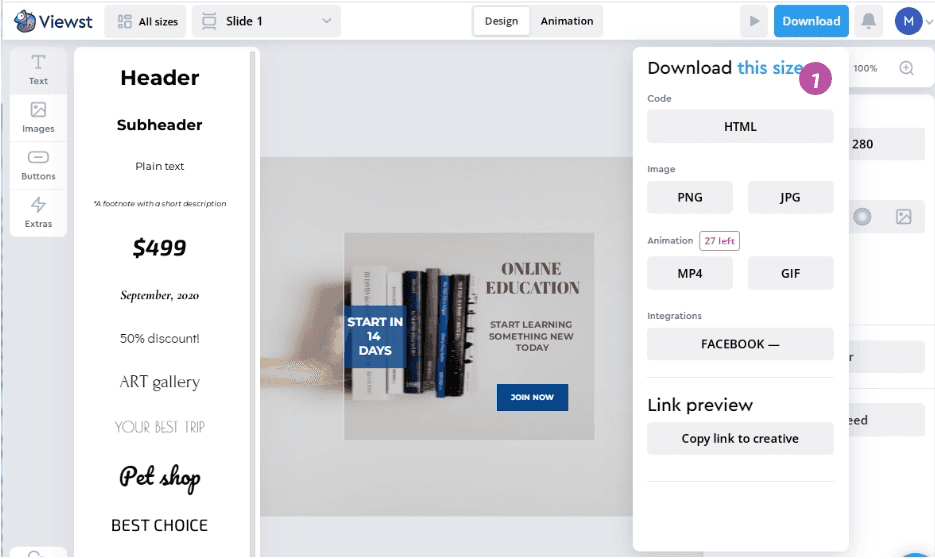
Click on the Download button in the top right corner.
Click on the MP4 or GIF button.
💡 Wait. Making the video or GIF may take a few minutes. When the file is ready, downloading will start automatically.
To download the specific size of creative in MP4 or GIF:
Open the size you want to download.
Click on the Download button in the top right corner.
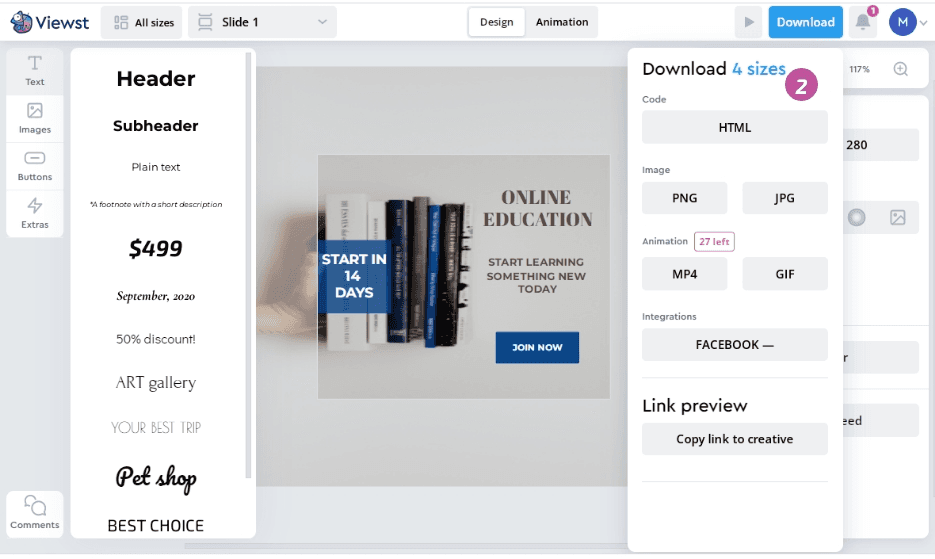
Ensure that This
1option is selected. You can also switch it to All2and download all sizes of the creative.Click on the MP4 or GIF button.
💡 The exported gif file has poor quality if you use an image with a gradient.
Perhaps you should choose a non-gradient background for GIF, or run this creative in HTML format, then everything will be smoothly and beautifully displayed.
How to optimize GIF banners
GIF is a popular web format due to its frame-by-frame animation capabilities.
Ad serving companies and sites all have their own unique standards, most accept creatives no larger than 150kb. But, for example, DV360 accepts GIFs up to 10MB.
Viewst doesn't optimize GIF and MP4 and provides you with high-quality file so to give you an opportunity to use it whenever you want and to change the quality you want.
To reduce the overall size of the GIF file, we recommend that you follow these guidelines:
Try to avoid elements and pictures with a gradient. The presence of all the colors of the rainbow within the GIF animation online will increase the weight and degrade the quality of the banner. GIF has only 256 colors in the palette, and for a smooth gradient we need to change colors smoothly, and GIF does not allow that.
Reduce the duration of animations and additional effects. Long animations add weight, and effects degrade quality. For example, if text or a picture has a shadow, then when the file is converted to GIF, this shadow can become a dirty spot.
If your case allows, reduce the banner resolution using the resize function. GIFs of lower resolution weigh less.
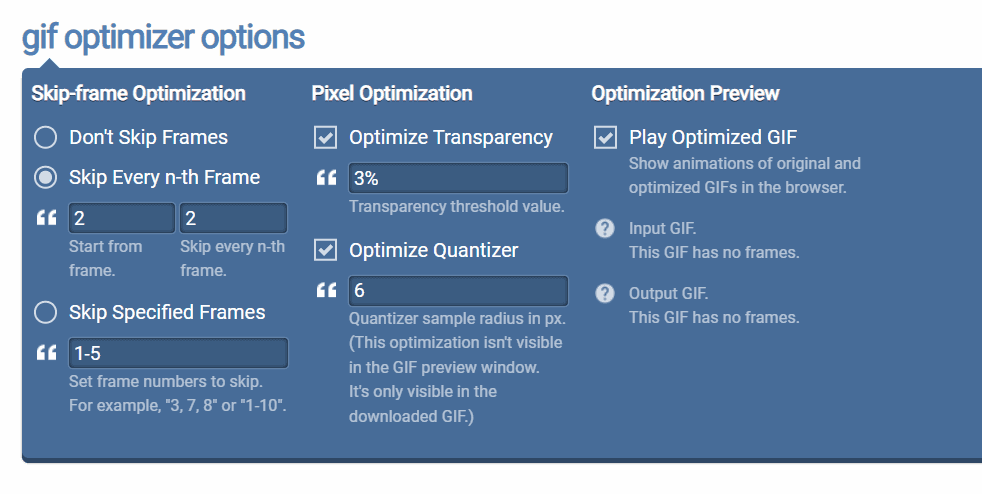
If your creative has a high weight and you have followed all of our recommendations above, use https://onlinegiftools.com/optimize-gif or another similar tool to optimize your file.
For example, in Online Gif Tools the skip-frame optimization changes the number of frames in a GIF. You can skip every 2nd, 3rd, 4th, or nth frame starting from any frame.
Frequently asked questions
How does Viewst’s platform facilitate real-time collaboration between creative and media teams?
Viewst’s platform facilitates real-time collaboration between creative and media teams by providing a mutual workspace where they can seamlessly collaborate at the design step and are able to share comments and stay on the same page with all their mutual projects. The platform allows for quick and efficient collaboration, enabling teams to receive prompt data on each creative performance. This ongoing conversation and continuous flow of ideas and insights between designers and media buyers enhance understanding and collaboration between the two teams.
Can Viewst provide more details on how they establish attribution connections between Google Campaign Manager and various Demand-Side Platforms?
Viewst has achieved a significant breakthrough by successfully establishing attribution connections between Google Campaign Manager (CM) and various Demand-Side Platforms (DSPs). Through this integration, Viewst provides advertisers with immediate feedback on the effectiveness of their display ads. The platform’s proprietary algorithms correlate user interactions with creative variations across multiple channels, attributing conversions and engagement metrics directly to specific creative elements. This granular level of insight allows for rapid iteration and refinement of ad creatives, leading to improved campaign performance.
What specific features does Viewst offer to bridge the gap between creative and media teams and foster understanding and collaboration?
Viewst offers features, such as statuses for each creative and each ratio inside it, assignee, who is in charge of the project, deadline settings, preview sharing link to speed up and simplify approval process, data analytics of each creative performance, etc.The platform provides a home field for both creative and media teams, creating a space where everyone feels valued and can contribute their unique perspectives. It enables teams to iterate quickly, improve creatives, and speed up go-to-market. With Viewst, collaboration is not a one-off handoff but an ongoing conversation, allowing for a continuous flow of ideas and insights. This fosters a comprehensive understanding of consumer behavior and facilitates data-driven design decisions, resulting in exceptional user experiences.