You can add a Text element at the Design tab.
To add some text:
Open the editor at the Design tab.
Choose Text
1on the Elements panel.Click on the chosen text element (choose by style, you can edit the text later) or drag and drop it onto the canvas.

To edit the text double-click it on canvas 2 and type the text you want to add.
To adjust its style, choose the element on the canvas and make changes using the Editing panel 3.
How to add AI variations
Viewst’s AI-powered creative copy generator works like magic and generates perfectly-fitted texts based on your creative content. With it, you can make creative variations for A/B testing in literally 2 clicks.
Boost your creativity to write catchy copy for your campaigns. AI generation works with any domain in more than 50 languages.
It is a great tool to speed up production and push your creative performance forward.
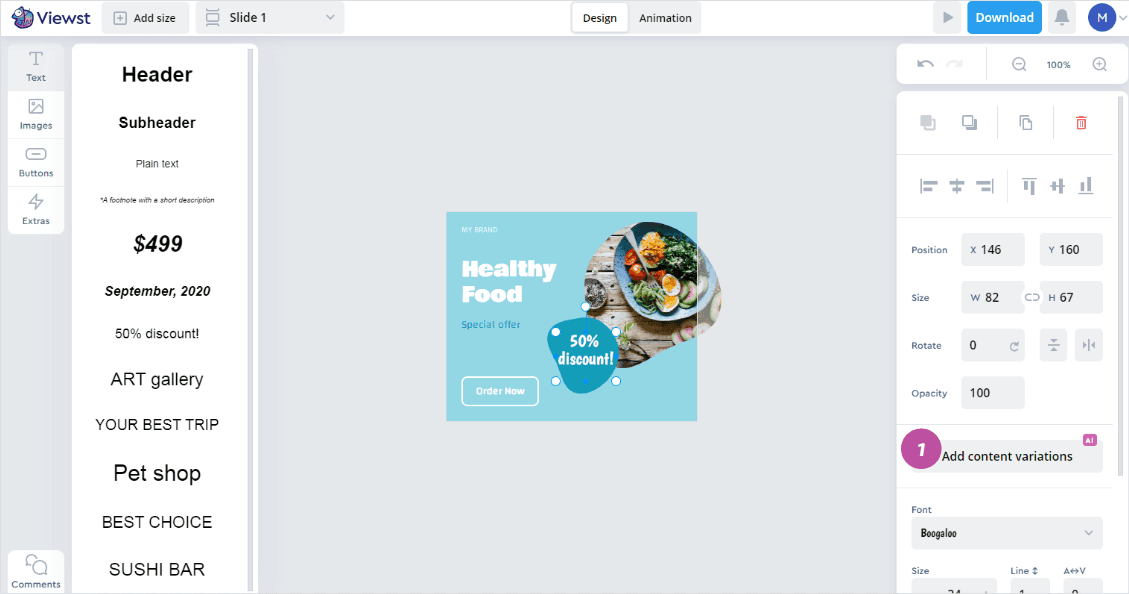
Choose the text or button for which you want to add variations.
Click the Add content variations (AI) button
1.
AI generated text will appear in the Variant 2 field. You can use it as it is, make the necessary edits
2or delete this version if it doesn't suit you3.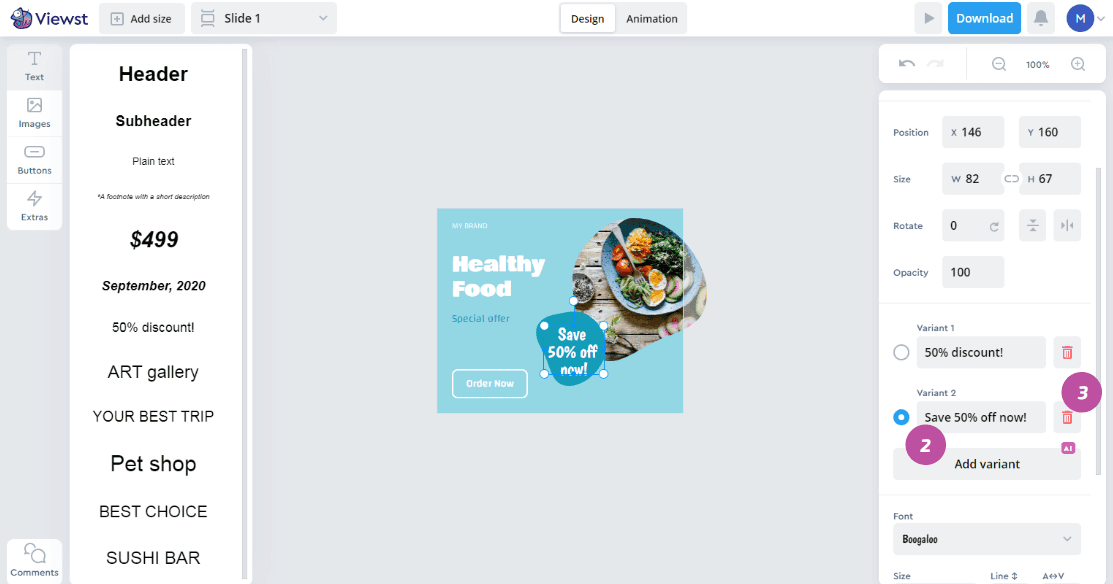
Frequently asked questions
How does Viewst’s platform facilitate real-time collaboration between creative and media teams?
Viewst’s platform facilitates real-time collaboration between creative and media teams by providing a mutual workspace where they can seamlessly collaborate at the design step and are able to share comments and stay on the same page with all their mutual projects. The platform allows for quick and efficient collaboration, enabling teams to receive prompt data on each creative performance. This ongoing conversation and continuous flow of ideas and insights between designers and media buyers enhance understanding and collaboration between the two teams.
Can Viewst provide more details on how they establish attribution connections between Google Campaign Manager and various Demand-Side Platforms?
Viewst has achieved a significant breakthrough by successfully establishing attribution connections between Google Campaign Manager (CM) and various Demand-Side Platforms (DSPs). Through this integration, Viewst provides advertisers with immediate feedback on the effectiveness of their display ads. The platform’s proprietary algorithms correlate user interactions with creative variations across multiple channels, attributing conversions and engagement metrics directly to specific creative elements. This granular level of insight allows for rapid iteration and refinement of ad creatives, leading to improved campaign performance.
What specific features does Viewst offer to bridge the gap between creative and media teams and foster understanding and collaboration?
Viewst offers features, such as statuses for each creative and each ratio inside it, assignee, who is in charge of the project, deadline settings, preview sharing link to speed up and simplify approval process, data analytics of each creative performance, etc.The platform provides a home field for both creative and media teams, creating a space where everyone feels valued and can contribute their unique perspectives. It enables teams to iterate quickly, improve creatives, and speed up go-to-market. With Viewst, collaboration is not a one-off handoff but an ongoing conversation, allowing for a continuous flow of ideas and insights. This fosters a comprehensive understanding of consumer behavior and facilitates data-driven design decisions, resulting in exceptional user experiences.