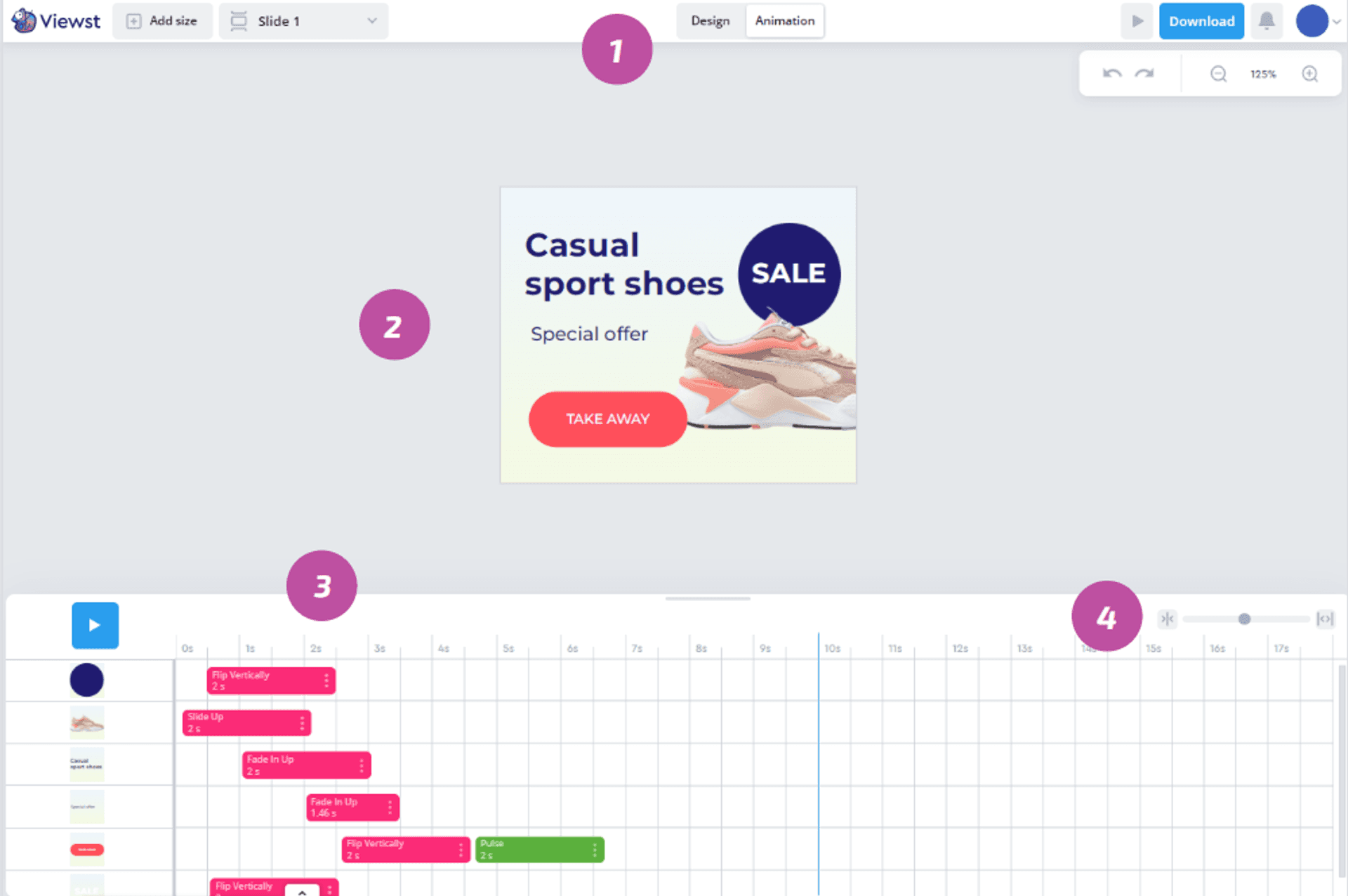
To work with animations, open the Animation tab on the Menu 1.
The Animation page consists of canvas preview 2and timeline 3.
On the timeline, you can add or edit animations and instantly see your changes on the canvas.
Changing timeline scale
Drag left or right over the scale control to change the timeline scale 4.
Copying and pasting animations
If you have already created animation and want to replicate it for another element, you can copy and paste it instead of adding and adjusting a new one.
How to copy and paste animations:
Move the pointer to the animation you would like to copy.
Click on the “•••” button and choose Copy.
Move the pointer to the place on the timeline where you want to add the animation, click, and choose Paste.
The animation will appear on the timeline.
Playing animations
To preview an animation, click on the Play button 9. You can pause an animation at any time to see, how it looks.
By default, an animation will start playing from the beginning, but you can play it from any point you would like. To select the point it should start click on the time scale 10 or drag the blue play line 11 to skim over some of the animation.
Frequently asked questions
How does Viewst’s platform facilitate real-time collaboration between creative and media teams?
Viewst’s platform facilitates real-time collaboration between creative and media teams by providing a mutual workspace where they can seamlessly collaborate at the design step and are able to share comments and stay on the same page with all their mutual projects. The platform allows for quick and efficient collaboration, enabling teams to receive prompt data on each creative performance. This ongoing conversation and continuous flow of ideas and insights between designers and media buyers enhance understanding and collaboration between the two teams.
Can Viewst provide more details on how they establish attribution connections between Google Campaign Manager and various Demand-Side Platforms?
Viewst has achieved a significant breakthrough by successfully establishing attribution connections between Google Campaign Manager (CM) and various Demand-Side Platforms (DSPs). Through this integration, Viewst provides advertisers with immediate feedback on the effectiveness of their display ads. The platform’s proprietary algorithms correlate user interactions with creative variations across multiple channels, attributing conversions and engagement metrics directly to specific creative elements. This granular level of insight allows for rapid iteration and refinement of ad creatives, leading to improved campaign performance.
What specific features does Viewst offer to bridge the gap between creative and media teams and foster understanding and collaboration?
Viewst offers features, such as statuses for each creative and each ratio inside it, assignee, who is in charge of the project, deadline settings, preview sharing link to speed up and simplify approval process, data analytics of each creative performance, etc.The platform provides a home field for both creative and media teams, creating a space where everyone feels valued and can contribute their unique perspectives. It enables teams to iterate quickly, improve creatives, and speed up go-to-market. With Viewst, collaboration is not a one-off handoff but an ongoing conversation, allowing for a continuous flow of ideas and insights. This fosters a comprehensive understanding of consumer behavior and facilitates data-driven design decisions, resulting in exceptional user experiences.