
Why Display Ad QA Breaks at Scale (and What to Do About It)
Display ad QA and approvals don’t usually fail because the work is bad. They fail because the workflow is.
When you’re shipping hundreds of HTML5 banners per campaign, the bottleneck isn’t concepting. It’s execution: spec checks, version control, approvals, and trafficking.
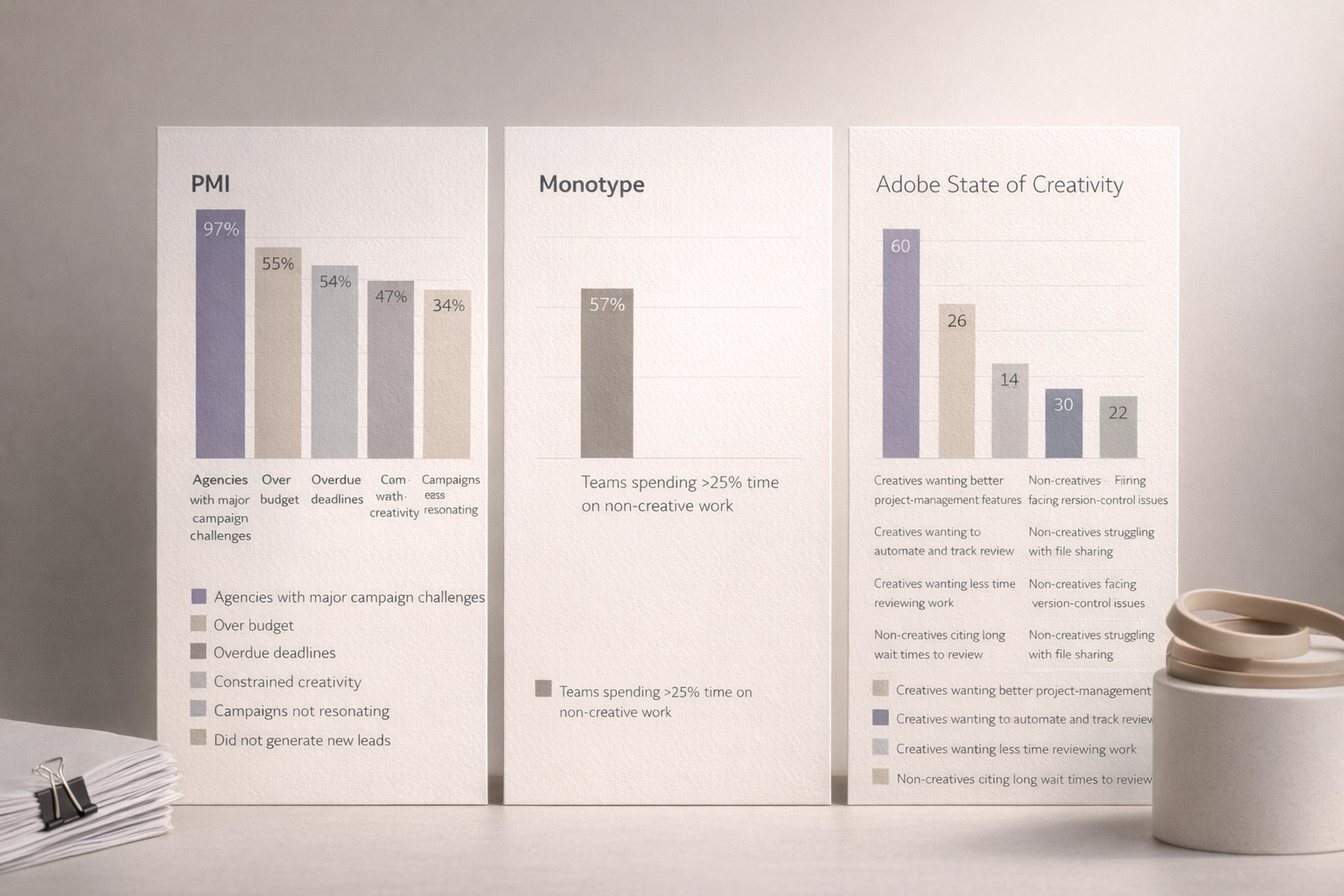
Recent data backs this up:
PMI reports 97% of agencies hit major campaign challenges; 54% miss deadlines and 55% go over budget.
Monotype found 57% of creative teams spend more than a quarter of their time on non-creative tasks like asset management and compliance checks.
Adobe’s 2024 State of Creativity says 6 in 10 creatives want better project-management features; 26% specifically want to automate and track creative review.
This article outlines a practical, scalable display ad QA and approvals workflow — built for teams producing hundreds of creatives, not just a handful. We’ll cover:
A robust but lightweight display ad QA process
A practical HTML5 banner ad QA checklist
Roles and responsibilities in the ad approvals workflow
How integrated production environments like Viewst reduce errors and miscommunications
The Core Principle: One Master, One Shared Review Surface
The most reliable high-volume workflow emerging across Adobe, Celtra, and others follows a simple pattern:
One master creative → one shared review surface → role-based signoff → automated spec checks → export.
This matters because version drift is what kills timelines. Adobe explicitly calls out the file-shuffle pattern — export, upload, feedback, revise, re-upload — as a source of version drift, lost metadata, and wasted time.
Viewst’s production philosophy is built around the same idea:
Master creative is the single source of truth.
All resizes, language versions, and format variations stay structurally linked to that master.
Review and approvals happen inside the production environment, not around it.
When you eliminate handoffs between tools, you eliminate at least half the QA headaches.
A Scalable Display Ad QA Workflow (Step-by-Step)
Here’s a workflow pattern that scales from tens to hundreds of creatives per campaign. Adapt the detail to your team size, but keep the sequence.
1. Define the QA and approvals plan upfront
QA is not a last step; it’s a designed process. At kickoff, document:
What formats and channels are in scope (e.g., Google DV360, Google Ads, Amazon DSP, retail media networks).
Who signs off on what (creative, brand, legal, performance, regional teams).
Which specs apply
Google: HTML5 limits, click tags, max 30s animation, no autoplay audio, HTML5 access prerequisites (90 days / $9,000 lifetime spend / policy history).
Amazon: 200 KB max HTML tag, 3 redirect cap, HTTPS-only, max 10 HTTPS requests.
How many rounds of review are allowed and what counts as a blocking issue.
Document this in your brief, not in someone’s head.
2. Build a master set, not one-offs
Instead of building every size independently:
Design a master HTML5 creative that reflects final layout, brand, and motion.
Use creative automation tools for display advertising to generate variations:
AI Smart Resize for all required sizes from one master.
Brandbooks for typography, colors, and logo lockups.
Component-based layouts so changes propagate.
In Viewst, this structure becomes the backbone for:
Consistent animation and timing.
Reusable layout logic across languages and offers.
Synchronized updates when copy or legal changes.
3. Centralize production and review in one environment
The best software for creating and managing display ads now behaves like an integrated production environment, not a folder of exports.
In practice, that means:
Designers build and animate directly in a true WYSIWYG HTML5 editor.
Stakeholders review ad sets in one shared view (no scattered screenshots).
Feedback is pinned to specific creatives, sizes, or elements.
Version history and approvals are tracked per set.
This integrated approach mirrors Adobe’s guidance that when planning, collaboration, and delivery share a foundation, every handoff gets faster and simpler.
Platforms like Viewst add:
AI Instant Animator to apply motion consistently across layers.
AI Image Deflatening to turn flat assets into editable HTML5 banners.
Direct Figma/Adobe imports to avoid rebuilding from scratch.
HTML5 Banner Ad QA Checklist (Practical and Repeatable)
Here is a production-ready HTML5 banner ad QA checklist you can plug into your process. Break it into four layers: content, design, behavior, and compliance.
1) Content & messaging QA
Copy accuracy
Headlines, subheadlines, CTAs match approved brief.
No spelling or grammar errors.
Legal disclaimers and footnotes present where required.
Localization
Correct language by market; no mixed-language assets.
Currency, dates, and units localized correctly.
Offer details
Offer terms (discount, dates, promo codes) are up to date.
Expiry dates match campaign schedule.
2) Design & brand QA
Brand compliance
Fonts, colors, and logo usage match brand guidelines.
No unauthorized variations or experimental lockups.
Layout consistency
Key elements (logo, product, CTA) are consistently placed across sizes.
Small sizes still readable; no microtype.
Visual hierarchy
Headline legible at a glance.
CTA visible and clearly clickable.
Using Viewst brandbooks, you can lock typography and colors across all formats so designers and local teams can’t accidentally break brand rules.
3) Technical & behavior QA
This is where many QA processes fall down, especially for HTML5 display.
Click behavior
Click tags implemented correctly according to Google DV360 or ad server specs.
Click tags not minified (per DV360 guidance).
Click-through URL tested in QA environment.
Animation
Total animation duration ≤ 30 seconds for DV360.
No flashing or effects that could trigger publisher rejection.
Looping behavior matches platform requirements.
Audio and video
No autoplay audio; any video autoplay must be muted.
User-initiated audio/video complies with publisher policies.
Weight & loading
Google Ads uploaded HTML5 ZIP ≤ 600 KB.
Amazon HTML tag ≤ 200 KB, max 10 HTTPS requests, assets on a CDN.
No console logs or debug scripts left in production.
4) Compliance & brand safety QA
Policy checks
No prohibited content (sensitive categories, misleading claims, restricted products).
Age-gated content correctly labeled if applicable.
Brand safety
Imagery aligns with internal standards on representation and ethics.
Claims and testimonials approved by legal or compliance where needed.
Metadata & tracking
UTM parameters correct and consistent.
Campaign, ad group, and creative naming match trafficking plan.
Embed this QA checklist as a template in your project management or inside your creative automation platform. Viewst enables many of these checks to run at the set level instead of per-ad manual checks.
Roles and Responsibilities in the Ad Approvals Workflow
To avoid chaos, every stakeholder needs a specific decision role. Adobe recommends using a RACI (Responsible, Accountable, Consulted, Informed) model. Here’s how it maps to high-volume display ad QA.
Core roles in a display ad QA process
Creative Director / Design Lead
Accountable for creative quality and concept integrity.
Approves master creative and key variations.
Production Designer / Motion Designer
Responsible for building HTML5 banners and resizes.
Implements motion, applies brandbooks, runs technical QA.
Creative Operations / Project Manager
Accountable for timeline, scope, and approvals flow.
Owns the QA checklist and ensures each stage completes.
Brand / Marketing Manager
Approves final messaging, branding, and localization.
Consulted on late-stage changes affecting positioning.
Legal / Compliance (as needed)
Approves disclaimers, claims, regulated content.
Often only involved on specific campaigns.
Performance Marketer / Media Manager
Consulted on variants needed for A/B testing.
Ensures naming, tracking, and trafficking requirements are met.
How to keep the workflow lightweight
Single approver per decision
One accountable approver for creative.
One accountable approver for brand/legal.
Role-based permissions in your production platform
Designers edit; stakeholders comment; approvers sign off.
No surprise edits from non-production roles.
Defined rounds
Round 1: Master concept + key sizes.
Round 2: Full set QA and localization.
Round 3: Final pre-flight signoff.
Adobe notes that project professionals operationalize creativity; they don’t constrain it. Giving them clear authority to run QA and approvals is how you protect creative focus.
How Integrated Production Environments Reduce Errors
Scattered tools generate scattered errors. A typical manual workflow looks like this:
Design in Figma.
Animate in a separate motion tool.
Export PNGs or HTML5.
Send via email or Slack for feedback.
Track changes in a spreadsheet.
Rebuild resizes with each change.
Every step creates risk:
Version drift between exported files and source designs.
Conflicting feedback in different channels.
Manual copy/paste errors across sizes.
Missed technical constraints per platform.
Creative automation platforms for display advertising are designed to remove exactly this failure mode.
Benefits of an integrated ad production environment
In an integrated environment like Viewst, you get:
One source of truth
All creatives (HTML5, GIF, MP4) live in one project.
Master creative controls variants; updates propagate automatically.
Built-in collaboration
Review, comments, and approvals happen inside the banner set.
No screenshots or PDF decks; stakeholders respond to live creatives.
Automated production
AI Smart Resize creates all required sizes from one master.
AI Instant Animator applies motion across variants in one click.
AI Image Deflatening turns flat assets into editable layouts.
Spec-aware exports
Export presets aligned to Google Ads, DV360, Amazon DSP.
Consistent click tag implementation and file weight checks.
Result: fewer errors, less rework, and more time for actual design.
Practical Example: QA and Approvals for 250+ Creatives
Consider a multi-market campaign with:
12 base sizes per market.
5 markets.
4 copy variants for A/B tests.
That’s 240+ creatives, before alternate themes. Here’s how a Viewst-style workflow keeps it under control.
Build one master HTML5 creative for the primary size.
Apply brandbook to lock fonts, colors, and logo use.
Use AI Smart Resize to generate 12 sizes.
Duplicate the set per market; swap copy via structured fields.
Have the Creative Director approve the master set in-platform.
Run the HTML5 banner ad QA checklist once at the set level.
Auto-apply corrections across all sizes.
Export platform-specific packages (Google Ads HTML5, DV360 tags, Amazon tags) with spec-aware presets.
The Creative Director touches one master.
The Production Designer manages a single integrated project.
The Creative Ops lead tracks one approval thread.
That’s how you maintain operational rigor without drowning in QA.
Ethical and Governance Considerations for AI in QA
As AI-driven creative automation platforms become standard, governance matters. You want ethical AI tools for display ad design that reinforce, not erode, brand standards.
Key principles:
Human-in-the-loop
AI handles mechanical tasks (resizes, animations, exports).
Humans own judgment calls on concept, brand, and ethics.
Brand control
Locked brandbooks and templates prevent AI from drifting off-brand.
Governance rules define what AI can and can’t change.
Auditability
Version history and approvals are logged.
You can always trace who approved what and when.
Viewst’s ethos is explicit: AI should remove non-creative suffering, not creative control. That’s especially critical in enterprise environments where brand control is non-negotiable.
FAQ: Display Ad QA and Approvals at Scale
1. What is a display ad QA process?
A display ad QA process is a structured set of checks to ensure HTML5 banners and display ads are accurate, on-brand, technically compliant, and ready for trafficking. It typically covers content, design, behavior, and compliance, and ends with formal approvals.
2. How do I reduce errors in banner ad production?
To reduce errors in banner ad production:
Use one master creative as the source for all sizes.
Centralize production and approvals in a single platform.
Apply a consistent ad build QA checklist.
Automate repetitive tasks like resizing and animation.
Lock brandbooks to prevent off-template edits.
3. Who should own the ad approvals workflow?
Typically, Creative Operations or a Project Manager owns the ad approvals workflow. They coordinate inputs from Creative Directors, brand/marketing managers, legal, and media teams, and ensure each stage of QA is completed before export.
4. What tools help with creative QA automation for display ads?
Creative automation platforms for display advertising — such as Viewst — provide:
AI Smart Resize and automated animation.
Built-in HTML5 banner ad QA checklists and spec-aware exports.
Integrated review and approval workflows.
Version control for display ads and structured comments.
These features reduce manual work and lower the risk of version drift.
5. How do integrated ad production environments compare to traditional workflows?
Integrated ad production environments replace fragmented tools (Figma + motion + email + spreadsheets) with a single system for creation, QA, and approvals. They provide one shared review surface, automated spec checks, and role-based signoff, which shortens cycles and cuts errors in high-volume campaigns.
Final Takeaway
You don’t fix display ad QA by adding more checkpoints. You fix it by designing a workflow where:
The master creative rules all.
Review happens inside the production environment.
QA checklists are standardized and automated where possible.
Roles and responsibilities are explicit, not implied.
Viewst is built exactly for this layer: creative operations for advertising teams that need to ship hundreds of HTML5 display ads without sacrificing craft, brand integrity, or their designers’ sanity.
If speed-to-market, operational rigor, and brand consistency are priorities for your team, it’s time to treat banner production as infrastructure — and give QA and approvals a workflow that actually works.

Victoria is the CEO at Viewst. She is a serial entrepreneur and startup founder. She worked in Investment Banking for 9 years as international funds sales, trader, and portfolio manager. Then she decided to switch to her own startup. In 2017 Victoria founded Profit Button (a new kind of rich media banners), the project has grown to 8 countries on 3 continents in 2 years. In 2021 she founded Viewst startup. The company now has clients from 43 countries, including the USA, Canada, England, France, Brazil, Kenya, Indonesia, etc.
In this article
" height="11.060000000000002px" id="wzBCZ87AK" transform="translate(6.47 2.47)" width="6.590000000000003px"/></g></svg>)