Display Ad Platform Support: Creative Automation, HTML5 Specs & Programmatic Advertising (2026 Guide)
Display Ad Platform Support: Creative Automation, HTML5 Specs & Programmatic Advertising (2026 Guide)
Explore
Explore
•
•
Victoria Duben
Victoria Duben
•
•
•
•
•
•
— min read
— min read
— min read

Meta description: Creative automation tools for display advertising platform comparison, plus an HTML5 ad production playbook for Google, The Trade Desk, Amazon DSP, and more.
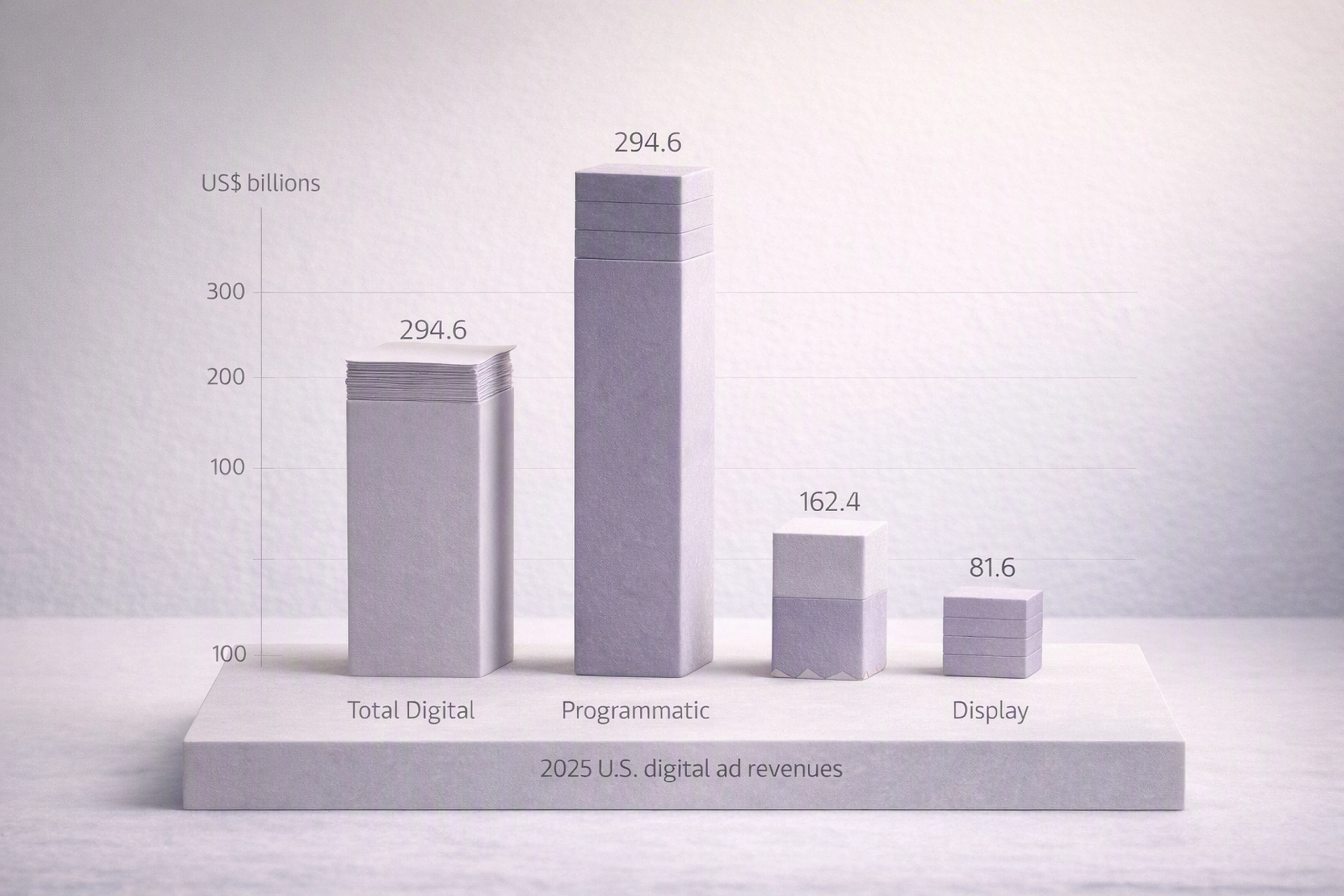
Programmatic advertising now accounts for more than half of U.S. digital ad revenue, with programmatic hitting $162.4B in 2025 (+20.5% YoY) and display at $81.6B (+9.8% YoY) according to IAB’s 2025 report (published April 2026) iab.com, 2026. That scale means creative teams must design display ads that work across multiple platforms, specs, and formats — without drowning in manual production.
This guide explains the display ad platform landscape, key HTML5 and programmatic specs, and how to structure file setup, QA, and versioning using modern creative automation tools like Viewst.
Programmatic advertising & display platforms: the landscape
Creative teams building display ads today typically have to support:
Google Ads (GDN / YouTube / Discovery)
Google Display & Video 360 (DV360)
Campaign Manager 360 (CM360)
The Trade Desk
Amazon DSP
Major networks & SSPs (Yahoo, Xandr, etc.)
Retail media networks
Social platforms that accept HTML5/video assets
IAB reports total U.S. digital ad revenue at $294.6B in 2025 (+13.9% YoY) iab.com, 2026. Google’s Display Network alone reaches 2M+ sites and apps Google Ads Help, accessed Aug 2026.
The implication for creative operations:
You can’t optimize for a single placement.
You must design for platform families, environments (web, app, MRAID), and spec clusters.
You need infrastructure — not ad‑hoc files — to keep up.
This is the layer where Viewst sits: between design tools (Figma, Adobe) and media platforms (DV360, The Trade Desk, Amazon DSP), handling HTML5 production, scaling, and QA.
Creative automation platforms for display advertising: tools & features comparison
Creative automation tools for display advertising focus on reducing manual resizing, versioning, and QA. Here is a high-level comparison of common approaches.
| Platform / Stack | Core focus | HTML5 export | Automation features | DCO support | MRAID / AMPHTML | Version control & governance |
|------------------|-----------|--------------|---------------------|------------|-----------------|-----------------------------|
| Viewst (HTML5-native ad production) | Programmatic banner production infrastructure | Yes, native editable HTML5 / GIF / MP4 | AI Smart Resize, AI Image Deflatening, AI Designer, Instant Animator, brandbooks, batch exports | Integrates with DCO workflows via HTML5 sets and variants | Supports HTML5 for web & in-app, MRAID-compatible builds, AMPHTML export patterns | Master-based system, brandbooks, approval states, shared libraries | | Figma + plugins | Design & prototyping | Limited (via plugins, often flat assets) | Component reuse, some plugin-based bulk export | Indirect, via feeds and dev work | Requires custom code or plugins | File naming and manual libraries, no native ad lifecycle governance | | Adobe Animate / Photoshop / After Effects | Creative craft, motion | Yes (Animate) / image or video exports | Timeline animation, some templates, no platform-aware QA | Requires separate DCO setup | Custom dev work for MRAID/AMPHTML | Versioning via files and CC libraries; no structured approval states | | Google Web Designer | HTML5 banner building | Yes | Components, responsive layout, basic automation | Works with Studio / DV360 DCO | MRAID components available | Project-level; limited multi-brand governance | | In-house custom builder | Highly customized workflows | Yes (depends on stack) | Depends on investment; often templating + feeds | Can be tightly integrated | Possible with engineering support | Custom naming and branching; relies on engineering discipline |
Viewst’s differentiator: it treats banner production as infrastructure, not design, with automation (e.g., AI Smart Resize) wrapped around a single master creative and brandbooks — so you can align with programmatic platform specs without turning designers into production line workers.
HTML5 ad production platform: specs, exports, and best tools
An HTML5 ad production platform for programmatic display should:
Generate clean HTML5 bundles that pass DV360, CM360, The Trade Desk, and Amazon DSP checks.
Support clickTAG or equivalent click-handling conventions per platform.
Produce backup GIF/JPG/PNG images for environments that can’t serve HTML5.
Handle MRAID for in‑app and AMPHTML for Google’s AMP inventory.
Enforce file-size, cookie, and HTTP call budgets per platform.
Viewst is built natively on HTML5 so the editor is true WYSIWYG: what you see in the browser is what runs in the ad slot. This makes it easier to ensure that exports match network rules like DV360’s 5 MB total download, 25 cookie, and 100 HTTP call limits for HTML5 creatives DV360 Help, updated Jan 2025.
Platform specs quick reference (2026)
Important: Limits can change, and some vary by publisher or placement. Always verify against the current official docs before launch.
| Platform | Accepted file types (display) | Max file size (HTML5) | Cookie / HTTP call limits | Backup required? | clickTag rules | Special notes |
|----------|-------------------------------|------------------------|---------------------------|------------------|----------------|---------------|
| Google Ads (GDN uploaded display) | HTML5 ZIP, AMPHTML, JPG, PNG, GIF | Typically 150 KB for static; HTML5 bundles expected to be lightweight; Google recommends minimizing size Google Ads Help, accessed Aug 2026 | No explicit public cookie/HTTP caps at creative level; subject to Google policies | Fallback image recommended for HTML5; static formats serve as their own fallback | Uses googletag.* macros internally; HTML5 uploaded ads typically rely on standard clickTag patterns compatible with CM360/DV360 | Responsive and asset-based formats rely on modular assets instead of fixed-size HTML5 | | DV360 (HTML5 display)** | HTML5 ZIP, image, video, third-party tags DV360 Help, updated Jan 2025 | 5 MB total download per creative | Max 25 cookies and 100 HTTP calls per creative DV360 Help, 2025 | Yes, backup image or polite load recommended | Requires at least one click tag; CM360-style clickTag in HTML referenced by DV360 | Manual tag wrapping removed Jan 7, 2025 in favor of automated verification DV360 Help, 2025 | | CM360 | HTML5 ZIP, image backup CM360 Help, accessed Aug 2026 | No hard public cap; typical practice ≤ 2–3 MB | No specific cookie/HTTP limits published; relies on DV360 / publisher constraints | Yes, separate backup image strongly recommended | Requires at least one clickTag parameter accessible to trafficking CM360 Help, 2026 | Requires clean ZIP structure: HTML plus referenced assets only | | The Trade Desk | HTML5 ZIP, image, third-party tags The Trade Desk API Docs, accessed Aug 2026 | Varies by publisher; commonly 200–300 KB initial load; follow individual SSP specs | No global public cookie/HTTP cap; publisher and browser policies apply | Backup images recommended, especially for high-impact placements | Uses URL parameter approach for click-through; click handling defined in primary HTML file as a single click-through URL | Creative type cannot be changed after creation; approval required before spend | | Amazon DSP | Image, HTML5 ZIP, video; 62 placement sizes supported for standard display [Amazon Advertising, product release note 2024, accessed Aug 2026] | Amazon recommends lightweight creatives; many placements align with 200 KB+ guidelines | No explicit global cookie/HTTP caps published; creatives must comply with Amazon policies | Static backup recommended; some placements serve static only | Uses click-through URLs defined in console or tags; HTML5 must route clicks via Amazon’s click URL | Standard display workflow consolidates multiple creative types into one workflow [Amazon Advertising Help, accessed Aug 2026] | | Mobile in‑app (MRAID) (via multiple SSPs) | HTML5/MRAID, image, video [IAB MRAID 3.0, 2018] | Often 200 KB initial load; larger polite load allowed post‑render | Cookie/HTTP calls constrained by SDK and device; no universal cap | Backup static image recommended; some SDKs fall back if MRAID fails | Click handled via MRAID APIs (e.g., mraid.open()), not classic clickTag | Must respect MRAID v2/3 ready states and environment messaging | | AMPHTML (Google) | AMPHTML ads Google Ads Help, accessed Aug 2026 | Strictly optimized; Google enforces fast-loading AMP constraints | Limited custom JavaScript; HTTP calls tightly constrained by AMP runtime | AMPHTML itself is the lightweight fallback; static backup still recommended | Click handled through AMP components, not manual clickTag | Uses amp-ad formats; no arbitrary JS allowed |
How to build ads for Google Ads & DV360 specs
For Google Ads and DV360, align creative setup with how Google is evolving its ads:
Google is shifting to asset-based, responsive ads built from modular headlines, descriptions, images, and logos Google Ads Help, accessed Aug 2026.
IAB’s New Ad Portfolio also promotes flexible, aspect-ratio-based units instead of rigid sizes [IAB New Ad Portfolio, 2017].
Practical implications:
Build a single master HTML5 creative per concept with modular layers.
Use your HTML5 ad production platform (e.g., Viewst) to generate all required sizes from that master, mirroring Google’s responsive mindset.
For DV360 you must:
Keep total download ≤ 5 MB, ≤ 25 cookies, and ≤ 100 HTTP calls DV360 Help, 2025.
Include at least one click tag accessible for trafficking.
Provide a backup image and test polite load if using heavy assets.
IAB Rising Stars, responsive formats, and flexible specs
Older IAB Rising Stars units (e.g., Billboard, Filmstrip, Portrait) were defined with very specific dimensions and behavior. IAB’s New Ad Portfolio (2017, still referenced in 2026) shifted the industry toward:
Flexible sizes defined by aspect ratios.
Responsive behavior across screens.
Strict file-size and load guidance to protect performance.
While individual Rising Stars specs are less central today, the lessons remain:
Avoid hard‑coding creative for a single fixed placement.
Design with scale and adaptability in mind, not one‑off showcase units.
Viewst’s AI Smart Resize and master‑based architecture align directly with this flexible-spec philosophy.
VAST vs VPAID: how it affects display & rich media teams
Video and rich media specs also affect display-focused teams, especially when banners expand into video.
VAST (Video Ad Serving Template) [IAB VAST 4.1, 2018]:
XML standard that describes video ads for players.
Specifies media files, duration, tracking URLs, and click-through URLs.
Used by most video platforms for in-stream and out-stream.
Creatives are generally non-interactive video files plus tracking.
VPAID (Video Player-Ad Interface Definition) [IAB VPAID 2.0, 2012]:
Allows interactive video ads via JavaScript or Flash (now deprecated).
Historically enabled in-player interactivity and advanced measurement.
Increasingly deprecated or unsupported due to security and performance concerns; Open Measurement SDK + VAST has largely replaced it.
Impact on display/rich media teams:
For classic display, you mainly work with HTML5 and MRAID.
For video-heavy display (e.g., out‑stream units), you’ll be asked for VAST-compatible video files and tracking, not VPAID.
Prepare short video cuts and companion banners that inherit brand and messaging from your HTML5 master.
clickTAG implementation in HTML5 banners
Click handling is one of the most common reasons HTML5 ads fail QA. Most programmatic platforms rely on a standard clickTag variable so trafficking teams can swap landing URLs without editing the creative.
Canonical clickTAG pattern for HTML5
A widely accepted pattern (compatible with CM360 and DV360) looks like this:
<!DOCTYPE html>
<html>
<head>
  <meta charset="UTF-8" />
  <title>HTML5 Banner</title>
  <script type="text/javascript">
    var clickTag = "https://example.com/default-landing";

    function handleClick() {
      window.open(clickTag, "_blank");
    }
  </script>
</head>
<body onclick="handleClick()" style="margin:0; padding:0;">
  <!-- Banner content goes here -->
</body>
</html>
Key rules:
Define
clickTagin the global scope so ad servers can override it.Use a single click handler entry point (e.g.,
handleClick()bound to the main click area).Open in a new tab/window (
_blank) to align with user expectations and platform policies.
Where platforms deviate
The Trade Desk: click-through is typically set as a URL in the UI or tag; creatives should not hard-code landing page URLs beyond a default. The click event should trigger the URL provided by the platform The Trade Desk API Docs, accessed Aug 2026.
MRAID in-app: use
mraid.open()with the click URL, notwindow.open()[IAB MRAID 3.0, 2018].AMPHTML: clicks are handled via AMP components (e.g.,
<a>withamp-analytics), not arbitrary JavaScript.
Well-designed platforms like Viewst bake clickTAG patterns into templates so designers don’t have to think about JavaScript every time they export.
Backup GIF / static fallback requirements
Many environments still require a static backup asset even if your primary creative is HTML5.
Examples:
CM360 explicitly allows a separate backup image for HTML5 creatives CM360 Help, 2026.
DV360 and The Trade Desk rely on publisher tags where backups are recommended to ensure coverage for non‑HTML5 inventory.
Best practices for backup GIF/JPG/PNG:
Dimensions: match the primary HTML5 size (e.g., 300×250, 160×600, 728×90) exactly.
File name: append a clear suffix, e.g.:
brand_campaign_300x250_master_backup.jpg.Weight: keep under 40–60 KB whenever possible; absolute maximums vary by publisher.
Content: preserve key brand elements, headline, CTA, and any legally required copy.
Animation: many backup slots do not support animated GIFs; assume static unless the spec explicitly allows animation.
Viewst can export HTML5 banners plus static GIF/JPG/PNG derivatives from the same master, ensuring consistent design and messaging.
AMPHTML ads requirements (Google)
AMPHTML ads are creatives built using the AMP framework for faster loading. They are commonly used on AMP pages across Google’s network.
Key constraints Google Ads Help, accessed Aug 2026:
No arbitrary JavaScript: you must use AMP components only.
Strict size & performance limits: all assets must be highly optimized; heavy scripts and bulky images will be rejected.
Limited interactivity: advanced interactions must be implemented using supported AMP components.
Validation required: AMPHTML must pass AMP validator checks.
Most design teams do not hand-code AMPHTML. Instead, they:
Produce clean HTML5 creatives with clear structure.
Collaborate with dev or use a production platform that can generate AMPHTML variants.
Viewst’s HTML5-first structure and master-based approach make it easier to convert a validated banner layout into AMPHTML templates where needed.
Mobile in-app MRAID specs for creatives
For mobile app inventory, most programmatic platforms rely on MRAID (Mobile Rich Media Ad Interface Definitions). Google’s mobile ads SDK supports MRAID up to v3 and Open Measurement SDK Google Authorized Buyers Help, accessed Aug 2026.
Essential MRAID considerations:
Readiness: only use MRAID features after
mraid.getState()returns"default"or"expanded"and after thereadyevent.Click handling: use
mraid.open(clickUrl);instead ofwindow.open().Viewability & measurement: MRAID 3.0 works with Open Measurement for accurate viewability.
Resize/expand: obey publisher policies; don’t auto-expand without clear user interaction.
If your HTML5 production platform can enforce MRAID-safe patterns or export MRAID-ready bundles, you’ll avoid many in-app QA failures.
Creative operations for high-volume ad production
With programmatic and display spend growing, creative teams face industrial-scale production:
IAB reports $259B in U.S. digital ad revenue for 2024 (+15% YoY) up from $225B in 2023 (+7.3% YoY) IAB Internet Advertising Revenue Report 2024, published April 2025.
Amazon DSP supports 62 placement sizes, but the average campaign uses only 3.6 sizes — a sign of under-utilization due to production constraints [Amazon Advertising product notes, 2024].
To keep up, teams need:
A single master creative per concept as the source of truth.
Automated Smart Resize across sizes and aspect ratios.
Governed brandbooks and templates to avoid off-brand local edits.
Integrated review and approval inside the production environment.
This is exactly the problem space Viewst is designed to handle.
Version control for ad creatives: master, formats, and variants
Programmatic platforms like Google Ads and The Trade Desk treat creatives as objects with specific types and approval states. The Trade Desk notes that a creative type cannot be changed after creation and that ad groups require approved creatives to spend The Trade Desk API Docs, accessed Aug 2026.
That means you should treat versioning as a system, not file sprawl.
Versioning & naming taxonomy example
A practical naming schema that works well with HTML5 production platforms looks like this:
Master creative (concept-level):
brand_campaign23Q4_master-01.html
Size family variants (from the same master):
brand_campaign23Q4_300x250_master-01.htmlbrand_campaign23Q4_160x600_master-01.htmlbrand_campaign23Q4_728x90_master-01.html
Message variants (e.g., promo vs evergreen):
brand_campaign23Q4_300x250_promo10_master-01.htmlbrand_campaign23Q4_300x250_evergreen_master-01.html
Locale variants:
brand_campaign23Q4_300x250_promo10_en-US_master-01.htmlbrand_campaign23Q4_300x250_promo10_es-MX_master-01.html
Approval states (managed in your platform, reflected only when necessary in export):
Working file:
brand_campaign23Q4_300x250_promo10_en-US_master-01_WIP.htmlReady for QA:
..._QA.htmlApproved:
..._APPROVED.html(or stored as a metadata status to avoid filename bloat)
The goal is to keep master, size, message, locale, and state clearly separate so you can:
Change a legal line globally by updating the master.
Spin up localized copy without duplicating animation.
See which variants are actually live vs in design.
Viewst encodes much of this not just in filenames but in its internal model: one master creative, multiple synced variants, and explicit approval states.
Best software for creating and managing display ads
For decision-makers asking “What is the best software for creating and managing display ads?”, the answer depends on your scale and constraints.
For high-volume, multi-market programmatic campaigns
Recommended: Viewst (HTML5-native ad production platform)
Pros:
Built for HTML5 and programmatic display (not generic design).
AI Smart Resize, AI Image Deflatening, AI Designer, and Instant Animator remove mechanical work.
Brandbooks and locked styles maintain brand consistency across sizes and markets.
Integrated review and approvals keep feedback inside the banner sets.
Exports production-ready HTML5, GIF, MP4 aligned with major platform specs.
Cons:
Not a Figma replacement; assumes you already have master design concepts.
For concepting and cross-channel design systems
Recommended: Figma + Adobe Creative Cloud
Pros:
Ideal for UX, UI, and broader brand systems.
Strong collaboration and prototyping.
Cons:
HTML5 exports rely on plugins or dev handoff.
No native platform-aware QA or banner automation.
For one-off HTML5 banner builds with deep control
Recommended: Google Web Designer or Adobe Animate
Pros:
Canvas-level control over animation.
Direct HTML5 output.
Cons:
Manual resizing and versioning.
No scalable governance or integrated approvals.
In practice, many enterprise teams pair Figma/Adobe → Viewst → Programmatic platforms to keep creative and production both strong.
Ad QA checklist for programmatic display
Ad QA is no longer a last-minute visual check. It’s a structured discipline that must validate behavior, specs, and measurement.
Use this step-by-step QA checklist before trafficking.
1) Visual & functional QA
Layout matches design across all sizes.
Fonts, colors, and logos follow brandbook.
Animation plays smoothly, ends on a clear frame.
No strobing or rapid flashing.
CTA is clear and readable.
Recommended tools:
Native preview inside your HTML5 production platform (e.g., Viewst multi-size preview).
Browser dev tools for responsive sizing.
2) Platform-behavior QA
Click opens landing page in a new tab/window (where required).
No pop-ups, alert boxes, or intrusive overlays.
No autoplay audio.
For MRAID,
mraid.getState()becomes"default"andmraid.readyevent fires before using MRAID APIs.
Recommended tools:
Test HTML5 ZIP in a staging CM360/DV360 environment.
Use emulator/simulator for in-app MRAID (network SDK demo apps, QA devices).
3) Technical budget & spec checks
File size within platform limits (e.g., DV360 ≤ 5 MB total download) DV360 Help, 2025.
Cookie count ≤ 25 and HTTP calls ≤ 100 for DV360 creatives.
No local or session storage usage in CM360/DV360 HTML5 CM360 Help, 2026.
Animation duration and loop count follow publisher rules (e.g., commonly ≤ 30 seconds, max 3 loops).
Recommended tools:
Browser network panel for HTTP call count and payload.
Online ZIP/file size analyzers.
4) clickTAG & landing validation
clickTag(or equivalent) is defined globally and used consistently.No hard-coded production URLs; landing pages are injected via platform where possible.
Landing URLs pass tracking & UTM requirements.
Test:
Temporarily set
clickTagto a staging URL and verify navigation.Inspect code to ensure one canonical click handler.
5) Verification and third-party tags
DV360 moved to automated tag wrapping for verification as of Jan 7, 2025 DV360 Help, 2025.
Checks:
Ensure creative does not break when verification JS is injected.
Confirm that viewability and brand-safety vendors are approved by the platform.
Tools:
Publisher or agency test environments with verification enabled.
6) Mobile / MRAID & Open Measurement
In-app creatives respond correctly to orientation changes.
Tap area matches visible CTA.
MRAID functions (
mraid.open,mraid.expand) behave correctly.Open Measurement SDK signals are present where required.
Tools:
Real devices on both iOS and Android.
Publisher test apps or QA harnesses that expose MRAID logs.
7) Backup assets & fallbacks
Backup GIF/JPG/PNG provided for every HTML5 size.
Filenames match a clear pattern (
..._backup.jpg).Backups are uploaded and linked in CM360/DV360/The Trade Desk.
Implement this checklist inside your production platform (e.g., as a shared QA template in Viewst) so it becomes routine, not hero work.
Polite load: what it means across platforms
“Polite load” describes a pattern where the ad loads an initial lightweight shell, then loads heavier assets only after the page content is mostly loaded or after user interaction.
In practical terms:
Initial load should be within tight weight limits (e.g., ~40–150 KB).
Additional assets (large images, video, fonts) are requested after
window.onloador an equivalent trigger.Some SSPs explicitly specify initial vs secondary load budgets.
Since there is no single global definition, you should:
Treat polite load as a performance budget concept rather than a specific API.
Check each major platform’s documentation and, when in doubt, keep initial payloads lean.
Viewst’s HTML5 output allows you to structure assets so core layout is light and additional motion or high-res imagery can be deferred.
How PPC & programmatic requirements inform creative setup
Programmatic display and PPC (search, responsive display, retail media) increasingly share:
Asset-based ad models (headlines, descriptions, images, logos combined at runtime).
Strict relevance and quality requirements (landing page quality, policy rules).
Implications for creative production:
Build modular masters: separate background artwork, copy lines, CTAs, and legal.
Keep copy variants (PPC headlines, display headlines) aligned via a single content source.
Track message variants by promo period or audience segment (e.g., acquisition vs retention).
Ensure all creative files reference the same set of landing pages used in PPC to maintain continuity.
Viewst’s AI Designer can transform prompts and master copy into structured HTML5 banners, which you then align with PPC messaging and landing strategies.
FAQ: Display ad platform support & programmatic creative
1. What is the best way to manage multiple display ad sizes across platforms?
Use a single master creative per concept and a creative automation platform (like Viewst) to generate all required sizes. This keeps animation, brand elements, and legal copy synced while adapting layout for each size and platform.
2. Do I still need HTML5 banners if platforms offer responsive display ads?
Yes. Responsive formats are powerful, but many premium placements, custom units, and retargeting campaigns still require HTML5 or video creatives. HTML5 gives you full control over animation, layout, and on-brand experiences.
3. How do I avoid clickTAG issues in HTML5 banners?
Follow a canonical clickTAG pattern:
Define
var clickTag = "https://example.com";in global scope.Use a single click handler that calls
window.open(clickTag, "_blank");.Don’t hard-code production URLs; let trafficking override
clickTag.
Test in CM360/DV360 or your ad server’s preview tools before launch.
4. What’s the difference between VAST and VPAID for my creative team?
VAST is the current standard for video ads (XML plus media files and tracking).
VPAID is an older interactive standard that is now largely deprecated.
For most new work, your team should focus on VAST-compliant video and companion display units, rather than VPAID.
5. How does Viewst fit into a typical enterprise creative stack?
Viewst sits between design and media:
Designers create concepts in Figma/Adobe.
Assets are imported into Viewst, where Smart Resize, animation, and versioning happen.
Viewst exports production-ready HTML5, static, and video files aligned with DV360, The Trade Desk, Amazon DSP, and other specs.
This removes non-creative production work while keeping designers in control of creative quality.
If your team is operating under high volume and tight deadlines, treating HTML5 banner production as infrastructure rather than ad‑hoc design is the only sustainable path. Viewst was built precisely to handle that layer — so your experts can focus on the creative decisions that actually move performance.
Meta description: Creative automation tools for display advertising platform comparison, plus an HTML5 ad production playbook for Google, The Trade Desk, Amazon DSP, and more.
Programmatic advertising now accounts for more than half of U.S. digital ad revenue, with programmatic hitting $162.4B in 2025 (+20.5% YoY) and display at $81.6B (+9.8% YoY) according to IAB’s 2025 report (published April 2026) iab.com, 2026. That scale means creative teams must design display ads that work across multiple platforms, specs, and formats — without drowning in manual production.
This guide explains the display ad platform landscape, key HTML5 and programmatic specs, and how to structure file setup, QA, and versioning using modern creative automation tools like Viewst.
Programmatic advertising & display platforms: the landscape
Creative teams building display ads today typically have to support:
Google Ads (GDN / YouTube / Discovery)
Google Display & Video 360 (DV360)
Campaign Manager 360 (CM360)
The Trade Desk
Amazon DSP
Major networks & SSPs (Yahoo, Xandr, etc.)
Retail media networks
Social platforms that accept HTML5/video assets
IAB reports total U.S. digital ad revenue at $294.6B in 2025 (+13.9% YoY) iab.com, 2026. Google’s Display Network alone reaches 2M+ sites and apps Google Ads Help, accessed Aug 2026.
The implication for creative operations:
You can’t optimize for a single placement.
You must design for platform families, environments (web, app, MRAID), and spec clusters.
You need infrastructure — not ad‑hoc files — to keep up.
This is the layer where Viewst sits: between design tools (Figma, Adobe) and media platforms (DV360, The Trade Desk, Amazon DSP), handling HTML5 production, scaling, and QA.
Creative automation platforms for display advertising: tools & features comparison
Creative automation tools for display advertising focus on reducing manual resizing, versioning, and QA. Here is a high-level comparison of common approaches.
| Platform / Stack | Core focus | HTML5 export | Automation features | DCO support | MRAID / AMPHTML | Version control & governance |
|------------------|-----------|--------------|---------------------|------------|-----------------|-----------------------------|
| Viewst (HTML5-native ad production) | Programmatic banner production infrastructure | Yes, native editable HTML5 / GIF / MP4 | AI Smart Resize, AI Image Deflatening, AI Designer, Instant Animator, brandbooks, batch exports | Integrates with DCO workflows via HTML5 sets and variants | Supports HTML5 for web & in-app, MRAID-compatible builds, AMPHTML export patterns | Master-based system, brandbooks, approval states, shared libraries | | Figma + plugins | Design & prototyping | Limited (via plugins, often flat assets) | Component reuse, some plugin-based bulk export | Indirect, via feeds and dev work | Requires custom code or plugins | File naming and manual libraries, no native ad lifecycle governance | | Adobe Animate / Photoshop / After Effects | Creative craft, motion | Yes (Animate) / image or video exports | Timeline animation, some templates, no platform-aware QA | Requires separate DCO setup | Custom dev work for MRAID/AMPHTML | Versioning via files and CC libraries; no structured approval states | | Google Web Designer | HTML5 banner building | Yes | Components, responsive layout, basic automation | Works with Studio / DV360 DCO | MRAID components available | Project-level; limited multi-brand governance | | In-house custom builder | Highly customized workflows | Yes (depends on stack) | Depends on investment; often templating + feeds | Can be tightly integrated | Possible with engineering support | Custom naming and branching; relies on engineering discipline |
Viewst’s differentiator: it treats banner production as infrastructure, not design, with automation (e.g., AI Smart Resize) wrapped around a single master creative and brandbooks — so you can align with programmatic platform specs without turning designers into production line workers.
HTML5 ad production platform: specs, exports, and best tools
An HTML5 ad production platform for programmatic display should:
Generate clean HTML5 bundles that pass DV360, CM360, The Trade Desk, and Amazon DSP checks.
Support clickTAG or equivalent click-handling conventions per platform.
Produce backup GIF/JPG/PNG images for environments that can’t serve HTML5.
Handle MRAID for in‑app and AMPHTML for Google’s AMP inventory.
Enforce file-size, cookie, and HTTP call budgets per platform.
Viewst is built natively on HTML5 so the editor is true WYSIWYG: what you see in the browser is what runs in the ad slot. This makes it easier to ensure that exports match network rules like DV360’s 5 MB total download, 25 cookie, and 100 HTTP call limits for HTML5 creatives DV360 Help, updated Jan 2025.
Platform specs quick reference (2026)
Important: Limits can change, and some vary by publisher or placement. Always verify against the current official docs before launch.
| Platform | Accepted file types (display) | Max file size (HTML5) | Cookie / HTTP call limits | Backup required? | clickTag rules | Special notes |
|----------|-------------------------------|------------------------|---------------------------|------------------|----------------|---------------|
| Google Ads (GDN uploaded display) | HTML5 ZIP, AMPHTML, JPG, PNG, GIF | Typically 150 KB for static; HTML5 bundles expected to be lightweight; Google recommends minimizing size Google Ads Help, accessed Aug 2026 | No explicit public cookie/HTTP caps at creative level; subject to Google policies | Fallback image recommended for HTML5; static formats serve as their own fallback | Uses googletag.* macros internally; HTML5 uploaded ads typically rely on standard clickTag patterns compatible with CM360/DV360 | Responsive and asset-based formats rely on modular assets instead of fixed-size HTML5 | | DV360 (HTML5 display)** | HTML5 ZIP, image, video, third-party tags DV360 Help, updated Jan 2025 | 5 MB total download per creative | Max 25 cookies and 100 HTTP calls per creative DV360 Help, 2025 | Yes, backup image or polite load recommended | Requires at least one click tag; CM360-style clickTag in HTML referenced by DV360 | Manual tag wrapping removed Jan 7, 2025 in favor of automated verification DV360 Help, 2025 | | CM360 | HTML5 ZIP, image backup CM360 Help, accessed Aug 2026 | No hard public cap; typical practice ≤ 2–3 MB | No specific cookie/HTTP limits published; relies on DV360 / publisher constraints | Yes, separate backup image strongly recommended | Requires at least one clickTag parameter accessible to trafficking CM360 Help, 2026 | Requires clean ZIP structure: HTML plus referenced assets only | | The Trade Desk | HTML5 ZIP, image, third-party tags The Trade Desk API Docs, accessed Aug 2026 | Varies by publisher; commonly 200–300 KB initial load; follow individual SSP specs | No global public cookie/HTTP cap; publisher and browser policies apply | Backup images recommended, especially for high-impact placements | Uses URL parameter approach for click-through; click handling defined in primary HTML file as a single click-through URL | Creative type cannot be changed after creation; approval required before spend | | Amazon DSP | Image, HTML5 ZIP, video; 62 placement sizes supported for standard display [Amazon Advertising, product release note 2024, accessed Aug 2026] | Amazon recommends lightweight creatives; many placements align with 200 KB+ guidelines | No explicit global cookie/HTTP caps published; creatives must comply with Amazon policies | Static backup recommended; some placements serve static only | Uses click-through URLs defined in console or tags; HTML5 must route clicks via Amazon’s click URL | Standard display workflow consolidates multiple creative types into one workflow [Amazon Advertising Help, accessed Aug 2026] | | Mobile in‑app (MRAID) (via multiple SSPs) | HTML5/MRAID, image, video [IAB MRAID 3.0, 2018] | Often 200 KB initial load; larger polite load allowed post‑render | Cookie/HTTP calls constrained by SDK and device; no universal cap | Backup static image recommended; some SDKs fall back if MRAID fails | Click handled via MRAID APIs (e.g., mraid.open()), not classic clickTag | Must respect MRAID v2/3 ready states and environment messaging | | AMPHTML (Google) | AMPHTML ads Google Ads Help, accessed Aug 2026 | Strictly optimized; Google enforces fast-loading AMP constraints | Limited custom JavaScript; HTTP calls tightly constrained by AMP runtime | AMPHTML itself is the lightweight fallback; static backup still recommended | Click handled through AMP components, not manual clickTag | Uses amp-ad formats; no arbitrary JS allowed |
How to build ads for Google Ads & DV360 specs
For Google Ads and DV360, align creative setup with how Google is evolving its ads:
Google is shifting to asset-based, responsive ads built from modular headlines, descriptions, images, and logos Google Ads Help, accessed Aug 2026.
IAB’s New Ad Portfolio also promotes flexible, aspect-ratio-based units instead of rigid sizes [IAB New Ad Portfolio, 2017].
Practical implications:
Build a single master HTML5 creative per concept with modular layers.
Use your HTML5 ad production platform (e.g., Viewst) to generate all required sizes from that master, mirroring Google’s responsive mindset.
For DV360 you must:
Keep total download ≤ 5 MB, ≤ 25 cookies, and ≤ 100 HTTP calls DV360 Help, 2025.
Include at least one click tag accessible for trafficking.
Provide a backup image and test polite load if using heavy assets.
IAB Rising Stars, responsive formats, and flexible specs
Older IAB Rising Stars units (e.g., Billboard, Filmstrip, Portrait) were defined with very specific dimensions and behavior. IAB’s New Ad Portfolio (2017, still referenced in 2026) shifted the industry toward:
Flexible sizes defined by aspect ratios.
Responsive behavior across screens.
Strict file-size and load guidance to protect performance.
While individual Rising Stars specs are less central today, the lessons remain:
Avoid hard‑coding creative for a single fixed placement.
Design with scale and adaptability in mind, not one‑off showcase units.
Viewst’s AI Smart Resize and master‑based architecture align directly with this flexible-spec philosophy.
VAST vs VPAID: how it affects display & rich media teams
Video and rich media specs also affect display-focused teams, especially when banners expand into video.
VAST (Video Ad Serving Template) [IAB VAST 4.1, 2018]:
XML standard that describes video ads for players.
Specifies media files, duration, tracking URLs, and click-through URLs.
Used by most video platforms for in-stream and out-stream.
Creatives are generally non-interactive video files plus tracking.
VPAID (Video Player-Ad Interface Definition) [IAB VPAID 2.0, 2012]:
Allows interactive video ads via JavaScript or Flash (now deprecated).
Historically enabled in-player interactivity and advanced measurement.
Increasingly deprecated or unsupported due to security and performance concerns; Open Measurement SDK + VAST has largely replaced it.
Impact on display/rich media teams:
For classic display, you mainly work with HTML5 and MRAID.
For video-heavy display (e.g., out‑stream units), you’ll be asked for VAST-compatible video files and tracking, not VPAID.
Prepare short video cuts and companion banners that inherit brand and messaging from your HTML5 master.
clickTAG implementation in HTML5 banners
Click handling is one of the most common reasons HTML5 ads fail QA. Most programmatic platforms rely on a standard clickTag variable so trafficking teams can swap landing URLs without editing the creative.
Canonical clickTAG pattern for HTML5
A widely accepted pattern (compatible with CM360 and DV360) looks like this:
<!DOCTYPE html>
<html>
<head>
  <meta charset="UTF-8" />
  <title>HTML5 Banner</title>
  <script type="text/javascript">
    var clickTag = "https://example.com/default-landing";

    function handleClick() {
      window.open(clickTag, "_blank");
    }
  </script>
</head>
<body onclick="handleClick()" style="margin:0; padding:0;">
  <!-- Banner content goes here -->
</body>
</html>
Key rules:
Define
clickTagin the global scope so ad servers can override it.Use a single click handler entry point (e.g.,
handleClick()bound to the main click area).Open in a new tab/window (
_blank) to align with user expectations and platform policies.
Where platforms deviate
The Trade Desk: click-through is typically set as a URL in the UI or tag; creatives should not hard-code landing page URLs beyond a default. The click event should trigger the URL provided by the platform The Trade Desk API Docs, accessed Aug 2026.
MRAID in-app: use
mraid.open()with the click URL, notwindow.open()[IAB MRAID 3.0, 2018].AMPHTML: clicks are handled via AMP components (e.g.,
<a>withamp-analytics), not arbitrary JavaScript.
Well-designed platforms like Viewst bake clickTAG patterns into templates so designers don’t have to think about JavaScript every time they export.
Backup GIF / static fallback requirements
Many environments still require a static backup asset even if your primary creative is HTML5.
Examples:
CM360 explicitly allows a separate backup image for HTML5 creatives CM360 Help, 2026.
DV360 and The Trade Desk rely on publisher tags where backups are recommended to ensure coverage for non‑HTML5 inventory.
Best practices for backup GIF/JPG/PNG:
Dimensions: match the primary HTML5 size (e.g., 300×250, 160×600, 728×90) exactly.
File name: append a clear suffix, e.g.:
brand_campaign_300x250_master_backup.jpg.Weight: keep under 40–60 KB whenever possible; absolute maximums vary by publisher.
Content: preserve key brand elements, headline, CTA, and any legally required copy.
Animation: many backup slots do not support animated GIFs; assume static unless the spec explicitly allows animation.
Viewst can export HTML5 banners plus static GIF/JPG/PNG derivatives from the same master, ensuring consistent design and messaging.
AMPHTML ads requirements (Google)
AMPHTML ads are creatives built using the AMP framework for faster loading. They are commonly used on AMP pages across Google’s network.
Key constraints Google Ads Help, accessed Aug 2026:
No arbitrary JavaScript: you must use AMP components only.
Strict size & performance limits: all assets must be highly optimized; heavy scripts and bulky images will be rejected.
Limited interactivity: advanced interactions must be implemented using supported AMP components.
Validation required: AMPHTML must pass AMP validator checks.
Most design teams do not hand-code AMPHTML. Instead, they:
Produce clean HTML5 creatives with clear structure.
Collaborate with dev or use a production platform that can generate AMPHTML variants.
Viewst’s HTML5-first structure and master-based approach make it easier to convert a validated banner layout into AMPHTML templates where needed.
Mobile in-app MRAID specs for creatives
For mobile app inventory, most programmatic platforms rely on MRAID (Mobile Rich Media Ad Interface Definitions). Google’s mobile ads SDK supports MRAID up to v3 and Open Measurement SDK Google Authorized Buyers Help, accessed Aug 2026.
Essential MRAID considerations:
Readiness: only use MRAID features after
mraid.getState()returns"default"or"expanded"and after thereadyevent.Click handling: use
mraid.open(clickUrl);instead ofwindow.open().Viewability & measurement: MRAID 3.0 works with Open Measurement for accurate viewability.
Resize/expand: obey publisher policies; don’t auto-expand without clear user interaction.
If your HTML5 production platform can enforce MRAID-safe patterns or export MRAID-ready bundles, you’ll avoid many in-app QA failures.
Creative operations for high-volume ad production
With programmatic and display spend growing, creative teams face industrial-scale production:
IAB reports $259B in U.S. digital ad revenue for 2024 (+15% YoY) up from $225B in 2023 (+7.3% YoY) IAB Internet Advertising Revenue Report 2024, published April 2025.
Amazon DSP supports 62 placement sizes, but the average campaign uses only 3.6 sizes — a sign of under-utilization due to production constraints [Amazon Advertising product notes, 2024].
To keep up, teams need:
A single master creative per concept as the source of truth.
Automated Smart Resize across sizes and aspect ratios.
Governed brandbooks and templates to avoid off-brand local edits.
Integrated review and approval inside the production environment.
This is exactly the problem space Viewst is designed to handle.
Version control for ad creatives: master, formats, and variants
Programmatic platforms like Google Ads and The Trade Desk treat creatives as objects with specific types and approval states. The Trade Desk notes that a creative type cannot be changed after creation and that ad groups require approved creatives to spend The Trade Desk API Docs, accessed Aug 2026.
That means you should treat versioning as a system, not file sprawl.
Versioning & naming taxonomy example
A practical naming schema that works well with HTML5 production platforms looks like this:
Master creative (concept-level):
brand_campaign23Q4_master-01.html
Size family variants (from the same master):
brand_campaign23Q4_300x250_master-01.htmlbrand_campaign23Q4_160x600_master-01.htmlbrand_campaign23Q4_728x90_master-01.html
Message variants (e.g., promo vs evergreen):
brand_campaign23Q4_300x250_promo10_master-01.htmlbrand_campaign23Q4_300x250_evergreen_master-01.html
Locale variants:
brand_campaign23Q4_300x250_promo10_en-US_master-01.htmlbrand_campaign23Q4_300x250_promo10_es-MX_master-01.html
Approval states (managed in your platform, reflected only when necessary in export):
Working file:
brand_campaign23Q4_300x250_promo10_en-US_master-01_WIP.htmlReady for QA:
..._QA.htmlApproved:
..._APPROVED.html(or stored as a metadata status to avoid filename bloat)
The goal is to keep master, size, message, locale, and state clearly separate so you can:
Change a legal line globally by updating the master.
Spin up localized copy without duplicating animation.
See which variants are actually live vs in design.
Viewst encodes much of this not just in filenames but in its internal model: one master creative, multiple synced variants, and explicit approval states.
Best software for creating and managing display ads
For decision-makers asking “What is the best software for creating and managing display ads?”, the answer depends on your scale and constraints.
For high-volume, multi-market programmatic campaigns
Recommended: Viewst (HTML5-native ad production platform)
Pros:
Built for HTML5 and programmatic display (not generic design).
AI Smart Resize, AI Image Deflatening, AI Designer, and Instant Animator remove mechanical work.
Brandbooks and locked styles maintain brand consistency across sizes and markets.
Integrated review and approvals keep feedback inside the banner sets.
Exports production-ready HTML5, GIF, MP4 aligned with major platform specs.
Cons:
Not a Figma replacement; assumes you already have master design concepts.
For concepting and cross-channel design systems
Recommended: Figma + Adobe Creative Cloud
Pros:
Ideal for UX, UI, and broader brand systems.
Strong collaboration and prototyping.
Cons:
HTML5 exports rely on plugins or dev handoff.
No native platform-aware QA or banner automation.
For one-off HTML5 banner builds with deep control
Recommended: Google Web Designer or Adobe Animate
Pros:
Canvas-level control over animation.
Direct HTML5 output.
Cons:
Manual resizing and versioning.
No scalable governance or integrated approvals.
In practice, many enterprise teams pair Figma/Adobe → Viewst → Programmatic platforms to keep creative and production both strong.
Ad QA checklist for programmatic display
Ad QA is no longer a last-minute visual check. It’s a structured discipline that must validate behavior, specs, and measurement.
Use this step-by-step QA checklist before trafficking.
1) Visual & functional QA
Layout matches design across all sizes.
Fonts, colors, and logos follow brandbook.
Animation plays smoothly, ends on a clear frame.
No strobing or rapid flashing.
CTA is clear and readable.
Recommended tools:
Native preview inside your HTML5 production platform (e.g., Viewst multi-size preview).
Browser dev tools for responsive sizing.
2) Platform-behavior QA
Click opens landing page in a new tab/window (where required).
No pop-ups, alert boxes, or intrusive overlays.
No autoplay audio.
For MRAID,
mraid.getState()becomes"default"andmraid.readyevent fires before using MRAID APIs.
Recommended tools:
Test HTML5 ZIP in a staging CM360/DV360 environment.
Use emulator/simulator for in-app MRAID (network SDK demo apps, QA devices).
3) Technical budget & spec checks
File size within platform limits (e.g., DV360 ≤ 5 MB total download) DV360 Help, 2025.
Cookie count ≤ 25 and HTTP calls ≤ 100 for DV360 creatives.
No local or session storage usage in CM360/DV360 HTML5 CM360 Help, 2026.
Animation duration and loop count follow publisher rules (e.g., commonly ≤ 30 seconds, max 3 loops).
Recommended tools:
Browser network panel for HTTP call count and payload.
Online ZIP/file size analyzers.
4) clickTAG & landing validation
clickTag(or equivalent) is defined globally and used consistently.No hard-coded production URLs; landing pages are injected via platform where possible.
Landing URLs pass tracking & UTM requirements.
Test:
Temporarily set
clickTagto a staging URL and verify navigation.Inspect code to ensure one canonical click handler.
5) Verification and third-party tags
DV360 moved to automated tag wrapping for verification as of Jan 7, 2025 DV360 Help, 2025.
Checks:
Ensure creative does not break when verification JS is injected.
Confirm that viewability and brand-safety vendors are approved by the platform.
Tools:
Publisher or agency test environments with verification enabled.
6) Mobile / MRAID & Open Measurement
In-app creatives respond correctly to orientation changes.
Tap area matches visible CTA.
MRAID functions (
mraid.open,mraid.expand) behave correctly.Open Measurement SDK signals are present where required.
Tools:
Real devices on both iOS and Android.
Publisher test apps or QA harnesses that expose MRAID logs.
7) Backup assets & fallbacks
Backup GIF/JPG/PNG provided for every HTML5 size.
Filenames match a clear pattern (
..._backup.jpg).Backups are uploaded and linked in CM360/DV360/The Trade Desk.
Implement this checklist inside your production platform (e.g., as a shared QA template in Viewst) so it becomes routine, not hero work.
Polite load: what it means across platforms
“Polite load” describes a pattern where the ad loads an initial lightweight shell, then loads heavier assets only after the page content is mostly loaded or after user interaction.
In practical terms:
Initial load should be within tight weight limits (e.g., ~40–150 KB).
Additional assets (large images, video, fonts) are requested after
window.onloador an equivalent trigger.Some SSPs explicitly specify initial vs secondary load budgets.
Since there is no single global definition, you should:
Treat polite load as a performance budget concept rather than a specific API.
Check each major platform’s documentation and, when in doubt, keep initial payloads lean.
Viewst’s HTML5 output allows you to structure assets so core layout is light and additional motion or high-res imagery can be deferred.
How PPC & programmatic requirements inform creative setup
Programmatic display and PPC (search, responsive display, retail media) increasingly share:
Asset-based ad models (headlines, descriptions, images, logos combined at runtime).
Strict relevance and quality requirements (landing page quality, policy rules).
Implications for creative production:
Build modular masters: separate background artwork, copy lines, CTAs, and legal.
Keep copy variants (PPC headlines, display headlines) aligned via a single content source.
Track message variants by promo period or audience segment (e.g., acquisition vs retention).
Ensure all creative files reference the same set of landing pages used in PPC to maintain continuity.
Viewst’s AI Designer can transform prompts and master copy into structured HTML5 banners, which you then align with PPC messaging and landing strategies.
FAQ: Display ad platform support & programmatic creative
1. What is the best way to manage multiple display ad sizes across platforms?
Use a single master creative per concept and a creative automation platform (like Viewst) to generate all required sizes. This keeps animation, brand elements, and legal copy synced while adapting layout for each size and platform.
2. Do I still need HTML5 banners if platforms offer responsive display ads?
Yes. Responsive formats are powerful, but many premium placements, custom units, and retargeting campaigns still require HTML5 or video creatives. HTML5 gives you full control over animation, layout, and on-brand experiences.
3. How do I avoid clickTAG issues in HTML5 banners?
Follow a canonical clickTAG pattern:
Define
var clickTag = "https://example.com";in global scope.Use a single click handler that calls
window.open(clickTag, "_blank");.Don’t hard-code production URLs; let trafficking override
clickTag.
Test in CM360/DV360 or your ad server’s preview tools before launch.
4. What’s the difference between VAST and VPAID for my creative team?
VAST is the current standard for video ads (XML plus media files and tracking).
VPAID is an older interactive standard that is now largely deprecated.
For most new work, your team should focus on VAST-compliant video and companion display units, rather than VPAID.
5. How does Viewst fit into a typical enterprise creative stack?
Viewst sits between design and media:
Designers create concepts in Figma/Adobe.
Assets are imported into Viewst, where Smart Resize, animation, and versioning happen.
Viewst exports production-ready HTML5, static, and video files aligned with DV360, The Trade Desk, Amazon DSP, and other specs.
This removes non-creative production work while keeping designers in control of creative quality.
If your team is operating under high volume and tight deadlines, treating HTML5 banner production as infrastructure rather than ad‑hoc design is the only sustainable path. Viewst was built precisely to handle that layer — so your experts can focus on the creative decisions that actually move performance.

Victoria is the CEO at Viewst. She is a serial entrepreneur and startup founder. She worked in Investment Banking for 9 years as international funds sales, trader, and portfolio manager. Then she decided to switch to her own startup. In 2017 Victoria founded Profit Button (a new kind of rich media banners), the project has grown to 8 countries on 3 continents in 2 years. In 2021 she founded Viewst startup. The company now has clients from 43 countries, including the USA, Canada, England, France, Brazil, Kenya, Indonesia, etc.
In this article
" height="11.060000000000002px" id="wzBCZ87AK" transform="translate(6.47 2.47)" width="6.590000000000003px"/></g></svg>)