
When AI is part of your ad production stack, the creative brief can’t just be a concept doc. It has to act as a production system.
This ranking is for:
Creative directors and design leaders standardizing briefs across teams
Creative operations and production leads building scalable workflows
Agencies and in-house studios using AI and automation (including Viewst) to deliver high-volume display, social, and video ads
How these 6 templates were ranked
The six creative brief templates below are ranked based on how well they:
Support automated production (resize, localization, motion, export)
Work across formats (display, social, video, programmatic, retail media)
Protect brand and compliance while letting AI do the work
Reduce re-briefing when you need more variants, markets, or tests
Integrate smoothly with Viewst’s AI ad production workflows (AI Designer, Smart Resize, Instant Animator, brand systems, and HTML5 export)
They’re all structured templates, not PDFs. Each one is:
Explained in plain language
Mapped to best-fit teams and campaign types
Paired with at least one honest limitation (where it might not be enough)
If you want a deeper foundation first, see our related guide: how to structure creative briefs so campaigns are scalable and automatable.
1. Variant‑Driven Master Creative Brief
Best for: Mid‑market and enterprise teams running always‑on performance and brand campaigns with heavy testing across display, social, and video.
Why it’s #1:
The Variant‑Driven Master Creative Brief starts from a single master creative direction and encodes all the rules for variants: formats, offers, audiences, markets, and tests.
That maps directly to how high-performing organizations now work. Adobe’s Forrester TEI study modeled a $10B company running 300 campaigns a year and producing 550,000+ hero and variant assets, with AI driving a projected 461% ROI. At that scale, the master brief must be designed for variant generation, not one-off executions.
Core sections in the template
Business objective & KPIs
Clear numeric goal per campaign (e.g., “+20% ROAS vs last quarter on prospecting”).Single master messaging platform
One approved story, value prop, and proof points that all variants must respect.Variant matrix
A structured table listing:Channels: display, paid social, pre-roll, vertical video
Formats and sizes: IAB display sizes, 1:1, 9:16, 16:9 etc.
Audiences: new vs existing customers, by segment
Offers: evergreen, limited time, dynamic pricing
Automation rules
Encoded instructions such as:“Headline length: 30–60 characters for social, 20–40 for display.”
“Regional legal line must appear in footer for EU locales.”
“Local price pulls from feed; if missing, default to ‘See offer’ CTA.”
Brand and compliance guardrails
Brandbook and asset libraries that AI tools must use
Disallowed claims, mandatory disclosures
AI transparency choices (e.g., IAB’s risk-based disclosure guidance)
How it enables Viewst
This template mirrors Viewst’s “one master creative across every format” approach:
The variant matrix drops neatly into Viewst as one master design that you then resize, localize, and animate with Smart Resize and Instant Animator.
The automation rules act as configuration for how Viewst’s AI Designer and Image Deflatening should treat layouts and copy.
Brand and compliance guardrails map to Brandbooks, reusable assets, and permissions so teams stay on-brand at scale.
Where it falls short
It’s heavyweight: ideal for big campaigns, overkill for quick bursts.
Requires disciplined teams and a central ops owner to keep the matrix updated.
Use this when you know your campaign will spawn dozens or hundreds of variants across channels and markets.
2. Channel‑Aware Production Blueprint
Best for: Performance marketers, growth teams, and agencies running cross‑channel, performance‑driven campaigns where inventory rules matter.
Google’s Performance Max playbook stresses that asset groups must include text, images, videos, logos, and URLs, and that creative needs to fit each inventory. Adobe’s channel templates say roughly the same: define dimensions, aspect ratios, and fields precisely.
The Channel‑Aware Production Blueprint takes that idea and turns it into a brief.
Core sections in the template
Inventory map
A grid of:Platform (Meta, Google Display, YouTube, TikTok, retail media, CTV)
Inventory type (feed, in-stream, bumper, discovery, carousel, etc.)
Required and optional assets per slot
Asset specification library
Machine-readable constraints:Character counts and cut‑off points
Safe zones and logo placements
Maximum file sizes and durations
Field‑locking rules
What AI can and cannot touch:“Logo locked.”
“CTA phrasing can vary, verb must be ‘Get’ or ‘See’.”
“Price comes only from feed, never inferred.”
Small‑screen design guidance
You explicitly brief small-screen design for display and social, reflecting Google’s guidance on mobile-first creative.
How it enables Viewst
The inventory map translates into a set of Viewst templates (or a single master with multiple format targets) that AI Designer can populate.
Asset specifications map onto Viewst’s export presets and HTML5 file limits.
Field‑locking rules match Viewst’s editable vs locked elements, ensuring AI automation doesn’t break brand governance.
Where it falls short
Strong on production detail, lighter on concept; you’ll need a separate concept / brand strategy doc or pair it with template #1.
Can feel too granular for pure brand or awareness campaigns.
Use this template if your team constantly asks: “Will this creative actually clear platform specs the first time?”
3. Localization‑Ready Global Campaign Brief
Best for: Global brands and agencies running multi‑market campaigns with heavy localization and translation needs.
Localization has become a production feature, not a manual service task. Tools like The Brief and Hunch emphasize resizing, translation, and hyper-local variants in minutes. To use those capabilities safely, you need a brief that encodes localization logic.
Core sections in the template
Market and language map
Priority languages and regional clusters
Market tiers (A/B/C) for depth of variant coverage
Transcreation guidelines
Which elements get direct translation (e.g., T&Cs)
Which require creative adaptation (e.g., idioms, humor)
Local legal restrictions and mandatory statements
Localizable content fields
Clearly tagged content for automation:Headlines, subheads, body copy
CTAs, offers, prices, place names
Non‑localizable master elements
Layout archetypes
Visual metaphors that must stay consistent
Brand cues (logo treatment, motion language, mnemonic sounds)
Localization QA checklist
Especially critical when AI translation is involved: font support, line wraps, right‑to‑left layouts, and truncation.
How it enables Viewst
Market and language maps plus localizable fields plug into Viewst’s localization and translation capabilities.
Designers can approve one global master design in Viewst, then auto‑localize copy and images while keeping non-localizable elements locked.
QA checklists can be turned into Viewst review and approval checklists per market.
Where it falls short
Not optimized for single‑market campaigns; adds overhead if you don’t cross borders.
Needs collaboration between creative, local market leads, and legal to set up properly.
Use this template when your main question is: “How do we launch consistent, compliant creative across 5–30 markets without hand‑building every banner?”
4. Motion‑First Animated & Video Brief
Best for: Teams leaning into animated display, short‑form social video, and YouTube where motion is the primary creative lever.
Google’s ABCD playbook for YouTube emphasizes a fast hook, early brand cues, and planning for sound-on. AI video tools (like ngram and others) now expect a brief + script + storyboard, not just a headline.
The Motion‑First Brief captures those requirements.
Core sections in the template
Attention structure
0–3 sec: Hook concept options & visual references
3–7 sec: Problem/benefit framing
7–15 sec: Offer, CTA, and legal
Motion hierarchy for banners: how elements enter, emphasize, and resolve
Motion language & constraints
What types of motion are allowed (e.g., fades, slides, parallax; no aggressive flashes)
Speed ranges, easing, and loop rules
Audio & captions plan
Sound‑on vs sound‑off priorities
Music and VO guidance
Caption requirements per channel
Story beats library
Reusable micro‑storylines that AI can recombine across assets.
How it enables Viewst
The attention structure maps to how you animate elements with Instant Animator in Viewst across HTML5 display and short-form placements.
Motion constraints can be encoded in Viewst templates so AI‑applied animation respects brand motion language.
One layout in Viewst can become multiple motion variants for testing (e.g., different hooks and CTA reveals) without re‑designing.
Where it falls short
Less emphasis on detailed copy fields; you may need to pair it with another template for heavily regulated text.
Requires a certain level of motion literacy in your team to define good rules.
Use this template if you’re asking: “How do we brief motion so AI tools help us scale animation without turning everything into the same generic movement?”
5. Compliance‑Centric Regulated Industry Brief
Best for: Financial services, fintech, healthcare, insurance, and any team where legal, risk, and privacy reviews dominate timelines.
IAB Europe reports that privacy is the top concern and lack of expertise/training is the main barrier to AI adoption. Only 43% of companies surveyed have marketing-specific AI guidelines, and 18% have no formal AI governance at all.
For regulated advertisers, that gap is dangerous. The Compliance‑Centric Brief closes it.
Core sections in the template
Risk classification & approval path
Risk tier (e.g., low / medium / high) based on claims and data use
Required reviewers (legal, compliance, privacy, brand)
Claims library with substantiation
Pre‑approved claims with references
Banned phrases and risk flags
Disclosure and AI transparency rules
When, where, and how to disclose AI use in creative
Alignment with IAB’s risk‑based AI disclosure framework
Any required C2PA or provenance metadata in the asset chain
Data use & targeting boundaries
What customer data informs dynamic creative
Sensitive categories to avoid per channel
How it enables Viewst
Pre‑approved claims become locked content blocks in Viewst templates; AI can rearrange but not rewrite them.
Disclosure rules can be implemented as standard footers or overlays across all variants.
Brandbooks in Viewst can include compliance styles (e.g., mandatory disclaimers and logo lockups).
Where it falls short
Not a great standalone brief for pure creative ideation; it’s restrictive by design.
Best as a layer on top of templates #1–4.
Use this template if your biggest bottleneck is: “We can produce ads quickly, but compliance and AI governance slow everything down.”
6. Creative Ops Sprint Brief for Always‑On Testing
Best for: Creative and performance teams running continuous experiments and wanting to scale creative testing with AI.
Kitchn reports that some customers increased monthly ad output from 250 to 1,200+ ads and cut manual ad tasks by 50% using automation. WARC notes that AI and synthetic attention data now allow testing at roughly the same speed you can produce creative.
The Creative Ops Sprint Brief is built for that reality.
Core sections in the template
Sprint goal and test hypothesis
“Increase CTR on retargeting display by 15% by testing 3 hook angles and 2 motion patterns.”
Variant taxonomy
Naming structure that encodes channel, audience, hook, offer, and creative concept.
Guardrails for experimentation
What can change (headline, image, motion) and what cannot (promise, price, logo).
Automation & feedback loop
Which parts of the workflow are AI‑powered (e.g., layout variations, copy alternatives)
What signals come back into the template (e.g., attention scores, CTR, ROAS) for next sprint.
How it enables Viewst
Viewst’s AI Designer and Instant Animator can generate clusters of variants per sprint, all tied back to the taxonomy.
Teams can quickly duplicate a master creative in Viewst, tweak hooks and motion, and export multiple HTML5 versions for programmatic and social.
Integrated review and status tracking in Viewst align neatly with the sprint cadence.
Where it falls short
Not ideal for hero brand launches where depth of storytelling and craft outweigh test volume.
Needs close collaboration between performance marketers and creative ops.
Use this template when your core question is: “How do we scale structured creative testing without drowning in manual production?”
Comparison Table: 6 Creative Brief Templates at a Glance
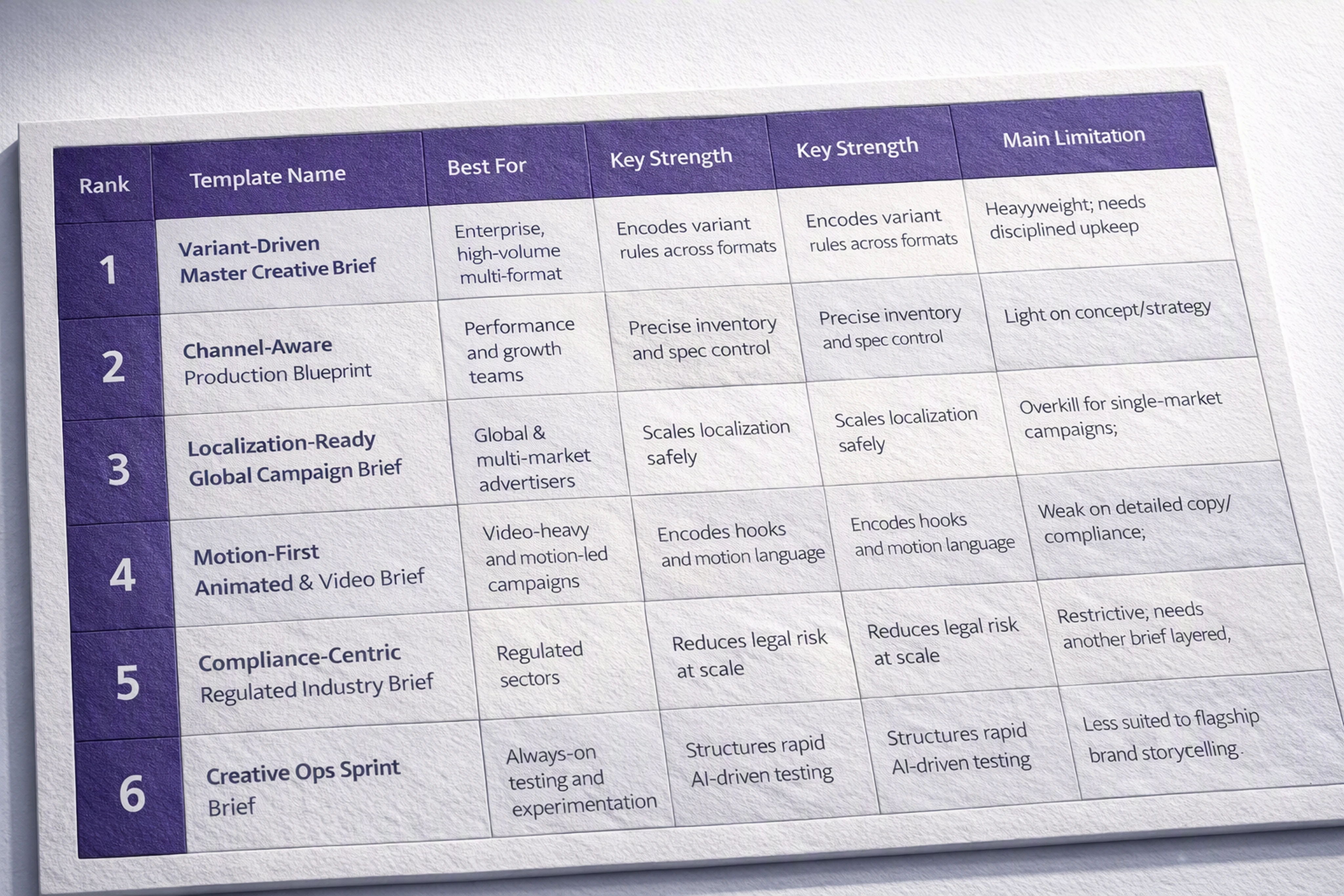
Rank | Template Name | Best For | Key Strength | Main Limitation |
|---|---|---|---|---|
1 | Variant‑Driven Master Creative Brief | Enterprise, high‑volume multi‑format campaigns | Encodes variant rules across formats | Heavyweight; needs disciplined upkeep |
2 | Channel‑Aware Production Blueprint | Performance and growth teams | Precise inventory and spec control | Light on concept/strategy |
3 | Localization‑Ready Global Campaign Brief | Global & multi‑market advertisers | Scales localization safely | Overkill for single‑market campaigns |
4 | Motion‑First Animated & Video Brief | Video‑heavy and motion‑led campaigns | Encodes hooks and motion language | Weak on detailed copy/compliance |
5 | Compliance‑Centric Regulated Industry Brief | Regulated sectors (finance, health, insurance) | Reduces legal risk at scale | Restrictive; needs another brief layered |
6 | Creative Ops Sprint Brief | Always‑on testing and experimentation | Structures rapid AI‑driven testing | Less suited to flagship brand storytelling |
Which Creative Brief Template Should Your Studio Standardize On?
You don’t need six different briefs in daily use. Most studios thrive with one primary template, plus one or two overlays for special situations.
If you’re an in‑house creative team at a mid‑large company
Standardize on:
Primary: Variant‑Driven Master Creative Brief (#1)
Add: Channel‑Aware Production Blueprint (#2) as an appendix when campaigns are performance-heavy.
Why: You’ll get one approved master creative direction that your designers build once in Viewst, then automate resizing, localization, and animation without re‑briefing every format.
If you’re a global brand or network agency
Standardize on:
Primary: Localization‑Ready Global Campaign Brief (#3)
Add: Compliance‑Centric Regulated Industry Brief (#5) for high‑risk products or regions.
Why: You’ll reduce friction with local markets and legal, and Viewst becomes your global‑to‑local production engine.
If you’re a performance agency or growth team
Standardize on:
Primary: Creative Ops Sprint Brief (#6)
Add: Channel‑Aware Production Blueprint (#2) for spec accuracy.
Why: You’ll align creative work to testing sprints and use Viewst to bulk‑produce, review, and ship variants without adding headcount.
If you’re motion‑led or video‑first
Standardize on:
Primary: Motion‑First Animated & Video Brief (#4)
Add: Variant‑Driven Master Creative Brief (#1) when campaigns expand into static display and feed formats.
Why: You’ll define clear motion rules and let Viewst transform a single master design into animated HTML5 and short‑form video variants.
How to Roll Out a New Creative Brief Template in 30 Days
Once you’ve chosen your primary template, treat it like a product launch:
Pilot with one campaign and one team
Start with a cooperative brand or client. Use the new brief only for that work.Wire it into Viewst from day one
Convert brief sections into Viewst templates (sizes, brandbooks, fields).
Define what’s locked vs editable vs AI‑generated.
Time the workflow
Measure:Time from brief to first round of creatives
Number of review cycles
Time from final approval to exported, ad‑network‑ready HTML5 assets
Collect feedback from designers and producers
Ask specifically:Which sections of the brief were most useful on the Viewst canvas?
Which parts can be automated or pre‑filled next time?
Refine and standardize
Iterate once, then make it mandatory for similar campaigns.
With AI now present in 85% of marketing organizations and 73% planning to maintain or increase AI investment, the teams that win will be the ones whose briefs are designed for automation while keeping creative judgment in control.
FAQ: Creative Briefs for Automated, Multi‑Format Ad Production
1. What makes a creative brief “automation‑ready” for AI ad production?
An automation‑ready brief:
Defines formats, channels, and assets explicitly
Encodes rules for variants (offers, audiences, markets, motion)
Specifies what AI can change and what must remain locked
Includes brand and compliance guardrails that tools like Viewst can enforce
Instead of prose like “we’ll need some social ads,” it has a variant matrix and asset specs that a system can actually act on.
2. Do I need different creative briefs for display, social, and video?
Not necessarily. For most teams, the right move is:
Use one master template (e.g., Variant‑Driven Master Creative or Motion‑First), and
Add channel‑aware sections that list formats, specs, and inventory rules.
That gives you a consistent way to brief creative, while still encoding the differences between display banners, social feed units, and video.
3. How do these templates work with Viewst specifically?
Viewst takes your brief and turns it into a connected production workflow:
Master creative becomes a single canvas with all sizes and variants
Variant rules inform AI Designer, Smart Resize, and Instant Animator
Brandbooks and locked fields enforce brand and compliance systems
Review and approvals stay connected to the campaign and export settings
The better structured your brief, the more Viewst can automate without sacrificing creative control.
4. How should we handle AI transparency and ethics in the brief?
Add a dedicated AI and compliance section that covers:
What parts of the creative pipeline may use AI (copy, layout, motion, resizing)
When you must disclose AI use, in line with IAB’s risk‑based framework
Provenance or C2PA requirements if your organization uses them
That clarity helps your creative team, your legal partners, and any AI tools operate within the same ethical and regulatory boundaries.
5. How often should we update our creative brief templates?
Review at least twice a year, or whenever:
You adopt new AI or creative automation tools
Platforms change specs or introduce new formats
Legal or privacy rules shift in key markets
Treat your brief templates like production infrastructure: they should evolve alongside your tools, channels, and governance.
When your brief is built for automation, platforms like Viewst can remove non‑creative work from creative work — and your team can focus on decisions that actually require judgment, taste, and expertise.

Victoria is the CEO at Viewst. She is a serial entrepreneur and startup founder. She worked in Investment Banking for 9 years as international funds sales, trader, and portfolio manager. Then she decided to switch to her own startup. In 2017 Victoria founded Profit Button (a new kind of rich media banners), the project has grown to 8 countries on 3 continents in 2 years. In 2021 she founded Viewst startup. The company now has clients from 43 countries, including the USA, Canada, England, France, Brazil, Kenya, Indonesia, etc.
In this article
" height="11.060000000000002px" id="wzBCZ87AK" transform="translate(6.47 2.47)" width="6.590000000000003px"/></g></svg>)