
Overview: Why You Need a Single Creative Automation Workflow
Most creative teams don’t lose time on ideas. They lose it on operations.
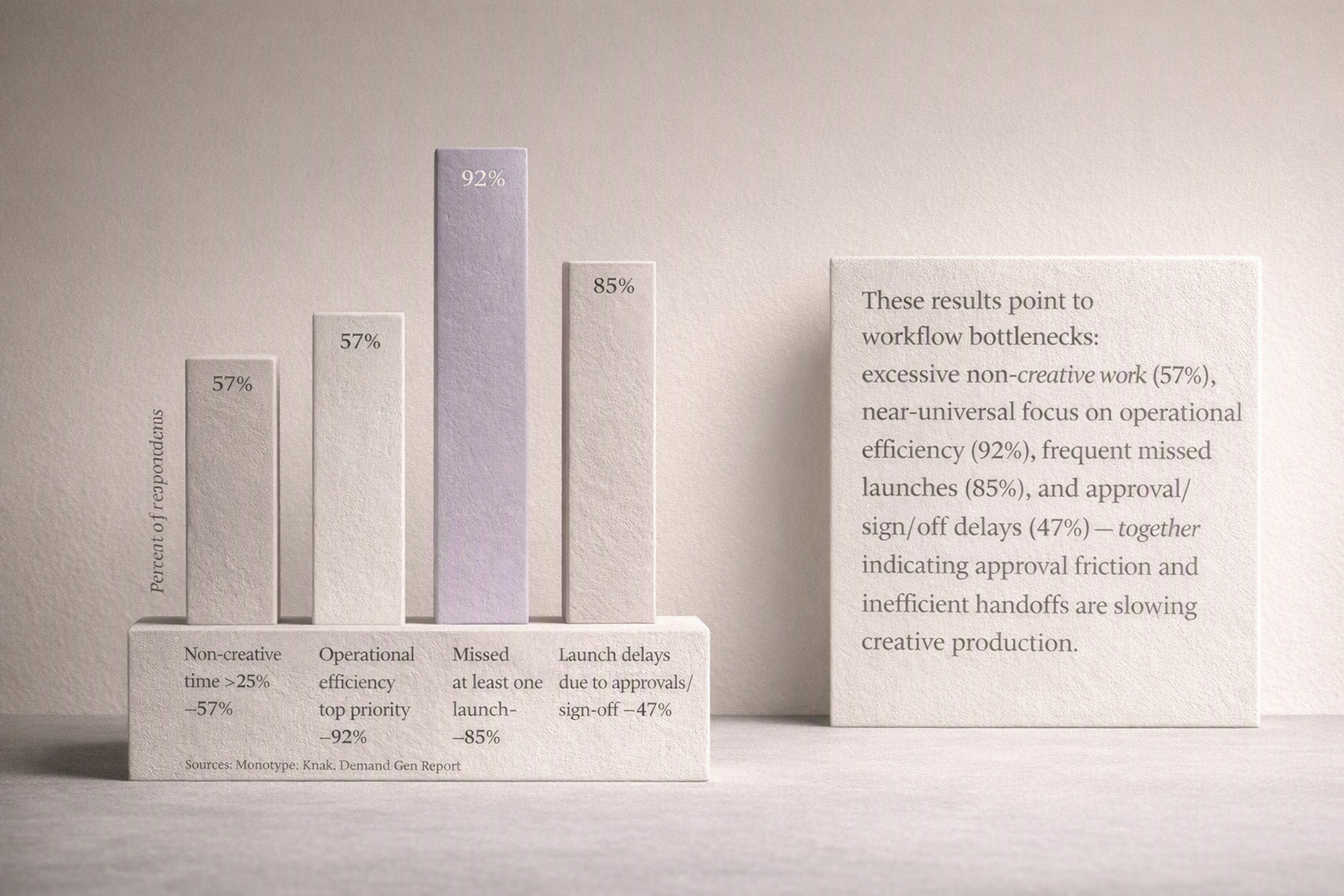
Monotype’s 2025 research found 57% of creative professionals spend more than a quarter of their time on non-creative work, and 92% rank operational efficiency as a top priority. Knak’s 2026 report shows 85% of enterprise teams missed at least one campaign launch in the last year due to workflow constraints, with approvals and sign-off as the top cause.
If your display advertising process still jumps between Figma, email, chat, ad servers, and shared drives, you’re carrying unnecessary friction.
This tutorial walks you step-by-step through building one digital creative automation flow:
From brief
Through production with creative AI tools
Through review and approval
To final HTML5 / GIF / MP4 export ready for media.
We’ll use Viewst as the production backbone example, but the same principles apply to any creative automation tools for display advertising.
For a broader landscape overview, check out our pillar guide: “Creative Automation Platforms: Full Guide to Digital Workflows and Creative AI Apps.”
Prerequisites: What You Need Before You Automate
Before you design a digital workflow, make sure a few basics are in place.
1. Clear roles and responsibilities
You need to know who does what at each stage:
Creative director / head of design
Designers / motion designers
Creative operations / project managers
Performance marketers / channel owners
Legal / brand governance
Document owners for:
Brief intake
Creative production
QA and brand checks
Final approval
Export and trafficking
2. Core tools selected (even if not fully integrated yet)
You’ll connect three layers:
Task & project tools
Asana, Jira, Monday, ClickUp, etc.
Creative AI & design tools
Figma / Adobe CC for concepts
Viewst or another creative automation software for display advertising for production.
Review & approval tools
Native review in Viewst
Or Ziflow, Frame.io, or built-in proofing in your PM tool.
3. A “master creative” mindset
Your automation will only be stable if you treat one master creative as the single source of truth.
Everything should flow from that:
All banner sizes
Localized variants
A/B test versions
This is how Viewst’s AI Smart Resize, brandbooks, and version syncing work—and it’s also the pattern used by Celtra, Bannerflow, and similar platforms.
Step 1: Map Your End-to-End Creative Workflow
You can’t automate what you haven’t mapped.
1.1 List every step from brief to export
Start with a single representative campaign (e.g., a multi-market display push) and write down:
Brief intake
Concept / key visual creation
Master banner build
Size and variant production
Copy and legal adaptation
Internal review
Stakeholder approval
QA and brand check
Export (HTML5, GIF, MP4)
Upload to ad server / DSP
Keep each step to a single verb plus a noun: “Create master,” “Review banners,” “Export HTML5.”
1.2 Identify handoffs and tools per step
For each step, capture:
Who is responsible
Which tool they’re in
What input/output they need
Example:
Step: Build master HTML5 banner
Owner: Senior designer
Tool: Viewst (with Figma import)
Input: Approved key visual from Figma, copy deck
Output: Editable HTML5 master creative
This will expose where work is currently getting stuck.
1.3 Highlight bottlenecks and repeat work
Mark steps where you see:
Multiple rounds of manual resizing
Copy-paste of feedback from one tool to another
Waiting for approvals without clear deadlines
Manual export / upload per ad network
These are your primary candidates for workflow automation.
Step 2: Decide What to Automate vs. What to Keep Human
Not every step should be automated. Good automation protects creative judgment instead of replacing it.
2.1 Automate mechanical, repeatable tasks
Target tasks with high volume, clear rules, and low creative risk:
Resizing banners into required formats
Applying brand-consistent typography and colors
Duplicating variants for markets and languages
Basic animations across many layers
Routing tasks and reminders
Exporting in the right formats for specific ad platforms
In Viewst, this maps directly to:
AI Smart Resize: One master → all standard sizes
AI Instant Animator: One-click motion applied across layers
Brandbooks: Locked fonts, colors, and components applied at scale
2.2 Keep human review on creative and risk-sensitive decisions
Tasks that need judgment or carry risk should stay human:
Concept and visual direction
Copywriting and messaging hierarchy
Final brand and legal sign-off
Sensitive audiences or regulated industries
This aligns with Adobe’s 2024 position: use AI to remove monotony and inconsistency, not to bypass creative or compliance expertise.
2.3 Align with ethical and legal AI guidance
To implement ethical AI tools for display ad design, cross-check your automation plan against:
NIST AI Risk Management Framework: keep human oversight and audit trails
IAB AI Transparency Framework: document where AI is used in the process
FTC guidance: there is no AI exemption; your AI-assisted claims and creatives must still meet all advertising laws
Document how AI is used in your workflow so you can explain it to stakeholders—or regulators—if needed.
Step 3: Design Your “One Digital Flow” Architecture
Now you’ll design the actual end-to-end flow that connects tools.
3.1 Define your system of record
Pick one system that will be the source of truth:
For tasks and deadlines: usually Asana / Jira / Monday
For creatives themselves: Viewst as the HTML5-native ad production layer
Everything else (Slack, email, links) should reference back to these.
3.2 Draw the high-level flow
Your target pattern for display ads should look like this:
Brief submitted via form (Asana, Jira, or a simple intake form)
Task created automatically + Viewst project initiated
Designer imports master visual from Figma/Adobe into Viewst
Designer builds & styles one master HTML5 creative
AI Smart Resize generates all sizes; AI Instant Animator adds motion
Reviewers comment directly on the banner set inside Viewst
Approvals sync back to task tool (status = Approved)
Viewst exports HTML5 / GIF / MP4 in required specs
Files delivered via shared folder, direct upload, or ad server integration
This is the “brief to export in one digital flow” pattern you’re aiming for.
3.3 Choose connection points between tools
At minimum, connect:
Intake → Tasks: Form submission creates a task with required fields
Tasks → Viewst: Task creation triggers a new Viewst project or links to an existing one
Viewst → Review: Share review links with comments and approvals in one place
Viewst → Tasks: Approval event updates task status automatically (via webhook or integration)
Viewst → Storage / DSP: Exports saved to a shared storage bucket or uploaded directly
Tools like Asana support automation rules and webhooks; Frame.io and Ziflow integrate with PM tools and Slack for notifications.
Step 4: Implement Step-by-Step Automation from Brief to Export
This is where we make it practical. Use this as a blueprint you can adapt.
4.1 Step A – Automate brief intake and task creation
Goal: Every campaign starts the same way with complete, structured information.
Actions:
Create a campaign intake form in your task tool with required fields:
Campaign name, objective, channels
Markets / languages
Required sizes and formats (e.g., IAB standard display set)
Brand / product references, links to existing assets
Deadlines and budget constraints
Add logic so submissions:
Auto-create a campaign task
Auto-assign to creative ops
Auto-set due dates based on SLAs
(Optional) Use workflow automation (e.g., Asana Rules):
If channel includes “Display,” auto-tag as “Needs Viewst production”
Auto-create a subtask: “Create Viewst project + import master creative”
Result: No more missing specs, and every display brief follows a consistent path.
4.2 Step B – Standardize master creative creation in Viewst
Goal: Stop building every banner from scratch; use one master as the control point.
Actions:
Import approved visual from Figma or Adobe into Viewst.
Build a single master HTML5 banner:
Define layout zones for headline, body, CTA, logo
Connect dynamic content (if used)
Apply brandbook settings: fonts, colors, spacing
Lock brand-critical elements via Viewst brandbooks:
Logo position
Brand colors
CTA styles
Document this as a repeatable template for similar campaigns.
Result: Master creative becomes your single source of truth. All variations inherit from it.
4.3 Step C – Use AI to automate sizes and variants
Goal: Eliminate manual resizing and repetitive tweaks.
Actions:
Use AI Smart Resize (or equivalent) to generate all required sizes:
Standard display set (e.g., 300x250, 728x90, 160x600, 300x600, 320x50)
Campaign-specific sizes (e.g., 970x250, 336x280)
Configure rules for responsive adaptive behavior:
Priority content always visible
Safe margins for logos and CTAs
Use AI Instant Animator to apply basic motion across all sizes:
Entrance transitions
Simple looped animations
For market/language variants:
Duplicate variant sets from the master
Connect copy placeholders to localized texts
Maintain locked brand elements via brandbooks
Result: Designers stay focused on the master and creative decisions; the AI handles repetitive scaling.
4.4 Step D – Embed review and approvals in the production layer
Goal: Keep feedback where the work is, not scattered across email and slides.
Actions:
Enable collaborative review directly in Viewst:
Invite reviewers from marketing, brand, legal
Share one link to the full set of banners
Define review stages (mirroring tools like Ziflow):
Stage 1: Creative review (CD, designers)
Stage 2: Brand & legal
Stage 3: Channel owner / performance
Set clear rules:
Each stage has due dates and required roles
Feedback is left as comments on specific banners or elements
No approvals via email—everything must be in the system
Connect stages to your task tool:
Approval event in Viewst triggers status change in Asana/Jira
Failed review (requested changes) reopens the design task
Result: Approvals become structured, auditable steps, not hidden conversations.
4.5 Step E – Automate export and delivery of ad-ready assets
Goal: Ensure production-ready HTML5 ads reach media teams consistently.
Actions:
Define standard export presets in Viewst:
HTML5 with IAB-compliant settings
GIF fallback (if required)
MP4 for specific display/video formats
Align presets with media requirements:
File size limits
ClickTag implementation
Naming conventions (campaign, size, market, variant)
Automate export triggers where possible:
“Approved” status in Viewst enables export button or triggers batch export
Export files to a connected storage location (e.g., cloud folder)
Connect to trafficking workflow:
Notify media ops via Slack or task tool when exports are ready
Attach or link files directly in the trafficking task
Result: No manual packaging per campaign; exports are consistent and fast.
Step 5: Add Governance, Auditability, and Safety
Workflow automation has to be safe, not just fast.
5.1 Document how AI is used in your creative stack
Create a short AI usage policy for creative production:
Which tools use AI (Smart Resize, Instant Animator, Image Deflatening)
What AI is allowed to do (resize, animate, structure) vs. not (fully generate concepts without human review)
Who is accountable for final approvals
This helps you align with NIST’s AI RMF and IAB’s AI transparency guidance.
5.2 Keep brand control non-negotiable
Use your production platform’s governance features:
Brandbooks: locked palettes, typography, spacing
Template libraries for repeat campaign types
Role-based permissions for who can edit what
This ensures AI-assisted production reinforces your brand instead of undermining it.
5.3 Maintain audit trails and provenance
Ensure your workflow keeps records of:
Who approved which creative and when
Which versions were exported and used
What changes were made and by whom
Where possible, retain metadata (inspired by Content Authenticity initiatives) so you can trace creative lineage.
5.4 Train your team on the new flow
Even the best automation fails if people don’t trust it.
Run a pilot campaign with the new workflow
Capture metrics: time-to-first-proof, number of rounds, total production time
Share results (e.g., “resizing time down 70%”) to build internal support
Vendor case studies (Celtra, Bannerflow) show 2–19x efficiency gains when creative automation is properly implemented. Use your own data to validate and optimize.
Step 6: Measure and Optimize Your Creative Automation Workflow
Once your digital flow is live, treat it as a product.
6.1 Track operational KPIs
Measure before vs. after:
Time from brief to first proof
Time from brief to final export
Number of review rounds
Number of missed launch dates
Volume of banners produced per designer per month
6.2 Connect creative performance feedback
Advanced stacks feed ad performance back into the production layer.
Capture performance metrics (CTR, CVR) by creative variant
Use insights to update templates and master creatives
Prioritize automation on the most impactful elements (CTA variants, headlines)
This closes the loop from creative automation to continuous optimization.
6.3 Iterate on automation rules
Treat your workflow as versioned as well:
Start with basic automations (intake, resize, review routing)
Add more complex rules over time (e.g., region-specific templates, dynamic content integration)
Regularly review for compliance and ethical risk
Quick Reference: Example “Brief to Export” Digital Flow
For teams using Viewst as the production backbone, a typical automated flow looks like:
Brief submitted via Asana/Jira form
Task auto-created and tagged as “Display – Use Viewst”
Creative ops creates Viewst project and links to task
Designer imports Figma master into Viewst
Master HTML5 creative built and brandbook applied
AI Smart Resize generates all sizes; AI Instant Animator adds motion
Internal review and comments inside Viewst
Brand/legal approval stages complete (tracked via task statuses)
Viewst exports HTML5 / GIF / MP4 in pre-set formats
Files pushed to shared storage and trafficking tasks notified
This replaces fragmented tools with one integrated production studio and a clear, auditable path from brief to export.
FAQ: Creative Automation Workflows for Display Advertising
1. What is a creative automation workflow for banner ads?
A creative automation workflow for banner ads is a structured, digital process that connects brief intake, design, automated resizing, review, and export in one system.
It typically uses creative automation tools for display advertising like Viewst to turn one master creative into many on-brand HTML5 banners with integrated review and approvals.
2. Which parts of the display ad workflow should I automate first?
Start with high-friction, low-risk areas:
Resizing and formatting banners into many sizes
Duplicating and localizing variants
Routing review tasks and reminders
Standardizing exports (HTML5, GIF, MP4)
These yield immediate time savings without sacrificing creative quality.
3. How do I connect AI creative platforms to review tools?
There are three common patterns:
Use the built-in review features of your creative platform (e.g., Viewst’s collaborative review).
Integrate with tools like Ziflow or Frame.io via links and APIs for structured review stages.
Use automation tools (Asana Rules, webhooks, Zapier) to sync approval statuses between creative and task tools.
The goal is to keep comments and approvals inside the production environment, not in email.
4. How can I safely implement marketing workflow automation with AI?
To safely implement marketing workflow automation for creative teams:
Follow guidance like NIST’s AI RMF and IAB’s AI transparency framework
Document where AI is used and keep human oversight for risk-sensitive steps
Use brandbooks and permissions to control AI-generated outputs
Maintain audit logs of approvals, changes, and exports
Remember the FTC’s view: there is no AI exemption from consumer protection laws.
5. Why use a specialized production platform instead of just Figma or Adobe?
Figma and Adobe are excellent design tools, but they sit upstream.
A platform like Viewst is built specifically for production:
Native HTML5 output ready for ad networks
AI Smart Resize and AI Instant Animator tuned for banner sets
Brandbooks and governance for large teams
Integrated review, approvals, and exports
Together, they create the “one digital flow” from brief to export that traditional design tools alone can’t provide.

Victoria is the CEO at Viewst. She is a serial entrepreneur and startup founder. She worked in Investment Banking for 9 years as international funds sales, trader, and portfolio manager. Then she decided to switch to her own startup. In 2017 Victoria founded Profit Button (a new kind of rich media banners), the project has grown to 8 countries on 3 continents in 2 years. In 2021 she founded Viewst startup. The company now has clients from 43 countries, including the USA, Canada, England, France, Brazil, Kenya, Indonesia, etc.
In this article
" height="11.060000000000002px" id="wzBCZ87AK" transform="translate(6.47 2.47)" width="6.590000000000003px"/></g></svg>)