
In-housing has moved from being a trend to being the default.
According to ANA’s 2026 State of In-Housing benchmark, jurors are five times more likely to say marketers are in-housing more than they’re pulling work back to agencies, and 53% say the primary role of in-house teams is now upstream strategy and brand-building.
That shift has a direct impact on how banner ads get produced.
This ranked roundup breaks down the top 6 ways in-housing changes banner ad production workflows—and how Heads of Creative, Creative Operations leaders, and production teams can use Viewst to keep quality high while shortening cycle times.
How this ranking was made (and who it’s for)
This list is based on:
Recent benchmarks from ANA, Adobe, and Cella
Real HTML5 export requirements from Google and Microsoft
Patterns we see in Viewst customers in financial services, consulting, SaaS, retail, and agencies
It’s written for:
Heads of Creative / Design Directors
Creative Operations and production leads
Performance marketing and growth leaders who rely on targeted display advertising and continuous testing
Each entry covers:
What changes when you in-house
Why it matters for banner ad production
Practical moves with Viewst to make that change an advantage
A limitation or risk you need to plan for
If you want a deeper dive on how targeting itself affects creative volume, see this guide: how “targeted to” really changes banner production demands.
1. Briefing shifts from campaign-by-campaign to ongoing pipelines
What changes
In-house teams don’t just take briefs; they help write them.
ANA data shows 53% of in-house agencies now act as strategic partners, not just execution shops. That means:
Briefs are more upstream and brand-driven
Campaigns roll into each other as an ongoing content pipeline
Performance and creative sit under the same roof
For banner ad production, you move from “make these 20 sizes for this one flight” to “we need continually refreshed display creative across products, audiences, and tests.”
Why it matters for banner workflows
This changes how you structure production:
You need reusable master concepts that can support many waves of iterations
You need explicit rules for targeted variants (audience, offer, region, language)
You need faster feedback loops between performance data and creative updates
Without a structured briefing-to-production pipeline, the volume simply overwhelms the team.
Adobe’s research shows 96% of marketers already see content demand up at least 2x, and 71% expect a 5x increase by 2027. That doesn’t work with ad hoc banner briefs.
Practical moves with Viewst
Use Viewst to:
Build a single master creative per campaign on the canvas
Lock in layout, hierarchy, and animation direction
Treat it as the strategic “brief in pixels” that everything else inherits
Store brand rules as Brandbooks and reusable assets
Fonts, colors, logo treatments, CTAs, compliant disclosures
Create templated variant structures
Audience segments (prospects vs customers)
Offer tiers (intro offer vs renewal vs upsell)
Regional/localization variants
Once the master creative is approved, Viewst lets you spin out versions without re-briefing every single banner.
Limitation / risk
If your team doesn’t formalize the operating model (intake, SLAs, decision rights), upstream strategy can clog the pipeline instead of clarifying it.
Cella notes that 91% of teams document process, but documentation alone is not enough. You still need a production infrastructure that makes brief-to-banner flow predictable. Viewst is that infrastructure; the operating model is still your job.
2. Versioning expands from “sizes” to “systems of variants”
What changes
Agencies traditionally handled versioning as a production afterthought: take a key visual, resize to required placements, maybe swap an image or headline.
In-house teams working closely with performance marketing face a different reality:
Targeted advertising creates dozens or hundreds of variants per campaign
Audiences expect fresh content weekly or several times per week—62% say so in Adobe’s research
Growth teams want constant test matrices: creative × audience × offer × placement
Versioning becomes a system, not a resizing task.
Why it matters for banner workflows
For banner ads, that means:
You have to manage combinatorial complexity: sizes × formats × audiences × languages
You need clear rules for what can change (copy, image, offer) and what must not (compliance, logo, legal lines)
You must keep HTML5 output editable so you can adjust later without recreating everything
This is where creative automation tools for display advertising either earn their keep or fail: some tools lock you into non-editable exports or limited layout flexibility.
Practical moves with Viewst
Viewst is built as creative automation software for display advertising with native HTML5 output and full editability.
Use it to:
Create one master layout and generate all required banner sizes
Smart Resize preserves hierarchy while adapting to 300x250, 160x600, 728x90, etc.
Define variant parameters directly on canvas
Text fields for offer, audience, region, language
Image slots mapped to product categories or personas
Apply AI Designer and Instant Animator to quickly produce first drafts
Then let designers refine details, animation timing, and micro-typography
Because Viewst outputs structured, editable HTML5, your versioning system stays flexible: every layer can be changed later.
Limitation / risk
The main risk is variant sprawl without governance.
If you don’t define:
Which variants are allowed
Who approves them
How long they stay in rotation
You end up with a cluttered media library and the same few winners being copy-pasted beyond their relevance.
Viewst solves the production side; you still need a testing and governance plan for targeted display campaigns.
3. Localization and compliance move inside, not downstream
What changes
In-housing pulls localization, legal, and compliance closer to creative.
In many mid-market and enterprise organizations, that means:
Regional marketing teams sit under the same leadership as central creative
Legal and compliance have established review patterns with in-house teams
Financial services, consulting, SaaS, and fintech require tight control on disclosures
Localization is no longer “send to the translation agency and hope.” It’s a core capability.
Why it matters for banner workflows
For banner ad production, this shows up as:
Multiple languages per campaign
Country- or state-specific legal lines and disclaimers
Offers that differ by region or product line
If your banner workflow can’t handle localized copy plus compliance without rebuilding every asset manually, in-housing will feel slower rather than faster.
Practical moves with Viewst
Viewst gives localization and compliance their own place in the production infrastructure:
Use Brandbooks to define:
Approved legal boilerplate per product/region
Rules for font sizes and minimum placement of disclosures
Store multi-language copy as variants
Create language sets for EN, ES, FR, DE, etc.
Map text fields to localized strings
Let local teams adjust copy within controlled styles
Permissions limit what can change (e.g., body copy and CTA, but not legal block)
Then, when you resize or animate, Viewst keeps the legal and localization elements attached to the layout—no more missing footnotes in a 160x600.
Limitation / risk
Localization and compliance are organizational challenges first, tooling challenges second.
If you don’t define:
Who owns final sign-off per region
Which languages are supported at what quality level
How often compliant copy can be updated
You’ll still see bottlenecks, even with strong creative automation tools.
Viewst gives you the canvas and governance controls; you still need a clear compliance operating model.
4. Review and approval become continuous, not episodic
What changes
Agency workflows often cluster review around a few big milestones: concept presentation, round 1, round 2, final.
In-housing—and the move to ongoing campaign pipelines—turns review into a continuous process:
Creative, marketing, and performance teams comment in real time
New variants are requested mid-flight based on live results
Stakeholders expect visibility into what’s approved at all times
Adobe’s State of Creativity report shows 83% of decision makers experienced workload changes in the last 12 months and 3 in 4 planned to invest in tools to improve productivity. Review and approval is one of the first places they look.
Why it matters for banner workflows
For banner production, that means:
You need integrated review in the same environment where banners are built
Stakeholders must see animated previews, not flat JPGs
Approvals must be tied to specific versions so you know what’s safe to ship
Email threads and static PDFs are simply too slow and opaque for high-volume display work.
Practical moves with Viewst
Viewst embeds review and approvals into the production workflow:
Share live animated previews of HTML5 banners directly from the platform
Collect comments on specific elements (e.g., “legal too small on 300x600”, “CTA needs stronger contrast”)
Use statuses and approvals tied to versions
Draft → In review → Approved for media
Because review happens on the actual production-ready creative, you don’t lose time translating feedback back into a separate build.
Limitation / risk
Integrated review tools don’t fix decision fatigue.
If you invite too many stakeholders into every banner decision, your cycle time will still balloon.
To unlock Viewst’s automation benefits, define:
Who approves master creative vs market variants
What changes can be made post-approval without re-opening full review
SLAs for feedback (e.g., 24 hours for variant tweaks, 72 hours for new concepts)
5. Export rules and ad platform compliance become a core competency
What changes
When creative production lives inside the organization, export and delivery can’t be left to agencies or ad ops vendors.
In-house teams increasingly own:
Packaging and validating HTML5 creatives for Google Ads, Campaign Manager 360, Microsoft Advertising, retail media networks, and programmatic platforms
Managing click tags, file structures, and size limits
Preparing fallback assets and static alternatives where required
Campaign Manager 360, for example, allows up to 100 files and 9.5 MB per HTML5 creative; Google Ads App campaigns cap HTML5 ZIPs at 5 MB and 512 files. Microsoft requires a single ZIP with index.html at the root and a clickTag reference.
Why it matters for banner workflows
If your export workflow is fragile, you will feel the pain of in-housing immediately:
Banners that look fine locally fail upload or render incorrectly
Media teams waste hours repackaging assets
Creative teams are dragged into last-mile troubleshooting when time is tight
In high-volume, targeted display campaigns, export is not an afterthought—it’s part of the creative system.
Practical moves with Viewst
Viewst is built as production-ready infrastructure for HTML5 display ads:
Export platform-specific ZIPs with correct structure and click tags
Google Ads, Campaign Manager 360, Microsoft Advertising presets
Keep exports within file-count and size limits automatically
Generate fallback static assets alongside animated HTML5 when required
Because all output is native, editable HTML5, you can fix issues without reconstructing banners from scratch.
Limitation / risk
Export automation doesn’t replace ad ops expertise.
You still need:
Knowledge of network-specific nuances (e.g., retail media, custom DSP specs)
A clear handoff between creative and media teams
A regular QA process to catch issues before campaigns go live
Viewst gives you compliant, structured output; your team must still own the overall delivery playbook.
6. AI moves from “idea generator” to production collaborator
What changes
Cella’s 2025 Intelligence Report shows:
49% of teams use AI for ideation
Only 25% trust it for research
63% see AI as a productivity tool
Just 5% report strong AI proficiency
In-house teams feel both sides of this reality:
Pressure to adopt AI and speed up workflows
Skepticism about handing over creative control or brand safety
The real shift is AI becoming production infrastructure, not a novelty.
Why it matters for banner workflows
For banner ad production, AI can:
Generate first-pass layouts from a prompt or existing key visual
Resize, reflow, and animate systems of banners at scale
Help manage image adaptation and deflatening for HTML5
But AI must be ethical and controllable:
Designers need to see and edit every layer
Brand rules must be enforced
No black-box outputs that can’t be adjusted or traced
Practical moves with Viewst
Viewst is designed as an ethical AI tool for display ad design:
Use AI Designer to create initial HTML5 banner layouts from a concept or brief
Apply Smart Resize and Instant Animator to accelerate routine production work
Leverage Image Deflatening to turn flat assets into structured, editable banners
Across all of this, Viewst keeps:
Every element editable on the canvas
Brand rules enforced via Brandbooks and controlled styles
Designers in full control of the final result
AI handles the production burden. Creative teams stay in control.
Limitation / risk
AI adoption fails when training and expectations aren’t set.
To make Viewst’s AI stick, teams need:
Clear guidelines for which tasks AI should handle (e.g., resizing, first-pass animation) and which require human judgment
Training sessions to build proficiency beyond the 5% “strong” category Cella reports
A shared standard for quality and brand fit that AI outputs must meet
Summary comparison: how in-housing changes banner production
Here’s a side-by-side look at the six changes and what Viewst brings to each.
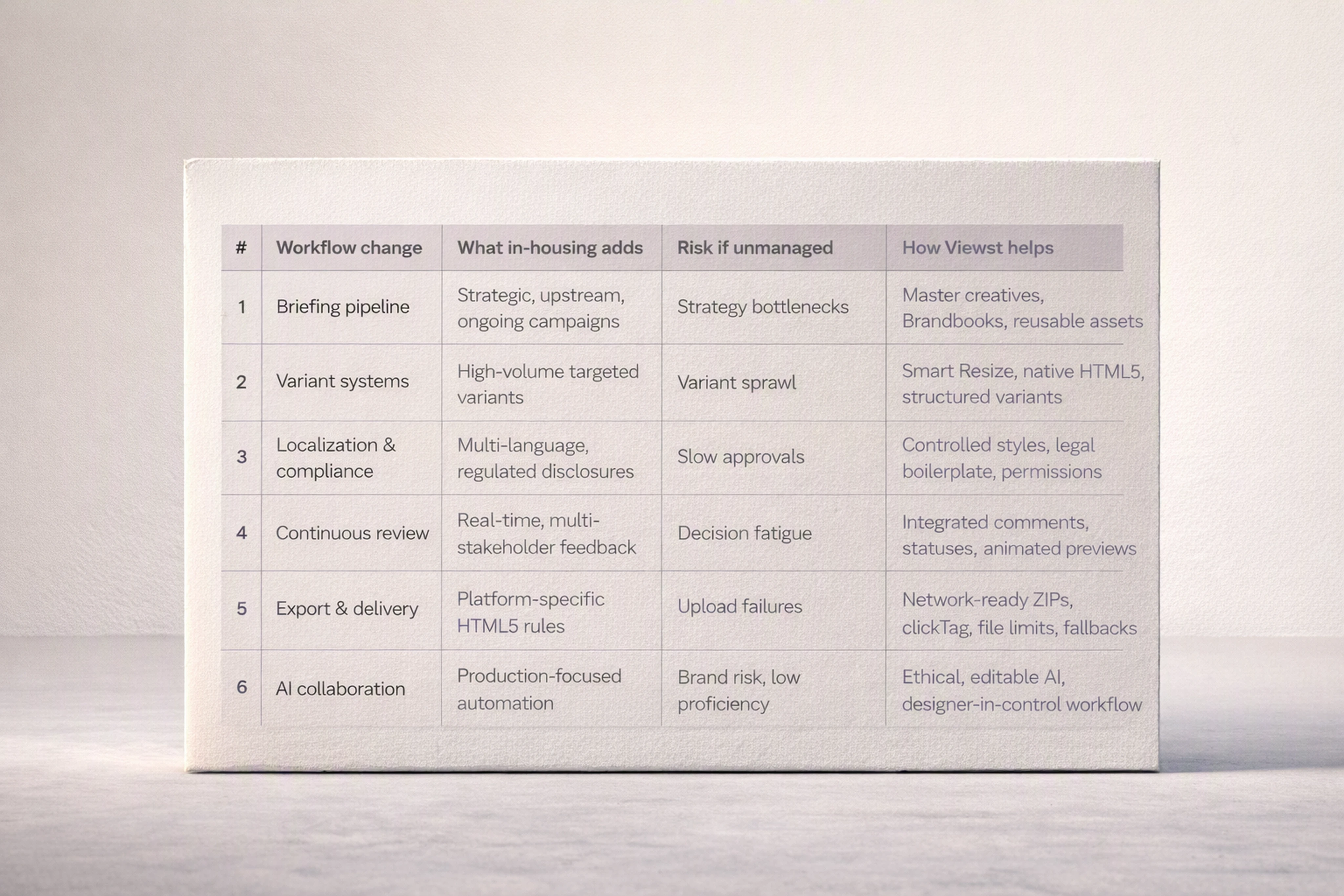
# | Workflow change | What in-housing adds | Risk if unmanaged | How Viewst helps |
|---|---|---|---|---|
1 | Briefing pipeline | Strategic, upstream, ongoing campaigns | Strategy bottlenecks | Master creatives, Brandbooks, reusable assets |
2 | Variant systems | High-volume targeted variants | Variant sprawl | Smart Resize, native HTML5, structured variant parameters |
3 | Localization & compliance | Multi-language, regulated disclosures | Slow approvals | Controlled styles, legal boilerplate, permissions |
4 | Continuous review | Real-time, multi-stakeholder feedback | Decision fatigue | Integrated comments, statuses, animated previews |
5 | Export & delivery | Platform-specific HTML5 rules | Upload failures | Network-ready ZIPs, clickTag, file limits, fallbacks |
6 | AI collaboration | Production-focused automation | Brand risk, low proficiency | Ethical, editable AI, designer-in-control workflow |
Recommendations by use case
Instead of picking a single “winner,” here’s how to prioritize based on your current pressure points.
If your main challenge is volume and speed
Focus on changes #2 (variant systems) and #6 (AI collaboration).
Use Viewst’s AI Designer, Smart Resize, and Instant Animator to automate resizing and motion
Build variant systems on one master creative to reduce rework
If your main challenge is governance and consistency
Focus on #1 (briefing pipeline), #3 (localization & compliance), and #4 (continuous review).
Define master creatives and brand rules in Viewst
Use controlled styles and permissions to protect compliance
Move review into Viewst with animated previews and approvals
If your main challenge is delivery across platforms
Focus on #5 (export & delivery).
Use Viewst’s export presets for Google Ads, Campaign Manager 360, Microsoft Advertising
Standardize your creative-to-media handoff with Viewst as the single source of ad-ready truth
In all three scenarios, Viewst acts as the production infrastructure for digital advertising—removing non-creative work from creative work so your team can focus on judgment, taste, and strategy.
FAQ: In-housing and banner ad production workflows
1. Why does in-housing increase banner ad production volume?
In-housing connects creative more directly to marketing and performance teams. That proximity leads to:
More test ideas
More targeted campaigns
Faster iteration cycles
Adobe’s data shows 62% of audiences expect new content weekly or more, and 71% of marketers expect demand to grow 5x by 2027. In-house teams feel that demand first, especially in banner ad production.
2. What’s the biggest banner workflow risk when in-housing?
The biggest risk is underestimating production complexity—assuming that internal creative teams can absorb agency-level volume without new infrastructure.
Without a platform like Viewst, teams face:
Manual resizing across dozens of placements
Fragmented versioning and localization processes
Slow review and export cycles
All of which erode the strategic benefits of in-housing.
3. How does Viewst differ from standard ad design software?
Traditional ad design software focuses on creation, not production. Files often need to be rebuilt or translated into HTML5 for real ad platforms.
Viewst is a creative automation platform for display advertising that:
Produces native, editable HTML5 banners
Connects design, resize, localization, animation, review, approval, and export in one workflow
Uses AI specifically for production tasks while keeping designers in control
It’s the infrastructure layer most in-house teams are missing.
4. Can Viewst handle both agency and in-house workflows?
Yes. Viewst is used by both agencies (including Saatchi & Saatchi) and in-house teams at mid-market and enterprise companies.
Its model supports:
Shared Brandbooks and reusable assets across clients or business units
Permissions and roles for internal teams, external partners, and freelancers
Production-ready exports for multiple ad networks
That makes it suitable for hybrid models where some work is in-housed and some remains with agencies.
5. How should we start implementing Viewst in an in-house team?
Most teams start with one high-volume, targeted display campaign and use Viewst to:
Build and approve a single master creative
Generate core banner sizes via Smart Resize
Add variant logic for audiences, offers, and languages
Run review and approvals inside Viewst
Export HTML5 creatives directly to Google/Microsoft ad platforms
Once that workflow is proven, they expand Viewst to other campaigns and regions, turning it into the standard production infrastructure for digital advertising.

Victoria is the CEO at Viewst. She is a serial entrepreneur and startup founder. She worked in Investment Banking for 9 years as international funds sales, trader, and portfolio manager. Then she decided to switch to her own startup. In 2017 Victoria founded Profit Button (a new kind of rich media banners), the project has grown to 8 countries on 3 continents in 2 years. In 2021 she founded Viewst startup. The company now has clients from 43 countries, including the USA, Canada, England, France, Brazil, Kenya, Indonesia, etc.
In this article
" height="11.060000000000002px" id="wzBCZ87AK" transform="translate(6.47 2.47)" width="6.590000000000003px"/></g></svg>)