
Why Creative Automation for Display Ads Is Now an Infrastructure Question
U.S. digital ad revenue reached $259 billion in 2024, growing 15% year-over-year, according to IAB. That surge shows up directly in your backlog: more campaigns, more markets, more formats, and more pressure on display production.
Most teams have already responded with tooling.
Smartly’s 2024 survey reports 96% of marketing leaders invest in creative automation and 96% in generative AI.
Yet 78% say they still lack the right tools to execute strategy, and 66% struggle with the growing number of channels.
The conclusion: the problem isn’t whether you use creative automation. It’s which kind, and how that platform fits into your display production workflow.
This article compares four categories of creative automation tools for display advertising:
Generic design platforms
Templating and DCO-focused tools
AI-only generators
Specialized HTML5 ad production studios
We’ll break down the key features, tradeoffs, and where Viewst sits—without turning this into a pitch.
The Four Main Categories of Creative Automation Platforms
1. Generic Design Platforms
What they are:
Tools like Figma, Adobe Creative Cloud, and Canva that cover broad design needs: product pages, social assets, email, presentations, and sometimes display ads.
Strengths:
Versatile: One environment for brand, product, and campaign design.
Deep creative control: Fine-grained control over layout, typography, illustration.
Growing AI features: Image generation, style transfer, and copy suggestions integrated into design workflows.
Limitations for display ad production:
HTML5 is an afterthought. IAB describes HTML5 ads as “mini web pages” that need structured packaging, code, and performance constraints. Generic tools rarely handle that layer.
Resizing and versioning are manual. Designers spend hours adapting master creatives to dozens of sizes and markets.
Export ≠ production-ready. Many outputs are flat images or videos that still need additional work to meet ad platform specs (e.g., Google’s 600 KB zip limit for standard HTML5 display).
Best fit:
Brand and concept development
Complex visual systems and UI design
Teams with strong design ops but separate ad production pipelines
2. Templating and Dynamic Creative Optimization (DCO) Tools
What they are:
Platforms that focus on templates, feeds, and dynamic assembly of creative. Examples include Celtra, Bannerflow, Storyteq, and various DCO solutions integrated into ad servers and DSPs.
Strengths:
Template-driven scaling: One template can power hundreds or thousands of variants.
Integrated performance feedback: Bannerflow reports 84.7% of marketers track creative performance in real time, and many of these tools feed performance back into templates.
Connected workflow: Celtra, for example, emphasizes a single system for generation → review → approval → activation → performance.
Limitations for display production:
Template-first, craft-second. Teams may feel constrained by template logic, especially for high-touch brand campaigns.
Complex setup overhead. Feeds, rules, and data sources require ongoing maintenance and governance.
Not always HTML5-native. Some tools lean more toward content management than code-level HTML5 output.
Best fit:
Retail, travel, marketplace, and promo-heavy campaigns
Always-on dynamic display and retargeting
Orgs with strong data/engineering support for maintaining templates and feeds
3. AI-Only Generators for Ad Creative
What they are:
Tools whose primary value is generation: images, video, copy, layouts. Think general-purpose GenAI platforms, plus newer ad-focused generators that produce banner or video mocks from prompts.
Strengths:
Speed from zero: Rapid ideation and concepting, especially when starting with minimal assets.
Volume on demand: Ability to generate large sets of options for testing.
Low barrier to entry: Non-design stakeholders can spin up visuals.
Limitations—and consumer trust reality:
Smartly’s 2025 consumer research (1,351 U.S. respondents) shows a clear boundary:
48% trust ads made by a person with AI help.
Only 13% trust ads created entirely by AI.
84% want AI use disclosed.
41% say trust increases when a human is involved or reviews the ad.
Operationally, AI-only generators also struggle with:
Brand governance: Fonts, colors, and composition can drift from guidelines.
Platform constraints: Outputs often ignore file-size limits, HTML5 packaging, and network policies.
Editability: Generated assets can be “flat” and hard to integrate into production workflows.
Best fit:
Early-stage concepting and moodboards
Visual exploration for campaigns with flexible brand systems
Controlled experiments, when creative leadership reviews and approves outputs
4. Specialized HTML5 Ad Production Studios
What they are:
Platforms that treat banner ad production as infrastructure, not as general design. They sit between design (Figma, Adobe) and media (ad servers, DSPs), owning the high-friction layer of HTML5 production: resizing, animation, packaging, approvals, and export.
Typical capabilities:
Master creative → structured variants. One master file drives all sizes and versions.
Native HTML5 output. Editable code and layers, not just flattened assets.
Built-in motion. One-click animation or timeline tools tailored to banners.
Production-aware export. ZIPs, GIFs, MP4s aligned to constraints like Google’s 600 KB HTML5 limit.
This is the category where Viewst operates, with a focus on:
AI Smart Resize
AI Image Deflatening (rebuilding flat assets into editable designs)
AI Designer for HTML5 banners from prompts
AI Instant Animator
Brandbooks and governance
Collaborative review inside the banner sets
Best fit:
High-volume banner and display ad production across markets and formats
Teams where speed-to-market and brand consistency are non-negotiable
Organizations that want one production studio between design tools and media platforms
Must-Have Features for Modern Display Ad Teams
If you manage display in a mid-market or enterprise environment, these are the must-have features you should look for when comparing creative automation platforms.
1. Master Creative and Smart Resizing
Why it matters:
Manual resizing drains senior designers’ time and introduces risk. With campaigns needing dozens of sizes per concept, repetitive resizing becomes a systems problem, not a craft problem.
What to demand:
Single source of truth: One master creative that structurally governs all variants.
Smart Resize: Automatic generation of required sizes from the master, with controls for layout rules.
Synced updates: Changes applied to the master propagate across all sizes.
2. Native Editable HTML5 Output
IAB describes HTML5 ads as mini web pages, and Google specifies strict constraints:
Standard HTML5 display uploads require ZIP packaging, local assets, meta tags, and a 600 KB size limit.
App campaign HTML5/playables allow up to 5 MB and 512 files.
Your platform should:
Generate native HTML5 with editable layers.
Respect size and packaging constraints for major networks.
Keep code performance-aware (load, animation, asset weights).
3. AI for Production Tasks, Not Creative Judgment
Given consumer trust data, fully automated AI creative is a risk. The smarter approach is to use AI where it’s least controversial:
Resizing and layout adjustments across formats.
Rebuilding flat assets into editable designs.
Generating motion from static layers.
Look for:
AI features that focus on mechanical work, not replacing design judgment.
Clear controls that let designers override or refine AI decisions.
Governance frameworks so AI outputs comply with brand standards.
4. Brandbooks and Governance Inside the Tool
Brand control is becoming a feature, not an afterthought. Canva, Figma, Bannerflow, Storyteq, and Viewst all emphasize this.
For display, governance should include:
Locked brandbooks: Fonts, colors, spacing, and logo use controlled globally.
Template-level rules: Regions that are editable vs. locked.
Permissions and roles: Who can change master templates vs. local variants.
This is especially critical when AI is involved, so automation reinforces standards rather than eroding them.
5. Integrated Collaboration and Approval
Smartly’s research shows the pain is still operational: 58% struggle sourcing assets, 48% with platform best practices, 44% with personalization to specs.
A big driver of that pain is scattered communication:
Screenshots in email
Links in chat
Feedback in decks
Your platform should:
Host comments, feedback, and approvals directly inside the creative set.
Provide shareable previews for stakeholders without requiring design tools.
Maintain an audit trail of changes and sign-offs.
6. Performance-Aware Production
Bannerflow found 84.7% of marketers track creative performance in real time but still struggle to convert data into action.
Practical requirements for display teams:
Flexible versioning: Quickly spin up new variations (copy, offer, image) for testing.
Connection to performance data: Even simple metrics (CTR, conversion) to guide which variants to expand or retire.
Fast iteration loops: Turning performance insight into new creative without rebuilding everything from scratch.
Comparing Platform Categories: Key Tradeoffs
Here’s how the categories stack up on the capabilities that matter most to display teams.
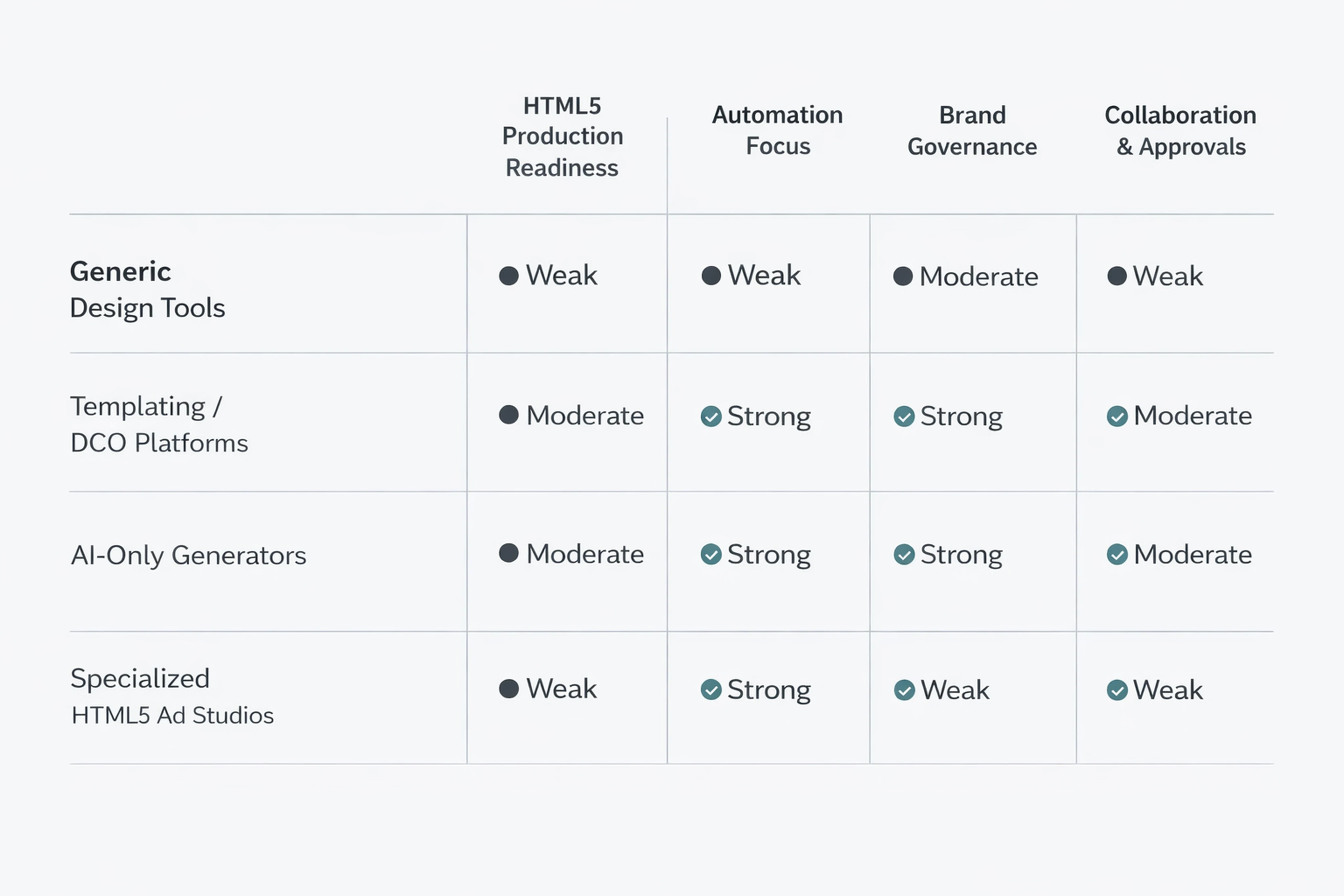
Generic design tools:
Pros: Deep creative control; perfect for master brand development.
Cons: Weak HTML5 handling; manual production; fragmented review.
Templating / DCO platforms:
Pros: Excellent scaling and data-driven variation; strong performance linkage.
Cons: Template rigidity; higher setup overhead; not always focused on HTML5 craft.
AI-only generators:
Pros: Fast ideation; high volume; democratized creation.
Cons: Brand risk; low consumer trust; limited production-readiness.
Specialized HTML5 ad studios:
Pros: Production-native; built for HTML5 constraints; automation on non-creative tasks; embedded governance.
Cons: Narrower focus; best used alongside design tools and media platforms.
For most enterprise display teams, the answer isn’t choosing just one category. It’s orchestrating them:
Use generic design tools for brand and UX.
Use specialized ad studios to turn those masters into production-ready HTML5 sets.
Layer in templating/DCO where data-driven personalization is core.
Use AI generators for concepting, with human review for anything that ships.
Where Viewst Fits in the Creative Automation Landscape
Against this backdrop, Viewst’s role is clear: it’s a specialized HTML5 ad production platform designed as infrastructure for high-volume banner workflows.
What Viewst focuses on
Production, not general design. It assumes you already have creative expertise and brand systems from tools like Figma or Adobe.
HTML5-native output. Viewst produces ad-network-ready HTML5 with editable layers, plus GIF/MP4 exports when needed.
AI for mechanical tasks:
Smart Resize from a single master
Image Deflatening to turn flat assets into editable structures
AI Designer to convert prompts into structured HTML5 banners
Instant Animator to add motion across layers with one click
Problems Viewst is designed to solve
Production bottlenecks: Converting a few master concepts into dozens of sizes and markets.
Non-creative suffering: Designers spending most of their time on resizes, exports, and file packaging rather than design.
Brand risk at scale: Maintaining consistent typography, color, and layout across regions and local adaptations.
Fragmented review: Feedback and approvals happening outside the production environment.
How it coexists with other tools
Viewst is not trying to replace:
Figma or Adobe for core design work
DCO platforms for data-driven personalization
AI image generators for concept exploration
Instead, it acts as the infrastructure layer between your design stack and media stack, taking on the high-friction work of turning creative intent into production-ready HTML5 banners at scale.
This positioning aligns with broader industry trends: AI moving from “generate an image” to “operate inside production workflows,” and brand governance moving from process documents into the tools themselves.
Practical Checklist: What to Consider When Choosing a Creative Automation Platform
When you evaluate creative automation software for display advertising, use these questions:
HTML5 readiness
Does it output native, editable HTML5 with proper packaging?
Does it respect size and file constraints for major ad networks?
Master creative handling
Can one master govern all sizes and variants?
Are updates synced across the set?
AI role and ethics
Is AI focused on production tasks rather than replacing creative judgment?
Can you disclose AI use easily and maintain human review, in line with trust data where 48% of consumers prefer human + AI workflows?
Brand governance
Are brandbooks, fonts, and colors locked at the platform level?
Can local teams adapt creative without breaking core guidelines?
Collaboration and approvals
Does feedback happen inside the tool, tied to specific variants and sizes?
Is there a structured approval flow that aligns with your compliance or legal requirements?
Integration with existing reality
Does the platform sit comfortably between your design tools and media stack?
Can it work with Figma/Adobe imports and export assets compatible with your ad servers and DSPs?
If a platform answers these questions well, it’s more likely to reduce the operational pain Smartly highlights—asset sourcing, platform best practices, and per-spec personalization—without forcing your teams to change how they create.
FAQ: Creative Automation Platforms for Display Advertising
1. What’s the best software for creating and managing display ads?
There is no single “best” tool; the strongest setups combine categories:
Design platforms (Figma, Adobe) for master creative.
Specialized HTML5 ad studios (like Viewst and peers) for production-ready banners.
Templating/DCO tools for data-driven personalization and dynamic content.
The “best” stack is the one that matches your volume, governance needs, and dependence on HTML5.
2. How do templating tools differ from AI generators for ads?
Templating tools use predefined structures and often data feeds to produce variants at scale, with strong control over layout and brand standards. AI generators create assets from prompts, which is powerful for ideation but weaker on governance and editability.
For display teams, templating tools are safer for live campaigns, while AI generators are better for exploration—with human review before anything ships.
3. What are must-have features in a creative automation platform for display teams?
Must-haves include:
Master creative management and smart resizing
Native editable HTML5 output aligned to IAB and Google guidelines
AI that handles mechanical production tasks
Built-in brandbooks and style governance
Integrated review and approvals inside the production environment
These features address the operational pain points that 78% of marketing leaders highlight when they say they lack the right tools.
4. Are AI advertising tools safe to use for brand-critical display campaigns?
They are safe when:
A human designs or reviews every ad before launch.
AI is used for production tasks (resizing, layout, animation) rather than creative judgment alone.
Brand governance is enforced inside the platform.
Smartly’s consumer research shows people prefer human + AI workflows and want transparent disclosure of AI use, so safety is as much about process as it is about technology.
5. Why do specialized ad studios matter if we already have strong design tools?
Design tools excel at creating master assets, but they are not optimized for:
Producing dozens of HTML5 sizes with consistent motion and packaging
Managing review and approvals directly inside banner sets
Automating repetitive production tasks without sacrificing control
Specialized studios treat this layer as infrastructure, which is critical when speed-to-market, operational rigor, and brand consistency are competitive priorities—not nice-to-haves.
In an environment where digital ad spend keeps climbing and channel complexity keeps increasing, creative automation for display is no longer about one “magic” tool. It’s about building an ecosystem where design craft, AI, and infrastructure each play the role they’re best suited for—and where platforms like Viewst take on the non-creative suffering that slows your campaigns down.

Victoria is the CEO at Viewst. She is a serial entrepreneur and startup founder. She worked in Investment Banking for 9 years as international funds sales, trader, and portfolio manager. Then she decided to switch to her own startup. In 2017 Victoria founded Profit Button (a new kind of rich media banners), the project has grown to 8 countries on 3 continents in 2 years. In 2021 she founded Viewst startup. The company now has clients from 43 countries, including the USA, Canada, England, France, Brazil, Kenya, Indonesia, etc.
In this article
" height="11.060000000000002px" id="wzBCZ87AK" transform="translate(6.47 2.47)" width="6.590000000000003px"/></g></svg>)