
Overview: Choosing the Right Online Ad Maker for High‑Volume Display Campaigns
Display ad production has shifted from "a few JPEGs" to an always‑on, multi‑market operation. Today, the best ad maker online tools are closer to production systems than design apps.
This comparison reviews Storyteq, Viewst, and other leading display ad creators with a focus on:
Modular design and template‑based production
Content approval workflows and governance
Exporting ad‑ready files to ad servers and media teams
If you need a deeper strategic overview of tooling options, see our related guide: best tools for high‑volume display campaigns and modular creative work.
Why Creative Automation Tools Matter Now
Modern creative teams are under sustained production pressure. Industry studies confirm that this is not a temporary spike; it’s the new baseline.
Key data points:
Monotype found 57% of creative teams spend more than a quarter of their time on non‑creative tasks.
Adobe’s 2025 survey reports content demand doubled for 96% of marketers, and 76% said timelines shortened.
82% of companies update content at least weekly, 30% daily, and 99% of creative pros use gen AI in some capacity.
The implication is straightforward:
You can’t scale display ads with manual resizing, exports, and email‑based approvals.
You need a creative automation platform that turns "master creative → governed variants" into a repeatable, low‑friction process.
Core Evaluation Criteria for Online Ad Makers
Before comparing tools, it helps to define what actually matters for high‑volume display work. Below are core criteria decision‑makers use when evaluating creative automation platforms.
1. HTML5‑Native Banner Production
For modern display advertising, HTML5 is the standard. IAB Tech Lab explicitly positions HTML5 as the framework that meets display guidelines without legacy plugins.
You should look for:
Editable HTML5 output (not just flat images or videos)
True WYSIWYG editors where what you see in the canvas matches the ad server output
Support for interactive elements and motion without hand‑coding
2. Template & Modular Design Capabilities
High‑volume campaigns depend on master templates. All variants and sizes should stem from a single source of truth.
Key capabilities:
Master‑to‑variant workflows for multiple sizes and markets
Brandbooks or style systems that lock fonts, colors, and spacing
Support for modular layouts and reusable components (e.g., price modules, tagline blocks)
3. AI‑Powered Production Automation
AI has become a workflow layer rather than a novelty. Adobe’s research shows 88% of creatives believe gen AI helps them produce content faster.
In this context, look for:
Smart resize: generating all sizes from a single master
Automated motion: one‑click layer animation
Asset “deflattening”: turning flat files into editable designs
AI‑assisted layout from prompts, but with designer control over the final result
4. Content Approval Workflows & Governance
Approval workflows are now a core buying criterion. Monotype’s Bernie Gracy argues for “systematic creative operations” that reduce inefficiency and risk.
Practical requirements:
In‑platform comments and threaded feedback
Role‑based approvals (creative, marketing, legal, local markets)
Version history and clear sign‑off status
Governance that prevents off‑brand changes
5. Export, Trafficking & Ad‑Server Readiness
Production doesn’t end at the export button. How creatives move into ad servers, DSPs, and retail media platforms is a differentiator.
You’ll want:
Export options: HTML5, GIF, MP4, PNG, JPG
Ad‑tag generation where relevant
Integrations or frictionless handoff to major platforms (DV360, The Trade Desk, Yahoo DSP, etc.)
Stable files that media teams can traffic without rework
Platform Snapshot: Where Storyteq, Viewst & Others Sit in the Stack
The creative automation market has split into adjacent categories. Understanding each platform’s center of gravity helps match tools to your needs.
Viewst – HTML5‑native ad production infrastructure between design (Figma/Adobe) and media.
Storyteq – Enterprise‑grade content production and adaptation platform with workflow depth.
Bannerflow – Creative automation with strong localization and DCO orientation.
Celtra – Automation plus activation and data‑driven creative operations.
Smartly.io – Creative + trafficking tightly connected to programmatic and social media buying.
Creatopy – Flexible online ad maker with ad tags and multi‑format export.
Viewst: HTML5 Ad Production Infrastructure for Creative Teams
Viewst is built as an HTML5‑native production studio for banner ads. It focuses on removing non‑creative work from designers while respecting brand governance.
Strengths in Modular Design & Templates
Viewst’s architecture is built around master creatives. All variants derive structurally from one master.
Highlights:
AI Smart Resize generates all required sizes from a single master creative.
Brandbooks lock typography, colors, and spacing across formats and markets.
True WYSIWYG editor ensures the canvas output matches live HTML5 behavior.
Figma and Adobe imports preserve structure, making them workable masters rather than static assets.
AI & Production Automation
Viewst uses AI for production, not to replace creative judgment. It tackles the mechanical work that drains senior designers’ time.
Key features:
AI Smart Resize – automatic size versions with layout intelligence.
AI Image Deflatening – converts flat assets into editable designs.
AI Designer – prompts to structured HTML5 banners that can be fully edited.
AI Instant Animator – one‑click motion across layers with fast iteration.
Viewst reports up to 20x faster output compared to traditional workflows, and says 17,000+ brands use the platform.
Content Approval Workflows & Governance
Viewst treats collaboration as part of production, not an add‑on. Feedback and approvals live inside the banner sets.
Capabilities:
In‑editor comments attached to specific variants or elements
Structured review cycles for stakeholders and clients
Brandbooks that enforce locked styles to reduce brand risk
Versioning tied to the master creative so updates propagate correctly
Export & Ad‑Server Readiness
Viewst sits just before trafficking in the stack. Its goal is to hand media teams truly ad‑ready assets.
Export options:
Native HTML5 with editable layers
MP4, GIF, PNG, JPG for different channel needs
Support for DV360 and other major platforms via export settings and integrations
Best fit:
Agencies and in‑house teams managing large HTML5 banner sets
Performance marketing teams needing frequent A/B tests
Organizations that want infrastructure between design tools and ad servers, not another general‑purpose design app
Viewst also offers a 14‑day free trial, reducing friction for pilot projects.
Storyteq: Enterprise Content Adaptation & Workflow Engine
Storyteq positions itself as a content marketing and creative automation platform with strong localization and collaboration. It is built for global brands managing complex campaigns.
Strengths in Modular Design & Localization
Storyteq’s Adaptation Studio focuses on turning master assets into localized variants. Case studies show its scale.
Examples:
Heineken reports 40k localized assets generated from templates across 160 countries and 28 languages, with 40% cost reduction.
Meliá Hotels cites 40% reduction in production time per asset and 60–70% reduction in production costs, producing 875 video assets for one campaign.
Capabilities:
Template‑based localization for video and display
Rules‑driven fields for copy, pricing, and local offers
Modular assets that support global concepts with local nuance
Workflow & Governance Depth
Storyteq is stronger on enterprise workflows than pure banner production. Collaboration and version control are central.
You get:
Customizable workflows for different teams and markets
Integrated collaboration hub with approvals and tasks
Versioning tied to DAM/content libraries
Governance layers suitable for legal/compliance involvement
Storyteq emphasizes implementation projects of around 8 weeks, and notes there is no free trial. This reflects its enterprise orientation.
Export & Integrations
Storyteq is designed to connect content production to distribution.
It supports:
Export to paid media platforms and ad libraries
Integration with DAMs and Adobe tools
Delivery into content hubs used by global marketing teams
Best fit:
Global brands with complex localization and compliance needs
Organizations prioritizing workflow orchestration over hands‑on HTML5 editing
Teams whose main challenge is aligning dozens of markets and stakeholders
Bannerflow, Celtra, Smartly & Creatopy: Adjacent Options
Several other tools often show up in “ad maker online” comparisons. They solve overlapping but distinct problems.
Bannerflow
Bannerflow emphasizes localization, DCO, and integrations.
Key points:
Strong multi‑market production capabilities
Customer claims include 50% lower display build time for Meliá across 43 markets / 9 languages, and Telia cutting localized production from weeks to hours.
Integrations with 100+ ad platforms for trafficking ad tags
Best when you need:
Template‑based local market adaptation
Direct ad‑tag delivery into ad platforms
Celtra
Celtra positions itself as a creative automation and operations platform.
Highlights:
Emphasis on data‑driven creative, production efficiency, and activation
Nike reportedly achieved 19.5% higher production efficiency using Celtra’s services.
Strong linkage between creative production and media performance workflows
Best when you need:
End‑to‑end creative operations tied to performance metrics
Smartly.io
Smartly connects creative production tightly to programmatic and social media buying.
Capabilities:
Direct trafficking of creatives to DSPs like Yahoo, The Trade Desk, and DV360
Creative optimization for paid social and display
Best when you need:
A combined creative + media activation layer
Creatopy
Creatopy is an accessible online display ad creator with robust export options.
Features:
Multi‑format export including ad tags
Template library suited to smaller teams and quick deployments
Best when you need:
A flexible, UI‑driven ad maker online without deep enterprise workflows
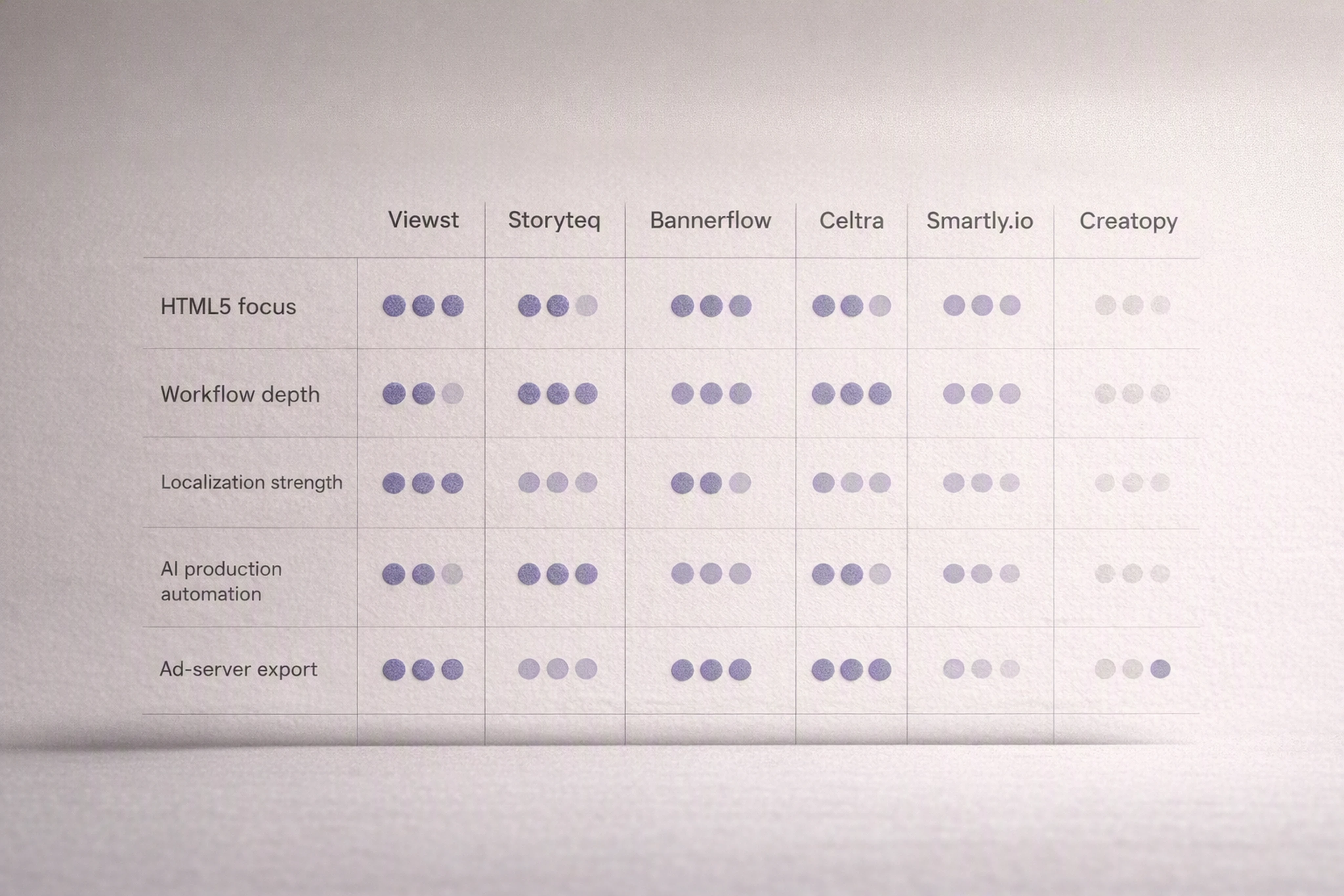
Comparison Table: Storyteq vs Viewst vs Other Online Ad Makers
The table below summarizes how major platforms score against the core criteria.
Which Ad Maker Online Tool Should You Choose?
Different platforms are optimized for different problems. Here’s a practical way to decide.
If Your Primary Challenge Is HTML5 Banner Production at Scale
Choose Viewst.
It is the best fit when:
You need to turn a few master creatives into dozens or hundreds of HTML5 variants.
Designers are losing time to resizing, animation, and exporting.
You want brand‑governed templates that media teams can traffic without rework.
Viewst’s AI Smart Resize, Image Deflatening, and Instant Animator make it a dedicated HTML5 ad production platform, not a general design tool.
If Your Primary Challenge Is Enterprise Workflow & Localization
Choose Storyteq.
It is ideal when:
You operate across many markets and languages.
You need customizable workflows, legal review, and tight DAM integration.
You want a system that orchestrates content adaptation rather than hands‑on HTML5 building.
The trade‑off is a longer implementation and less of a banner‑specific focus.
If You Need Strong DCO, Tag‑Level Integrations, or Activation
Consider Bannerflow, Celtra, Smartly.io.
These platforms are best when:
You want localization plus dynamic creative optimization.
You need to push tags directly into ad platforms and DSPs.
You prefer a solution that covers both creative and media activation.
If You Need a Flexible, Accessible Ad Maker for Smaller Teams
Consider Creatopy.
It is well‑suited for:
Teams that need an online display ad creator with ad tag export
Organizations that don’t require deep enterprise governance
Practical Buying Checklist
To turn this comparison into an actionable decision, walk through these questions with stakeholders:
Volume & Complexity
How many sizes, languages, and markets do you manage per campaign?
How often do you update creative (weekly, daily)?
Workflow Pain Points
Where are current bottlenecks: resizing, approvals, trafficking, or localization?
How many tools does an asset pass through from concept to ad server?
Governance Needs
How strict are your brand and compliance requirements?
Do you need legal/regulatory review inside the platform?
Integration Targets
Which design tools (Figma, Adobe) and ad platforms (DV360, TTD) are non‑negotiable?
Do you require DAM integration or tag‑level push to DSPs?
Change Management & Rollout
Can you support an 8‑week implementation, or do you need a fast pilot with a free trial?
How will you onboard designers, media teams, and local markets?
Use these answers to narrow the field:
If you need a production studio between design and media, start with Viewst.
If you need enterprise‑grade workflow and localization, start with Storyteq.
If your priority is DCO and trafficking, explore Bannerflow, Celtra, Smartly.io.
If you need a straightforward online ad maker, consider Creatopy.
FAQ: Ad Maker Online Tools & Creative Automation
1. What is the difference between a design tool and an ad production platform?
Design tools like Figma and Adobe focus on creating visual concepts. Ad production platforms like Viewst or Storyteq focus on scaling, governing, and exporting those concepts into many ad‑ready variants.
In practice:
Designers use Figma/Adobe to craft master creatives.
Production platforms turn those masters into structured HTML5 sets, handle approvals, and export to ad servers.
2. Why is HTML5‑native output important for display advertising?
HTML5 is the current standard for display ads according to IAB Tech Lab. It avoids legacy plugin issues and supports interactive, responsive creatives.
HTML5‑native output matters because:
Media teams can traffic files directly into ad servers.
Designers retain control over layers and motion.
Updates to a master can propagate across all sizes without rebuilding flat image files.
3. How do content approval workflows reduce production time?
Workflows reduce time by centralizing feedback and sign‑off inside the production environment. Instead of screenshots and email chains, stakeholders review live banners in context.
Benefits include:
Fewer miscommunications about versions
Faster legal and brand review cycles
Clear “approved” status that media teams can trust
4. Can AI really help without compromising creative quality?
Yes, when AI is used for mechanical tasks rather than judgment. Adobe’s research shows 88% of creatives say AI helps them work faster, and 87% say quality improved.
In practical use:
AI handles resizes, simple animation, and export prep.
Designers still own concept, composition, and final decisions.
5. How should we pilot a new ad maker online platform?
Start with one high‑volume campaign and clear success metrics. For example, measure time‑to‑produce a full HTML5 set before and after.
Recommended steps:
Select a campaign with multiple sizes and markets.
Define KPIs (build time, error rate, review cycles).
Import master creatives from Figma/Adobe.
Use the platform’s automation features (resize, animate, export).
Compare performance against your previous workflow.
This approach quickly reveals whether tools like Viewst or Storyteq address your real bottlenecks.

Steven Khuong is a GTM strategist and advisor focused on helping companies scale creative production and advertising systems using AI and automation. He has led growth initiatives across high-volume digital platforms, with a focus on turning fragmented creative workflows into structured, scalable systems that drive faster campaign execution and performance.
In this article
" height="11.060000000000002px" id="wzBCZ87AK" transform="translate(6.47 2.47)" width="6.590000000000003px"/></g></svg>)