Creative Automation Tools for Display Advertising: Integrating Campaign Manager 360 with AI Ad Platforms at Scale
Creative Automation Tools for Display Advertising: Integrating Campaign Manager 360 with AI Ad Platforms at Scale
Explore
Explore
•
•
Victoria Duben
Victoria Duben
•
•
•
•
•
•
— min read
— min read
— min read

Introduction: Why CM360 + AI Is Now Core Ad Production Infrastructure
Creative automation tools for display advertising are no longer a nice-to-have. They’re becoming the backbone of how large organizations ship campaigns across markets, formats, and channels.
Google Campaign Manager 360 (CM360) sits at the governed trafficking and measurement layer, while AI ad platforms handle upstream production. Used together, they let creative and media teams move fast without sacrificing control.
This guide explains:
How large teams integrate CM360 with AI ad platforms like Viewst
Trafficking‑friendly naming and version control strategies
How CM360 creative size limits and requirements shape banner templates
Practical workflows for HTML5 upload, clickTAG implementation, and bulk production
Throughout, we’ll use Viewst as the example of an HTML5‑native ad production platform, and we’ll reference CM360’s official documentation so this can double as a technical playbook.
CM360’s Role in a Modern Creative Automation Stack
Google positions Campaign Manager 360 as the cross‑channel ad management and measurement layer: centralized serving across web, apps, YouTube, and CTV with attribution and verification baked in (Google Marketing Platform, accessed 2026‑08‑18).
Key points for large teams:
System of record for media
Mondelēz calls CM360 their “system of record” across media (Google Marketing Platform case study, accessed 2026‑08‑18).
All placements, creatives, and reporting roll up here.
Governed trafficking rules
CM360’s HTML5 rules (ZIP packaging, file limits, clickTAG requirements) define what “valid creative” means (Google Support, HTML5 creatives, updated 2024, accessed 2026‑08‑18).
Metadata‑driven version control
Creative names, IDs, and version numbers drive reporting and updates.
Editing a shared creative affects every campaign using it (Google Support, About creatives, updated 2023, accessed 2026‑08‑18).
AI ad platforms (Viewst, Adobe GenStudio, Celtra, Smartly, Bannerflow) sit upstream from CM360. They own the high‑friction layer: scaling, animating, localizing, and exporting ready‑to‑traffic HTML5.
Why Large Teams Need Creative Automation for Display
The workload and volume realities are clear:
Adobe’s 2024 State of Creativity report found 83% of decision makers saw employee workload increase in the past 12 months and 3 in 4 plan to invest in tools/software to handle it (Adobe, State of Creativity 2024, published 2024‑06, accessed 2026‑08‑18).
Adobe also reports 64% of marketers expect content demand to grow by at least 5x by 2026 (Adobe Blog, GenStudio partnership announcement, published 2024‑10‑14, accessed 2026‑08‑18).
IAB’s 2026 “AI Gap Widens” study shows 83% of ad executives say their company has deployed AI in the creative process, up from 60% in 2024 (IAB Insights, The AI Gap Widens, published 2026‑05, accessed 2026‑08‑18).
AI use is especially common in social (85%) and display (73%), and 86% of buyers use or plan to use genAI for video ad creative (IAB Insights, The AI Gap Widens, 2026‑05).
Celtra’s case studies show how extreme the scale can get:
inDrive received a request for almost 18,000 creatives in one week; automation cut delivery time from ~2 weeks to 3–5 days, with a 93% reduction in repeat production time (Celtra Blog, inDrive case study, published 2023‑09, accessed 2026‑08‑18).
Nike achieved a 19.5x boost in production efficiency for localized campaigns (Celtra Blog, Nike case study, published 2022‑11, accessed 2026‑08‑18).
Without creative automation tools for display advertising, these demands overwhelm teams. With them, CM360 becomes the clean, governed output layer rather than a bottleneck.
CM360 Creative Size Limits and Requirements: The Rules That Shape Templates
CM360’s HTML5 constraints heavily influence how you architect banner templates upstream.
Core CM360 HTML5 Requirements
From Google’s HTML5 creative documentation (Google Support, HTML5 creatives, updated 2024, accessed 2026‑08‑18) and polite load guidance (Google Support, Polite load for HTML5, updated 2023, accessed 2026‑08‑18):
Packaging & files
One ZIP file per HTML5 creative.
ZIP can contain up to 100 files total (polite load doc, CM360 HTML5 size limits).
All referenced assets (images, CSS, JS) must be inside the ZIP; no external local references.
Size limits
Total creative assets must be ≤ 9.5 MB (CM360 polite load guidance).
Polite‑load image must be < 40 KB.
When total creative size exceeds 150 KB, polite loading behavior kicks in.
Technical restrictions
Must include at least one clickTAG to enable outbound click tracking (Google Support, HTML5 creatives & click tags, 2024).
Avoid using localStorage or sessionStorage in HTML5 creatives (same HTML5 guidance, disallowed features).
Avoid
"%"in file names; certain special characters can break uploads (HTML5 upload rules).
For production teams, these rules become design constraints:
Template frameworks must keep asset counts and sizes under control.
Animations and effects must be optimized to stay below the 9.5 MB ceiling.
JS libraries and font usage need to be carefully budgeted.
Upstream AI platforms like Viewst encode these limits into export presets so designers don’t have to memorize every detail.
Trafficking‑Friendly Naming Conventions for CM360 Creatives
CM360’s version control and reporting are driven by metadata, especially creative names. Google’s guidance on creatives stresses that names are used in reports and cannot be changed after association (Google Support, About creatives, updated 2023, accessed 2026‑08‑18).
Practical naming rules for trafficking‑friendly templates:
Use structured, predictable patterns
Example:
Brand_Campaign_Objective_Size_Language_Version.ACME_SummerSale_RET_300x250_EN_v01.
Keep names concise but descriptive
CM360 allows up to 256 characters for creative names (standard field limit in CM360 UI; see Google Support, Fields reference, accessed 2026‑08‑18).
In practice, aim for 80–120 characters to keep trafficking manageable.
Standardize vocabularies
Agree on canonical values for objectives (
RET,PROS,AWARENESS), formats (HTML5,GIF,MP4), languages (EN,ES,FR).
Use allowed characters only
Stick to: letters A–Z, a–z; numbers 0–9; underscore
_; hyphen-; and space.Avoid
%,#,?, and non‑ASCII characters to prevent upload and serving issues (HTML5 file name recommendations).
AI ad platforms can enforce these rules. For example, Viewst can generate trafficking‑friendly names automatically from campaign metadata and brandbooks, ensuring everything aligns with CM360’s expectations.
DCM Creative Version Control: How CM360 Treats Creative Updates
CM360 (formerly DCM, DoubleClick Campaign Manager) uses strict versioning behavior. From Google’s creative documentation (Google Support, About creatives, updated 2023, accessed 2026‑08‑18):
Shared creative objects
A single creative can be reused across multiple campaigns and placements.
Editing that creative’s assets affects every placement using it.
Version numbers
CM360 auto‑increments a version number whenever creative assets are changed.
Previous versions remain accessible in logs but are not served once updated.
Immutable fields after association
Certain fields (like creative type and dimension) cannot be changed after the creative is associated.
Names are used in reporting and should not be changed mid‑flight.
Implications for workflow:
Treat each master template (e.g., 300x250 banner set) as a governed object.
Use cloning when you need a materially new concept, not a minor tweak.
Drive updates from a single source of truth upstream (e.g., Viewst master creative) and then version out in CM360.
Creative Automation Platform Comparison: How Viewst Fits the Ecosystem
Creative Automation Platform Comparison
Enterprise teams often compare multiple creative automation tools for display advertising. Here’s a compact creative automation platform comparison focused on CM360‑adjacent workflows.
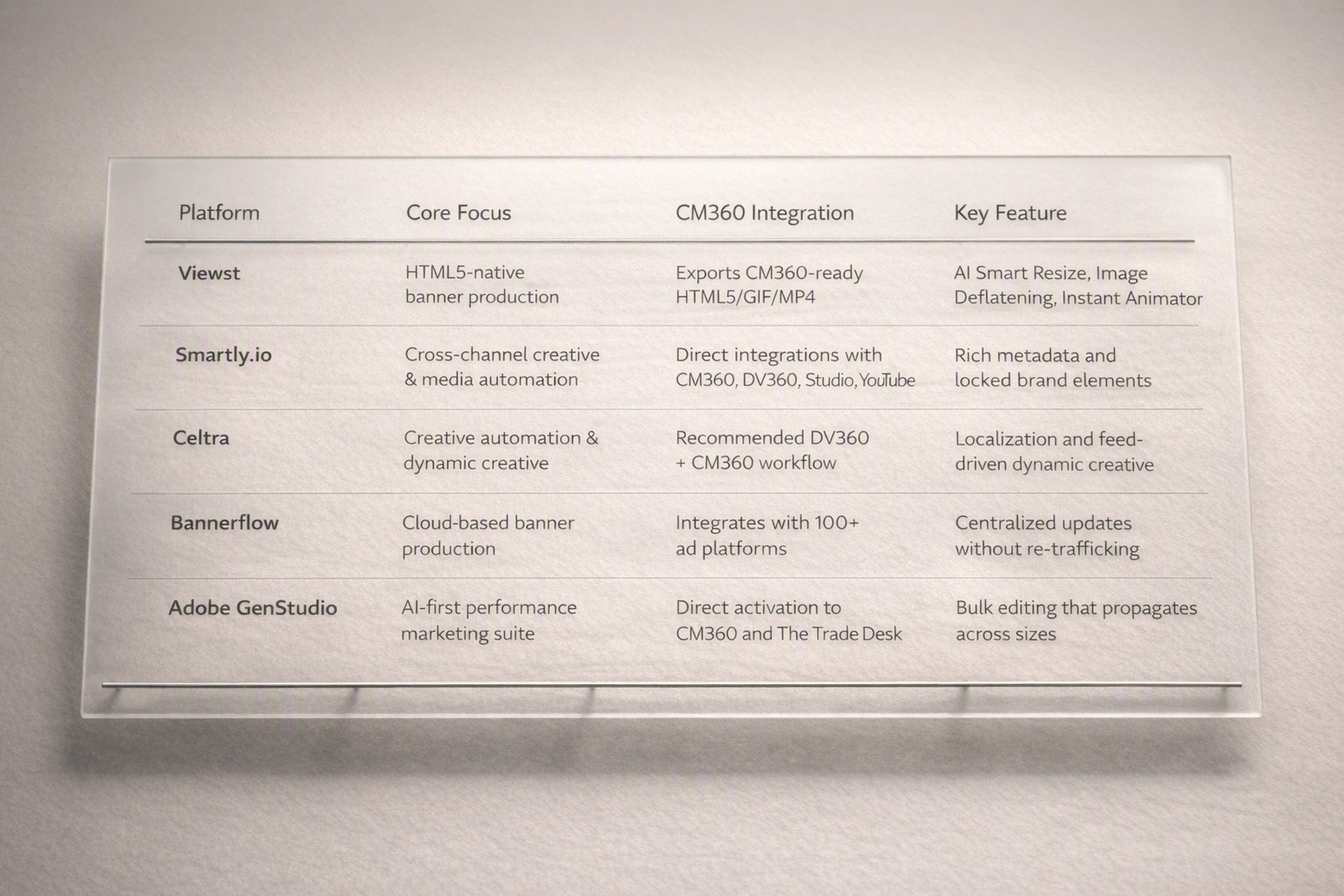
Platform | Core Focus | CM360 / Google Stack Integration | Distinguishing Features |
|---|---|---|---|
Viewst | HTML5‑native banner production | Exports production‑ready HTML5 / GIF / MP4 for CM360; sits between design and media | AI Smart Resize, Image Deflatening, Instant Animator, true WYSIWYG, brandbooks |
Smartly.io | Cross‑channel creative & media automation | Direct integrations with Campaign Manager, DV360, Studio, YouTube (Smartly product page, accessed 2026‑08‑18) | Rich metadata, locked brand elements, centralized workflows |
Celtra | Creative automation & dynamic creative | Recommended DV360 + CM360 workflow; supports CM trafficking (Celtra Support, Google Campaign Manager, accessed 2026‑08‑18) | Strong localization, feed‑driven dynamic creative |
Bannerflow | Cloud‑based banner production | Integrates with 100+ ad platforms; supports centralized updates “without re‑trafficking” (Bannerflow integrations, accessed 2026‑08‑18) | Broad platform coverage, live editing of running campaigns |
Adobe GenStudio | AI‑first performance marketing suite | Direct activation to CM360 and The Trade Desk; bulk editing propagates across sizes (Adobe GenStudio release notes, published 2026‑02, accessed 2026‑08‑18) | Deep integration with Adobe stack; generative content + governed templates |
Where Viewst stands out:
Built natively around HTML5 for display and retail media.
Focused on production infrastructure, not general design.
AI is applied to non‑creative suffering (resizes, exports, animations), keeping designers in control.
How CM360 Constraints Shape AI‑Powered Banner Templates
When you integrate CM360 with AI advertising tools for creating banners, CM360’s rules shape template architecture upstream.
Master Creative as Source of Truth
Modern guidance from Adobe GenStudio emphasizes bulk editing from a master template that propagates across sizes and pages (Adobe GenStudio release notes, 2026‑02). Google’s Studio dynamic creative docs echo this: one creative shell can serve a size while content swaps via feeds (Google Studio dynamic creative overview, accessed 2026‑08‑18).
Viewst aligns with this approach:
One master HTML5 design per concept.
AI Smart Resize generates all required sizes from that master.
Updates to the master propagate across all variants.
Template Design Checklist for CM360 Compatibility
To stay within CM360 creative size limits and requirements:
Limit fonts and JS libraries; embed only what you need.
Keep image asset counts under 100 per ZIP.
Use compressed assets and sprites where possible.
Implement clickTAG exactly as CM360 expects.
Avoid localStorage/sessionStorage and any unsupported browser APIs.
AI platforms can automate guardrails:
Pre‑flight checks before export.
Automatic image compression and JS bundling.
Warnings when templates approach file or size thresholds.
How to Upload HTML5 Creatives to CM360 (UI & API)
How to Upload HTML5 Creatives to CM360: UI Workflow
Google’s HTML5 creative upload flow is documented in its support articles (Google Support, HTML5 creatives, updated 2024, accessed 2026‑08‑18). Here’s the practical step‑by‑step process.
Prepare your ZIP
Ensure one HTML file is the entry point (often
index.html).Keep total assets ≤ 9.5 MB and ≤ 100 files.
Confirm file names use safe characters (no
%).
Navigate to Creatives
In CM360, go to Campaigns → Creatives.
Click New and select HTML5 as the creative type.
Upload the ZIP
In the creative form, choose Upload asset.
Select ZIP and upload your packaged creative.
Set metadata
Enter a trafficking‑friendly name using your naming convention.
Choose dimensions (e.g., 300x250), advertiser, and campaign.
Validate & save
CM360 will process the ZIP and flag errors.
Preview the creative; test clicks and impressions.
Click Save.
Attach to placements
Go to Placements and associate the creative.
Confirm targeting and rotation settings.
bulk upload creatives Campaign Manager 360: CSV & Folder Methods
Google offers bulk upload options documented in its batch upload guide (Google Support, Batch upload creatives, updated 2023, accessed 2026‑08‑18).
Two common methods:
By folder
Store each creative’s ZIP in a dedicated folder.
Use the CM360 UI bulk upload and select the folder.
CM360 creates one creative per ZIP automatically.
By CSV file name mapping
Prepare a CSV with required columns, such as:
creativeNamecreativeType(e.g.,HTML5_BANNER)width,heightfileName(ZIP file name)
Use Bulk upload to import the CSV and associated ZIPs.
Common error messages and fixes:
"Invalid file structure"
Cause: No HTML entry file or wrong folder structure.
Fix: Ensure
index.htmlor main HTML is at ZIP root.
"Unsupported characters in file name"
Cause:
%,#, or other special characters.Fix: Rename assets before zipping.
"Creative exceeds size limits"
Cause: Assets > 9.5 MB or too many files.
Fix: Compress images, remove unused assets, reduce library sizes.
API Options
For very high‑volume workflows, you can use the CM360 API (Google Developers, Campaign Manager 360 API, accessed 2026‑08‑18).
Typical steps:
Authenticate via OAuth.
Use the creatives.insert endpoint to create HTML5 creatives.
Attach ZIP assets via creativeAssets.insert.
Link creatives to placements via placements.patch or trafficking scripts.
AI platforms like Viewst can build a direct integration to automate this flow, pushing production‑ready ZIPs into CM360 with correct metadata.
ClickTAG Implementation CM360: Example Code Snippet
CM360 requires a clickTAG (also referred to as clickTag) so the ad server can record clicks. Google’s guidance shows the correct implementation pattern (Google Support, click tags in HTML5 creatives, updated 2024, accessed 2026‑08‑18).
Basic clickTAG implementation example:
<!DOCTYPE html>
<html>
  <head>
    <meta charset="UTF-8" />
    <title>CM360 HTML5 Creative</title>
    <script type="text/javascript">
      // CM360 will set this variable at serving time
      var clickTag = "https://www.example.com";

      function handleClick() {
        window.open(clickTag, "_blank");
      }
    </script>
  </head>
  <body onclick="handleClick()" style="margin:0; padding:0;">
    <div id="banner" style="width:300px; height:250px; cursor:pointer;">
      <!-- Banner content here -->
      <p>Summer Sale – Shop Now</p>
    </div>
  </body>
</html>
Key rules:
Define
var clickTagin the global scope.Use
window.open(clickTag, "_blank")on the click handler.Do not hard‑code destination URLs elsewhere.
AI ad production platforms can inject this pattern into all exported HTML5 templates so every creative complies with CM360’s requirements.
End‑to‑End Workflow: CM360 + Viewst in a High‑Volume Campaign
Here’s a concrete "Putting It All Together" workflow showing how CM360 and an AI production platform like Viewst hand off artifacts.
Brief & master concept
Creative team designs a master concept in Figma or Adobe.
Viewst imports the design and turns it into a structured HTML5 master banner.
Template setup in Viewst
Define layout regions, brand‑locked elements (logo, colors, fonts).
Configure brandbooks and governance rules.
AI‑driven production at scale
Use AI Smart Resize to generate all required sizes from the master.
Apply Instant Animator for consistent motion across layers.
Use AI Designer for fast variant creation (e.g., headlines, offers) while maintaining brand standards.
Pre‑flight for CM360 constraints
Viewst runs checks for:
ZIP size and file count (≤ 9.5 MB, ≤ 100 files).
Safe file names and asset paths.
Correct clickTAG implementation.
Adjust compression or simplify animation if needed.
Export to traffickable assets
Export each banner as a CM360‑ready HTML5 ZIP.
Apply trafficking‑friendly naming automatically (e.g.,
Brand_Campaign_Size_Language_v01).
Upload to CM360
Use UI or bulk upload (CSV + ZIPs) to create creatives.
Map names, types, and dimensions per template.
Trafficking & QA
Associate creatives with placements.
QA in CM360 preview: verify rendering, click behavior, tracking macros.
Launch & reporting
Campaign goes live; CM360 serves and tracks impressions, clicks, conversions.
Creative names power performance reports (e.g., by size, message, language).
Optimization loop
Performance marketers identify winners and losers by creative variant.
Designers adjust the Viewst master creative (e.g., headline hierarchy, CTA).
Viewst propagates changes across all sizes; new ZIPs overwrite or create new versions in CM360.
Governed iteration
CM360’s version control logs changes, while Viewst keeps the creative source of truth.
Both sides remain aligned: CM360 for serving and measurement, Viewst for production and governance.
Quick Reference Cheat Sheet: CM360 Constraints & Naming
This quick reference summarizes CM360 creative size limits and requirements, plus naming and versioning behavior.
CM360 HTML5 Constraints (Sources: Google Support docs)
One ZIP per HTML5 creative (HTML5 creatives).
Up to 100 files per HTML5 creative (Polite load & size limits).
Max creative assets size: 9.5 MB (Polite load guidance).
Polite‑load image: < 40 KB (Polite load image size).
Polite load threshold: 150 KB total creative size (same source).
At least one clickTAG required (HTML5 creatives & click tags).
Avoid localStorage/sessionStorage (HTML5 restrictions).
No "%" in file names; avoid special characters (File name rules).
Naming & Versioning (Sources: About creatives, Fields reference)
Creative name length: up to 256 characters (Fields reference).
Allowed characters (recommended): letters, numbers, underscore, hyphen, space.
Names used in reports: don’t change mid‑flight (About creatives).
Shared creative behavior: one creative can be attached to many placements (About creatives).
Versioning: CM360 increments creative version when assets change (About creatives).
Upstream AI ad platforms should encode all these rules into their export logic to reduce trafficking errors.
FAQ: Common CM360 + Creative Automation Questions
What is the best software for creating and managing display ads at scale?
For large teams, the "best software for creating and managing display ads" usually combines:
A creative automation platform (Viewst, Celtra, Smartly, Bannerflow, Adobe GenStudio) for building and scaling HTML5 banners.
An ad management platform like CM360 for trafficking, measurement, and governance.
This combination separates production complexity from serving rules, which is essential at enterprise scale.
How do dynamic creative templates Campaign Manager 360 work?
Dynamic creative templates in Campaign Manager 360 rely on Google Studio and feed‑based content swapping (Google Studio dynamic creative overview).
You build one creative shell (HTML5 template) and link it to a data feed. CM360 and Studio then serve different content variations (copy, images, offers) from that feed without changing the underlying creative ID.
What are Rich Media Studio CM360 templates?
Rich Media Studio CM360 templates are pre‑built creative shells in Google Studio designed for advanced formats:
Expandable banners
Interactive units
Dynamic product ads
They integrate with CM360 for trafficking and reporting, and they follow the same HTML5 and clickTAG requirements documented in CM360 support.
How does DCM creative version control affect optimization?
DCM creative version control (now CM360) means:
Updating a shared creative changes what’s served across all placements using it.
Version numbers help you track when asset changes were made.
For optimization, this encourages master creative discipline: update the upstream template (e.g., in Viewst), then push that controlled change into CM360 rather than hand‑editing individual creatives.
How do you integrate Campaign Manager 360 with creative automation tools for display advertising?
Integration typically looks like:
Use a creative automation platform (Viewst, Celtra, Smartly, Adobe GenStudio, Bannerflow) to build and export CM360‑ready HTML5 ZIPs.
Apply trafficking‑friendly naming and metadata in the export.
Upload via CM360 UI, bulk CSV, or the CM360 API.
Optionally, build a direct connector so the platform can call the CM360 API and create creatives automatically.
This keeps designers inside the production studio while CM360 remains the governed ad server and measurement hub.
Introduction: Why CM360 + AI Is Now Core Ad Production Infrastructure
Creative automation tools for display advertising are no longer a nice-to-have. They’re becoming the backbone of how large organizations ship campaigns across markets, formats, and channels.
Google Campaign Manager 360 (CM360) sits at the governed trafficking and measurement layer, while AI ad platforms handle upstream production. Used together, they let creative and media teams move fast without sacrificing control.
This guide explains:
How large teams integrate CM360 with AI ad platforms like Viewst
Trafficking‑friendly naming and version control strategies
How CM360 creative size limits and requirements shape banner templates
Practical workflows for HTML5 upload, clickTAG implementation, and bulk production
Throughout, we’ll use Viewst as the example of an HTML5‑native ad production platform, and we’ll reference CM360’s official documentation so this can double as a technical playbook.
CM360’s Role in a Modern Creative Automation Stack
Google positions Campaign Manager 360 as the cross‑channel ad management and measurement layer: centralized serving across web, apps, YouTube, and CTV with attribution and verification baked in (Google Marketing Platform, accessed 2026‑08‑18).
Key points for large teams:
System of record for media
Mondelēz calls CM360 their “system of record” across media (Google Marketing Platform case study, accessed 2026‑08‑18).
All placements, creatives, and reporting roll up here.
Governed trafficking rules
CM360’s HTML5 rules (ZIP packaging, file limits, clickTAG requirements) define what “valid creative” means (Google Support, HTML5 creatives, updated 2024, accessed 2026‑08‑18).
Metadata‑driven version control
Creative names, IDs, and version numbers drive reporting and updates.
Editing a shared creative affects every campaign using it (Google Support, About creatives, updated 2023, accessed 2026‑08‑18).
AI ad platforms (Viewst, Adobe GenStudio, Celtra, Smartly, Bannerflow) sit upstream from CM360. They own the high‑friction layer: scaling, animating, localizing, and exporting ready‑to‑traffic HTML5.
Why Large Teams Need Creative Automation for Display
The workload and volume realities are clear:
Adobe’s 2024 State of Creativity report found 83% of decision makers saw employee workload increase in the past 12 months and 3 in 4 plan to invest in tools/software to handle it (Adobe, State of Creativity 2024, published 2024‑06, accessed 2026‑08‑18).
Adobe also reports 64% of marketers expect content demand to grow by at least 5x by 2026 (Adobe Blog, GenStudio partnership announcement, published 2024‑10‑14, accessed 2026‑08‑18).
IAB’s 2026 “AI Gap Widens” study shows 83% of ad executives say their company has deployed AI in the creative process, up from 60% in 2024 (IAB Insights, The AI Gap Widens, published 2026‑05, accessed 2026‑08‑18).
AI use is especially common in social (85%) and display (73%), and 86% of buyers use or plan to use genAI for video ad creative (IAB Insights, The AI Gap Widens, 2026‑05).
Celtra’s case studies show how extreme the scale can get:
inDrive received a request for almost 18,000 creatives in one week; automation cut delivery time from ~2 weeks to 3–5 days, with a 93% reduction in repeat production time (Celtra Blog, inDrive case study, published 2023‑09, accessed 2026‑08‑18).
Nike achieved a 19.5x boost in production efficiency for localized campaigns (Celtra Blog, Nike case study, published 2022‑11, accessed 2026‑08‑18).
Without creative automation tools for display advertising, these demands overwhelm teams. With them, CM360 becomes the clean, governed output layer rather than a bottleneck.
CM360 Creative Size Limits and Requirements: The Rules That Shape Templates
CM360’s HTML5 constraints heavily influence how you architect banner templates upstream.
Core CM360 HTML5 Requirements
From Google’s HTML5 creative documentation (Google Support, HTML5 creatives, updated 2024, accessed 2026‑08‑18) and polite load guidance (Google Support, Polite load for HTML5, updated 2023, accessed 2026‑08‑18):
Packaging & files
One ZIP file per HTML5 creative.
ZIP can contain up to 100 files total (polite load doc, CM360 HTML5 size limits).
All referenced assets (images, CSS, JS) must be inside the ZIP; no external local references.
Size limits
Total creative assets must be ≤ 9.5 MB (CM360 polite load guidance).
Polite‑load image must be < 40 KB.
When total creative size exceeds 150 KB, polite loading behavior kicks in.
Technical restrictions
Must include at least one clickTAG to enable outbound click tracking (Google Support, HTML5 creatives & click tags, 2024).
Avoid using localStorage or sessionStorage in HTML5 creatives (same HTML5 guidance, disallowed features).
Avoid
"%"in file names; certain special characters can break uploads (HTML5 upload rules).
For production teams, these rules become design constraints:
Template frameworks must keep asset counts and sizes under control.
Animations and effects must be optimized to stay below the 9.5 MB ceiling.
JS libraries and font usage need to be carefully budgeted.
Upstream AI platforms like Viewst encode these limits into export presets so designers don’t have to memorize every detail.
Trafficking‑Friendly Naming Conventions for CM360 Creatives
CM360’s version control and reporting are driven by metadata, especially creative names. Google’s guidance on creatives stresses that names are used in reports and cannot be changed after association (Google Support, About creatives, updated 2023, accessed 2026‑08‑18).
Practical naming rules for trafficking‑friendly templates:
Use structured, predictable patterns
Example:
Brand_Campaign_Objective_Size_Language_Version.ACME_SummerSale_RET_300x250_EN_v01.
Keep names concise but descriptive
CM360 allows up to 256 characters for creative names (standard field limit in CM360 UI; see Google Support, Fields reference, accessed 2026‑08‑18).
In practice, aim for 80–120 characters to keep trafficking manageable.
Standardize vocabularies
Agree on canonical values for objectives (
RET,PROS,AWARENESS), formats (HTML5,GIF,MP4), languages (EN,ES,FR).
Use allowed characters only
Stick to: letters A–Z, a–z; numbers 0–9; underscore
_; hyphen-; and space.Avoid
%,#,?, and non‑ASCII characters to prevent upload and serving issues (HTML5 file name recommendations).
AI ad platforms can enforce these rules. For example, Viewst can generate trafficking‑friendly names automatically from campaign metadata and brandbooks, ensuring everything aligns with CM360’s expectations.
DCM Creative Version Control: How CM360 Treats Creative Updates
CM360 (formerly DCM, DoubleClick Campaign Manager) uses strict versioning behavior. From Google’s creative documentation (Google Support, About creatives, updated 2023, accessed 2026‑08‑18):
Shared creative objects
A single creative can be reused across multiple campaigns and placements.
Editing that creative’s assets affects every placement using it.
Version numbers
CM360 auto‑increments a version number whenever creative assets are changed.
Previous versions remain accessible in logs but are not served once updated.
Immutable fields after association
Certain fields (like creative type and dimension) cannot be changed after the creative is associated.
Names are used in reporting and should not be changed mid‑flight.
Implications for workflow:
Treat each master template (e.g., 300x250 banner set) as a governed object.
Use cloning when you need a materially new concept, not a minor tweak.
Drive updates from a single source of truth upstream (e.g., Viewst master creative) and then version out in CM360.
Creative Automation Platform Comparison: How Viewst Fits the Ecosystem
Creative Automation Platform Comparison
Enterprise teams often compare multiple creative automation tools for display advertising. Here’s a compact creative automation platform comparison focused on CM360‑adjacent workflows.
Platform | Core Focus | CM360 / Google Stack Integration | Distinguishing Features |
|---|---|---|---|
Viewst | HTML5‑native banner production | Exports production‑ready HTML5 / GIF / MP4 for CM360; sits between design and media | AI Smart Resize, Image Deflatening, Instant Animator, true WYSIWYG, brandbooks |
Smartly.io | Cross‑channel creative & media automation | Direct integrations with Campaign Manager, DV360, Studio, YouTube (Smartly product page, accessed 2026‑08‑18) | Rich metadata, locked brand elements, centralized workflows |
Celtra | Creative automation & dynamic creative | Recommended DV360 + CM360 workflow; supports CM trafficking (Celtra Support, Google Campaign Manager, accessed 2026‑08‑18) | Strong localization, feed‑driven dynamic creative |
Bannerflow | Cloud‑based banner production | Integrates with 100+ ad platforms; supports centralized updates “without re‑trafficking” (Bannerflow integrations, accessed 2026‑08‑18) | Broad platform coverage, live editing of running campaigns |
Adobe GenStudio | AI‑first performance marketing suite | Direct activation to CM360 and The Trade Desk; bulk editing propagates across sizes (Adobe GenStudio release notes, published 2026‑02, accessed 2026‑08‑18) | Deep integration with Adobe stack; generative content + governed templates |
Where Viewst stands out:
Built natively around HTML5 for display and retail media.
Focused on production infrastructure, not general design.
AI is applied to non‑creative suffering (resizes, exports, animations), keeping designers in control.
How CM360 Constraints Shape AI‑Powered Banner Templates
When you integrate CM360 with AI advertising tools for creating banners, CM360’s rules shape template architecture upstream.
Master Creative as Source of Truth
Modern guidance from Adobe GenStudio emphasizes bulk editing from a master template that propagates across sizes and pages (Adobe GenStudio release notes, 2026‑02). Google’s Studio dynamic creative docs echo this: one creative shell can serve a size while content swaps via feeds (Google Studio dynamic creative overview, accessed 2026‑08‑18).
Viewst aligns with this approach:
One master HTML5 design per concept.
AI Smart Resize generates all required sizes from that master.
Updates to the master propagate across all variants.
Template Design Checklist for CM360 Compatibility
To stay within CM360 creative size limits and requirements:
Limit fonts and JS libraries; embed only what you need.
Keep image asset counts under 100 per ZIP.
Use compressed assets and sprites where possible.
Implement clickTAG exactly as CM360 expects.
Avoid localStorage/sessionStorage and any unsupported browser APIs.
AI platforms can automate guardrails:
Pre‑flight checks before export.
Automatic image compression and JS bundling.
Warnings when templates approach file or size thresholds.
How to Upload HTML5 Creatives to CM360 (UI & API)
How to Upload HTML5 Creatives to CM360: UI Workflow
Google’s HTML5 creative upload flow is documented in its support articles (Google Support, HTML5 creatives, updated 2024, accessed 2026‑08‑18). Here’s the practical step‑by‑step process.
Prepare your ZIP
Ensure one HTML file is the entry point (often
index.html).Keep total assets ≤ 9.5 MB and ≤ 100 files.
Confirm file names use safe characters (no
%).
Navigate to Creatives
In CM360, go to Campaigns → Creatives.
Click New and select HTML5 as the creative type.
Upload the ZIP
In the creative form, choose Upload asset.
Select ZIP and upload your packaged creative.
Set metadata
Enter a trafficking‑friendly name using your naming convention.
Choose dimensions (e.g., 300x250), advertiser, and campaign.
Validate & save
CM360 will process the ZIP and flag errors.
Preview the creative; test clicks and impressions.
Click Save.
Attach to placements
Go to Placements and associate the creative.
Confirm targeting and rotation settings.
bulk upload creatives Campaign Manager 360: CSV & Folder Methods
Google offers bulk upload options documented in its batch upload guide (Google Support, Batch upload creatives, updated 2023, accessed 2026‑08‑18).
Two common methods:
By folder
Store each creative’s ZIP in a dedicated folder.
Use the CM360 UI bulk upload and select the folder.
CM360 creates one creative per ZIP automatically.
By CSV file name mapping
Prepare a CSV with required columns, such as:
creativeNamecreativeType(e.g.,HTML5_BANNER)width,heightfileName(ZIP file name)
Use Bulk upload to import the CSV and associated ZIPs.
Common error messages and fixes:
"Invalid file structure"
Cause: No HTML entry file or wrong folder structure.
Fix: Ensure
index.htmlor main HTML is at ZIP root.
"Unsupported characters in file name"
Cause:
%,#, or other special characters.Fix: Rename assets before zipping.
"Creative exceeds size limits"
Cause: Assets > 9.5 MB or too many files.
Fix: Compress images, remove unused assets, reduce library sizes.
API Options
For very high‑volume workflows, you can use the CM360 API (Google Developers, Campaign Manager 360 API, accessed 2026‑08‑18).
Typical steps:
Authenticate via OAuth.
Use the creatives.insert endpoint to create HTML5 creatives.
Attach ZIP assets via creativeAssets.insert.
Link creatives to placements via placements.patch or trafficking scripts.
AI platforms like Viewst can build a direct integration to automate this flow, pushing production‑ready ZIPs into CM360 with correct metadata.
ClickTAG Implementation CM360: Example Code Snippet
CM360 requires a clickTAG (also referred to as clickTag) so the ad server can record clicks. Google’s guidance shows the correct implementation pattern (Google Support, click tags in HTML5 creatives, updated 2024, accessed 2026‑08‑18).
Basic clickTAG implementation example:
<!DOCTYPE html>
<html>
  <head>
    <meta charset="UTF-8" />
    <title>CM360 HTML5 Creative</title>
    <script type="text/javascript">
      // CM360 will set this variable at serving time
      var clickTag = "https://www.example.com";

      function handleClick() {
        window.open(clickTag, "_blank");
      }
    </script>
  </head>
  <body onclick="handleClick()" style="margin:0; padding:0;">
    <div id="banner" style="width:300px; height:250px; cursor:pointer;">
      <!-- Banner content here -->
      <p>Summer Sale – Shop Now</p>
    </div>
  </body>
</html>
Key rules:
Define
var clickTagin the global scope.Use
window.open(clickTag, "_blank")on the click handler.Do not hard‑code destination URLs elsewhere.
AI ad production platforms can inject this pattern into all exported HTML5 templates so every creative complies with CM360’s requirements.
End‑to‑End Workflow: CM360 + Viewst in a High‑Volume Campaign
Here’s a concrete "Putting It All Together" workflow showing how CM360 and an AI production platform like Viewst hand off artifacts.
Brief & master concept
Creative team designs a master concept in Figma or Adobe.
Viewst imports the design and turns it into a structured HTML5 master banner.
Template setup in Viewst
Define layout regions, brand‑locked elements (logo, colors, fonts).
Configure brandbooks and governance rules.
AI‑driven production at scale
Use AI Smart Resize to generate all required sizes from the master.
Apply Instant Animator for consistent motion across layers.
Use AI Designer for fast variant creation (e.g., headlines, offers) while maintaining brand standards.
Pre‑flight for CM360 constraints
Viewst runs checks for:
ZIP size and file count (≤ 9.5 MB, ≤ 100 files).
Safe file names and asset paths.
Correct clickTAG implementation.
Adjust compression or simplify animation if needed.
Export to traffickable assets
Export each banner as a CM360‑ready HTML5 ZIP.
Apply trafficking‑friendly naming automatically (e.g.,
Brand_Campaign_Size_Language_v01).
Upload to CM360
Use UI or bulk upload (CSV + ZIPs) to create creatives.
Map names, types, and dimensions per template.
Trafficking & QA
Associate creatives with placements.
QA in CM360 preview: verify rendering, click behavior, tracking macros.
Launch & reporting
Campaign goes live; CM360 serves and tracks impressions, clicks, conversions.
Creative names power performance reports (e.g., by size, message, language).
Optimization loop
Performance marketers identify winners and losers by creative variant.
Designers adjust the Viewst master creative (e.g., headline hierarchy, CTA).
Viewst propagates changes across all sizes; new ZIPs overwrite or create new versions in CM360.
Governed iteration
CM360’s version control logs changes, while Viewst keeps the creative source of truth.
Both sides remain aligned: CM360 for serving and measurement, Viewst for production and governance.
Quick Reference Cheat Sheet: CM360 Constraints & Naming
This quick reference summarizes CM360 creative size limits and requirements, plus naming and versioning behavior.
CM360 HTML5 Constraints (Sources: Google Support docs)
One ZIP per HTML5 creative (HTML5 creatives).
Up to 100 files per HTML5 creative (Polite load & size limits).
Max creative assets size: 9.5 MB (Polite load guidance).
Polite‑load image: < 40 KB (Polite load image size).
Polite load threshold: 150 KB total creative size (same source).
At least one clickTAG required (HTML5 creatives & click tags).
Avoid localStorage/sessionStorage (HTML5 restrictions).
No "%" in file names; avoid special characters (File name rules).
Naming & Versioning (Sources: About creatives, Fields reference)
Creative name length: up to 256 characters (Fields reference).
Allowed characters (recommended): letters, numbers, underscore, hyphen, space.
Names used in reports: don’t change mid‑flight (About creatives).
Shared creative behavior: one creative can be attached to many placements (About creatives).
Versioning: CM360 increments creative version when assets change (About creatives).
Upstream AI ad platforms should encode all these rules into their export logic to reduce trafficking errors.
FAQ: Common CM360 + Creative Automation Questions
What is the best software for creating and managing display ads at scale?
For large teams, the "best software for creating and managing display ads" usually combines:
A creative automation platform (Viewst, Celtra, Smartly, Bannerflow, Adobe GenStudio) for building and scaling HTML5 banners.
An ad management platform like CM360 for trafficking, measurement, and governance.
This combination separates production complexity from serving rules, which is essential at enterprise scale.
How do dynamic creative templates Campaign Manager 360 work?
Dynamic creative templates in Campaign Manager 360 rely on Google Studio and feed‑based content swapping (Google Studio dynamic creative overview).
You build one creative shell (HTML5 template) and link it to a data feed. CM360 and Studio then serve different content variations (copy, images, offers) from that feed without changing the underlying creative ID.
What are Rich Media Studio CM360 templates?
Rich Media Studio CM360 templates are pre‑built creative shells in Google Studio designed for advanced formats:
Expandable banners
Interactive units
Dynamic product ads
They integrate with CM360 for trafficking and reporting, and they follow the same HTML5 and clickTAG requirements documented in CM360 support.
How does DCM creative version control affect optimization?
DCM creative version control (now CM360) means:
Updating a shared creative changes what’s served across all placements using it.
Version numbers help you track when asset changes were made.
For optimization, this encourages master creative discipline: update the upstream template (e.g., in Viewst), then push that controlled change into CM360 rather than hand‑editing individual creatives.
How do you integrate Campaign Manager 360 with creative automation tools for display advertising?
Integration typically looks like:
Use a creative automation platform (Viewst, Celtra, Smartly, Adobe GenStudio, Bannerflow) to build and export CM360‑ready HTML5 ZIPs.
Apply trafficking‑friendly naming and metadata in the export.
Upload via CM360 UI, bulk CSV, or the CM360 API.
Optionally, build a direct connector so the platform can call the CM360 API and create creatives automatically.
This keeps designers inside the production studio while CM360 remains the governed ad server and measurement hub.

Victoria is the CEO at Viewst. She is a serial entrepreneur and startup founder. She worked in Investment Banking for 9 years as international funds sales, trader, and portfolio manager. Then she decided to switch to her own startup. In 2017 Victoria founded Profit Button (a new kind of rich media banners), the project has grown to 8 countries on 3 continents in 2 years. In 2021 she founded Viewst startup. The company now has clients from 43 countries, including the USA, Canada, England, France, Brazil, Kenya, Indonesia, etc.
In this article
" height="11.060000000000002px" id="wzBCZ87AK" transform="translate(6.47 2.47)" width="6.590000000000003px"/></g></svg>)