
Overview: Why Creative Specs Matter More Than Ever
Programmatic display now owns digital display.
In the U.S., internet ad revenue reached $258.6B in 2024, up 14.9% YoY.
Programmatic accounts for 91.3% of U.S. digital display ad spend and is still growing in double digits.
At this scale, the bottleneck is rarely media buying. It’s creative packaging, HTML5 specs, and how assets move from Figma to DSPs.
This article compares major programmatic advertising platforms and PPC/display environments through the lens of creative requirements and ad asset workflow — and shows how Viewst’s export options slot into each.
If you want the broader ecosystem context, see our in‑depth guide: display ad platform support: how programmatic advertising uses creative at scale.
The Platforms We’ll Compare
This comparison focuses on the environments most production teams wrestle with day‑to‑day:
Google DV360 (enterprise programmatic DSP)
Campaign Manager 360 (CM360) (ad server / trafficking hub)
Google Ads (PPC & responsive display)
The Trade Desk (API‑first programmatic DSP)
Amazon Ads (standard display and REC / component-based)
We’ll map each against:
Core creative specs for HTML5 and display
Asset workflow — how creatives are uploaded, approved, and trafficked
Automation level — manual vs asset-based vs API-based
How Viewst exports align — to keep production predictable
Key Criteria for Comparing Creative Automation Platforms
When you evaluate creative automation tools for display advertising, five criteria matter most:
Spec compliance at scale
Can you reliably meet DV360, CM360, The Trade Desk, and Amazon constraints without hand‑coding?
Export formats and packaging
Native HTML5 ZIP vs flat images vs video (GIF/MP4).
Click tags, file structure, and size limits.
Master creative governance
Can all sizes and variants be controlled from a single master asset?
Do brandbooks and locked styles propagate across resizes?
Collaboration and review inside production
Comments, approvals, and preview states in the same environment where banners are built.
Integration with programmatic & PPC workflows
Smooth handoff to DV360, CM360, The Trade Desk, Amazon Ads, and Google Ads.
Ability to support asset-based and template-driven formats.
Viewst’s position: it sits between design tools and media platforms, owning the high‑friction layer of scaling, animating, approving, and exporting HTML5‑native display ads.
Google DV360: Strict HTML5 Specs, High Programmatic Scale
DV360 Creative Specs That Matter
DV360 treats HTML5 creatives as mini web pages. Specs you must respect:
Browser download size: max 5 MB per HTML5 creative
ZIP file structure: up to 100 files, root HTML file required
HTTP calls: max 100 HTTP requests
Cookies: up to 25 cookies
Animation duration: no longer than 30 seconds
IAB Tech Lab describes HTML5 ads as “mini web pages” requiring careful packaging for performance. DV360 inherits this philosophy: creative is a technical object, not just a design.
DV360 Asset Workflow
Creatives are uploaded as HTML5 ZIPs or image/video assets.
Each creative requires correct clickTag implementation.
Approval is exchange‑aware: some inventory layers apply additional checks.
Trafficking teams often manage dozens of creative IDs per line item.
How Viewst Aligns With DV360
Viewst is built for DV360‑style environments:
Export HTML5 ads for Google DV360 as fully compliant ZIP packages.
True WYSIWYG: what you see in Viewst is what serves in the browser.
AI Smart Resize: generate every DV360 size from one master, while keeping file weight controlled.
AI Instant Animator: one‑click motion that respects the 30‑second constraint.
Brandbooks: locked fonts, colors, and logo usage across all resizes.
Result: DV360 traffickers receive clean ZIPs; designers never touch code or re‑build sizes manually.
Campaign Manager 360: Ad Server Rules and Packaging Discipline
CM360 HTML5 Packaging Requirements
CM360 is strict about how HTML5 ZIPs are structured:
Creative must upload as a .zip with the HTML file at the root.
No nested ZIPs within the main ZIP.
At least one clickTag required.
No use of local or session storage.
These rules are enforced in addition to DV360’s specs when CM360 is the trafficking hub.
CM360 Asset Workflow
CM360 stores creatives as the source for DV360 and other placements.
Ad ops teams rely on consistent naming, packaging, and clickTag behavior.
QA cycles often stall if HTML5 ZIPs are mis‑structured.
Viewst → CM360 Fit
Viewst’s export layer is designed for CM360 compatibility:
Production-ready HTML5 ZIPs with correct root structure.
Governed click behavior implemented once in the master template.
Figma / Adobe import: take master layouts from your design stack, then export CM360‑ready creatives.
For organizations where CM360 is the system of record, Viewst becomes the production infrastructure feeding it clean creatives.
Google Ads: Responsive Display and Asset-Based Creative
Google Ads Responsive Display Specs
Google Ads has moved heavily toward asset‑based responsive display ads. Instead of uploading every size, you provide components:
Multiple images, logos, headlines, descriptions.
Image/logo max file size around 5120 KB.
Google’s AI assembles combinations, adapting size, appearance, and format to inventory.
Asset Workflow in Google Ads
Upload a set of assets once.
Google generates and tests combinations automatically.
Manual HTML5 uploads are still possible, but asset-based is the default.
Viewst in a PPC / Responsive Display Stack
Viewst complements Google Ads in two main ways:
For manual display / discovery campaigns:
Export static or animated GIF/MP4 and HTML5 for display placements.
For asset-based responsive workflows:
Use Viewst to create high-quality base images and logos.
Maintain brand-consistent variations per market or audience.
Viewst lets designers stay in control of creative quality while Google’s AI handles placement and combination testing.
The Trade Desk: API-First Creative Workflow
The Trade Desk HTML5 and Creative Requirements
The Trade Desk supports HTML5 display with constraints similar to DV360 and CM360:
Creatives require correct click tracking and secure URLs.
File size and asset limits are enforced per inventory source.
But the differentiator is workflow, not basic specs.
API-Driven Creative Workflow
The Trade Desk is API-first for creative handling:
GraphQL/REST creative uploads.
Presigned upload URLs for assets.
Auto-approval for eligible creatives.
Bulk third-party creative uploads through Kokai/OpenTTD.
For high-volume teams, this turns creative trafficking into a pipeline, not a UI chore.
Where Viewst Fits for The Trade Desk
Viewst acts as the creative engine that feeds these pipelines:
Export native HTML5 ZIPs for The Trade Desk placements.
Standardized naming and packaging from the master creative concept.
Future-proofing for API integration: Viewst can be the source of truth that automated scripts pull from.
If your team is building an API‑driven stack, Viewst becomes the production node between design systems and The Trade Desk’s endpoints.
Amazon Ads: Component-Based and Standard Display Automation
Amazon Standard Display Specs and Automation
Amazon frames creative automation as a way to eliminate manual work. Key points:
Standard display supports over 60 sizes across desktop and mobile.
Advertisers can upload up to 10 image assets for static display.
Amazon reports a 70%+ reduction in creative build time with its standard display template workflow.
Impressions per creative increased 10x in rollout notes.
For REC and component-based formats:
Asset-based creatives can use up to 15 images.
Component-based ads can use up to 20 ASINs.
Amazon’s machine learning optimizes components and layout.
Amazon Asset Workflow
Upload a small set of images and product components.
Amazon auto-generates all necessary sizes.
AI optimization can yield +14% CTR lift on average for REC ads with AI optimization.
Viewst’s Role in Amazon Workflows
Viewst doesn’t replace Amazon’s template engine. Instead, it makes the source assets better, faster, and more consistent:
Create and manage brand-consistent image sets for Amazon’s asset-based workflows.
Use AI Smart Resize to generate Amazon‑compatible aspect ratios from one master.
Maintain locked brandbooks so global teams don’t drift from visual standards.
For Amazon, Viewst is the creative automation layer; Amazon is the placement and optimization layer.
Comparison Table: Programmatic Display Platforms vs Viewst Support
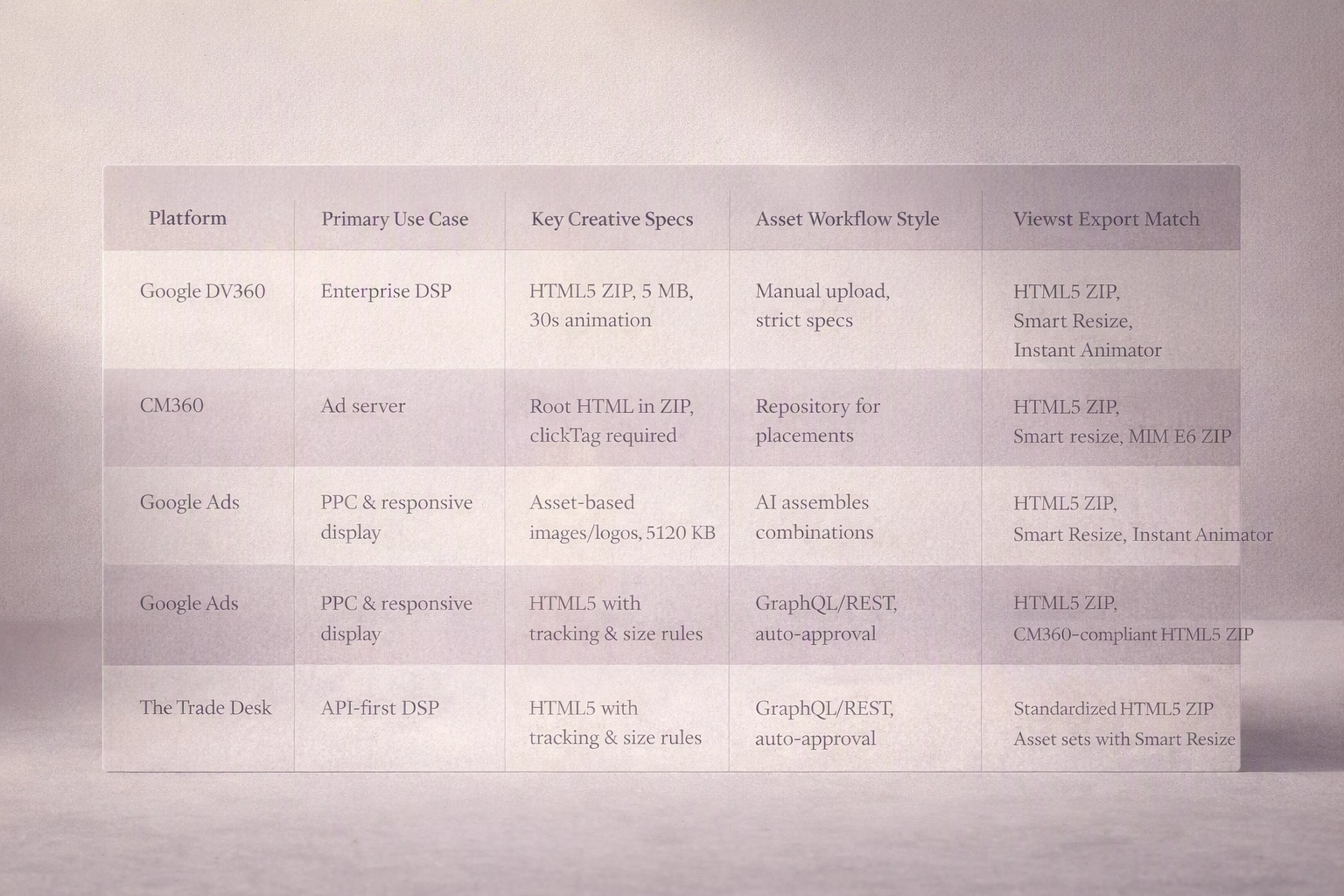
Platform | Primary Use Case | Key Creative Specs | Asset Workflow Style | Viewst Export Match |
|---|---|---|---|---|
Google DV360 | Enterprise programmatic DSP | HTML5 ZIP, max 5 MB, 100 files, 30s animation | Manual creative upload, strict spec compliance | Native HTML5 ZIP, Smart Resize, Instant Animator |
CM360 | Ad server / trafficking hub | Root HTML in ZIP, clickTag required, no nested ZIPs | Creative repository for DV360 and other placements | CM360-compliant HTML5 ZIP, governed click behavior |
Google Ads | PPC & responsive display | Asset-based images/logos, ~5120 KB per image | AI assembles combinations from asset sets | High-quality base images, GIF/MP4, HTML5 for manual display |
The Trade Desk | API-first programmatic DSP | HTML5 display with click tracking & size rules | GraphQL/REST uploads, presigned URLs, auto-approval | Standardized HTML5 ZIP from master creative, API-ready source |
Amazon Ads | Standard display & ecommerce ads | Up to 10 images (standard), 15 images & 20 ASINs (REC/component) | Template & component-based creative, AI optimization | Asset sets aligned to Amazon specs, Smart Resize, brandbooks |
Viewst vs General-Purpose Creative Automation Software
Most creative automation platforms for display advertising focus on template-based design or static image generation. They rarely own the HTML5 production layer end‑to‑end.
Viewst differs in three ways:
HTML5-native ad production
Output is editable HTML5, not just flat images or video.
Designers can adjust layers, animation, and interaction without touching code.
AI for production, not just generation
AI Smart Resize: all required sizes from one master.
AI Image Deflatening: convert flat assets into editable designs.
AI Designer: prompts to structured HTML5 banner sets.
AI Instant Animator: motion applied across layers with one click.
Brand governance at scale
Brandbooks enforce typography, spacing, and color systems.
Locked styles propagate across markets, channels, and teams.
For agencies and in‑house creative operations, this turns Viewst into production infrastructure, not just “another design tool.”
Mapping Viewst Exports to Programmatic and PPC Workflows
1. Programmatic Display (DV360, The Trade Desk, CM360)
Use Viewst as the source of HTML5 truth:
Build master HTML5 banners in Viewst.
Use AI Smart Resize to generate full size sets for each platform.
Export platform-compliant ZIPs and hand off to ad ops.
Keep versioning aligned via synced master creatives.
2. PPC and Asset-Based Display (Google Ads, Amazon)
Treat Viewst as the asset factory:
Design base images, logos, and short motion assets.
Maintain brand-consistent variants for different campaigns and geos.
Export images, GIF/MP4, and lightweight HTML5 where manually-managed display is still needed.
3. Cross-Platform Campaigns (Multi-market, Multi-DSP)
When your campaign spans DV360, The Trade Desk, Amazon, and Google Ads:
Keep one master creative in Viewst.
Use platform-specific export presets (DV360 HTML5, Amazon image sets, Google Ads display).
Maintain brandbooks so local adaptations don’t drift.
Run review and approval inside Viewst, then ship only approved versions to media teams.
This reduces the “spaghetti” of files moving between Figma, After Effects, email, Slack, and DSP UIs. Viewst becomes the single source of production truth.
Practical Recommendations by Use Case
If You’re an Agency Handling Many Accounts
Make Viewst your central banner production studio.
Standardize DV360 and The Trade Desk exports.
Use AI Smart Resize and Instant Animator to avoid burning senior designer time on resizes.
If You’re a Performance Marketing Team Iterating Constantly
Use Viewst to spin up A/B test variants quickly.
Export image and HTML5 versions for Google Ads and DV360.
Keep all versions tied back to one master creative for fast global updates.
If You’re an Enterprise Brand With Strict Governance
Lock brandbooks in Viewst and require all banner work to run through it.
Export compliant assets for CM360, DV360, and Amazon.
Use Viewst’s collaborative review to centralize approvals.
Across these scenarios, Viewst’s promise holds: it fixes what’s broken in banner production — not people.
FAQ: Creative Specs, Programmatic Platforms, and Viewst
What are the most important HTML5 specs to watch for DV360 and CM360?
The critical specs are:
DV360: 5 MB max browser download size, up to 100 files per ZIP, max 30 seconds of animation, limits on cookies and HTTP calls.
CM360: HTML file at the root of the ZIP, at least one clickTag, no nested ZIPs, no local/session storage.
Viewst exports HTML5 ZIPs that respect these constraints by design.
How does Viewst help with The Trade Desk’s API-first creative workflow?
The Trade Desk supports GraphQL/REST creative uploads, presigned URLs, and auto-approval. Viewst acts as the creative source of truth:
Produces standardized HTML5 ZIPs and asset names.
Lets your engineering or ad ops team build API pipelines that pull clean, versioned files from one place.
Can Viewst support responsive and asset-based formats like Google Ads and Amazon?
Yes.
While Google Ads and Amazon generate many sizes from asset sets, they still need high-quality images and logos. Viewst:
Creates brand-consistent image sets and motion assets.
Uses AI Smart Resize to match required aspect ratios.
Lets teams manage variants per product, market, or test cell.
Does Viewst replace Figma or Adobe in the creative stack?
No.
Viewst sits between design and media:
Figma/Adobe remain your ideation and design craft tools.
Viewst imports those designs and handles HTML5 production, scaling, animation, review, and export.
Designers stay designers; Viewst removes the non-creative production work.
How do I decide which Viewst export format to use for a campaign?
Use this rule of thumb:
DV360 / The Trade Desk / CM360 → HTML5 ZIP from Viewst.
Google Ads manual display → HTML5, GIF, or MP4, depending on placement.
Google Ads responsive / Amazon Ads component-based → image sets and lightweight motion assets from Viewst.
Anchor everything to a single master creative so updates and brand changes propagate cleanly.

Dasha is a content and product contributor at Viewst, focused on AI-driven creative production and modern advertising workflows. Her work explores how teams can streamline asset creation, scaling, and deployment using new technologies.
In this article
" height="11.060000000000002px" id="wzBCZ87AK" transform="translate(6.47 2.47)" width="6.590000000000003px"/></g></svg>)