
Creative automation for ads: the short answer
Creative automation for ads uses AI and structured workflows to turn a single idea or master design into hundreds or thousands of ready-to-traffic display and social assets—resized, localized, animated, reviewed, and exported—without designers rebuilding every ad by hand.
AI handles the repetitive production tasks (resizing, layout adaptation, animation, versioning). Human teams stay in charge of concept, visual direction, brand judgment, and approvals. Platforms like Viewst connect creative teams, programmatic buyers, and automated production in one workflow so high-volume campaigns can ship faster without sacrificing quality or control.
This article walks through how that works end-to-end.
Why creative automation for ads is now a necessity
Creative automation has shifted from “nice-to-have” to operational requirement for serious advertising teams.
Recent research shows why:
Adobe found 96% of marketers saw content demand at least double in two years; 62% reported a 5x increase or more.
71% expect content demand to grow more than 5x again by 2027.
99% of large companies are producing more content than two years ago.
At the same time:
Timelines are shrinking: 76% of marketers say production timelines have shortened.
48% of creative teams report they’re struggling to keep up.
CHILI’s Brandwidth research shows 84% of graphic pros have experienced product launch delays due to production bottlenecks.
The pressure is clearest in high-volume display and social campaigns:
More formats (HTML5, static, video, rich media)
More placements (programmatic display, retail media, paid social, app installs)
More variants (offers, audiences, markets, languages)
Faster testing cycles and creative refresh
Manual workflows—resizing each banner, rebuilding each social placement, copy-pasting localized copy—simply don’t scale to this level of demand.
Creative automation solves that by turning one master creative into many governed variants at speed.
End-to-end: how automated ad production workflow actually works
An automated ad production workflow for high-volume campaigns is a content supply chain. It connects:
Strategy and concept
Design and master layout
Resizing and adaptation
Localization and personalisation
Animation and polish
Review and approvals
Export and trafficking
Here’s how that typically runs, step by step.
1. Start with a master creative direction
The automation only works if you have a clear master concept:
Campaign idea, narrative, and key message
Brand rules: type, color, logo usage, tone of voice
Example layouts for key formats (e.g., 1080x1080, 300x250, 728x90)
Where AI fits:
AI can help generate initial layout options from a prompt or rough brief.
It can adapt an existing static design into a structured template.
Where humans stay essential:
Defining the idea and the role of each asset in the campaign.
Judging which concept is on-brand, distinctive, and strategically sound.
Approving the master layout and hierarchy (headline, CTA, imagery).
The goal: one master creative becomes the source of truth for every downstream variant.
2. Turn designs into structured, editable templates
Creative automation platforms for display advertising need structured designs, not flat files.
Typical steps:
Import designs from Figma, Adobe XD, Photoshop, or other tools.
Map layers (logo, image, headline, sub-copy, button) to editable components.
Establish brand systems: fonts, sizes, color tokens, spacing, animation rules.
Where AI fits:
“Image deflatening” can help convert flat images into layered HTML5 structures.
Smart analysis can detect text blocks, logos, and focal points automatically.
Where humans stay essential:
Setting the base grid and layout decisions.
Locking brand elements that should never be altered.
Defining which components are variable (offer, language, price) and which are fixed.
Once your master creative is a structured template, automation can safely generate variants.
3. Automate ad resizing for social platforms and display
Resizing is one of the biggest production bottlenecks.
A single programmatic campaign might call for:
Standard display sizes (300x250, 160x600, 728x90, 300x600)
Retail media placements with custom dimensions
Paid social formats (Feed, Stories, Reels, Carousels, in-stream) across platforms
Research from Amazon Ads shows their standard display creative template can reduce build time by 70% and supports 62 placement sizes, even though a typical campaign only uses about 3.6 sizes. The takeaway: most teams underutilize placements because manual resizing is painful.
Automated resizing workflows typically do:
Apply Smart Resize to adapt the master layout across all required sizes.
Maintain hierarchy: headline prominence, CTA visibility, logo placement.
Reflow copy to avoid overcrowding or awkward breaks.
Where AI fits:
Intelligent layout decisions per size (e.g., shifting elements from horizontal to vertical compositions).
Auto-detection of critical elements to preserve.
Proposals for variant layouts optimized for different placements.
Where humans stay essential:
Reviewing edge cases where small formats risk losing meaning.
Deciding when to simplify or drop elements for tiny banners.
Adjusting designs for platform-specific nuance (e.g., TikTok’s vertical focus, feed vs story behavior).
Result: your team gets complete format coverage in hours, not weeks.
4. Localize banner ads at scale (and keep them on-brand)
High-volume campaigns rarely run in one language or market.
Manual localization means:
New PSD or HTML file per language
Copy-paste translated text into each size
Continuous hand-off between localization, design, and QA
Creative automation platforms for display advertising and social solve localization by:
Treating text layers as data-driven fields.
Connecting localization spreadsheets, translation memory tools, or CMS.
Auto-inserting language variants into every size and format.
Where AI fits:
Suggesting layout adjustments when certain languages expand text (e.g., German vs English).
Flagging potential overflow or readability issues.
Offering draft translations that human linguists can refine.
Where humans stay essential:
Approving final copy for cultural nuance and regulatory compliance.
Checking sensitive markets (financial services, healthcare, government) for accuracy.
Ensuring imagery and messaging respect local expectations.
This is where automation delivers big ROI: CHILI’s Brandwidth research found 52% of businesses are significantly impacted by delays and 49% by increased operational costs due to inefficiencies. Systematized localization helps reduce both.
5. Automate animation for banner ads and social placements
Static creative often isn’t enough in competitive environments.
Automated animation workflows typically:
Apply preset motion patterns to key elements (fade-in headlines, slide-in CTAs).
Respect platform requirements (loop length, file size limits, HTML5 specs).
Generate HTML5 animations and sometimes lightweight video exports.
Where AI fits:
Instant Animator tools can derive motion rules from the master layout.
AI can propose animation sequences aligned with attention patterns (e.g., logo last, CTA after message).
Where humans stay essential:
Deciding motion style that fits the brand (subtle vs high-energy).
Polishing timing and easing so animations feel crafted, not generic.
Ensuring accessibility (avoiding overly aggressive flicker or motion that distracts).
Automation here isn’t about flashy effects. It’s about consistency across hundreds of assets.
6. Connect creative teams with programmatic buyers in one workflow
One of the biggest hidden costs in high-volume campaigns is coordination:
Creative teams build assets.
Performance marketers specify placements, audiences, and tests.
Media buyers or ad ops teams traffic campaigns in DSPs, ad servers, and retail media platforms.
Without a unified workflow, you get:
Long email threads with attachments and version confusion.
Manual export settings and click-tag errors.
Ad scheduling delays while teams hunt for the “final-final” file.
An AI ad production platform for agencies and enterprises can:
Keep campaign, assets, comments, and approvals in one system.
Show animated previews for all sizes and variants.
Track statuses (in progress, under review, approved, shipped).
Export in production-ready formats with correct click tags, naming, and network settings.
Where AI fits:
Suggesting optimal asset sets for each media plan (right mix of sizes and formats).
Checking assets against network specs (file weight, dimensions, HTML5 constraints).
Flagging potential trafficking issues before handover.
Where humans stay essential:
Making strategic decisions about which variants feed which audiences.
Defining creative testing plans (A/B, multivariate, audience-specific messaging).
Approving final asset sets in the context of budget and objectives.
The outcome is a connected pipeline from idea to impression, with fewer handoffs and less rework.
7. Review, approve, and export ads in one workflow
High-volume campaigns live or die by governance.
Integrated review and approval should provide:
Centralized view of all variants: formats, languages, offers, audiences.
Commenting on specific elements within an ad.
Approval gates per brand, legal, and local market.
Where AI fits:
Assisting brand compliance checks against defined rules (logo usage, color limits, tagline presence).
Highlighting differences between versions for faster review.
Auto-generating fallback assets for environments with stricter specs.
Where humans stay essential:
Final sign-off on anything customer-facing.
Situational judgment (e.g., whether a market can run limited-time offers or certain claims).
Ensuring sensitive categories meet internal and external standards.
Once approved, export workflows handle:
HTML5 zips structured for major ad networks.
Static image sets for social and retail media.
Naming conventions and trafficking documentation.
This is where platforms like viewst.com focus heavily: tying production automation to real-world delivery requirements across networks and formats.
Creative automation tools for display advertising: what matters
When evaluating creative automation platforms for display advertising, focus on:
Native HTML5 output with editable layers
Integrated AI across production, not just idea generation
Support for one master creative → many variants
Brand governance: brandbooks, reusable assets, permissions
Connected review and approval workflows
Production-ready export including click tags, file limits, and network presets
These capabilities ensure you’re automating the right part of the process: the repetitive, operational work—not the creative judgment.
Creative automation ROI for advertising teams
What does all of this mean in terms of value?
Independent and vendor data give some guidance:
Forrester’s TEI model (for Adobe’s creative solutions) projected 461% ROI for a $10B enterprise running 300 campaigns and producing 550,000+ assets.
Amazon Ads reports up to 70% reduction in creative build time using standardized templates.
Storyteq cites 60% faster time-to-market for personalized content.
Hunch reports customers saving 250+ hours of manual campaign work and achieving 25% lower CPA with automated DPA creatives.
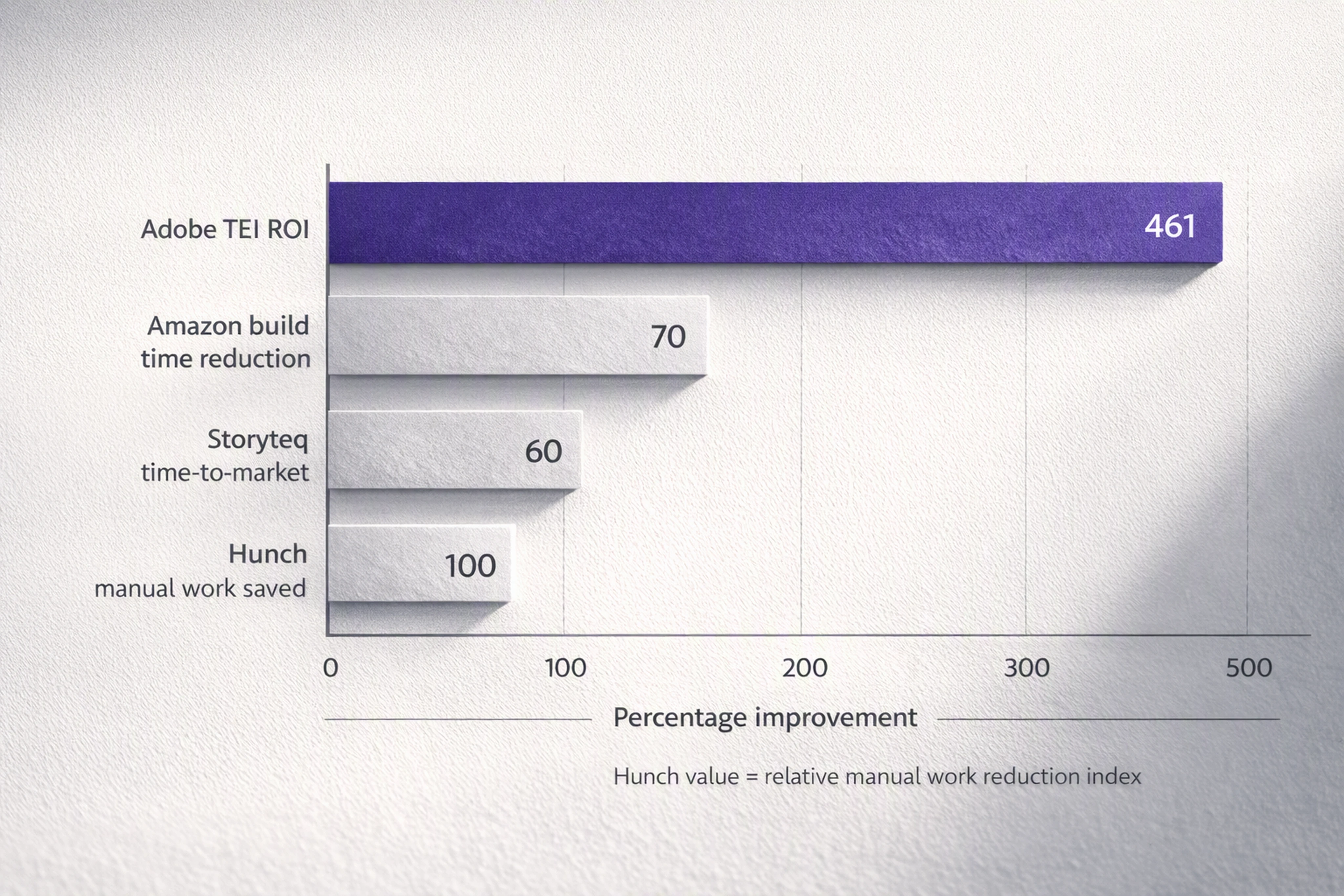
For mid-market and enterprise teams where programmatic display, retail media, and high-volume social are growth-critical, these gains go beyond efficiency:
Faster creative testing loops improve media performance.
More formats and variants increase reach and relevance.
Reduced burnout and workload pressure protect talent (CHILI found 87% of graphic pros had personal issues linked to workload pressure).
Automation is not about doing less creative—it’s about doing more high-quality creative, sustainably.
Which tasks should humans still do in ad production?
AI is now embedded across the creative pipeline—Adobe reports 99% of creative pros use gen AI, and 97% use it across ideation, creation, production, and post-production. But not every task should be automated.
Human teams should retain ownership of:
Concept and strategy: campaign ideas, audience insight, messaging architecture.
Visual and motion direction: look and feel, brand tone, motion language.
Nuanced copy and localization: cultural context, regulatory nuance, generational differences (56% of CHILI respondents doubt AI’s ability to understand these).
Brand and legal approvals: risk assessment and accountability.
Performance optimization decisions: interpreting test results in context of brand and business.
AI and automation are best applied to:
Resizing layouts and generating placement variants.
Structuring master creatives and mapping layers.
Animating elements according to reusable motion systems.
Populating language and offer variants from data sources.
Checking assets against technical and brand rules.
The most effective teams treat AI as a production collaborator, not a creative director.
Ethical AI tools for display ad design
As AI becomes central to creative automation, ethical considerations matter.
Key principles:
Transparency: teams should understand where and how AI is used in the workflow.
Provenance: following emerging standards (like Adobe’s Content Credentials) to disclose AI involvement where relevant.
Brand safety: ensuring AI outputs are governed by brandbooks and approvals, not freeform generation.
Bias and cultural sensitivity: human review for messaging and imagery in sensitive or diverse markets.
Industry guidance, like IAB’s 2026 framework, suggests a risk-based approach to disclosure—focus on material impact rather than blanket labels. In practice, that means:
Keeping humans in control of final creative.
Using AI to accelerate production, not to bypass professional judgment.
FAQ: creative automation for high-volume campaigns
Q1. How does creative automation differ from simple template-based design?
Template-based design usually means fixed layouts with manual editing per asset.
Creative automation platforms use structured templates plus AI to:
Generate dozens or hundreds of variants from one master.
Maintain brand systems across formats, markets, and audiences.
Integrate review, approvals, and export in a single workflow.
You’re not just filling a template—you’re running a governed production system.
Q2. Can AI really handle end-to-end ad production, or is it just a helper?
AI already plays a role across the pipeline:
Ideation and layout proposals
Production tasks (resizing, animation, localization)
Post-production checks (spec compliance, brand rule enforcement)
But end-to-end control still belongs to humans.
The most effective setups use AI for the repetitive, rule-based work, and keep humans on concept, taste, nuance, and approvals.
Q3. How do creative automation platforms integrate with programmatic advertising workflows?
Modern platforms connect directly to how ads are trafficked:
Generate all required sizes and variants for DSPs and ad servers.
Export HTML5 zips, images, and metadata aligned with network specs.
Hand off organized creative sets to media teams with clear naming and documentation.
This reduces trafficking errors, shortens launch timelines, and makes it easier to run multi-market, multi-format campaigns without chaos.
Q4. Will creative automation replace designers in agencies and brand teams?
Evidence suggests the opposite.
CHILI’s research shows nearly half of graphic professionals expect manual production to become obsolete, not design itself. Automation removes the grind—resizing, copy-pasting, repetitive layout tweaks—so designers can focus on:
Inventing new visual systems
Refactoring and improving templates
Crafting motion and interaction
Participating more deeply in strategy and testing
AI handles production burden. Designers retain creative control.
Q5. Where should a team start if they’re new to creative automation?
Practical starting points:
Identify one high-volume campaign with many sizes or languages.
Define a robust master creative and brand rules.
Use a platform that supports structured templates, AI-powered resizing, and HTML5 export.
Measure time saved, error reduction, and testing velocity.
From there, expand automation to more campaigns, markets, and teams, building a repeatable content supply chain for digital advertising.
By understanding where AI fits, which tasks stay human, and how platforms connect creative teams with programmatic buyers, you can turn creative automation into a competitive advantage rather than a buzzword.

Victoria is the CEO at Viewst. She is a serial entrepreneur and startup founder. She worked in Investment Banking for 9 years as international funds sales, trader, and portfolio manager. Then she decided to switch to her own startup. In 2017 Victoria founded Profit Button (a new kind of rich media banners), the project has grown to 8 countries on 3 continents in 2 years. In 2021 she founded Viewst startup. The company now has clients from 43 countries, including the USA, Canada, England, France, Brazil, Kenya, Indonesia, etc.
In this article
" height="11.060000000000002px" id="wzBCZ87AK" transform="translate(6.47 2.47)" width="6.590000000000003px"/></g></svg>)