
Google CM360 vs AI Ad Platforms: Choosing the Right Stack for Scaled Ad Building
When you’re shipping hundreds or thousands of HTML5 banners, the real question isn’t which tool to use — it’s where each tool belongs in your stack.
This article compares:
Google Campaign Manager 360 (CM360)
Classic DCM setups (Studio + Google Web Designer feeding CM360)
Specialized AI ad production platforms like Viewst
We’ll focus on high‑volume banner production, clarify what belongs in ad serving vs ad management vs creative production, and show how to integrate them into one reliable pipeline.
This piece complements our pillar guide, “Ad Builders at Scale: Integrating Google Campaign Manager 360 with AI Ad Platforms”, which dives deeper into step‑by‑step integration patterns.
The Three-Layer Stack for Scaled Display Ad Building
At scale, production chaos usually comes from mixing responsibilities across tools.
The most resilient setups cleanly separate three layers:
Creative production layer – where ads are actually built.
Ad management / serving layer – where ads are trafficked and measured.
Media buying / activation layer – where spend and audiences are controlled.
1. Creative Production Layer
This is where you:
Design the master creative.
Generate all sizes and variants (copy, language, offer, market).
Apply motion, brand rules, and localization.
Run collaboration and approval inside the build.
Viewst sits squarely here:
AI Smart Resize – all required banner sizes from one master.
AI Image Deflatening – turns flat assets into editable HTML5 designs.
AI Designer – prompts into structured, production-ready banners.
AI Instant Animator – one-click motion across layers.
Brandbooks – locked typography, colors, and brand rules at scale.
Native HTML5 / GIF / MP4 export – files ready for CM360 and ad servers.
2. Ad Management / Ad Serving Layer
This is where CM360 is built to shine.
Google defines Campaign Manager 360 as a web-based ad management system for:
Trafficking and placements.
Floodlight configuration and conversion tracking.
Verification and viewability.
Reporting across websites and mobile apps.
It manages campaigns, ads, creatives, placements, sites, and events — not design work.
3. Media Buying / Activation Layer
This is more DV360 territory:
Audience management and segmentation.
Inventory purchase and bid strategies.
Optimization and pacing.
Cross-channel performance monitoring.
Your creative files come from Viewst, your serving setup lives in CM360, and your media decisions sit in DV360.
Why CM360 Is Not a Creative Production Environment
Many teams still try to "produce" inside CM360 — then hit hard limits.
What CM360 Actually Does
CM360 is:
A centralized system of record for campaigns and creatives.
A trafficking and measurement hub with Floodlight and reporting.
The integration point between Studio, DV360, and YouTube.
It is not built for:
Layout design.
Multi-size creative building.
Animation and motion design.
Collaborative review and approvals.
Concrete Production Constraints in CM360
HTML5 display creatives in CM360 must:
Be uploaded as zipped bundles.
Include up to 100 files with a max size of 9.5 MB per creative.
Respect Google Web Designer publishing limits (up to 99 local assets / 10 MB).
Keep image assets under 4000×4000 pixels and 9.5 MB.
These limits are fine for a single build.
They become a bottleneck when you’re:
Rebuilding dozens of sizes per campaign.
Maintaining hundreds of variations across markets.
Trying to tweak motion or copy at the last minute.
Production work doesn’t belong inside CM360 — CM360 is the pipe, not the workshop.
Classic DCM Workflow vs Modern Creative Automation
Most "classic DCM" setups follow the older Google model:
Build creatives in Studio or Google Web Designer.
Publish/push creative shells into CM360.
Use dynamic feeds for personalization at serve time.
Classic DCM + Studio: Strengths and Limits
Strengths:
Good for dynamic creative optimization (DCO).
Serve-time personalization via feeds and profiles.
Integration with CM360 reporting.
Limitations for high-volume production:
One creative shell per ad size – multiplies build work.
Manual layout and resizing for each format.
Limited cross-team workflow for approvals.
Studio/CM360 roadmap increasingly focused on plumbing, not production.
Google’s own updates reinforce this direction:
Creative Projects removed from CM360 after Ads Creative Studio sunset.
Legacy creative-level third-party URL fields deprecated in favor of Event Tags.
New self-serve pixel workflows emphasize measurement, not creative.
Modern Creative Automation Platforms: Where Viewst Fits
Creative automation platforms like Viewst shift the focus from "build each size" to "govern variation at scale".
Viewst is designed to:
Treat master creative as the single source of truth.
Propagate changes across all sizes and variants instantly.
Enforce brandbooks across teams and markets.
Keep collaboration and approvals inside the production environment.
Where traditional tools give you more canvases, Viewst gives you one governed system for all HTML5 display output.
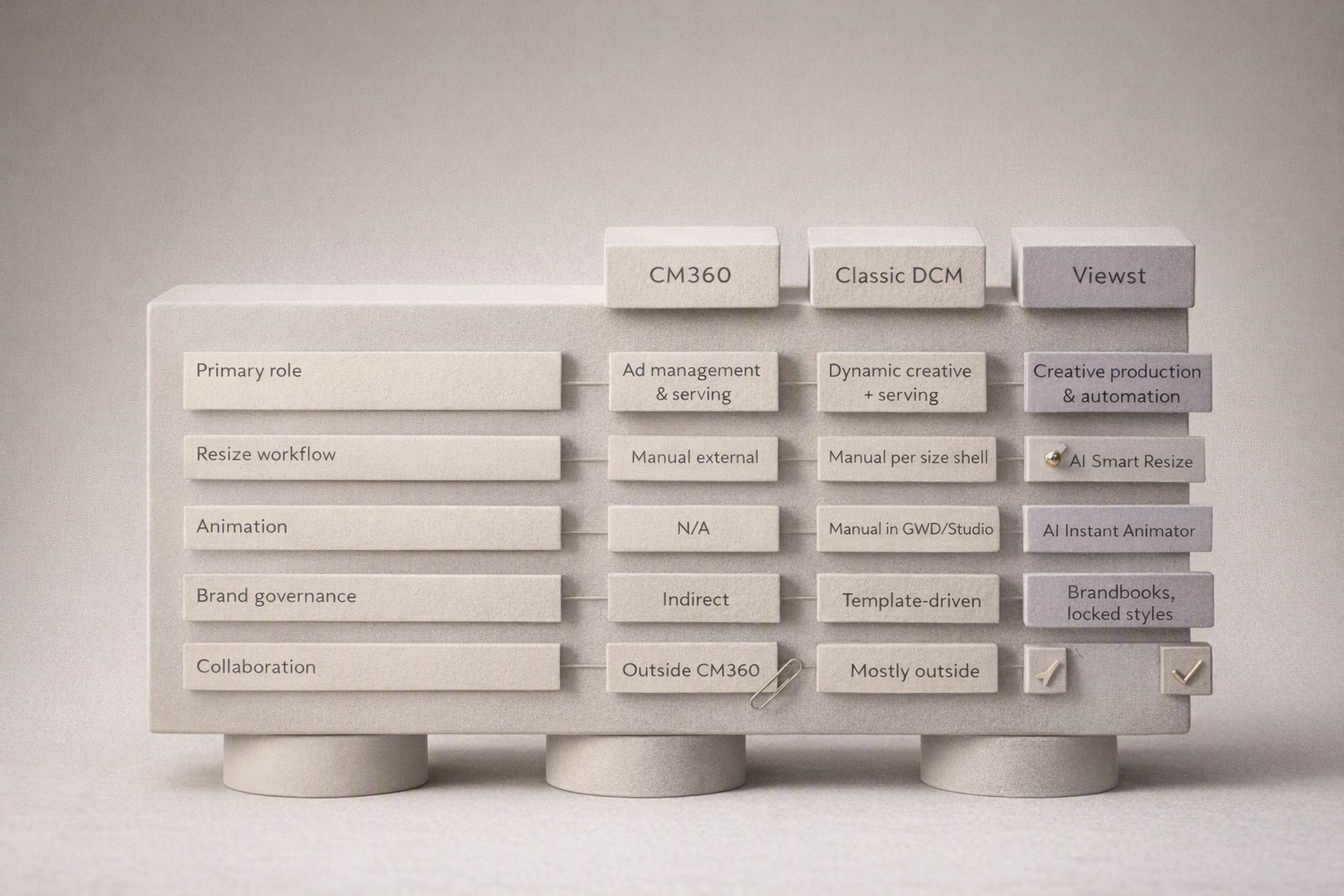
CM360 vs Viewst vs Classic DCM: Side-by-Side Comparison
Here’s how the main options stack up for high-volume banner work.
Key Criteria That Matter at Scale
For Heads of Creative, Creative Ops leaders, and performance teams, the decisive criteria are:
Speed-to-market for new campaigns.
Volume handling (sizes × variants × markets).
Brand control and governance.
Collaboration and approvals.
Integration with existing ad servers and DSPs.
Comparison Table
| Criteria | CM360 | Classic DCM (Studio + GWD + CM360) | Viewst (AI HTML5 production) |
|---------|-------|--------------------------------------|-------------------------------|
| Primary role | Ad management & serving | Dynamic creative + serving | Creative production & automation |
| Design tools | None (upload only) | Studio / GWD | Native HTML5 WYSIWYG editor |
| Resize workflow | Manual in external tools | Manual per size shell | AI Smart Resize from one master |
| Animation | N/A | Manual in GWD/Studio | AI Instant Animator across layers |
| Dynamic content (DCO) | Via Studio profiles/feeds | Strong, shell-per-size | Integrates with CM360 DCO; output-ready HTML5 |
| Brand governance | Indirect (naming, policies) | Template-driven | Brandbooks, locked styles, synced updates |
| Collaboration & approval | Outside CM360 | Mostly outside, via docs/email | In-editor comments, previews, approvals |
| File limits | 100 files / 9.5 MB per creative | Same CM360 limits | Optimized HTML5 exports for CM360/DV360 |
| Best use case | Central trafficking & reporting | Dynamic personalization with moderate volume | High-volume, multi-market banner production |
Real-World Performance and AI Adoption Data
To understand why the stack split matters, look at what’s happening in the market.
Time and Output Gains from Integrated Stacks
Google’s Mondelēz case study (using CM360 + Studio + DV360) reported:
25% less time spent on creative production and management.
40% more clicks vs standard display ads to ecommerce.
254 dynamic ad variations deployed in 4× less time.
That’s with a relatively traditional Google-first stack.
A specialized production layer like Viewst is designed to push those gains further for:
Even higher volumes.
More complex brand governance.
Multi-market adaptation at scale.
AI Is Becoming the Norm, Not the Edge Case
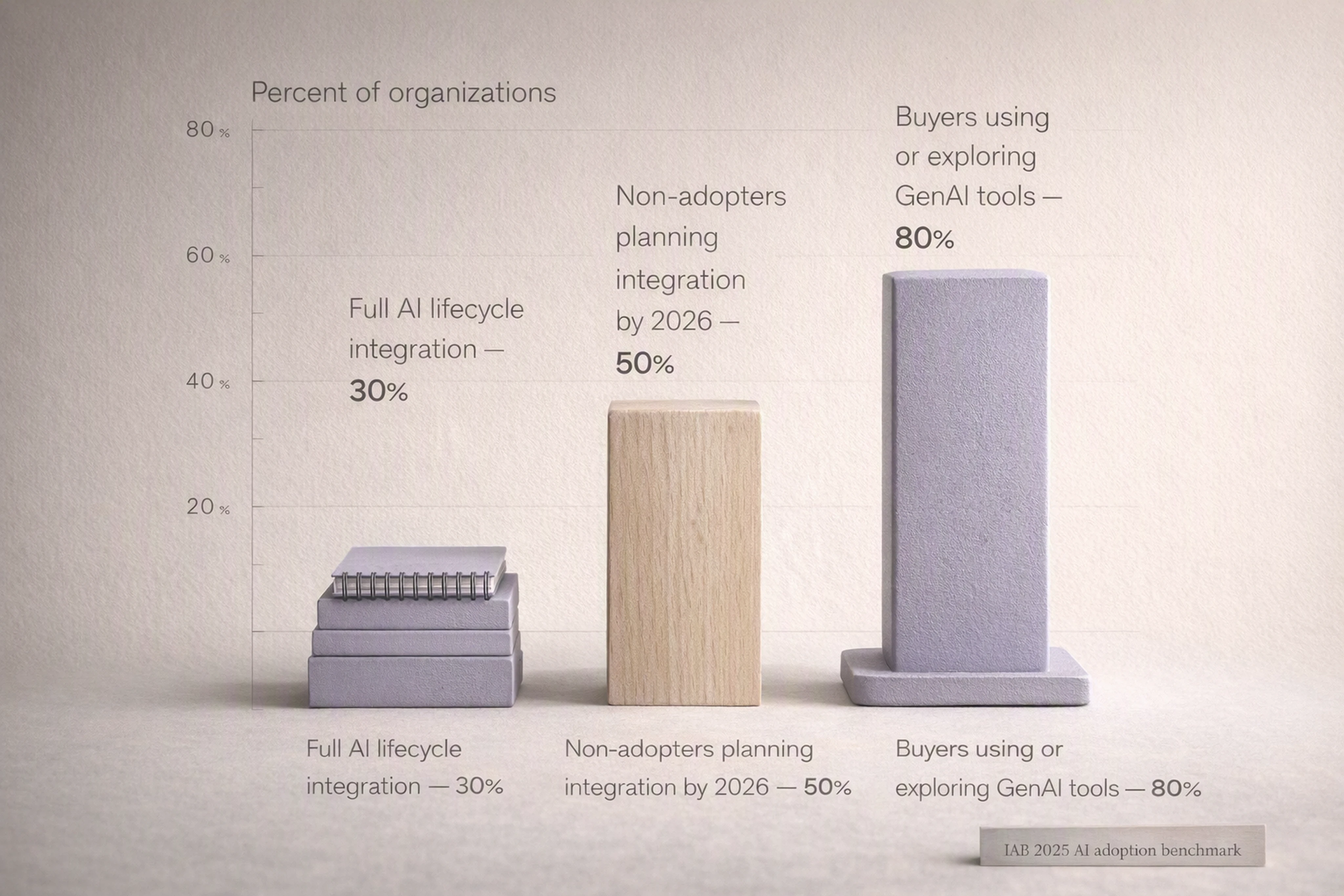
The IAB 2025 AI adoption benchmark found:
Only 30% of agencies, brands, and publishers had fully integrated AI across the media campaign lifecycle.
50% of those not yet integrated expected to do so by 2026.
80% of buyers were using or exploring GenAI tools for media planning and activation.
For creative teams, this means:
AI for production (resizes, exports, basic motion) is becoming a competitive necessity.
Tools like Viewst align with the industry’s shift toward AI-assisted, governed workflows rather than ad hoc GenAI experiments.
What Belongs in CM360 vs Viewst vs DV360
To avoid workflow confusion, assign tasks clearly.
Tasks That Belong in CM360 (Ad Management / Serving)
Use CM360 for:
Campaign setup: advertisers, campaigns, placements, sites.
Creative assignment: mapping uploaded HTML5 assets to ads and placements.
Trafficking: click trackers, tracking ads, tagging.
Floodlight & event tracking: conversions, attribution.
Verification & reporting: viewability, reach, frequency, performance.
Dynamic logic at serve time: via Studio profiles and feeds.
CM360 is your system of record and measurement backbone.
Tasks That Belong in Viewst (Creative Production Layer)
Use Viewst for:
Designing the master creative for each campaign.
AI Smart Resize to generate all required HTML5 banner sizes.
Creating variants: offers, messages, languages, seasonal updates.
Animating banners with AI Instant Animator.
Importing from Figma/Adobe and turning static layouts into live HTML5.
Applying brandbooks so fonts, colors, and spacing are governed.
Collaborative review and approvals within the creative set.
Exporting native HTML5 / GIF / MP4 ready for CM360 upload.
Viewst is your production infrastructure — it fixes what’s broken in banner production, not people.
Tasks That Belong in DV360 (Media Buying / Activation)
Use DV360 for:
Audience building and segmentation.
Inventory selection (exchanges, private marketplaces, YouTube inventory).
Bid strategies and budget allocation.
Optimization based on CM360 and platform-level signals.
DV360 is where you decide who sees your ads, where, and at what cost.
How to Integrate Viewst with CM360 for High-Volume HTML5 Campaigns
Once you split responsibilities, integration becomes straightforward.
Step-by-Step Integration Pattern
Design in Viewst
Build your master creative.
Use AI Smart Resize to generate all required IAB and custom sizes.
Apply animation and brandbooks to ensure consistency.
Export Production-Ready HTML5 From Viewst
Export as zipped HTML5 bundles, optimized for CM360’s file and size limits.
Keep naming conventions aligned with your CM360 schema (campaign, market, version).
Upload and Traffick in CM360
Upload each zip as an HTML5 creative.
Attach creatives to the appropriate ads and placements.
Configure Floodlight tags and event tracking.
Connect to DV360 for Activation
Use CM360 as the creative and tracking source.
Activate campaigns and audiences in DV360.
Optimize spend and bids based on CM360’s reporting.
Iterate Creatives in Viewst Without Breaking Trafficking
Make updates to master creative (copy, price, legal, brand tweaks) in Viewst.
Re-export updated HTML5 with the same or versioned creative IDs.
Re-upload into CM360 and keep placements intact.
This pattern keeps production agility high while preserving operational rigor in trafficking and measurement.
Recommendations by Use Case
1. High-Volume Banner Production Across Multiple Markets
Scenario: You run frequent campaigns across 10+ markets, each needing multiple sizes, languages, and offers.
Recommended stack:
Viewst as the creative production layer.
CM360 as the trafficking and measurement layer.
DV360 for media buying.
Why:
Viewst handles volume, variation, and brand governance.
CM360 and DV360 provide enterprise-grade tracking and buying.
2. Dynamic Creative Optimization (DCO) with Moderate Volume
Scenario: Complex personalization logic, but limited number of base creatives.
Recommended stack:
Viewst to produce base creative shells and variants.
Studio + CM360 to handle dynamic feeds and profiles.
DV360 for activation.
Why:
Studio is still strong for serve-time swaps.
Viewst reduces production overhead on the base creative assets.
3. Single-Market, Low-Volume Display
Scenario: A few campaigns per quarter, limited formats.
Recommended stack:
Figma/Adobe for design.
Google Web Designer for simple HTML5 builds.
CM360 + DV360 for trafficking and media.
Why:
Volume doesn’t justify a full production platform yet.
As volume and complexity grow, migrating to Viewst becomes attractive.
FAQ: CM360 vs AI Ad Platforms for Scaled Ad Building
1. Should I use CM360 to build my HTML5 banners?
No.
CM360 is an ad management and serving platform, not a creative studio. You should build banners in a creative production tool (e.g., Viewst) and upload the finished HTML5 bundles into CM360 for trafficking.
2. What’s the difference between a creative management platform and an ad server?
A creative management or production platform (like Viewst) focuses on:
Designing and resizing creatives.
Handling motion and layout.
Governing brand consistency.
Managing collaboration and approvals.
An ad server (like CM360) focuses on:
Serving ads to users.
Managing campaigns, placements, and tags.
Tracking impressions, clicks, and conversions.
You need both for scaled display advertising.
3. How does Viewst integrate with CM360 workflows?
Viewst outputs native HTML5, GIF, and MP4 assets that can be uploaded directly into CM360.
Once exported:
Upload zipped HTML5 banners as creatives into CM360.
Attach to ads and placements as usual.
Continue to iterate in Viewst and replace or version creatives in CM360.
Viewst effectively becomes your production studio feeding CM360.
4. Is AI safe to use for enterprise brand creative?
Used correctly, yes.
Viewst’s approach is ethical and brand-governed:
AI focuses on mechanical tasks (resizing, animation, deflatening) rather than creative judgment.
Brandbooks and locked styles ensure consistency and control.
Designers stay in charge of the creative direction; AI removes the repetitive work.
5. When should a mid-market brand invest in a platform like Viewst?
Signals that it’s time:
Designers spend more time on formats than on ideas.
You’re running multi-market or multi-language campaigns.
Review cycles across email, decks, and screenshots are slowing launches.
You’re already investing heavily in paid media and need to scale creative without growing headcount.
At that point, Viewst becomes critical production infrastructure, not just another tool.
If you’re ready to move from “just get the banners out” to governed, high-volume production, Viewst plus CM360 gives you a stack where:
Creatives are fast and consistent.
Trafficking is clean and measurable.
Media activation can finally keep up with your ideas.

Victoria is the CEO at Viewst. She is a serial entrepreneur and startup founder. She worked in Investment Banking for 9 years as international funds sales, trader, and portfolio manager. Then she decided to switch to her own startup. In 2017 Victoria founded Profit Button (a new kind of rich media banners), the project has grown to 8 countries on 3 continents in 2 years. In 2021 she founded Viewst startup. The company now has clients from 43 countries, including the USA, Canada, England, France, Brazil, Kenya, Indonesia, etc.
In this article
" height="11.060000000000002px" id="wzBCZ87AK" transform="translate(6.47 2.47)" width="6.590000000000003px"/></g></svg>)