
For quick, simple banners, Canva’s 24/7 banner maker is usually enough. For high-volume, HTML5 ad production with strict deadlines, Viewst is purpose-built to handle the workload.
This guide compares Canva vs Viewst specifically for teams producing display and HTML5 banners at scale—agencies, in-house creative teams, and performance marketing orgs.
Who each platform is really for
Choose Canva if:
You need fast, simple banners (static or lightly animated)
Your team is small and doesn’t depend on HTML5 ads
You’re comfortable exporting PNG/JPG/MP4 and handing off to others
Brand and review processes are important, but not ad-specific
Choose Viewst if:
You run continuous, high-volume campaigns where display is business-critical
You need native HTML5 export for ad networks and programmatic
You manage many sizes, markets, and languages from one master creative
You care about governance, creative control, and workflow as much as design
If your team is feeling the pressure of “more formats, more variants, faster,” Viewst is the tool designed for that reality.
The criteria that actually decide Canva vs Viewst
For serious banner/ad production work, these are the criteria that matter most:
Support quality & availability (including “24/7” reality)
Export & HTML5 readiness
Animation control for ads
Resizing, versioning & localization at scale
Governance, brand control & approvals
AI & automation for production (not just design)
Fit for enterprise ad workflows & stack
Total cost of production (not just license cost)
We’ll walk through each, then summarize with recommendations and alternatives.
Canva vs Viewst at a glance
Criterion | Canva | Viewst |
|---|---|---|
Primary fit | General design & quick banner creation for individuals/SMBs. | Dedicated AI ad production platform for teams scaling display campaigns. |
Export/output | Commonly exports PNG, JPG, MP4, GIF, PDF. HTML export is geared more toward email & web design than banner ad tags. | Native HTML5 export with structured, editable layers; also MP4/GIF/PNG/JPG for ad networks. |
Animation control | Simple page/element animations for social & presentations; limited ad-specific controls. | 82+ built-in animations, animation editor, Instant Animator tuned for HTML5 ad behavior. |
Resizing/versioning | Magic Resize + templates; still design-first, per-file workflows. | Smart Resize, multi-size creatives, ad-set sync, bulk generation from feeds/CSV. Built for ad-set production. |
Governance | Brand Kits, approvals, org permissions, SSO, SCIM; strong but generic. | Brandbooks, roles, statuses, deadlines, review links, SSO; ad-specific governance baked into workflows. |
Support | Help Center, AI assistant, tickets, and enterprise support; large self-serve ecosystem. | Direct email/phone, help center, enterprise manager; reviews highlight hands-on setup support. |
AI & automation focus | AI mostly for design assistance (copy, layouts, image generation). | AI focused on production acceleration: AI Designer, Smart Resize, Image Deflatening, Instant Animator. |
HTML5 ad maturity | Not positioned as HTML5 ad builder; banner docs emphasize flat exports. | Marketed as HTML5 ad builder and production infrastructure; claims up to 20x faster workflows (vendor data). |
Best for | Teams that need versatile design + occasional banners. | Teams where digital ad production is continuous, high-volume, and business-critical. |
1. Support quality & “24/7” reliability
When campaigns run in always-on channels, you need tools that don’t stall production.
Canva support & availability
Canva is a massive platform with 7,700+ G2 reviews (4.7/5). That scale brings:
A large Help Center and tutorials
An AI-powered assistant for in-app help
Ticket-based support and enterprise services on higher tiers
It’s built as an always-available, self-serve tool. For basic banners, that’s usually enough.
Viewst support & availability
Viewst is a smaller, specialist vendor, but its support posture is more hands-on:
Direct email/phone contact on the site
Working-hours support with real people
A public help center focused on ad production tasks
G2 reviews (also 4.7/5) that explicitly praise support during setup
For mid-market and enterprise teams, the trade-off is clear:
Canva offers scale and self-serve speed
Viewst offers specialist support for ad production problems
If your biggest risk is “no one knows how to fix this HTML5 export at 4 p.m. on launch day,” Viewst’s specialist support is often worth it.
2. Export & HTML5 readiness
This is the biggest practical difference for serious ad production.
Canva export capabilities
Canva’s banner docs emphasize:
PNG, JPG for static placements
MP4/GIF for animated posts and simple ads
PDF for print or decks
Canva has HTML-related export options, but available docs focus on emails and web pages, not ad tags. For most ad networks, that means:
You’ll need another tool or partner for proper HTML5 ad builds
Designers often hand off flat assets to media or dev teams to convert
Viewst export capabilities
Viewst is positioned around production-ready output:
Native HTML5 export with structured, editable layers
Prepares creative for real advertising environments:
File size limits
Click tags
Fallback assets
Network-specific settings
Also exports MP4/GIF and PNG/JPG for social and non-HTML placements
For teams already spending heavily on programmatic and retail media, this difference is decisive.
If your media plan includes rich media placements, Viewst’s HTML5 export is a core reason to upgrade.
3. Animation control for HTML5 ads
Static banners still matter, but performance teams increasingly rely on motion.
Animation in Canva
Canva’s animation is designed for simplicity:
Page-level animations (entrance/exit)
Element/text animations
Control over duration and basic style
It’s ideal for social posts, short videos, and presentations. But it lacks:
Deep timeline control for HTML5 behavior
Fine-grained interaction with ad specs per network
Animation in Viewst
Viewst treats animation as a production discipline:
82+ built-in animations tuned for banner behavior
Animation editor for timing and sequencing
Instant Animator to apply motion quickly across formats
Because output is native HTML5, every animated element remains:
Accessible and editable later
Adjustable for performance or brand reasons
You still keep creative control; Viewst’s AI just handles the repetitive animation wiring.
4. Resizing, versioning & localization at scale
This is where “design tool” vs “production system” matters most.
Canva: Magic Resize for simple workflows
Canva offers Magic Resize, which is useful when you:
Repurpose a design across a few sizes or channels
Need quick, one-off adaptations
However, production remains file-centric:
Each resized banner is essentially its own design
Changes must be managed across multiple versions
Localization and offer swapping can get manual fast
Viewst: one master creative, many outputs
Viewst is built around the idea of one master creative:
Approve one core direction
Adapt it across sizes, placements, languages, offers, markets
Use Smart Resize and multi-size creatives to keep everything in sync
It also supports bulk generation from feeds/CSV, which matters when:
You localize for many markets
You run structured creative testing for performance
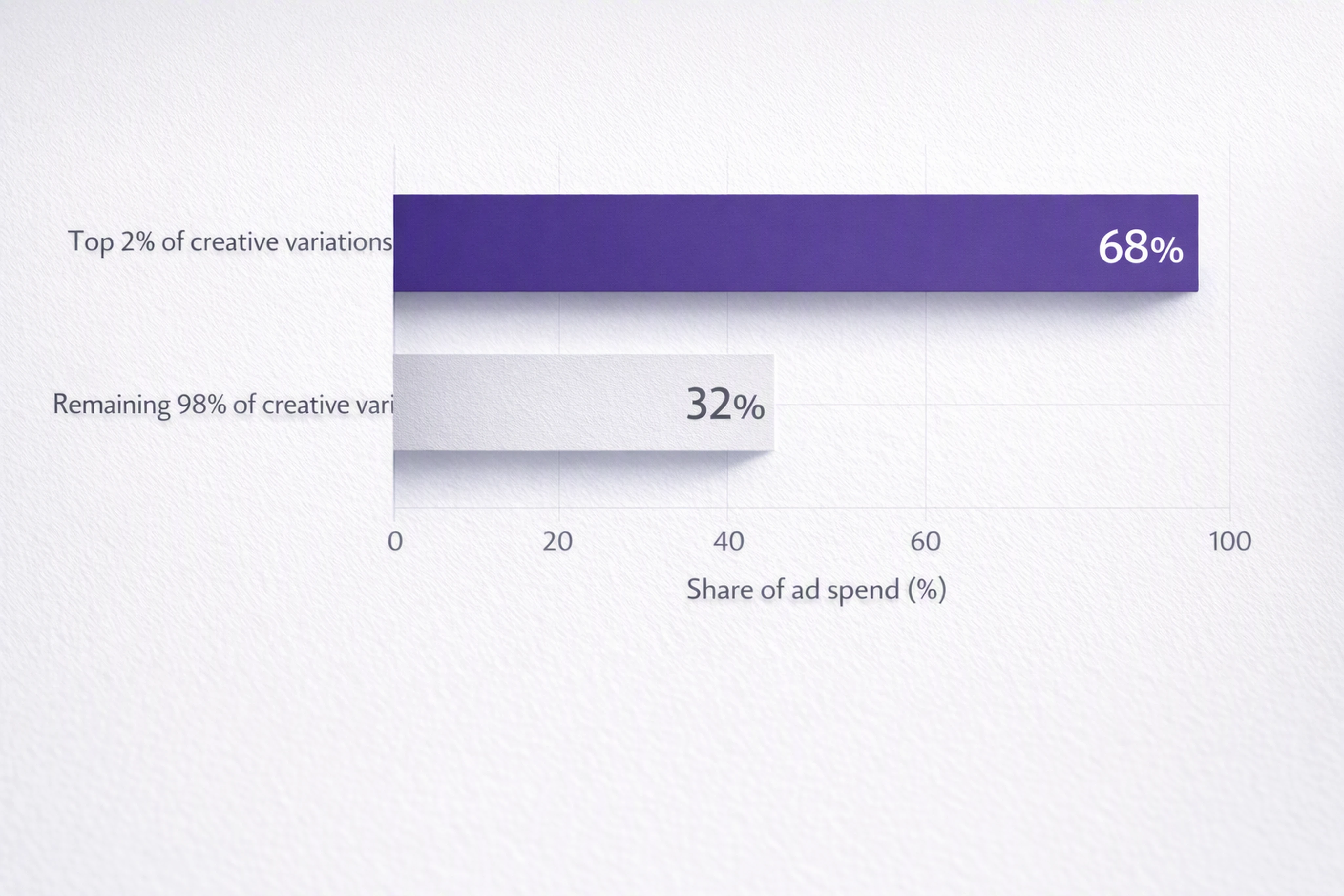
This aligns with industry reality: AppsFlyer found the top 2% of creative variations consume 68% of ad spend. You don’t need every possible variation—you need a production system that can spin up and iterate on the high-performing ones quickly.
5. Governance, brand control & approvals
Both tools take governance seriously, but they solve different problems.
Canva governance
On enterprise plans, Canva provides:
Brand Kits for colors, logos, fonts
Design approval workflows
Org-level permissions, SSO, SCIM
Data residency options
For general marketing and brand design, that’s robust. But approvals are design-agnostic—they’re not modeled around ad sets, campaigns, or placements.
Viewst governance
Viewst bakes governance into ad production concepts:
Brandbooks and reusable asset libraries
Roles and permissions tied to creative and campaign workflows
Status/deadline tracking within the production pipeline
Animated previews, shareable review links, approvals that map to campaigns
For creative ops and production leads, this is the difference between “Can we keep templates consistent?” and “Can we trust every ad variant shipping to a network?”
6. AI & automation for production (not just design)
AI adoption is now mainstream: McKinsey reports 65% of organizations use gen AI regularly and overall AI adoption has reached 72%. The question is no longer “AI or not?” but “Where in the workflow does AI live?”
Canva’s AI focus
Canva’s AI centers on creative assistance:
Generating copy, images, layouts
Suggesting design variants
Helping non-designers create visual content
This democratizes design, but it doesn’t deeply model ad production constraints.
Viewst’s AI focus
Viewst’s AI is designed for production acceleration:
AI Designer: go from prompt or existing design to ad-ready layouts
Smart Resize: adapt master creative across sizes automatically
Image Deflatening: separate flattened assets into structured layers
Instant Animator: add motion across a set of banners quickly
The result: Viewst claims workflows can be up to 20x faster than traditional methods (vendor-reported). Even if your mileage varies, the direction is clear—AI is applied where creative teams feel the most repetitive pressure.
7. Fit for enterprise ad workflows & stack
The market context is pushing teams toward specialized production systems:
U.S. digital ad revenue hit $258.6B in 2024, up 14.9% YoY (IAB/PwC)
Adobe reports 83% of decision makers saw workload changes in the past year and 3 in 4 plan to invest in tools/software
Teams can’t just add headcount every time media spend grows. They need infrastructure.
Canva in the enterprise
Canva fits well when:
You want a central design solution for many content types
You have a mix of designers and non-designers
Banners are one of many outputs—not the core of the business
It plays nicely alongside tools like Adobe Creative Cloud, Google Drive, and Slack.
Viewst in the enterprise
Viewst fits when:
Display, programmatic, and retail media are key growth channels
You run campaigns across regions, brands, and product lines
You already invest in Adobe, media platforms, and performance teams
Viewst is not a replacement for design software like Photoshop or Illustrator. It’s the production layer that takes finished ideas and turns them into campaign-ready ad sets.
8. Total cost of production
Licensing is only part of the cost. The bigger line items:
Designer hours spent on resizing and localization
Delays from inconsistent specs or rework
Errors that slip into live campaigns
Adobe’s 2024 State of Creativity report notes that 78% of employees see improved work efficiency from emerging tech, and 3 in 4 organizations are actively investing in tools to handle workload changes.
This reinforces a key point: the “cheapest” tool per seat isn’t always the cheapest way to produce ads when you factor in the cost of manual production.
If your team spends dozens of hours per month on repetitive banner work, a platform like Viewst can pay for itself via time saved and fewer launch issues.
When should a team upgrade from Canva to Viewst?
You don’t need Viewst for every banner. But you probably do when some (or all) of these are true:
You regularly deliver 10+ sizes per campaign
You run ongoing campaigns with frequent offer/price changes
You localize into multiple languages or markets
Your media team needs HTML5 tags, not just flat files
You’re under pressure to test more creative without hiring more designers
In that context, Canva remains useful for social assets and general marketing collateral, while Viewst becomes the core infrastructure for display and HTML5 ad production.
Other creative automation platforms to consider
If you’re weighing Canva vs Viewst, you might also look at:
Smartly.io – Strong for paid social and creative optimization tied directly to media buying; excellent for performance marketers but less focused on HTML5 display.
Celtra – Longstanding creative automation platform for enterprises; strong in brand governance and dynamic creative, particularly for large advertisers.
Storyteq – Focused on scaling video and display templates, with a strong angle on localization and content for global brands.
Adobe Express – Simpler than full Creative Cloud; good for quick social and marketing visuals, similar to Canva in spirit.
These tools sit closer to Viewst’s world—production systems for advertising, not just design apps.
Practical recommendations
If you’re a small team or startup:
Use Canva for quick banners, social ads, and one-off campaigns.
Introduce Viewst later when HTML5 and volume become pain points.
If you’re a mid-market in-house creative or growth team:
Keep Canva (or similar) for general design work.
Add Viewst as your ad production hub for display and programmatic.
If you’re a creative or media agency:
Use Viewst to standardize client ad production across accounts.
Use Canva/Adobe Express for fast storyboards, mockups, or non-ad collateral.
If HTML5 is core to your media plan today:
Go straight to Viewst or a peer platform (Celtra, Smartly.io, Storyteq) and treat Canva as a secondary design resource, not your primary ad builder.
FAQ: Choosing between Canva and Viewst for banner/ad production
1. Can Canva export HTML5 banners for ad networks?
Canva can produce web-ready assets, but its public docs emphasize PNG, JPG, GIF, MP4, and PDF outputs for banners. Its HTML export is more aligned with emails and page layouts, not structured HTML5 ad tags. For most display networks, you’ll still need another tool or partner to create compliant HTML5 ads.
2. Do I need Viewst if I already use Canva and Adobe Creative Cloud?
If your banner production volume is low and static, you might not. But if you:
Produce many sizes and variants per campaign
Need HTML5 output
Localize and iterate constantly
then Viewst becomes the production infrastructure layer that your existing design tools feed into. It doesn’t replace Photoshop or Illustrator; it complements them.
3. How does Viewst handle brand consistency across markets?
Viewst uses Brandbooks, asset libraries, and controlled styles to enforce fonts, colors, and layouts across teams and markets. Combined with statuses, permissions, and review workflows, this ensures localized or variant ads stay on brand while still adapting to local needs.
4. Is Canva better for non-designers than Viewst?
Yes. Canva is built to be accessible for non-designers creating a wide range of content. Viewst is designed for professional creative and advertising teams—designers, creative producers, and campaign managers who already work with structured campaigns and media plans.
5. Where does AI make the biggest difference in Viewst vs Canva?
In Canva, AI accelerates ideation and design creation (copy, imagery, layouts).
In Viewst, AI accelerates production: converting designs into HTML5, resizing, animating, versioning, and localizing.
If your bottleneck is “we can’t design enough ideas,” Canva’s AI helps. If your bottleneck is “we can’t produce all the required ad versions and HTML5 tags,” Viewst’s AI is the better fit.
For teams where digital ad production is mission-critical, Canva and Viewst are not either/or. Canva is the always-on sketchbook and banner maker. Viewst is the production infrastructure that turns approved ideas into finished, editable, animated, ad-ready campaigns at scale.

Victoria is the CEO at Viewst. She is a serial entrepreneur and startup founder. She worked in Investment Banking for 9 years as international funds sales, trader, and portfolio manager. Then she decided to switch to her own startup. In 2017 Victoria founded Profit Button (a new kind of rich media banners), the project has grown to 8 countries on 3 continents in 2 years. In 2021 she founded Viewst startup. The company now has clients from 43 countries, including the USA, Canada, England, France, Brazil, Kenya, Indonesia, etc.
In this article
" height="11.060000000000002px" id="wzBCZ87AK" transform="translate(6.47 2.47)" width="6.590000000000003px"/></g></svg>)