
Why Shift Banner Production In‑House (Without Burning Out Your Designers)
Bringing banner ad production in‑house can cut costs, increase speed, and tighten brand control.
ANA data shows in‑house is now a hybrid model: 92% of brands still use agencies, but in‑house teams handle about 61% of all work. Cost efficiency is the top reported benefit.
The risk: production work can quietly crush your creative team.
Monotype reports 57% of creative teams spend more than a quarter of their time on non‑creative tasks, and the Never Not Creative survey found 70% of people in media, marketing, and creative roles experienced burnout in the last year.
This guide walks through a practical, step‑by‑step plan to move banner production from external agencies into an in‑house setup using an HTML5 ad production platform like Viewst — without sacrificing creative quality or your team’s sanity.
For a broader strategy overview, see the pillar article “Ad Production Platforms for In‑House Marketing vs Agencies: A Complete In‑Housing Guide.” This tutorial focuses on the how.
Prerequisites: What You Need Before You Start
Before you launch an in‑housing project, make sure these basics are covered:
Defined scope
Start with display and HTML5 banners across key markets.
Keep video, complex rich media, and flagship brand campaigns with agencies initially.
Core tooling in place
A creative automation platform for display advertising (e.g., Viewst).
Existing design stack (Figma, Adobe) aligned with your brand system.
Access to ad platforms (Google Ads / DV360, retail media, social).
Operational owner
A single accountable lead (Head of Creative Ops, Design Director, or Production Lead).
Empowered to set rules, negotiate with agencies, and enforce SLAs.
Baseline metrics
Current average production time per banner set.
External spend on banner production (agency fees, studios, freelancers).
Error rates (QA fails, ad‑server rejections, off‑brand incidents).
Step 1: Align Stakeholders Around a Hybrid In‑House Model
The first step is alignment.
You’re not “firing agencies”; you’re moving high‑volume, repeatable banner production into an in‑house engine, then using agencies for concepting, major campaigns, and specialized work.
1.1 Map the stakeholder landscape
Identify who needs to be involved:
Creative & design
Heads of Creative / Design Directors
Senior designers, art directors
Marketing & performance
Performance marketing managers, growth leads
Brand managers and regional marketing leads
Media & ad ops
Ad operations specialists
Media agency contacts
Leadership & finance
CMO / VP Marketing
Finance or procurement for cost tracking
1.2 Define the “why” in business terms
Use clear, factual statements stakeholders can rally behind:
Cost savings
ANA reports 65% of brands have shifted work in‑house in the last three years, with cost efficiency as the top benefit.
Speed‑to‑market
IAB reports U.S. digital ad revenue at $258.6B in 2024, with display at $74.3B.
Faster banner production lets you capture more of that opportunity with timely campaigns.
Brand control & AI governance
Over 70% of marketers have already encountered AI‑related incidents like off‑brand content.
Locked brandbooks and governed templates reduce that risk.
1.3 Set a shared success definition
Agree on 3–5 measurable outcomes for the first 6–12 months:
Reduce average banner production time by 50–80%.
Cut external banner production spend by 30–50%.
Decrease QA failures and ad‑server rejections by at least 50%.
Maintain or improve CTR / conversion on in‑house banners.
Document this in a one‑page In‑House Banner Production Charter and circulate for sign‑off.
Step 2: Redesign the Banner Production Workflow
The main bottleneck in banner production is process, not talent.
Adobe describes creative operations as bringing "structure, process, and measurement" to creative work. McKinsey talks about hybrid human–agentic workforces where people design systems that handle repetitive tasks.
Your goal: move from manual file production to a governed, platform‑driven workflow.
2.1 Map your current state
Run a quick “current workflow” audit:
How are briefs delivered? (email, forms, chat)
Where is master creative designed? (Figma, Photoshop, Illustrator)
How are sizes and variants produced? (manual resize, copy‑paste layers)
How is review done? (screenshots in decks, email threads, chat)
How is export and trafficking handled? (manual ZIPs, ad‑server templates)
List every step from brief to live ad. Highlight where work is:
Repetitive (resizing, versioning)
Error‑prone (hand‑built HTML5, weight/format issues)
Scattered (feedback in 5 different tools)
2.2 Design the future state with an HTML5 ad production platform
Introduce a platform like Viewst between design and media.
In the target workflow:
Brief intake
Marketing submits a structured banner brief (objective, audience, messaging, required formats, markets).
Master creative design
Design creates a single master creative in Figma/Adobe or directly in Viewst.
Master import & setup
Import into Viewst as live, editable HTML5.
Apply brandbook: fonts, colors, spacing, logo rules locked at the platform level.
Automated scaling & variation
Use AI Smart Resize for all required sizes from one master.
Use AI Instant Animator for one‑click motion across layers.
Use AI Image Deflatening if you need to turn flat assets into editable designs.
Collaborative review inside the platform
Stakeholders comment on live previews instead of screenshots.
Approval status lives on each banner set.
Export & trafficking
Export native HTML5 ZIPs (for Campaign Manager 360 / ad servers), GIFs, or MP4s.
Respect IAB LEAN guidelines and Google’s file/request limits.
2.3 Standardize requests and SLAs
Create a Banner Production Request Form containing:
Campaign name, objective, and primary KPI.
Target audience(s) and markets.
Core message hierarchy (primary, secondary, CTA).
Required formats (e.g., 300x250, 728x90, 160x600, 300x600, 320x100, 970x250).
Language variants and personalization rules.
Deadlines and launch dates.
Then define ad production SLAs and governance:
Standard production SLA (e.g., 2–3 business days for a full set using Smart Resize).
Rush SLA (e.g., 24 hours for minor copy or visual updates).
Rules for versioning (v1 concept, v1.1 copy tweak, v2 major redesign).
2.4 Build QA and brand checks into the platform
Your QA process should live inside the production workflow.
Use the ad production platform to enforce:
Brand consistency
Locked fonts, colors, logo usage.
Predefined component templates (hero image, headline, subheadline, CTA).
Technical compliance
File weight limits per size.
Animation duration and loop rules (e.g., 15–30 seconds max, 3 loops).
HTML5 ZIP packaging (HTML + assets) per Google specs.
Review and approval gates
Designer review → Creative Director approval → Marketing sign‑off → Ad ops check.
Step 3: Define Rules of Engagement With Agencies
Moving banner production in‑house works best in a “Two Teams, One Marketing Engine” model.
You’re shifting execution, not creative partnership.
3.1 Reframe agency scope and expectations
Clarify the agency’s future role:
Agency keeps
Big‑idea concepting and campaign platforms.
Flagship launches, brand refreshes, complex interactive units.
Strategic optimization, testing roadmaps, and advanced formats.
In‑house team takes over
High‑volume, multi‑format banner production.
Local market adaptations and language variants.
Always‑on and performance campaigns requiring continuous iteration.
Put this into your agency collaboration rules and SOW updates.
3.2 Operational collaboration rules
Set clear rules so workflows don’t collide:
Master asset handoff
Agencies deliver Figma / Adobe files structured for import (clear layer naming, components).
One master creative per campaign acts as the “source of truth.”
Template governance
In‑house team owns banner templates inside Viewst.
Agencies can propose updates but don’t manually produce every size.
Feedback channels
Creative feedback happens on master assets and within the platform.
No more scattered screenshots in decks and email for banners.
AI usage boundaries
Use AI for production automation, not unsupervised generation.
In‑house team ensures AI outputs comply with brandbooks and legal.
3.3 Performance and ROI alignment
Make agencies part of the success story:
Share efficiency gains (e.g., 8x faster production similar to Siemens’ Celtra case study, or 99% time reduction like BackMarket’s reported shift from 9 days to 20 minutes).
Reinvest part of saved production budget into bigger strategic work with the agency.
Use shared dashboards tracking:
In‑house vs agency‑produced banner performance.
Cost per campaign, production time, and error rates.
Step 4: Choose the Right Creative Automation Platform
Your platform is the backbone of the new workflow.
You’re not looking for a generic AI image generator. You need creative automation tools for display advertising that treat banner production as infrastructure.
4.1 Core capabilities to require
When comparing creative production banner ad tools, use this checklist:
HTML5‑native output
Editable HTML5 layers, not flattened images.
Export as ad‑network‑ready ZIPs, GIFs, MP4s.
Master‑based automation
Smart resize from a single master creative.
Synchronized updates across all sizes.
AI for production
Automatic resizing, instant animation, and structured banners from prompts.
Image "deflatening" to turn flat assets into editable templates.
Brandbooks and governance
Locked brand settings and reusable templates.
Role‑based permissions and approval workflows.
Integrated collaboration
Commenting, sharing, and review inside the platform.
Version history and status tracking by banner set.
4.2 Why Viewst fits the in‑house banner use case
Viewst is built as an HTML5 ad production platform that sits between design tools and ad servers.
It’s purpose‑built for:
Agencies and in‑house teams under tight deadlines and high volume.
Multi‑market campaigns where brand consistency and governance are non‑negotiable.
Professional teams who need AI to remove mechanical work, not replace creative judgment.
With Viewst you can:
Use AI Smart Resize to generate all required formats from one master.
Apply AI Instant Animator to bring motion to static storyboards in seconds.
Convert flat assets into editable banners via AI Image Deflatening.
Keep review, approvals, and export inside one environment.
This aligns directly with McKinsey’s call for hybrid human–agentic workflows: designers stay designers, while the system handles repetitive production.
4.3 Platform rollout plan
Rollout your chosen platform in three phases:
Phase 1 – Pilot (1–3 campaigns)
Limited scopes, controlled stakeholders.
Focus on learnings and workflow refinement.
Phase 2 – Expansion (3–6 months)
Add more markets and always‑on campaigns.
Gradually shift banner work from agencies per agreed rules.
Phase 3 – Standardization (6–12 months)
Make the platform the default for display production.
Formalize it in process docs, onboarding, and SLAs.
Step 5: Run Three Pilot Campaigns for In‑House Production
Pilots let you test your new workflow in real conditions without risking key launches.
Below are three pilot campaign types you can use to de‑risk the transition.
Pilot 1: Always‑On Performance Campaign (Search + Display Support)
Goal: Prove speed and operational efficiency.
Scope:
One ongoing performance campaign (e.g., SaaS free trial, ecommerce category promotion).
5–8 standard banner sizes (Google Display Network, programmatic, retargeting).
Execution plan:
Agency or in‑house creative team delivers master key visual and copy.
Import into Viewst, set brandbook, and use Smart Resize for all formats.
Apply Instant Animator for subtle motion that lifts performance.
Run at least 3 iterations (A/B tests on headline, CTA, or offer).
Success metrics:
Production time per iteration vs historical agency process.
Number of sizes produced per designer hour.
CTR and conversion compared to previous baseline.
Pilot 2: Multi‑Market Localization Campaign
Goal: Validate brand governance and scaling across languages.
Scope:
One mid‑tier brand campaign running in 3–5 markets.
Shared visual system with localized copy and CTAs.
Execution plan:
Build one master creative in Viewst with locked brand styles.
Use language variants as content fields, not new designs.
Generate all required formats via Smart Resize per market.
Run integrated review with local marketing leads directly in the platform.
Success metrics:
Time saved compared to independent designs per market.
Reduction in off‑brand incidents or local deviations.
Local team satisfaction with speed and control.
Pilot 3: Rapid Test‑and‑Learn Performance Experiment
Goal: Demonstrate how in‑house production drives experimentation.
Scope:
A performance campaign where creative testing is the priority.
At least 4 creative concepts, each with 3–5 sizes.
Execution plan:
Use AI Designer / prompt‑based banner creation for initial structural variants based on brand‑approved messaging.
Set up templates in Viewst and duplicate for multiple test cells.
Run weekly iterations based on performance results.
Success metrics:
Number of tests executed per month vs historical norm.
Time from “new idea” to live banners.
Impact on performance KPIs (CTR, conversion, CPA).
Step 6: Measure, Optimize, and Scale
Once pilots are running, move from anecdote to data.
6.1 Build a simple performance and efficiency dashboard
Track key metrics for each campaign:
Production efficiency
Hours per banner set.
Sizes produced per designer per week.
Financial impact
External spend avoided per campaign.
Tool + labor cost vs agency cost.
Quality and brand control
QA fail rate (technical or brand issues).
Ad server rejections or policy flags.
Campaign performance
CTR, conversion rate, CPA.
Win rate of in‑house variants vs agency‑produced baselines.
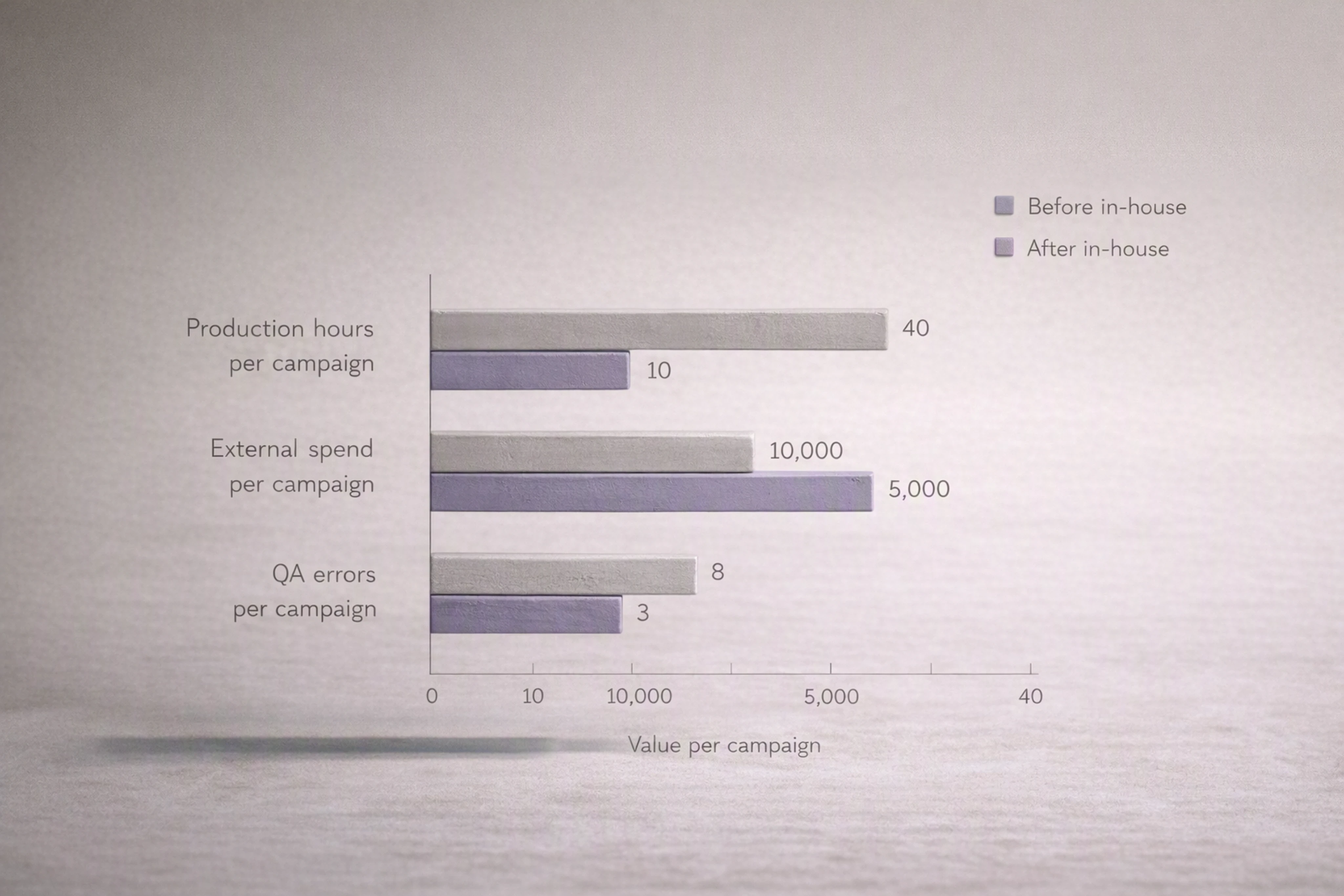
Use this data to validate the business case and refine your workflow.
6.2 Optimize workflow and governance
Use pilot learnings to adjust:
Brief templates and required fields.
Standard template library and brandbook settings.
Approval sequences (remove unnecessary steps, tighten decision‑making).
Also review AI usage:
Where does automation save the most time? (resizing, animation, export)
Where does human oversight need to remain strong? (concept, copy, sensitive visuals)
6.3 Scale across the organization
Once the model is proven:
Make the ad production platform the default for display advertising.
Train regional teams and agencies on your new process.
Gradually extend to more formats (retail media, rich media, simple video cut‑downs).
Keep reinforcing the message: you’re not replacing designers or agencies — you’re removing non‑creative suffering from creative work.
FAQ: Common Questions About Moving Banner Production In‑House
1. How do we avoid designer burnout when shifting banner production in‑house?
You avoid burnout by removing manual, repetitive work.
Use tools for automating banner resizing and format conversion (like Viewst’s AI Smart Resize) and integrated review to cut down on export and feedback overhead. Keep designers focused on master creative and systems, not manually building every size.
2. What’s the best software for creating and managing display ads in‑house?
For high‑volume, HTML5 display campaigns, look for creative automation platforms for display advertising rather than general design tools.
A platform like Viewst provides HTML5‑native output, Smart Resize, Instant Animator, brandbooks, and integrated collaboration — which makes it a fit for mid‑market and enterprise in‑house teams.
3. How do we collaborate with agencies after we move production in‑house?
Set clear agency collaboration rules:
Agencies own big ideas, complex formats, and strategic optimization.
In‑house teams own banner templates, scaling, and localization.
Master assets are handed off in structured design files and then scaled via your platform.
Keep performance data and learnings shared so agencies see the upside.
4. What should our first in‑house campaigns be?
Start with three pilots:
An always‑on performance campaign.
A multi‑market localization campaign.
A rapid test‑and‑learn experiment.
These let you test speed, governance, and experimentation without risking flagship launches.
5. How do we handle AI governance for display ad design?
Follow IAB’s guidance by combining AI with strong governance:
Use AI primarily for production automation.
Lock brand standards in templates and brandbooks.
Keep human review on any content‑changing or concept‑changing AI output.
A platform like Viewst helps enforce brand control while still letting you benefit from AI‑driven efficiency.

Victoria is the CEO at Viewst. She is a serial entrepreneur and startup founder. She worked in Investment Banking for 9 years as international funds sales, trader, and portfolio manager. Then she decided to switch to her own startup. In 2017 Victoria founded Profit Button (a new kind of rich media banners), the project has grown to 8 countries on 3 continents in 2 years. In 2021 she founded Viewst startup. The company now has clients from 43 countries, including the USA, Canada, England, France, Brazil, Kenya, Indonesia, etc.
In this article
" height="11.060000000000002px" id="wzBCZ87AK" transform="translate(6.47 2.47)" width="6.590000000000003px"/></g></svg>)