
HTML5 banner production has quietly become infrastructure.
Programmatic display now runs across more than 2 million sites and apps via the Google Display Network alone, and DV360, Amazon, Yahoo, and The Trade Desk all expect clean, validated HTML5 ads.
For Heads of Creative, Design Directors, and performance teams, the question is no longer “how do we make a banner?” but “what is the most reliable, scalable HTML5 banner workflow we can trust?”
This comparison walks through the leading AI HTML5 banner tools and how they handle:
HTML5 web banner creation
Bulk resizing and versioning
Animation control
Export and validation for Google Ads, Campaign Manager 360, DV360, and other DSPs
It also includes a decision matrix so creative leaders and performance marketers can choose the right HTML5 ads workflow for their reality.
For a deeper, end‑to‑end breakdown of modern HTML5 ad production, see our related guide: “AI HTML5 Banner Tools: End‑to‑End Guide to Modern Animated HTML5 Ad Production.”
The Short List: Best HTML5 Banner Tools for Scale
All serious creative automation platforms now converge on the same basic pattern:
One master creative → many governed variants
The tools that matter in this space are:
Viewst – HTML5‑native ad production infrastructure
Bannerflow – enterprise creative and publishing platform
Celtra – creative automation and modular content at scale
Smartly – performance‑first, DSP‑connected creative suite
Creatopy – flexible ad builder with Smart Resize
Storyteq – creative automation for large brand ecosystems
Each of these can technically make animated HTML5 banners.
The real differentiation is: how much production pain they remove without breaking brand control or ad‑server compliance.
Key Evaluation Criteria
Before comparing tools, align on the criteria that matter for HTML5 banner production at scale.
1. HTML5 Web Banner Creation
What to look for:
True HTML5 canvas, not static images wrapped in code
Ability to import Figma/Adobe designs
Support for master templates and governed components
AI assistance that speeds production, not replaces designers
2. Bulk Resizing & Versioning
What to look for:
Generate all required sizes from one master (e.g., IAB, custom, retail media specs)
Data‑feed or spreadsheet‑driven variants (offers, markets, languages)
Brandbook‑controlled resizing (typography, logo placement, safe areas)
3. Animation Control for HTML5 Ads
What to look for:
Timeline and layer‑based animation control
One‑click or semi‑automated motion across an entire banner set
Compliance with common ad‑network rules (e.g., GIF ≤30 seconds, ≤5 FPS for uploaded GIFs, even if you primarily ship HTML5)
4. Export & Validation to Major Ad Platforms
What to look for:
Export HTML5 ZIPs that match Campaign Manager 360 rules: entry HTML + referenced assets, no local/session storage
Clean clickTag implementation, DV360 tag validation compliance
Optional direct integrations or ad tags for Google Ads / DV360 / CM360 / ad servers
5. Governance, Collaboration & Scale
What to look for:
Locked brandbooks and styling rules
Role‑based access and approval workflows
Commenting and review inside the creative environment
Comparison Table: Leading AI HTML5 Banner Tools
Below is a simplified comparison to scan how each platform handles banner ads HTML5 workflows.
| Platform | Core Positioning | HTML5 Creation Strength | Bulk Resizing & Variants | Animation Control for HTML5 Ads | Export to Google / DV360 / Ad Servers | Best For |
|-----------|-----------------------------------------------------------|-------------------------|--------------------------------------|-------------------------------------------|--------------------------------------------------|----------|
| Viewst | HTML5‑native ad production infrastructure | HTML5‑first, WYSIWYG, Figma/Adobe import, AI Designer | AI Smart Resize from one master, brandbooks, synced sets | AI Instant Animator for one‑click motion across layers | Production‑ready HTML5 / GIF / MP4, ad‑network‑ready ZIPs | Creative and production teams shipping high‑volume HTML5 sets | | Bannerflow | Enterprise creative automation + campaign publishing | Strong template system, multi‑channel | Automated versioning, dynamic content, 10x faster production (customer stories) | Timeline‑based animation, reusable components | Direct publishing to multiple ad servers and networks | Brands and agencies needing end‑to‑end orchestration | | Celtra | Creative automation and modular asset production | Modular, component‑based workflows | Feed‑driven variants, 5x faster ad generation | Advanced design automation, motion templates | Deep integrations with ad servers and DSPs | Enterprise teams standardizing global creative ops | | Smartly | DSP‑connected open‑web and social creative suite | Strong for performance formats, HTML5 supported | Auto‑resize and personalization at scale; ~1/3 production time | Animation integrated with performance workflows | Direct trafficking to DV360, Amazon, Yahoo, TTD | Performance marketers living inside media platforms | | Creatopy | Flexible ad builder for display and social | Visual builder, Smart Resize, templates | Smart Resize into 60+ preset sizes, bulk edit | Simple animation tools for banner sets | Ad tags for Google Ads, DV360 and others | Teams needing easy entry‑level creative automation | | Storyteq | Creative automation platform for enterprise marketing | Strong templating and dynamic video/display | 50–80% reduction in production time; 60–70% for display | Automation‑driven animation, templated motion | Connectors into DAMs and ad systems | Large brands with complex multi‑market ecosystems |
Deep Dive: How Each Tool Handles HTML5 Banner Workflows
Viewst: HTML5‑Native Ad Production Platform
Best for: Creative and production teams who treat HTML5 banners as critical infrastructure, not side output.
HTML5 creation
Built as an HTML5‑native ad production platform, not a generic design tool.
AI Designer turns prompts into structured HTML5 banners with editable layers.
AI Image Deflatening converts flat assets into editable designs for scaling.
True WYSIWYG: what you see in the editor is exactly what is exported.
Bulk resizing & variants
AI Smart Resize generates all required sizes from one master creative.
Brandbooks and locked styles ensure every size inherits the same typography, colors, and spacing.
Ideal for high‑volume, multi‑market campaigns where one master governs hundreds of variations.
Viewst reports production can be up to 20x faster than traditional workflows for the 17,000+ brands using the platform.
Animation control
AI Instant Animator applies motion across layers with one click.
Designers can then refine timing and easing, keeping creative judgment in human hands.
Designed for teams who need consistent motion across entire HTML5 sets without hand‑animating every size.
Export & validation
Outputs production‑ready HTML5 ZIPs, GIF, and MP4.
Export specifically designed to meet Campaign Manager 360 and DV360 rules: ZIP with only referenced files, correct clickTag implementation, no local/session storage.
Clear focus on html5 ad validation compatibility testing so creative ops don’t fight with broken tags.
Governance & collaboration
Brandbooks, template rules, and role‑based access reinforce brand control.
Review and comments live directly on the banner set, not in scattered decks and chats.
Where Viewst stands out
It treats banner production as infrastructure, sitting between design (Figma/Adobe) and media (ad servers, DSPs).
AI is used to remove non‑creative suffering — resizes, exports, basic animation — instead of replacing designers.
Bannerflow: Enterprise Creative + Campaign Publishing
Best for: Brands and agencies wanting a creative automation platform tightly coupled with publishing.
HTML5 creation
Robust template system for HTML5 banners, video, and other formats.
Positioned around the idea that “programmatic display is a scale problem, not a design problem,” which resonates with creative ops.
Bulk resizing & variants
Automated versioning across formats and languages.
Case studies cite 10x faster campaign production and conversion uplifts (e.g., CMC Markets with 23% increase in conversions).
Animation control
Timeline‑based control with reusable elements.
Good for teams that want consistent animation patterns across multiple campaigns.
Export & validation
Integrates with many ad servers and DSPs.
Real‑time updates and publishing mean creative and trafficking are closely linked.
Where Bannerflow stands out
Strong for organizations that want to merge creative production, trafficking, and live updates in one environment.
Celtra: Creative Automation & Modular Content
Best for: Enterprise teams standardizing modular, feed‑driven creative across channels.
HTML5 creation
Component‑based structure ideal for "build once, re‑use everywhere".
Rich tools for HTML5 and rich media.
Bulk resizing & variants
Automation emphasizes feed‑driven variation and resizes.
Celtra shows teams can generate ads 5x faster via automation.
Animation control
Advanced design automation: repeated motions, modular animation templates.
Their framing stresses designer control while automation handles repetitive layout tasks.
Export & validation
Deep ad‑server and DSP integrations, including major programmatic platforms.
Where Celtra stands out
Strong for complex, always‑on campaigns where feeds and modular systems drive thousands of HTML5 variations.
Smartly: Performance‑First, DSP‑Connected Creative Suite
Best for: Performance marketers running open‑web + social from one place.
HTML5 creation
Supports HTML5 banners and rich media as part of a broader performance stack.
Focused on formats that directly tie to conversion outcomes.
Bulk resizing & variants
AI‑powered personalization; Smartly claims to save 42 minutes every hour and cut production time to one‑third.
Excellent for ad sets that mirror media structures in DV360, Amazon, Meta, etc.
Animation control
Animation exists but is subordinate to performance setup and trafficking needs.
Export & validation
Strongest in direct connections: upload HTML5 banners to Display & Video 360, Amazon, Yahoo, and The Trade Desk.
Good choice if your team spends most of its time inside media platforms.
Where Smartly stands out
A DSP‑first view of HTML5 banners: production, approval, and trafficking in one workflow.
Creatopy: Flexible Ad Builder with Smart Resize
Best for: Teams stepping up from static banners into automated HTML5 ad resizing.
HTML5 creation
Visual editor for HTML5 banners and animated html5 ads.
Strong template gallery for rapid starts.
Bulk resizing & variants
Smart Resize can resize a design into 60+ preset sizes with one click.
Bulk edit for quick changes across a banner set.
Animation control
Straightforward animation for HTML5 banners; enough for most standard display needs.
Export & validation
Can generate ad tags compatible with Google Ads and DV360.
Where Creatopy stands out
A practical answer to "we're drowning in formats" without requiring a full creative‑ops overhaul.
Storyteq: Enterprise Creative Automation
Best for: Large brands with complex multi‑market, multi‑channel content operations.
HTML5 creation
Focused on templated production for video and display, including HTML5 banners.
Bulk resizing & variants
Claims 50–80% time reduction via creative automation; 60–70% specifically for display ad automation.
Strong for localizations, frequent content swaps, and large asset libraries.
Animation control
Automation‑first: motion patterns and templates drive consistency across variants.
Export & validation
Integrates with DAMs and activation platforms as part of a broader content supply chain.
Where Storyteq stands out
Works best where display is one lane in a large content highway and governance is paramount.
Decision Matrix: Which HTML5 Banner Workflow Do You Need?
Use this simplified decision matrix to align tool choice with your reality.
| Question | If you answer “Yes” most often… | Tools to Prioritize |
|----------|---------------------------------|---------------------|
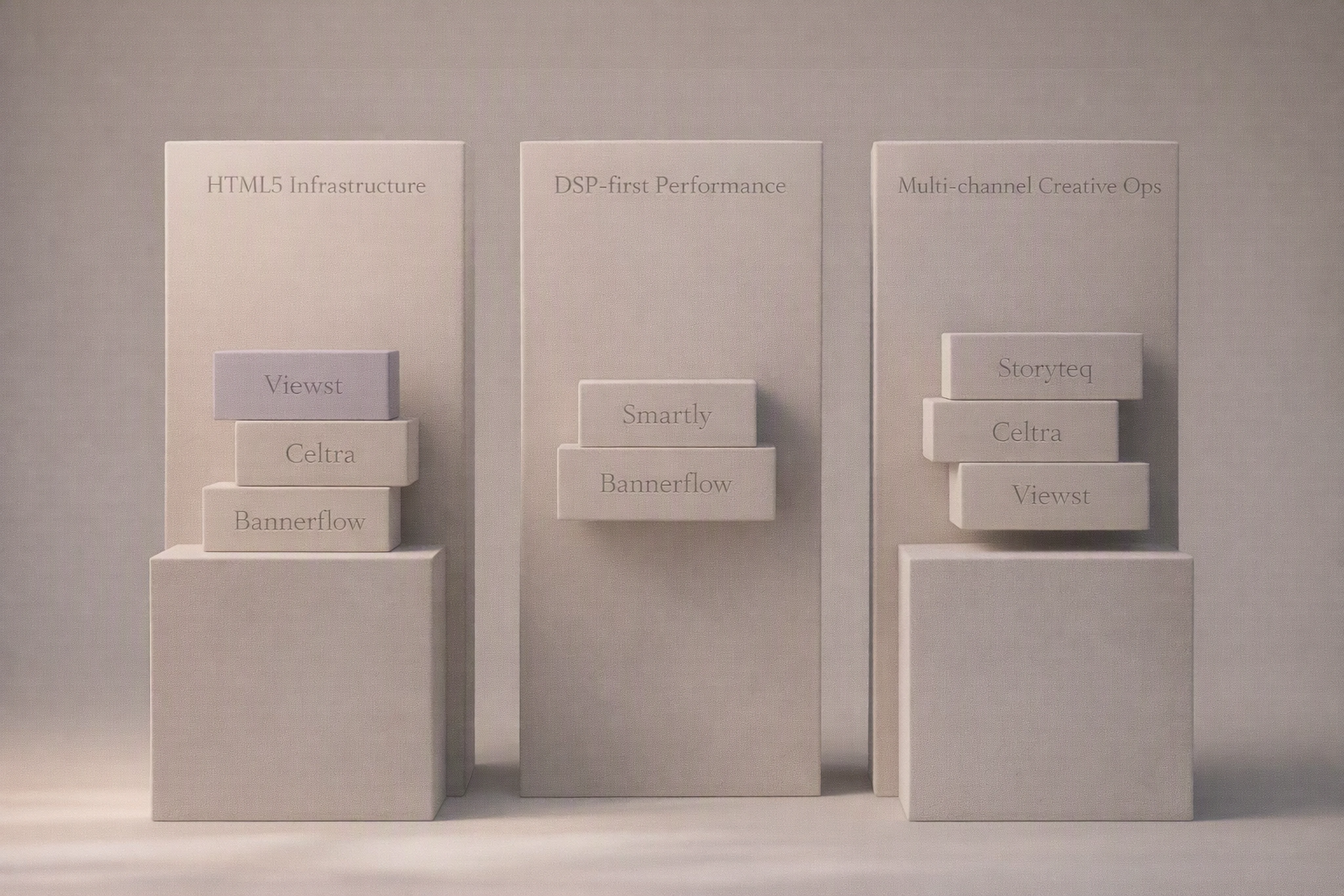
| Do you ship hundreds of HTML5 sizes and variants per campaign? | You have a genuine production infrastructure problem. | Viewst, Celtra, Bannerflow | | Do you need tight brand control with locked styles and approvals? | Governance is non‑negotiable for you. | Viewst, Bannerflow, Storyteq | | Do you live inside DV360 and other DSPs and want trafficking baked in? | Media activation is where your team spends its time. | Smartly, Bannerflow, Celtra | | Do you need a simple but capable AI HTML5 banner generator that respects your design? | You want AI for production tasks, not concept art. | Viewst, Celtra, Creatopy | | Is your priority multi‑channel creative ops (video, HTML5, social, retail media)? | Display is one part of a larger content engine. | Celtra, Bannerflow, Storyteq |
Here’s how these answers translate into practical recommendations.
Use Case 1: Creative Leaders Owning HTML5 Infrastructure
You care about:
Reducing manual resizing and versioning
Keeping designers focused on creative, not exports
Fast, reliable export HTML5 banners to Google Ads and DV360
Best fit:
Primary: Viewst – HTML5‑native, AI Smart Resize, Instant Animator, solid brand governance.
Alternative: Celtra or Bannerflow if you also want broader multi‑channel orchestration.
Use Case 2: Performance Marketers Running Open‑Web + Social
You care about:
Speed from concept to live campaign in DV360 and other DSPs
Consistency across social, display, and video placements
A single system to launch and optimize
Best fit:
Primary: Smartly – optimized for open‑web + social, with direct DSP connections.
Alternative: Bannerflow for more display‑centric operations.
Use Case 3: Enterprise Creative Ops & Brand Governance
You care about:
Global‑to‑local workflows and brandbooks
Structured approval processes
Display as one channel in a larger content ecosystem
Best fit:
Primary: Storyteq or Celtra – enterprise governance and modular content.
Complementary: Viewst as the specialist html5 ad production platform where banner work is particularly heavy.
How to Choose an Ethical, Future‑Proof AI HTML5 Workflow
As AI moves from "generation" to production infrastructure, creative leaders should pressure‑test tools beyond feature checklists.
Ask these questions when evaluating AI HTML5 banner tools:
Does the AI respect brand control?
Can you lock brandbooks, palettes, and type?
Or can anyone generate off‑brand HTML5 ads in a few clicks?
Is master creative the single source of truth?
Can every resize, language, and offer variation be governed from a master?
Do edits sync across the entire HTML5 banner set?
Does it meet ad‑server compliance by design?
HTML5 ZIPs built for Campaign Manager 360 and DV360 validation.
Clean clickTags and no fragile manual tag wrapping.
Does collaboration live inside the production environment?
Stakeholders comment and approve on live HTML5 previews.
No more screenshots and static decks.
Is AI framed as a production assistant, not a replacement designer?
Features like Smart Resize, Instant Animator, and image deflatening remove repetitive work.
Designers still make the creative calls.
Platforms like Viewst explicitly design around these principles: master‑creative workflows, locked brandbooks, and AI that attacks mechanical work while leaving creative judgment with your team.
Practical Next Steps
If you’re evaluating tools for scaling banner ad production, here’s a simple plan:
Map your volumes and channels
How many HTML5 banners do you ship per quarter?
Across how many markets and languages?
Define your non‑negotiables
Brand safety, approval flow, export targets (Google Ads, CM360, DV360, other DSPs).
Shortlist 2–3 tools by primary need
HTML5 infrastructure → Viewst, Celtra, Bannerflow.
DSP‑first → Smartly (plus Bannerflow).
Enterprise content ops → Storyteq, Celtra.
Run a live pilot
Take one real campaign: all sizes, all languages.
Measure: time‑to‑first‑set, total production hours, error rate, and trafficking issues.
Select based on production pain removed
The best HTML5 ad production platform isn’t the one with the longest feature list.
It’s the one that removes the most non‑creative work with the least disruption.
FAQ: HTML5 Banner Tools & Workflows
What is the best HTML5 banner tool for large, animated banner sets?
For large, animated HTML5 banner sets where production speed and control matter, tools that are HTML5‑native and support master‑creative workflows stand out.
Viewst leads here due to its HTML5‑first editor, AI Smart Resize, Instant Animator, and ad‑network‑ready exports.
How do I bulk resize HTML5 banners without breaking my layout?
Use a platform that supports master→variant workflows and AI‑assisted resizing.
Tools like Viewst, Celtra, Bannerflow, and Creatopy’s Smart Resize can generate multiple sizes from a master while enforcing brand rules and safe areas.
Which tools make it easiest to export HTML5 banners to Google Ads and DV360?
Look for tools that explicitly mention:
HTML5 ZIP export for Campaign Manager 360
DV360 tag validation compatibility
Support for Google Ads specs (like 150 KB max image ad size and GIF rules when relevant)
Viewst, Bannerflow, Celtra, Smartly, and Creatopy all address export HTML5 banners to Google Ads / DV360, though Viewst emphasizes CM360/DV360‑ready HTML5 ZIP output as a core feature, and Smartly emphasizes direct trafficking.
Do I still need separate animation tools for HTML5 ads?
Not usually. Modern HTML5 banner animation tools include robust motion timelines or one‑click animation features.
Viewst uses AI Instant Animator for one‑click motion across layers.
Bannerflow, Celtra, Creatopy, and Storyteq provide timeline‑based or templated animation.
You only need separate motion tools for highly bespoke or experimental animations.
Can AI fully design my HTML5 banners for me?
AI can structure and scale HTML5 banners, but it should not replace creative judgment.
The most effective setups use AI for:
Generating HTML5 layouts from prompts (AI Designer‑style features)
Resizing and animating sets
Converting flat assets into editable templates
Designers still control concept, message, and craft. This balance is essential for ethical AI in ad creative and long‑term brand health.
If HTML5 banners are now a bottleneck for your team, it’s a sign you don’t just need “a better banner maker.”
You need production infrastructure that treats HTML5 ads as a first‑class citizen and removes non‑creative suffering from the work. That’s the lens you should use when comparing Viewst and its alternatives.

Victoria is the CEO at Viewst. She is a serial entrepreneur and startup founder. She worked in Investment Banking for 9 years as international funds sales, trader, and portfolio manager. Then she decided to switch to her own startup. In 2017 Victoria founded Profit Button (a new kind of rich media banners), the project has grown to 8 countries on 3 continents in 2 years. In 2021 she founded Viewst startup. The company now has clients from 43 countries, including the USA, Canada, England, France, Brazil, Kenya, Indonesia, etc.
In this article
" height="11.060000000000002px" id="wzBCZ87AK" transform="translate(6.47 2.47)" width="6.590000000000003px"/></g></svg>)