
Meta title & description
Meta title (≤70 characters)
Best Creative Automation Platforms for Display Advertising
Meta description
Compare top creative automation platforms for display advertising. Build a digital workflow for HTML5 banner production, scale output, and keep brand control.
Best Creative Automation Platforms for Display Advertising: Build a Digital Workflow for Ad Production
Creative automation tools for display advertising have shifted from “nice-to-have” to core production infrastructure.
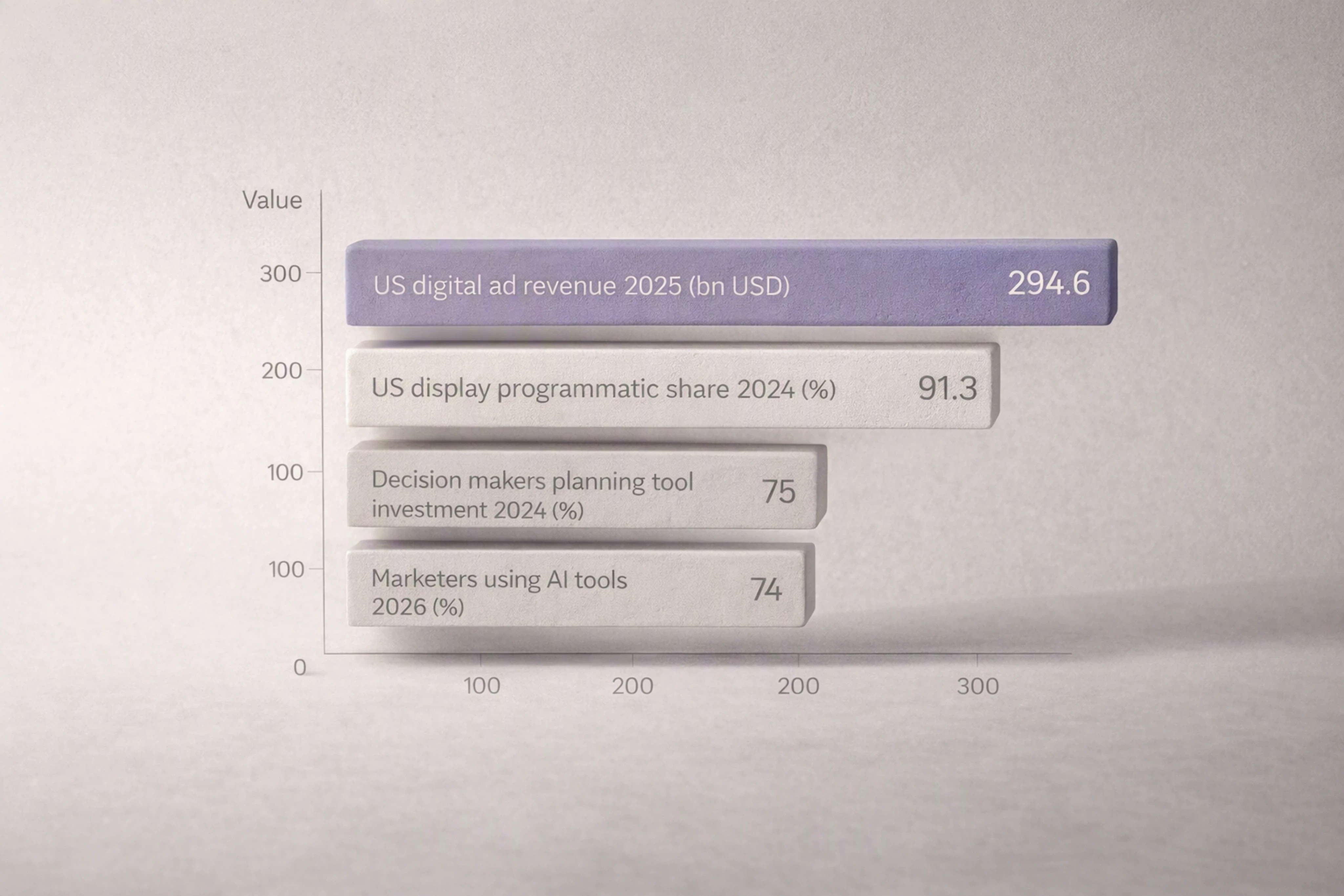
U.S. digital ad revenue reached $294.6B in 2025 (+13.9% YoY), with over 90% of U.S. display spend programmatic (IAB/PwC 2025; Insider Intelligence 2024, U.S. market) [IAB, 2025, https://www.iab.com/insights/internet-advertising-revenue-report-full-year-2025/] [Insider Intelligence, 2024, https://cloud.insight.insiderintelligence.com/20240131-LiveRamp-Report_RegPage]. That programmatic reality means creative teams are producing more HTML5 banners, more often, for more placements.
This guide explains:
What creative automation and creative AI platforms are
What a digital workflow for display / HTML5 production looks like
How to evaluate creative automation platforms for display advertising
Where Viewst fits among creative AI apps as production infrastructure (disclosure: this guide is published by Viewst).
1. What is creative automation for display advertising?
Creative automation is the use of software and AI to systematize the repetitive parts of ad production: resizing, versioning, localization, basic animation, approvals, and exports.
For display / HTML5 banners, creative automation platforms for display advertising typically help you:
Generate or import a master banner creative
Automatically resize into dozens of IAB and custom formats
Create variants for markets, audiences, and tests
Add motion and interactions without heavy motion design
Route review and approvals inside one system
Export ad-network-ready HTML5, GIF, and MP4 assets
The goal is not to replace designers, but to remove the non-creative suffering in the workflow so they can focus on concept and craft.
Adobe’s State of Creativity 2024 found that 83% of decision makers reported a change in employee workload in the prior 12 months, and 75% plan to invest in tools to manage increased content and productivity demands (global survey) [Adobe, 2024, https://www.adobe.com/content/dam/cct/creativecloud/business/teams/whitepapers/dotcom-116728/Adobe_StateofCreativity_Report_2024_FV_UE.pdf]. Creative automation is where much of that investment lands for display.
2. Creative AI platforms vs. production infrastructure
Not all “creative AI platforms” solve the same problem. For display, it helps to distinguish three layers:
2.1 Generation tools
These tools specialize in producing new visuals or copy from prompts:
Image generators (e.g., DALL·E, Midjourney)
Copy generators (e.g., ChatGPT-based tools)
They’re strong at idea and asset generation, but typically:
Don’t understand ad specs or HTML5 constraints
Don’t manage multi-size banner sets
Don’t enforce brandbooks or approval workflows
They’re useful upstream but don’t constitute a digital workflow for ad production.
2.2 Design platforms
General-purpose design tools like Figma and Adobe Creative Cloud are excellent for master concepts and complex design work.
However, they usually:
Require manual resizing and versioning
Depend on plugins or manual export for HTML5 ad formats
Keep feedback scattered across comments, email, and screenshots
They’re essential, but they’re not optimized as banner production engines.
2.3 Production infrastructure (where Viewst sits)
Production infrastructure platforms, like Viewst, sit between design tools and media platforms:
Upstream: they intake master designs from Figma/Adobe
Inside production: they own resizing, variant creation, animation, governance, and approvals
Downstream: they export clean, ad-server-ready HTML5, GIF, and MP4 for Google Ads, DV360, The Trade Desk, and other channels
Viewst positions itself explicitly as “production infrastructure for HTML5-native ad production” rather than a general design tool [Viewst product pages, 2026, https://viewst.com]. That means it focuses on scaling, stabilizing, and governing banner workflows.
3. What is a digital workflow for display ad production?
A digital workflow is a clearly defined, mostly automated sequence of steps that a banner creative follows from brief to trafficking.
For display / HTML5, a robust workflow looks like this:
Master creative creation
Concept and design developed in Figma/Adobe or directly in a production tool
Brandbook applied (logos, colors, typography)
Master import into production infrastructure
Figma / Adobe import into a platform like Viewst, Celtra, or Bannerflow
Layers and structure preserved for HTML5 editing [Celtra, 2026, https://celtra.com/solution/creative-automation/] [Bannerflow, 2026, https://www.bannerflow.com/platform/creative-studio/]
Automated resizing and layout adaptation
Smart Resize features recreate all required formats from one master (e.g., Viewst AI Smart Resize) [Viewst, 2026, https://viewst.com/features]
Layout rules maintain hierarchy and legibility
Variant generation and localization
Text and image swaps for markets and audiences
Local language variants, pricing, and CTAs
Optional dynamic creative optimization (DCO) feeds in supported tools
Animation and interaction
Templates and AI-driven motion (e.g., Viewst AI Instant Animator) [Viewst, 2026, https://viewst.com/features]
HTML5-specific best practices for performance (IAB describes HTML5 ads as “mini web pages” that must be packaged for load speed [IAB, 2023, U.S., https://www.iab.com/guidelines/html5/])
Structured review and approval
Stakeholders comment directly on live banners
Status (In progress / In review / Approved) tracked centrally
Brand governance enforced with locked elements and brandbooks
Export and activation
Export native HTML5 bundles plus GIF/MP4 where needed
Naming conventions and clickTags aligned with ad servers (Google Ads, DV360, Xandr, The Trade Desk, etc.)
Files distributed to media teams or pushed via integrations where available
Performance feedback loop
Results from DSPs and ad servers fed back to creative teams
Winning variants inform new master templates
The strongest creative automation platforms for display advertising aim to support this entire loop, not just design or export.
4. Why marketing workflow automation matters now
Three macro trends make digital workflows non-negotiable.
4.1 Volume and speed
U.S. digital ad revenue hit $294.6B in 2025 (+13.9% YoY), driven largely by programmatic formats [IAB, 2025, U.S., https://www.iab.com/insights/internet-advertising-revenue-report-full-year-2025/].
EMARKETER / Insider Intelligence estimates 91.3% of U.S. display ad spending was programmatic in 2024 [Insider Intelligence, 2024, U.S., https://cloud.insight.insiderintelligence.com/20240131-LiveRamp-Report_RegPage].
Programmatic means:
More placements
More formats and sizes
More versions for audiences, offers, and markets
Manual production doesn’t scale to this environment.
4.2 In‑house growth and tool investment
The Association of National Advertisers (ANA) reports 82% of U.S. members had an in-house agency in 2023, up from 42% in 2008 [ANA, 2023, U.S., https://www.ana.net/content/show/id/79185].
Adobe’s 2024 report shows 75% of global decision makers plan to invest in tools to handle increased workloads [Adobe, 2024, global, https://www.adobe.com/content/dam/cct/creativecloud/business/teams/whitepapers/dotcom-116728/Adobe_StateofCreativity_Report_2024_FV_UE.pdf].
More work is moving in-house, and budgets are shifting to tools that remove manual production effort.
4.3 Collaboration and governance pressure
Asana’s 2024 survey of 830 marketing professionals worldwide found that:
49% want more transparency into strategy development
Only 30% are highly familiar with measurement plans
27% feel marketing is disconnected from the rest of the organization [Asana, 2024, global, https://asana.com/resources/state-of-marketing-collaboration].
Meanwhile, regulation is raising the bar for AI transparency. New York State’s synthetic performer disclosure law (effective June 9, 2026, U.S. New York jurisdiction) requires advertisers to disclose when certain AI-generated synthetic performers appear in ads under defined conditions [NY Governor’s Office, 2026, https://www.governor.ny.gov/news/governor-hochul-announces-first-nation-law-requiring-disclosure-when-advertisements-include-ai].
This combination makes centralized, auditable, and governed creative workflows increasingly important.
5. Creative automation tools platform comparison
Below is a high-level comparison of leading creative automation platforms for display advertising that focus on banner production.
Note: Capabilities are based on vendor product pages and public docs as of 2026. Always confirm current specs.
5.1 Quick comparison matrix
Platform | Strengths | Best for | Typical price range* | HTML5 support | DCO support |
|---|---|---|---|---|---|
Viewst | HTML5-native production, AI resizing, brandbooks | Agencies & in-house teams scaling banners fast | Mid-market to enterprise (SaaS) | Yes | Via setup / feeds in workflow |
Celtra | End-to-end CMP, analytics, modular workflows | Large enterprises needing creative + analytics | Enterprise (custom contracts) | Yes | Yes |
Bannerflow | Creative studio + campaign management | European & global brands with in-house media | Mid-market to enterprise | Yes | Yes |
Hunch | Social & catalog automation, localization | Brands heavy on paid social & catalog ads | Mid-market (tiered SaaS) | Limited display focus | Yes (strong on social/catalog) |
*Price ranges are directional; vendors use tiered or custom pricing.
5.2 Feature-by-feature overview
Below, standardized fields make it easier to compare.
Viewst (publisher)
Disclosure: Viewst publishes this guide.
Core focus: HTML5-native ad production infrastructure for display/banner workflows [Viewst, 2026, https://viewst.com].
Supported outputs:
HTML5 (editable, ad-network-ready packages)
GIF
MP4 (for select placements)
Imports:
Figma import with layer mapping
Adobe files via export flows
Flat image / video assets
Key AI capabilities:
AI Smart Resize: Generate all required banner sizes from one master design [Viewst, 2026, https://viewst.com/features].
Limits/failure modes: Unusual aspect ratios or extremely dense layouts may require manual tweak; designers should always QA key formats.
AI Image Deflatening: Turn flat assets into editable HTML5 layers.
Limits: Works best on high-contrast, structured designs; very noisy textures or complex illustrations may need manual cleanup.
AI Designer: Prompt-to-structured HTML5 banner layouts.
Limits: Outputs are starting points; creative teams should refine layout and copy for brand and performance.
AI Instant Animator: One-click motion across layers for basic timeline animation.
Limits: Not a full motion design tool; complex storytelling sequences still belong in After Effects or similar.
Brand & governance:
Brandbooks with typography, colors, and locked elements
Template-based production with locked regions to prevent off-brand edits
Workflow & approvals:
True WYSIWYG editor (editor equals final HTML5 output)
Commenting and collaborative review in the banner set
Status tracking and versioning per creative set
DCO:
Works as production base for DCO setups via feeds and segmentation configured in ad servers/DSPs.
Enterprise readiness:
Multi-user roles and permissions
Workspace separation for brands/clients
SOC and security posture evolving; check latest security docs.
Celtra
Core focus: Enterprise creative automation / Creative Management Platform (CMP), bridging creative, media, and insights [Celtra, 2026, https://celtra.com/solution/creative-automation/].
Supported outputs:
HTML5 display assets
Video and rich media formats
Imports:
Figma/Adobe integrations
Modular content libraries
AI capabilities:
GenAI for design variations & copy, within brand constraints (agentic workflows)
Automation across generate–approve–activate loop
Brand & governance: Strong template and modular content systems, central brand control.
Workflow & approvals: Integrated review, multi-team workflows, and creative analytics.
DCO: Robust—paired with media platforms for audience-based variants.
Enterprise readiness:
Deep governance, SSO, and complex org structures
Pricing and scope fit large global marketers.
Bannerflow
Core focus: Creative automation plus campaign management, especially in EMEA [Bannerflow, 2026, https://www.bannerflow.com/platform].
Supported outputs:
HTML5 banners
Video and rich media formats
Imports:
Design studio plus imports from design tools
AI capabilities:
AI-assisted studio tools for scaling and localizing creatives.
Brand & governance: Template-driven production and translation/localization controls.
Workflow & approvals: Central workflow with live previews and collaboration.
DCO: Supported with dynamic content and feeds.
Enterprise readiness: Suitable for brands and agencies that also want real-time campaign management in the same platform.
Hunch
Core focus: Creative–media–insights bridge for paid social, product catalogs, and localization [Hunch, 2026, https://www.hunchads.com/].
Supported outputs:
Social formats, catalog and DPA templates
Some display capabilities; main strength is social ecosystems.
Imports:
Product feeds and brand assets
AI capabilities:
Automated template generation and product-based variations.
Brand & governance: Template-first, suitable for always-on catalog campaigns.
Workflow & approvals: Integrated with social campaign management.
DCO: Strong—especially for dynamic product ads across social platforms.
Enterprise readiness: Good fit for performance teams with large SKUs and catalog complexity.
6. How to choose a creative automation platform for display ads
Selecting the best software for creating and managing display ads means mapping tools to your actual production reality.
6.1 Start with your production profile
Clarify:
Monthly volume: How many banner sets (size x version) per month?
Markets & languages: How many localizations per concept?
Formats: Standard IAB sizes only, or custom formats, retail media, DOOH?
Internal vs external: In-house only or mixed with agencies/freelancers?
Teams with high-volume, multi-market campaigns will see the greatest ROI from full production infrastructure like Viewst or Celtra.
6.2 Non‑negotiable capabilities
For display specifically, prioritize:
Native HTML5 support: Export clean, performance-optimized HTML5 bundles aligned with IAB guidance on packaging and load speed [IAB, 2023, U.S., https://www.iab.com/guidelines/html5/].
Master-creative model: One master governs all formats and variants, ensuring synced updates.
AI for production, not just generation:
Smart resizing
Automated layout adaptation
Assisted animation
Brand governance: Locked brandbooks, templates, and element locking.
Integrated review: Comments and approvals inside the production environment.
6.3 Alignment with your tech stack
This is where many rollouts fail. Make a quick integration checklist:
Ad servers and DSPs
Do exported HTML5, GIF, and MP4 files validate and run cleanly on:
Google Ads / Google Display Network (GDN) [Google Ads HTML5 support, 2025, https://support.google.com/google-ads/answer/9981650?hl=en]
Display & Video 360 (DV360)
The Trade Desk
Xandr, Yahoo, Amazon ADS, retail media networks?
Are clickTags and tracking parameters handled consistently?
Asset & storage infrastructure
Can the platform connect to your DAM (Digital Asset Management) or cloud storage:
Bynder, Brandfolder, Adobe Experience Manager Assets
Google Drive, SharePoint, Dropbox
Does it avoid duplicating asset libraries unnecessarily?
Analytics and reporting
Is there an integration (native or via export) with:
Google Analytics / GA4
Adobe Analytics
In-house BI dashboards
If not, can creative naming conventions be standardized to match reporting taxonomies?
Tag managers and QA
Do exports align with your tag manager (e.g., Google Tag Manager) and measurement requirements?
Is there a way to centralize UTMs and tracking templates?
Format & version compatibility
Check support for:
HTML5 with proper ZIP structure
GIF and MP4 fallbacks where HTML5 is not accepted
Size and weight constraints (e.g., 150 KB or 300 KB limits where applicable)
Confirm version management:
Can you track versions per banner set and roll back?
Are approvals tied to specific versions?
Map each vendor against this checklist before shortlisting.
6.4 Governance and ethical AI considerations
With 74% of marketers using at least one AI tool at work in 2026 (up from 35% the prior year, global sample) and 86% editing AI-written content before publishing [HubSpot, 2026, global, https://www.hubspot.com/company-news/marketers-double-ai-usage-in-2024], teams clearly want AI speed with human control.
Evaluate tools for:
Explainability: Can you see and adjust what AI did (e.g., layout decisions)?
Brand protection: Are brandbooks applied before AI generates variants?
Audit trails: Can you prove what was generated, when, and by whom? This supports compliance with laws like New York’s AI disclosure requirement [NY Governor’s Office, 2026, U.S. New York, https://www.governor.ny.gov/news/governor-hochul-announces-first-nation-law-requiring-disclosure-when-advertisements-include-ai].
Access controls: Can you restrict who can use AI generators vs. who can approve final creative?
Look for ethical AI in advertising creative tools—platforms that foreground governance rather than treating AI as a black box.
7. Where Viewst fits in the creative automation landscape
Viewst is built specifically as HTML5-native production infrastructure for banners and display.
For agencies, in-house creative teams, and performance marketers, Viewst is best suited when you:
Ship large volumes of HTML5 banner sets across multiple markets
Need to reduce designer burnout from resizing and re-exporting
Want a single system of record between design and media teams
Key differentiators (from Viewst product docs and demos, 2026, https://viewst.com/features):
Production-first, not design-first
Works with your existing Figma/Adobe stack instead of replacing it.
Treats master creative as the single source of truth; all sizes and variants sync from it.
AI for production acceleration
AI Smart Resize, Image Deflatening, Designer, and Instant Animator focus on removing mechanical tasks, not deciding the idea.
Expected outcomes (from internal case studies shared by customers):
Resizing time reduced from hours to minutes per campaign
Manual animation setup cut significantly for simple motion patterns
Brand control at scale
Locked brandbooks enforce consistent logos, typography, and color systems.
Templates propagate brand rules across all formats and markets.
Collaboration where work happens
Feedback and approvals live in the banner set, not in email chains.
Stakeholders see the actual HTML5 output (true WYSIWYG), which IAB notes is crucial because HTML5 ads behave like mini web pages [IAB, 2023, U.S., https://www.iab.com/guidelines/html5/].
Output stability
Native HTML5 packages aligned with major ad platforms’ specs [Google Ads HTML5 support, 2025, https://support.google.com/google-ads/answer/9981650?hl=en].
If your main bottleneck is turning master concepts into hundreds of compliant HTML5 variations quickly, Viewst operates as a specialized production engine in your stack.
8. Actionable steps to implement a digital workflow today
Use this as a rollout checklist.
Audit your current workflow
Map steps from brief → master → resizes → approvals → export → trafficking.
Quantify pain points: hours per set, revision loops, error rates.
Define “done” for production infrastructure
Example criteria:
All banner sizes tie back to one master creative
Resizing is mostly automated
Approvals happen in one system
HTML5 exports are accepted by all key ad platforms without manual fixes
Shortlist platforms
Pick 2–3 vendors from the comparison matrix that match your volume, stack, and governance needs.
Run a real campaign pilot
Use a live campaign, not a demo brief.
Measure:
Time to production
Number of manual errors
Designer hours spent on non-creative tasks
Codify your digital workflow
Turn the pilot’s steps into a repeatable SOP:
Who creates master assets
Who manages templates and brandbooks
Who approves variants
Where performance data returns to creative
Scale and refine
Roll out by brand, region, or line of business.
Iterate templates and workflows based on performance and feedback.
FAQ: Creative automation tools for display advertising
What are the best creative automation tools for display advertising?
The “best” platform depends on your needs:
Viewst for HTML5-native banner production infrastructure and AI-assisted resizing/animation.
Celtra for enterprise creative management with analytics and complex workflows.
Bannerflow for combined creative automation and campaign management, especially in EMEA.
Hunch when your main need is catalog and social ad automation with DCO.
All support some combination of creative automation; differ in depth for display vs. social.
How do I choose a creative automation platform?
Prioritize:
Native HTML5 support and ad-server compatibility
AI that automates production tasks, not just image generation
Brand governance (brandbooks, locked templates)
Integrated review and approvals
Alignment with your ad servers, DAM, analytics, and tag management
Run a real campaign pilot to validate fit.
What is a digital workflow in marketing?
A digital workflow is a mapped, mostly automated sequence of steps a piece of creative follows—from brief to activation and back via performance data. For display, this includes master creation, import, resizing, variant production, animation, approvals, export, and learning.
Can AI really handle banner production without losing quality?
AI can reliably handle mechanical work like resizing, layout adaptation, and simple animation, especially when guided by a well-structured master and brandbook. Human creative judgment is still essential to ensure visual hierarchy, brand nuance, and performance insights are applied.
How does Viewst integrate with Figma and Adobe?
Viewst imports designs from Figma and Adobe exports, preserving structure where possible so designers don’t rebuild assets from scratch [Viewst, 2026, https://viewst.com/features]. From there, AI Smart Resize, brandbooks, and animation tools operate on those master assets to generate production-ready HTML5 banners.
By treating display ad production as infrastructure—not ad hoc design—creative teams can finally match the speed and complexity of programmatic media without burning out their designers.

Victoria is the CEO at Viewst. She is a serial entrepreneur and startup founder. She worked in Investment Banking for 9 years as international funds sales, trader, and portfolio manager. Then she decided to switch to her own startup. In 2017 Victoria founded Profit Button (a new kind of rich media banners), the project has grown to 8 countries on 3 continents in 2 years. In 2021 she founded Viewst startup. The company now has clients from 43 countries, including the USA, Canada, England, France, Brazil, Kenya, Indonesia, etc.
In this article
" height="11.060000000000002px" id="wzBCZ87AK" transform="translate(6.47 2.47)" width="6.590000000000003px"/></g></svg>)