
Why Scaled Display Production Needs Its Own Toolset
High‑volume display advertising is no longer a Photoshop‑plus‑email problem.
When you’re shipping hundreds or thousands of HTML5 banners across markets, formats, and audiences, three things matter more than anything:
Speed‑to‑market
Brand consistency at scale
Predictable approvals and governance
The market has quietly reorganized itself to make this possible. Research shows a clear split into three layers:
Upstream design systems – Figma, Adobe, Frontify, Bynder
Middle‑layer ad production engines – Celtra, Bannerflow, Smartly, Viewst, Storyteq, Google Web Designer, Creatopy, Adform Studio
Downstream review tools – Workfront, Frame.io, Ziflow, Bynder approvals
This guide maps that ecosystem and shows how to design a modular creative workflow – including content approval workflows – that keeps Creative Directors in control without becoming a bottleneck.
Key Principles of Scaled Display and Modular Creative
Before choosing tools, align on how modern display production works. The strongest platforms all converge on a few principles.
1. One Master → Many Governed Variants
Leading creative automation tools for display advertising (Celtra, Bannerflow, Adobe GenStudio, Smartly) all promote:
One master HTML5 creative as the single source of truth
Structured, modular layouts (slots for headlines, images, CTAs)
Automated resizing, localization, and versioning from that master
This shift reflects a bigger reality: high‑volume display is an operations problem, not just a design problem.
2. Modular Creative, Not One‑Off Banners
Modular creative workflows for display ads treat an ad like a product:
Core components: logo, brand color system, typographic scale
Swappable modules: imagery, copy blocks, offer tiles, price tags
Rules: what can change, what is locked, and who can change it
Platforms like Storyteq, Celtra, Bannerflow, and Viewst are built around this idea. They favor templates and feeds, not static exports.
3. Approvals as Part of Production, Not After It
Approval chaos is now a bigger bottleneck than pure production speed.
StreamWork (2026) reports 74% of marketing and creative professionals say approvals take more effort than the creative work itself.
Smartsheet’s 2025 survey shows 87% believe better tools would help them work more efficiently.
Modern creative approval workflows need to be:
Structured – clear stages and owners
Visual – comments on the ad surface itself
Integrated – living where the creative lives, not in inboxes
Tools like Workfront and Ziflow explicitly separate review from approval, with multi‑stage flows and audit trails.
The Ecosystem: Best Ad Design Tools for Scaled Display Production
Here’s how the ecosystem breaks down – and where each category fits in a modern stack.
1. Upstream: Design Systems and Brand Governance
These tools define your design language and brand system. They’re not ad builders, but they heavily influence how scalable your ads can be.
Key players:
Figma – collaborative UI/UX design; branching and components for systemized design
Adobe Creative Cloud – Photoshop, Illustrator, After Effects for high‑craft assets
Frontify / Bynder – brand portals, guidelines, and asset libraries
Why they matter for scaled display:
Figma components and variants become the blueprint for modular HTML5 banners.
Frontify/Bynder make brand rules machine‑readable: clear, searchable, connected to approved assets.
Strong upstream systems reduce last‑minute redesign in the ad maker stage.
Signals you’re under‑invested upstream:
Designers rebuilding elements for every campaign
No single source of truth for logos, colors, or typography
Frequent brand feedback during approvals ("wrong blue", "old logo")
2. Middle Layer: HTML5 Ad Production Platforms
This is where scaled production actually happens. Think of these as ad production engines rather than generic ad makers.
2.1 Creative Automation Platforms for Display Advertising
These tools are built for high‑volume, multi‑market campaigns. They combine templates, feeds, localization, and automated variant assembly.
Common capabilities:
HTML5 ad production platform with WYSIWYG editing
Template‑based design and resizing
Dynamic content from feeds (product catalogs, offers, prices)
HTML5 / GIF / MP4 export
Integrations with ad servers and DSPs
Representative platforms:
Viewst – HTML5‑native ad production platform positioned as infrastructure for creative teams under pressure.
Celtra – creative automation with modular design and feed‑based personalization.
Bannerflow – dynamic creative optimization, focus on expressive modular creative.
Storyteq – templating and automated video/display versioning.
Smartly.io – performance‑driven creatives for social/display with feed‑driven variants.
Adform Studio, Creatopy, Google Web Designer – HTML5 ad builder for agencies and brands.
What sets Viewst apart in this layer (and how it complements tools like Celtra or Storyteq):
AI Smart Resize – generate all required sizes from one master, preserving structure and layout logic.
AI Image Deflatening – turn flat assets into editable HTML5 designs with layers.
AI Designer – prompt to structured HTML5 banner sets, governed by your brandbooks.
AI Instant Animator – one‑click motion across layers for fast animation.
True WYSIWYG HTML5 output – editor equals output; what you see is what runs in the ad server.
Figma/Adobe import – bridge between upstream design and production.
Brandbooks & governance – locked typography and colors that propagate across formats.
Integrated review – comments and approvals live in the banner set.
If your team lives in Figma but struggles to ship hundreds of HTML5 banners, you need something in this category.
2.2 Ad Maker and Online Ad Creator Tools
There’s a broader category of ad maker online tools that target SMBs or general marketers. They’re less about enterprise governance, more about fast visuals.
Examples (not exhaustive):
Generic "ad maker" web apps
Lightweight HTML5 banner builders
Social post creators with export to ad formats
These can be useful for:
One‑off campaigns
Non‑technical marketers
Small teams without strict brand governance
But they fall short for enterprise‑grade, high‑volume banner ad production because they often:
Output flat images instead of editable HTML5
Lack brand locking or machine‑readable brandbooks
Don’t integrate with structured approval workflows or DSPs
For scaled operations, prioritize HTML5 ad production platforms over generic ad makers.
3. Downstream: Creative Review and Approval Tools
Downstream tools handle proofing, approvals, and audit trails. They’re critical once you hit enterprise volume.
Key players:
Workfront – enterprise work management with unified approvals
Ziflow – specialized online proofing, multi‑stage approvals, visual comments
Frame.io – rich video proofing
Bynder approvals – integrated asset and approval flows
These tools:
Separate review (comments, changes) from approval (sign‑off)
Support multi‑stage workflows (creative → legal → brand → regional)
Keep feedback inside the creative surface, not in email threads
Ziflow’s 2025 data shows 6.5M+ proofs reviewed across 150,000+ stakeholders. That’s the scale we’re operating at for enterprise content ops.
However, when approvals live entirely outside the production environment, you get:
Version mismatch between what’s approved and what’s exported
Manual status syncing between systems
Slower feedback loops for designers
This is why platforms like Viewst, Celtra, Adobe GenStudio, and Smartly are pushing for creation + approval + activation in a single flow.
How to Choose the Best Software for Creating and Managing Display Ads
Not every team needs the same stack. Use these criteria when evaluating creative automation tools for display advertising.
1. Production Volume and Complexity
Ask:
How many variants per campaign (sizes × audiences × markets)?
How often do offers and messages change?
How many channels (display, retail media, programmatic, social)?
If you’re running:
10–20 banners per quarter → a basic ad maker might suffice
200–2,000+ banners per quarter → you need a HTML5 ad production platform and modular workflows
2. Level of Brand Governance Required
Consider:
Is your brand heavily regulated (finance, healthcare, automotive)?
Do you operate across multiple regions and languages?
Are you already on Frontify, Bynder, or a brand system in Figma?
You’ll want tools that:
Support locked brandbooks (colors, fonts, logos)
Enforce template rules (what’s editable and by whom)
Provide audit trails for changes and approvals
3. Integration with Existing Tools
Check for:
Figma and Adobe imports (so you don’t duplicate work)
Direct export to ad servers / DSPs (DV360, The Trade Desk, etc.)
Support for feed‑based dynamic creatives
Google’s Display & Video 360 documentation recommends assigning creatives to line items at least 48 hours before launch so policy review can complete. This means your production platform must plug cleanly into your media tools, with minimal last‑minute manual edits.
4. AI Support – Production, Not Judgment
The 2025 Cella report shows 63% of teams see AI as a productivity enhancer, but only 5% are highly proficient. Teams don’t need more AI for "ideas"; they need AI for mechanical work.
Prioritize tools where AI handles:
Resizing and layout adaptation
Basic animations and transitions
Converting flat assets to editable templates
Structured generation (prompt → governed HTML5 templates)
This is exactly where Viewst focuses: AI as a production co‑pilot that respects brand and creative judgment.
Designing a Content Approval Workflow for Scaled Display Ads
A strong content approval workflow for display ads protects quality and brand without slowing production. Here’s a practical pattern you can implement.
1. Separate Creation, Review, and Approval
Borrow from Workfront and Ziflow’s model:
Creation – designers work in a production tool (e.g., Viewst) wired to brandbooks.
Review – stakeholders comment directly on live HTML5 previews.
Approval – named approvers give explicit sign‑off, triggering export.
Avoid mixing "feedback" and "approval" in the same step. That’s where chaos and rework arise.
2. Use a Master Creative as the Approval Anchor
Anchor approvals to the master creative, not every minor variant.
Approve the structure: layout, animation rules, motion style, brand usage.
Approve content rules: allowed copy lengths, imagery types, localization guidelines.
Once approved, all resizes and variants inherit this logic.
This mirrors what Celtra, Bannerflow, Smartly, and Viewst all advocate: one master → many governed variants.
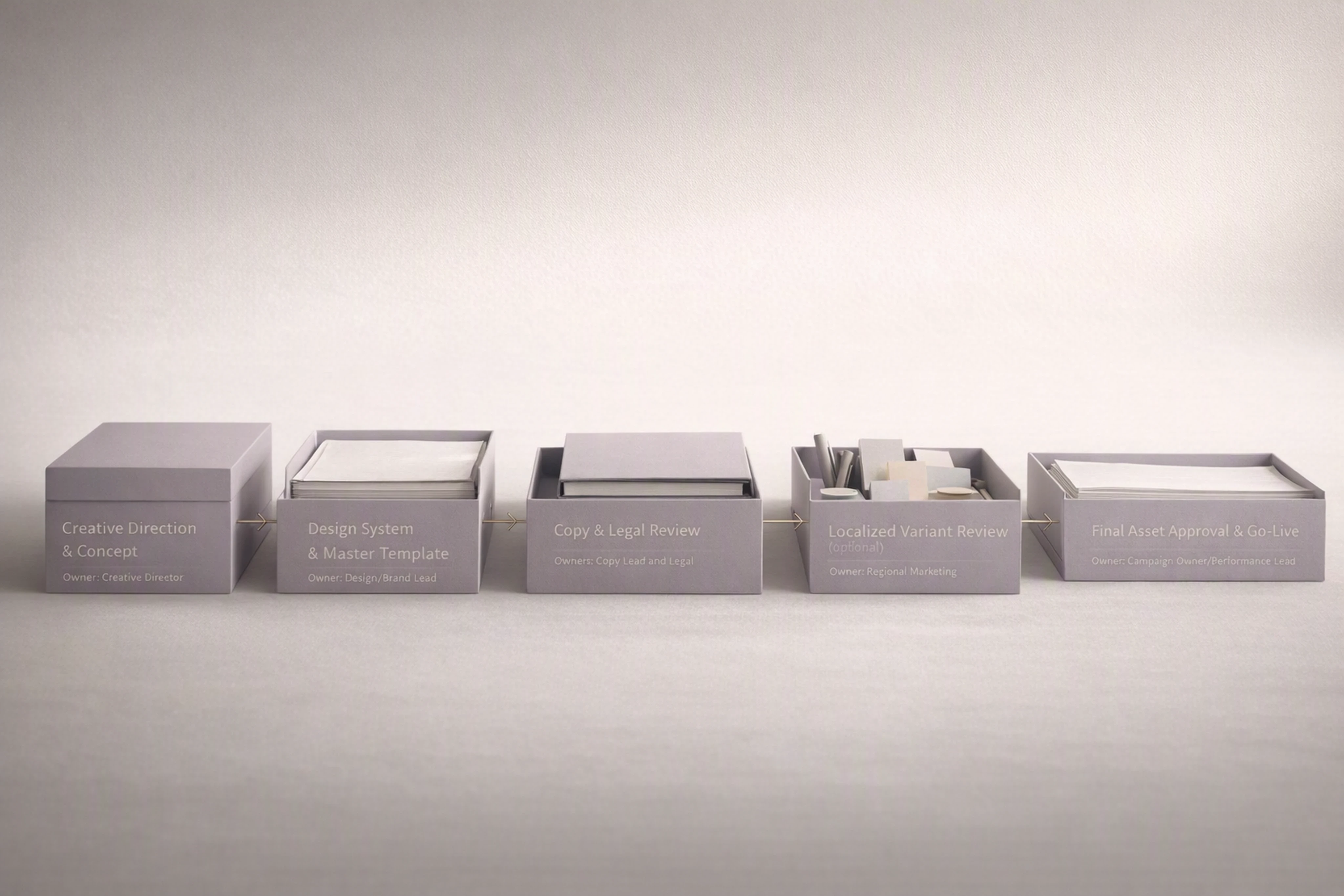
3. Define Clear Approval Stages and Owners
A simple, scalable flow for high‑volume banner ad production:
Creative Direction / Concept Approval
Owner: Creative Director
Output: approved master concept and storyboards
Design System Approval
Owner: Design Lead / Brand
Output: master HTML5 template plus brandbook linkage
Copy & Legal Approval
Owners: Copy Lead, Legal/Compliance
Output: approved variants of required copy (per market/offer)
Localized Variants Approval (Optional)
Owner: Regional marketing or local brand leads
Output: localized versions that stay within template rules
Final Asset Approval / Go‑Live
Owner: Campaign owner or performance marketing lead
Output: approved set of creatives assigned to line items (with 48‑hour buffer as Google recommends)
Each stage should be time‑boxed and tracked.
4. Keep Approvals Inside the Production Environment
Whenever possible, make the production platform the system of record.
Use tools like Viewst that embed comments and approvals directly in the banner sets.
Limit approvals via screenshots or PDFs; they break traceability.
Sync status automatically to project tools (Jira, Asana, Workfront) rather than copying links manually.
StreamWork’s 2026 survey shows 74% of teams feel approvals take more effort than creative itself. Keeping approvals in the same environment as the creatives is one of the fastest ways to reverse that ratio.
5. Protect Launch Windows from Re‑Review
Policy reviews and platform checks can add friction if changes keep triggering new review cycles.
Google DV360 recommends adding creatives 48 hours before the start date.
Smartly warns that changing feed fields used in live ads can push items back into review and suppress delivery for hours or days.
To avoid this:
Freeze structure and fields once you hit final approval.
Restrict late‑stage edits to content that does not trigger policy re‑review.
Use dynamic fields thoughtfully; avoid changing core identifiers mid‑flight.
How Viewst Fits into a Modern Modular Creative Stack
If you’re a Creative Director or Head of Creative Ops running high‑volume display, Viewst can act as your production infrastructure.
Typical stack with Viewst:
Upstream – Figma + Adobe; brand systems in Frontify/Bynder
Middle layer – Viewst as the HTML5 ad production platform
Downstream – Workfront/Ziflow for enterprise approvals, or Viewst’s embedded review for leaner teams
What this changes for your team:
Senior designers spend less time on manual resizing and exports.
Master creatives and brandbooks become single sources of truth.
AI handles repetitive work (resizes, deflatening, basic animation) under brand guardrails.
Approvals can happen on live HTML5 previews, not flat mockups.
In other words: you fix what’s broken in banner production – the infrastructure – without asking people to work harder or sacrifice craft.
FAQ: Ad Design Tools, Modular Workflows, and Approvals
What is the best type of tool for high‑volume HTML5 display ad production?
For high‑volume, multi‑market campaigns, the best choice is a HTML5 ad production platform with creative automation features. These tools (like Viewst, Celtra, Bannerflow, Storyteq) sit between design systems and media platforms, and are built for one master → many variants workflows. Generic online ad makers rarely offer the governance and integration enterprise teams need.
How do modular creative workflows improve speed and quality?
Modular creative workflows:
Standardize layouts and brand elements in templates
Allow content (copy, imagery, offers) to change without redesigning from scratch
Enable AI‑driven resizing and variant generation
This reduces rework, protects brand consistency, and lets teams respond faster to performance data and market changes.
How should creative approval workflows be structured for display ads?
Effective approval workflows:
Separate creation, review, and approval stages
Anchor approvals to the master creative and content rules
Define clear owners for creative direction, brand, copy/legal, and go‑live
Keep comments and approvals inside the production environment when possible
This ensures Creative Directors maintain quality control without becoming a launch bottleneck.
Where does AI add the most value in display ad design?
AI is most valuable in production mechanics, not creative judgment. Examples:
Smart resizing of banners for different formats
Converting flat assets into editable HTML5 templates
Applying consistent animations across layers
Generating structured banner sets from prompts under brand rules
Platforms like Viewst are explicitly designed around this co‑pilot model.
When should I add a dedicated review tool like Ziflow or Workfront?
Consider specialized review tools when:
You have multi‑department approvals (creative, brand, legal, compliance, regional)
You need audit trails for regulated industries
You manage content beyond display ads (video, print, long‑form)
For smaller or mid‑sized teams focused primarily on display, using embedded review inside a production platform like Viewst may be sufficient and faster.
Building a scalable, modular display ad workflow is less about finding a single "best ad maker" and more about choosing the right infrastructure layer.
Put a solid design system upstream, a specialized HTML5 ad production platform like Viewst in the middle, and structured approvals downstream. Then let AI take the mechanical work, so your designers can get back to what they’re actually hired for: creative thinking.

Victoria is the CEO at Viewst. She is a serial entrepreneur and startup founder. She worked in Investment Banking for 9 years as international funds sales, trader, and portfolio manager. Then she decided to switch to her own startup. In 2017 Victoria founded Profit Button (a new kind of rich media banners), the project has grown to 8 countries on 3 continents in 2 years. In 2021 she founded Viewst startup. The company now has clients from 43 countries, including the USA, Canada, England, France, Brazil, Kenya, Indonesia, etc.
In this article
" height="11.060000000000002px" id="wzBCZ87AK" transform="translate(6.47 2.47)" width="6.590000000000003px"/></g></svg>)