
Meta description: Compare the best creative automation tools and HTML5 ad production platforms for scaling high-volume display advertising and modular workflows.
Why creative automation for display advertising is now a production problem
High‑volume display advertising is no longer a niche concern.
The Interactive Advertising Bureau (IAB) reports that U.S. internet advertising revenue reached $258.6 billion in 2024, up 14.9% year‑over‑year (IAB, Internet Advertising Revenue Report 2024, Apr 2025, https://www.iab.com/insights/internet-advertising-revenue-report-full-year-2024/).
That growth translates directly into pressure on creative teams.
AppsFlyer’s 2025 Creative Optimization Report analyzed 1.1 million creative variations and $2.4 billion in ad spend across apps. Among high‑spend advertisers, non‑gaming apps averaged 2,365 creatives per quarter and top gaming apps averaged 2,743 per quarter (AppsFlyer, Feb 2025, https://www.appsflyer.com/resources/reports/creative-optimization-report-2025/).
For mid‑market and enterprise brands, that level of output is increasingly normal.
The bottleneck isn’t talent; it’s production.
Adobe’s 2024 State of Creativity report finds 83% of decision makers saw an increase or shift in workload in the past 12 months, and 75% plan to invest in tools/software to keep up (Adobe, Apr 2024, https://www.adobe.com/content/dam/cct/creativecloud/business/teams/whitepapers/dotcom-116728/Adobe_StateofCreativity_Report_2024_FV_UE.pdf).
Monotype’s 2025 Scaling Creative Operations study shows 57% of creative teams spend more than 25% of their time on non‑creative tasks, while 92% rank operational efficiency as a top priority (Monotype, Jan 2025, https://www.monotype.com/scaling-creative-operations).
Stoke’s 2025 Optimizing Creative Teams research reports burnout and stress as top challenges, driven by tight timelines, communication hurdles, and approval bottlenecks; although 86% of teams have formal prioritization processes, only 33% of leaders feel structurally efficient (The Stoke Group, Jan 2025, https://thestokegroup.com/optimizing-creative-teams-in-2025.pdf).
Creative automation tools for display advertising exist to remove that operational drag.
This guide covers:
The landscape of ad maker tools and online display ad creator platforms
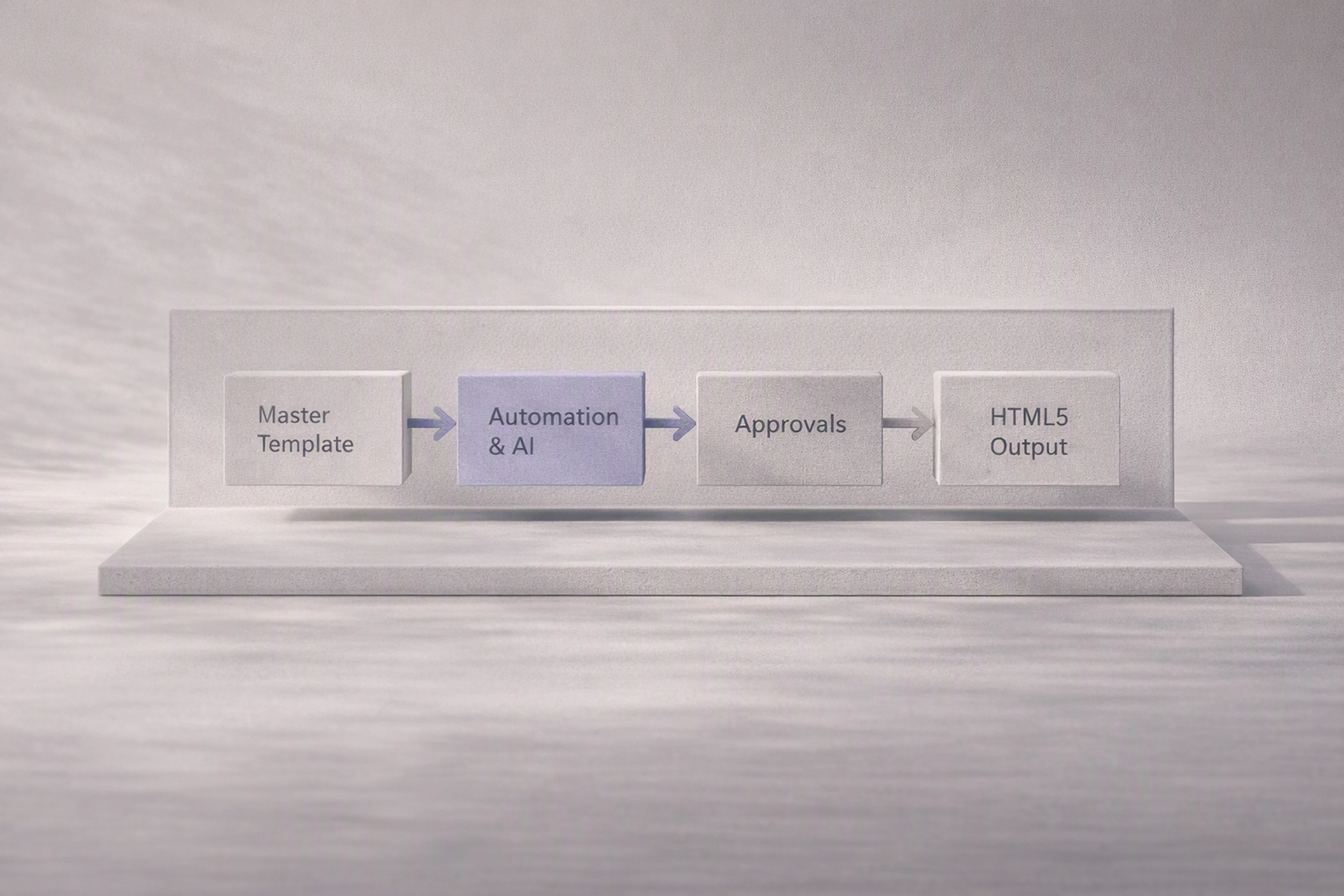
How modular creative workflows and master‑to‑variant systems actually work
Platform comparison: creative automation platforms for display advertising
How Viewst approaches HTML5 ad production as infrastructure
Practical criteria for choosing the best software for creating and managing display ads
Ethical AI in advertising creative tools
Key concepts: modular creative workflows and master‑to‑variant production
High‑volume campaigns require structure more than they require ideas.
Two concepts are central:
Modular creative workflows for display ads
A modular creative workflow breaks an ad into governed, reusable components:
Layout modules: placements for logo, product, offer, CTA, legal
Content modules: headlines, subheads, localized copy blocks
Design modules: color systems, type scales, image treatments
Those modules are then combined into templates that can be:
Reused across markets and campaigns
Updated centrally when brand rules change
Adapted programmatically based on audience, placement, or performance
Bannerflow notes that 93% of marketers track multiple creative performance metrics, and 74.3% track more than two, but struggle to turn that data into templated creative action (Bannerflow, Creative Automation: The Missing Link, Nov 2025, https://www.bannerflow.com/blog/creative-automation-isnt-the-problem-its-the-missing-link-between-data-and-creative).
Modular systems are how you turn insights into repeatable design decisions.
Ad variant generation from a master creative
A master creative is the single source of truth for a campaign:
It encodes the hierarchy, layout, brand rules, and motion logic
All sizes and variants inherit structure from it
Updates propagate downstream instead of being manually redrawn
This master‑to‑variant approach aligns with how leading creative automation platforms describe their workflows:
Celtra positions its platform as connecting "creative generation, review, approval, media activation, and performance tracking" around core concepts and templates (Celtra, Creative Automation Solution, accessed Sep 2026, https://celtra.com/solution/creative-automation/).
Smartly.io’s 2024 Digital Advertising Trends survey (global, 300+ marketing respondents) reports 96% investing in creative automation and 96% in generative AI, but 78% say they lack the right tools to operationalize variants across channels (Smartly.io, May 2024, https://www.smartly.io/resources/2024-digital-advertising-trends).
Master‑to‑variant systems are the practical foundation for "tools for creating thousands of ad variants" at a sustainable pace.
Platform comparison: creative automation platforms for display advertising
Below is an at‑a‑glance view of major creative automation platforms for display advertising. This comparison emphasizes objective attributes based on vendor documentation and public analyst coverage.
Note: Feature claims are based on vendor product pages as of September 2026. Pricing is indicative, not exhaustive, and typically varies by contract.
At a glance comparison matrix
Vendor: Celtra
Master‑to‑variant: Yes (template‑based, feed‑driven creative automation; vendor claim per Celtra solution page, Sep 2026: https://celtra.com/solution/creative-automation/)
HTML5 output: Yes (exports HTML5 ad units compatible with major ad servers; vendor docs)
AI features: Generative asset support and dynamic creative rules; emphasis on automation rather than pure gen‑AI
Governance: Brand templates, locked components, centralized asset libraries
Approvals: Integrated review and approval workflow within the platform
Pricing / target customer: Enterprise SaaS; brands and agencies with large, multi‑market campaigns
Vendor: Smartly.io
Master‑to‑variant: Yes (creative automation for social and some display, heavily feed‑based; Forrester cites Smartly as unifying workflows to "produce, personalize, and measure" creative, Oct 2024, https://secure.businesswire.com/news/home/20241015489310/en/Smartly-Named-a-Leader-in-Creative-Advertising-Technologies-2024-Analyst-Report)
HTML5 output: Primarily social and video; display HTML5 support varies by placement
AI features: Gen‑AI for image/text, automated creative optimization, and rule‑based personalization
Governance: Brand guardrails, approval flows, role‑based access
Approvals: Built‑in approvals, side‑by‑side creative comparisons
Pricing / target customer: Enterprise; performance teams and agencies operating paid social and cross‑channel campaigns
Vendor: Bannerflow
Master‑to‑variant: Yes ("create once, scale everywhere" templates and automatic resizes; Bannerflow product pages, accessed Sep 2026, https://www.bannerflow.com/)
HTML5 output: Yes (HTML5 banners plus video and dynamic formats)
AI features: Creative automation, data‑connected optimization; limited public emphasis on gen‑AI
Governance: Brand management, shared templates, permissions
Approvals: Comments, versioning, and approvals inside the platform (Bannerflow blog, Nov 2025)
Pricing / target customer: Mid‑market to enterprise brands; European stronghold, global reach
Vendor: Storyteq
Master‑to‑variant: Yes (template‑based video and display automation; Storyteq product pages, accessed Sep 2026, https://storyteq.com/)
HTML5 output: Focused on video and dynamic content; HTML5 banner support via templates for some integrations
AI features: Automation rules, asset personalization, limited public gen‑AI claims
Governance: Brand templates, central asset libraries
Approvals: Workflow and review tools integrated
Pricing / target customer: Enterprise creative ops teams working across video and display
Vendor: Viewst (HTML5‑native ad production platform)
Master‑to‑variant: Yes, centered on a master HTML5 creative that structurally governs all sizes and variants (vendor claim; Viewst product overview, accessed Sep 2026, https://viewst.com)
HTML5 output: Yes, native editable HTML5 output plus GIF/MP4 for ad‑network‑ready files (vendor claim)
AI features: AI Smart Resize (automatic size generation from master), AI Image Deflatening (turning flat assets into editable designs), AI Designer (prompt‑to‑banner sets), AI Instant Animator (one‑click motion across layers) — all designed for production rather than purely generative art (vendor claims)
Governance: Brandbooks with locked typography, color systems, and reusable components that propagate across all assets (vendor claim)
Approvals: Collaborative review, comments, and content approvals directly inside banner sets (vendor claim)
Pricing / target customer: Professional / enterprise creative teams and agencies running high‑volume HTML5 display campaigns; pricing by team volume and output. Public case studies and independent benchmarks are limited; evaluation typically occurs via proof‑of‑concept deployments.
This matrix shows a clear trend: creative automation platforms for display advertising are evolving into integrated production systems rather than point tools.
Celtra, Smartly.io, Bannerflow, Storyteq, and Viewst all:
Treat master templates as the foundation for scale
Embed approvals and collaboration into the production environment
Connect creative to media activation and/or performance data
Where Viewst differentiates — per its positioning — is by treating banner production specifically as infrastructure, with native HTML5 editing designed for high‑pressure production environments rather than general design use.
Creative automation software for display advertising — how to choose
Teams searching for the best software for creating and managing display ads should focus on operational fit, not just features.
The most important criteria:
Master‑to‑variant workflow
Does the platform enforce a single master creative per campaign?
Can you update copy or design once and synchronize all sizes?
HTML5 ad production depth
Are layers, animation timelines, and click‑throughs editable?
Does output match ad server requirements without manual fixes?
Automation and AI for production, not just generation
Can you automate resizing, animation, and export at scale?
Are AI tools governed by brandbooks and templates?
Content approval workflows for display ads
Are comments and approvals embedded inside the ad sets?
Can you track version history and sign‑off per variant or per campaign?
Brand governance and compliance
Can you lock fonts, colors, and logo usage?
Is there an auditable trail of changes to creative?
Integration with design and media ecosystems
Does it import from Figma/Adobe without flattening files beyond repair?
Can it export to ad servers, DSPs, and retail media platforms cleanly?
Enterprise readiness
SSO, role‑based access, audit logs
SLAs, uptime commitments, regional data handling
These criteria map directly onto the pain points highlighted by Monotype, Adobe, and Stoke: non‑creative time drain, operational inefficiency, and approval bottlenecks.
When evaluating creative automation tools for display advertising, ask vendors to demonstrate:
A live master‑to‑variant build for a real campaign
How brand rules are enforced when AI is involved
How approvals happen inside the actual production workspace
How Viewst supports scalable HTML5 ad production (vendor claims)
This section summarizes Viewst’s approach based on its own product messaging (Viewst, Product Overview, accessed Sep 2026, https://viewst.com). These are vendor claims rather than independently validated benchmarks.
Positioning: banner ad production as infrastructure
Viewst defines itself as an HTML5‑native ad production platform — a production infrastructure layer for creative and advertising teams under pressure:
Tight deadlines and multi‑market campaigns
High volumes of display units per sprint
Little tolerance for instability or broken exports
Instead of acting as a general design tool, Viewst sits between:
Design: Figma, Adobe Creative Cloud
Media: ad servers, DSPs, retail media platforms
It owns the high‑friction layer of scaling, animating, approving, and exporting ad‑ready assets.
Core production capabilities (vendor claims)
Viewst’s key features are explicitly oriented around production, not ideation:
AI Smart Resize
Generate all required sizes from one master HTML5 banner.
Maintain layout logic and brand hierarchy rather than naive image scaling.
AI Image Deflatening
Turn flat assets (e.g., static PSD exports, screenshots, or third‑party banners) into editable HTML5 designs with separated layers.
AI Designer
Convert structured prompts or briefs into HTML5 banner sets linked to a master template.
AI Instant Animator
Apply one‑click motion across layers following campaign‑level animation patterns.
True WYSIWYG editing
The editor mirrors final output — reducing discrepancies between design and deployed ads.
Imports & exports
Import assets from Figma and Adobe.
Export production‑ready HTML5, GIF, and MP4 suitable for major ad networks.
Brandbooks & governance
Define brandbooks with locked typography, color systems, and components.
Apply these rules across all campaign assets to reduce compliance risk.
Collaboration & content approvals
Leave comments directly on banners and sets.
Use structured content approval workflows inside the platform instead of email threads.
Independent third‑party case studies and benchmarks on Viewst’s performance (e.g., time saved, error reduction) are limited publicly. Most teams will need to validate these claims through pilot projects or side‑by‑side trials.
From master concept to thousands of variants: a practical workflow with Viewst
This section outlines a typical workflow for ad maker tools for high‑volume campaigns using Viewst as the example. The principles apply broadly to other modular platforms.
Step 1: Define the master concept
Start by anchoring the campaign in a single master creative:
Clarify the core message, offer, and audience.
Decide on visual hierarchy: logo, product, headline, CTA, legal.
Lock brand constraints via brandbooks (colors, type, spacing).
This master becomes the structural blueprint for all downstream assets.
Step 2: Build the master HTML5 banner
In Viewst’s HTML5 editor (vendor claim):
Import base design from Figma or Adobe, or use AI Designer to generate a first pass.
Set up layers for each content module (headline, price, image, CTA).
Define animation timelines for entrance, emphasis, and exit.
Map click‑through actions and tracking parameters.
Because Viewst outputs native editable HTML5, the master banner is a live ad unit, not a flat mock.
Step 3: Attach brandbooks and guardrails
To ensure consistency and compliance:
Attach the relevant brandbook to the master creative.
Lock critical elements (logo size, brand colors, primary font).
Define allowable ranges for variable components (headline length, alternative images).
Monotype notes that hidden compliance risks affect 68% of creative teams (Monotype, Jan 2025, https://www.monotype.com/scaling-creative-operations). Brandbooks and locked templates are practical defenses.
Step 4: Set up modular content for markets and audiences
Translate business requirements into modular content:
Create content sets for each market: localized headlines, currencies, legal lines.
Map segments to variations (e.g., prospect vs. existing customer).
Define A/B test cells that can be swapped without breaking layout.
This is where modular creative workflows for display ads start to pay off.
Step 5: Run AI Smart Resize
Use AI Smart Resize (vendor claim) to generate required formats:
Select all placements: 300x250, 160x600, 728x90, 970x250, 320x100, etc.
Run Smart Resize from the master HTML5 banner.
Review each size to ensure hierarchy and legibility carry through.
This replaces the manual, non‑creative resize work that Monotype identifies as a major time drain.
Step 6: Generate variants from the master
Once sizes are set, you can scale variants systematically:
Apply content sets to generate localized and persona‑specific versions per size.
Use AI Designer rules to swap headlines, imagery, or offers based on campaign logic (vendor claim).
Maintain structural consistency: motion, brand elements, and layout stay governed by the master.
This is where teams can realistically create hundreds or thousands of variants without collapsing under production overhead.
Step 7: Animate at scale with AI Instant Animator
To add motion consistently:
Define animation patterns at the master level (e.g., fade‑in headline, slide‑in image, pulsing CTA).
Use AI Instant Animator to apply these motion rules across all sizes and variants (vendor claim).
Spot‑check a subset of banners to ensure motion feels on‑brand and readable.
This aligns with Adobe’s recommendation that technology should "free teams from monotonous tasks" and reduce inconsistency (Adobe, Apr 2024, p. 14).
Step 8: Run content approval workflows inside the platform
Instead of exporting screenshots to email threads:
Invite stakeholders (creative directors, brand leads, legal) into the Viewst workspace.
Collect comments and change requests directly on each banner or set.
Track approvals by campaign and variant, with a clear audit trail.
Stoke’s research on creative teams shows approval bottlenecks and communication hurdles are core drivers of burnout (The Stoke Group, Jan 2025). Embedded content approvals are a direct response.
Step 9: Export production‑ready HTML5, GIF, MP4
Once approved:
Export HTML5 banners for primary display placements.
Export GIF or MP4 variants for environments that don’t support HTML5.
Ensure naming conventions and tracking parameters align with your ad server or DSP.
Because Viewst’s editor is WYSIWYG (vendor claim), output should match what reviewers saw during approvals, minimizing friction between creative and media teams.
Why integrated creative automation beats point tools
Several industry studies show that teams are moving away from fragmented stacks toward integrated systems:
Celtra’s 2024 state‑of‑the‑industry overview notes 73% of marketers already use generative AI tools for design/production, 67% want to expand AI/automation, and 66% are focused on improving ad creative quality (Celtra, How Brands and Agencies Are Optimizing Digital Creative Production, Jun 2024, https://celtra.com/blog/state-of-the-industry-how-brands-and-agencies-are-optimizing-digital-creative-production/).
Smartly.io’s Forrester coverage highlights that the strongest platforms "unify workflows to produce, personalize, and measure creative" (Business Wire, Oct 15 2024, https://secure.businesswire.com/news/home/20241015489310/en/Smartly-Named-a-Leader-in-Creative-Advertising-Technologies-2024-Analyst-Report).
Teams that try to combine:
Figma/Adobe for design
Separate motion tools for animation
Generic reviewers (PDFs, slides) for approvals
Manual exports into ad servers
end up with:
Versioning chaos (no single source of truth)
Approval bottlenecks spread across email and chat
Brand drift and compliance risk
An HTML5 ad production platform—whether Celtra, Bannerflow, Storyteq, or Viewst—acts as the connective tissue.
It:
Treats the master creative as the backbone of the entire set
Embeds approvals into the production environment
Automates mechanical tasks (resizes, exports, basic motion)
Keeps performance insights close to creative decisions
Ethical AI tools for display ad design
As AI takes on more of the creative workload, ethical considerations become operational requirements.
Monotype’s study warns that hidden compliance risks affect 68% of creative teams, often tied to inconsistent asset provenance and brand application (Monotype, Jan 2025).
When evaluating ethical AI tools for display ad design, focus on:
1. Asset provenance and licensing
Can the platform track where each asset came from (original shoot, stock library, gen‑AI)?
Are licenses and usage rights attached to assets inside the system?
Is gen‑AI trained or constrained in ways compatible with your legal and brand standards?
2. Watermarking and disclosure
Do you need to disclose AI‑generated content in certain markets or industries?
Can the system add subtle markers or maintain metadata indicating AI involvement?
3. Bias and representation
Does the platform or your workflow include review steps for representation and bias?
Are templates designed to avoid stereotyping in imagery or copy?
4. Human‑in‑the‑loop workflows
Are human reviewers explicitly responsible for final approvals on AI‑influenced creative?
Does the system make it clear what was generated vs. hand‑crafted?
5. Brand governance as an ethical control
Locked brandbooks prevent AI from improvising off‑brand colors, typography, or logos.
Governance reduces the risk of unauthorized creative or confusing brand signals.
Viewst’s emphasis on brandbooks and in‑platform approvals (vendor claim) reflects this direction: AI is a collaborator removing mechanical work, not a replacement for human judgment.
FAQ: ad design tools, creative automation, and modular workflows
1. What is the best ad design software for creative agencies running high‑volume display campaigns?
There’s no single "best" tool for every team, but agencies typically evaluate platforms like Celtra, Bannerflow, Storyteq, Smartly.io, and Viewst.
For high‑volume HTML5 banner production, platforms with strong master‑to‑variant workflows, native HTML5 output, and embedded approvals (rather than generic design tools) are usually the best fit.
2. What are the most important features in an ad maker for high‑volume campaigns?
Key features include:
Master‑to‑variant architecture for templates and layouts
HTML5‑native editing and export capabilities
Automation for resizing, animation, and export
Brandbooks and governance controls
Integrated content approval workflows and audit trails
Without these, teams end up spending most of their time on non‑creative work.
3. How do tools for creating thousands of ad variants avoid brand chaos?
They rely on governed templates and brand systems.
All variants inherit layout, motion, and styling from a master creative and locked brandbooks.
Local changes (copy, images, offers) happen inside controlled fields, with approvals tracked per campaign.
4. What’s the difference between generative AI tools and creative automation platforms for display advertising?
Generative AI tools focus on creating new assets (images, copy) from prompts.
Creative automation platforms focus on operating production: turning master creatives into structured sets of HTML5 ads, handling approvals, enforcing brand rules, and connecting to media and measurement.
Many modern platforms combine both, but their core value lies in automation around structured creative, not pure generation.
5. How does Viewst fit into an existing Figma/Adobe workflow?
Based on Viewst’s own claims, designers continue to craft master concepts in Figma or Adobe.
Those masters are imported into Viewst, converted into HTML5 templates, and then scaled, animated, reviewed, and exported from there.
Viewst sits between design tools and media platforms as the specialized production studio for display ads.
By approaching creative automation software for display advertising as production infrastructure—and by insisting on master‑to‑variant workflows, HTML5‑native output, and ethical AI guardrails—creative leaders can scale campaigns to thousands of units without sacrificing craft, brand integrity, or their team’s sanity.

Victoria is the CEO at Viewst. She is a serial entrepreneur and startup founder. She worked in Investment Banking for 9 years as international funds sales, trader, and portfolio manager. Then she decided to switch to her own startup. In 2017 Victoria founded Profit Button (a new kind of rich media banners), the project has grown to 8 countries on 3 continents in 2 years. In 2021 she founded Viewst startup. The company now has clients from 43 countries, including the USA, Canada, England, France, Brazil, Kenya, Indonesia, etc.
In this article
" height="11.060000000000002px" id="wzBCZ87AK" transform="translate(6.47 2.47)" width="6.590000000000003px"/></g></svg>)