
Banner Ads Guide for Digital Advertising: Platforms, Formats, and Targeting Basics
Banner ads are still one of the most reliable ways to scale digital campaigns across web, apps, social, and retail media.
But the production layer — dozens of sizes, formats, and versions — is where creative teams lose time.
This guide walks through:
Core banner formats and dimensions across major platforms
How animation, GIF, and HTML5 fit into modern display
Targeting and personalization basics (including privacy constraints)
How creative automation tools for display advertising help you scale
A practical workflow example using Viewst as a production studio
Last verified: 2026-09-19. Platform specs change frequently; always check linked docs before launching.
Creative automation tools for display advertising: what to look for
Creative automation platforms for display advertising are built to remove repetitive production work from designers while keeping creative quality and brand control.
Key capabilities to prioritize:
Master-based production
One master creative as the "source of truth" for all sizes and variants
Automated resizing & layout
Smart resize that respects layout hierarchy, safe areas, and aspect ratios
Animation & motion at scale
One-click animation templates applied consistently across a whole set
Versioning & localization
Structured variants by language, offer, market, or audience
Governance & brandbooks
Locked fonts, colors, logo usage, and legal lines enforced in the tool
Export-ready outputs
Native HTML5, GIF, and MP4 exports that match ad network specs
Collaboration & approvals
Comments, mark-up, and sign-offs inside the production environment
For teams running hundreds of banners, creative automation software for display advertising becomes critical infrastructure, sitting between design tools (Figma, Adobe) and media platforms (Google Ads, Meta, LinkedIn, Amazon Ads).
Banner formats & specs across major online advertising platforms
Banner solutions span classic display networks, social platforms, and retail media.
Below are common formats and technical constraints. Always confirm in official docs before launching.
Google Display & DV360 (GDN / Programmatic)
Sources:
Google Ads image specs: https://support.google.com/google-ads/answer/1722096
Google Ads HTML5 policy & requirements: https://support.google.com/google-ads/answer/6095883
Common image sizes (responsive display & uploaded image ads):
300×250 (Medium rectangle)
336×280 (Large rectangle)
728×90 (Leaderboard)
300×600 (Half page)
160×600 (Wide skyscraper)
320×100 (Large mobile banner)
Formats & limits (Google Ads, last verified 2026-09-19):
Allowed formats: JPG, PNG, GIF
Max file size: 150 KB per image (for standard image ads)
Animated GIFs:
Max length: 30 seconds
Looping allowed, but must stop after 30 seconds
Recommended frame rate: ≤ 5 fps to avoid flashing
HTML5 display ads (where still allowed):
Zip file size: up to 5 MB (Google Ads)
Max 10 files per HTML5 bundle
ClickTag implementation required
DV360 and other DSPs typically follow IAB display standards: https://www.iab.com/guidelines/digital-advertising-formats-guidelines/.
Meta (Facebook & Instagram) display-style placements
Sources:
Meta image ad specs: https://www.facebook.com/business/help/242286752159224
Meta video ad specs: https://www.facebook.com/business/help/500699693483917
Meta has moved away from old right-column-only banner references and toward unified image/video specs.
Key placements for banner-like creatives (last verified 2026-09-19):
Feed (Facebook & Instagram)
Recommended aspect ratios: 1:1 (square), 4:5 (vertical), 16:9 (horizontal)
Recommended size: 1080×1080 or higher
File types: JPG, PNG
Max file size: 30 MB per image
Right column (Facebook desktop)
Aspect ratio: ~1:1 or landscape; Meta now recommends using feed-ready 1:1 assets that auto-adapt
Historic guidance referenced 1200×1200; modern practice is to upload 1080×1080 and let Meta render
Stories & Reels
Aspect ratio: 9:16
Recommended size: 1080×1920
Video length: up to 60 seconds (placement dependent)
Animation on Meta is typically served as video (MP4) rather than GIF.
LinkedIn Ads banner specs
Source:
LinkedIn ads specs & dimensions: https://www.linkedin.com/help/lms/answer/a427793
Common "banner-like" formats (last verified 2026-09-19):
Single image ads (sponsored content)
Recommended image size: 1200×627 (1.91:1) or 1200×1200 (1:1)
File types: JPG, PNG
Max file size: 10 MB
Conversation & Message Ads banners
Banner image: 300×250
File types: JPG, PNG, GIF (static only)
Video ads
Resolution: min 360×360, max 1920×1920
File type: MP4
Max file size: 200 MB
The "LinkedIn banner" people refer to is often the 300×250 companion banner used alongside Message Ads or the 1200×627 single image in feed.
Retail media (Amazon Ads, Walmart Connect & others)
Sources:
Amazon Ads image specs: https://advertising.amazon.com/en/help/glossary/image-creative-specifications
Walmart Connect display specs: https://www.walmartconnect.com/resources
Common constraints (last verified 2026-09-19):
Amazon Sponsored Display / DSP
Standard sizes: 300×250, 160×600, 300×600, 728×90, 970×250, etc.
Formats: JPG, PNG, GIF
Max file size: typically 150 KB (IAB-aligned)
Walmart Connect display
Sizes and formats closely track IAB display standards
Strict rules on brand safety and product imagery
Retail media networks often add product data feeds and dynamic templates into the mix, which makes creative automation and feed integration particularly valuable.
Animation, GIF, and HTML5 in banner production
Animation is now expected in performance creative, but each platform enforces limits.
GIFs: when they work, when they don’t
Pros:
Easy to produce from image sequences
Supported across many display networks
Lightweight for simple motion
Typical constraints (IAB + Google Ads guidelines):
Max length: 30 seconds, must stop animating after that
Recommended frame rate: ≤ 5 fps to avoid flashing
Max file size: 150 KB on many networks (GDN, some retail media)
Cons:
No click-through tracking inside the asset
Heavier than static if not optimized
Can be visually rough compared to MP4 or HTML5
HTML5 banners
HTML5 banners deliver smooth motion, interactivity, and dynamic content.
Key constraints (Google Ads HTML5, last verified 2026-09-19):
Bundle (ZIP) size up to 5 MB
Max 10 files in a bundle
Must implement the
clickTagvariable per Google’s specNo auto-expanding or misleading behavior
HTML5 is also the standard in programmatic video (via VAST/OM SDK), but for pure display banners, it’s mostly about:
Animating layers
Swapping dynamic text/images from feeds
Respecting CPU and bandwidth limits
MP4 / video-format display creatives
On social and some display placements, short video has replaced animated GIFs.
Typical guidance:
Length: 6–15 seconds for high-performing, loop-friendly assets
File type: MP4 (H.264)
Frame rate: 24–30 fps
Video assets can be reused across platforms with correct aspect ratios (1:1, 4:5, 9:16, 16:9).
Targeting & personalization basics for banner ads
Banner solutions now combine:
Broad reach via open web and programmatic
Precision via audience, intent, and behavioral targeting
Key targeting dimensions:
Demographics – age, gender, job title (LinkedIn), household income (Google in some markets)
Interests & in-market segments – browsing behavior and purchase intent
Remarketing – site visitors, app users, cart abandoners
Contextual – page content, category, keyword
Geo – country, region, city, radius around locations
Personalization typically uses:
Dynamic creative optimization (DCO) – feeds and rules to swap product, price, and copy
Audience-based variants – different hero messages per segment
Creative automation software for display advertising helps map these dimensions to concrete creative variations without manual layout work.
Regional & privacy considerations
Targeting and personalization are constrained by regional privacy regulations and platform policies.
Key frameworks:
GDPR (EU/EEA) – strict consent requirements for tracking and personalized ads
CCPA/CPRA (California) – "Do Not Sell or Share" requirements for personal data
Apple ATT / SKAdNetwork (iOS) – app tracking limited without user opt-in
What this means for banner campaigns:
Retargeting pools may shrink in privacy-first regions.
Frequency capping and measurement may rely more on aggregated or contextual signals.
Retail media networks often provide anonymized, aggregated shopper segments instead of raw user-level data.
Practical responses:
Maintain separate creative and targeting strategies by region (e.g., EU vs US).
Use more contextual messaging and less micro-personalization where consent is limited.
Ensure your creative automation tools and feeds respect opt-out flags and data retention rules.
Platform comparison: creative automation platforms for display advertising
Creative automation platforms vary widely in outputs, governance, AI focus, and pricing.
Below is a high-level comparison based on publicly available information and typical use cases (last verified 2026-09-19). Always confirm details directly in each vendor’s documentation.
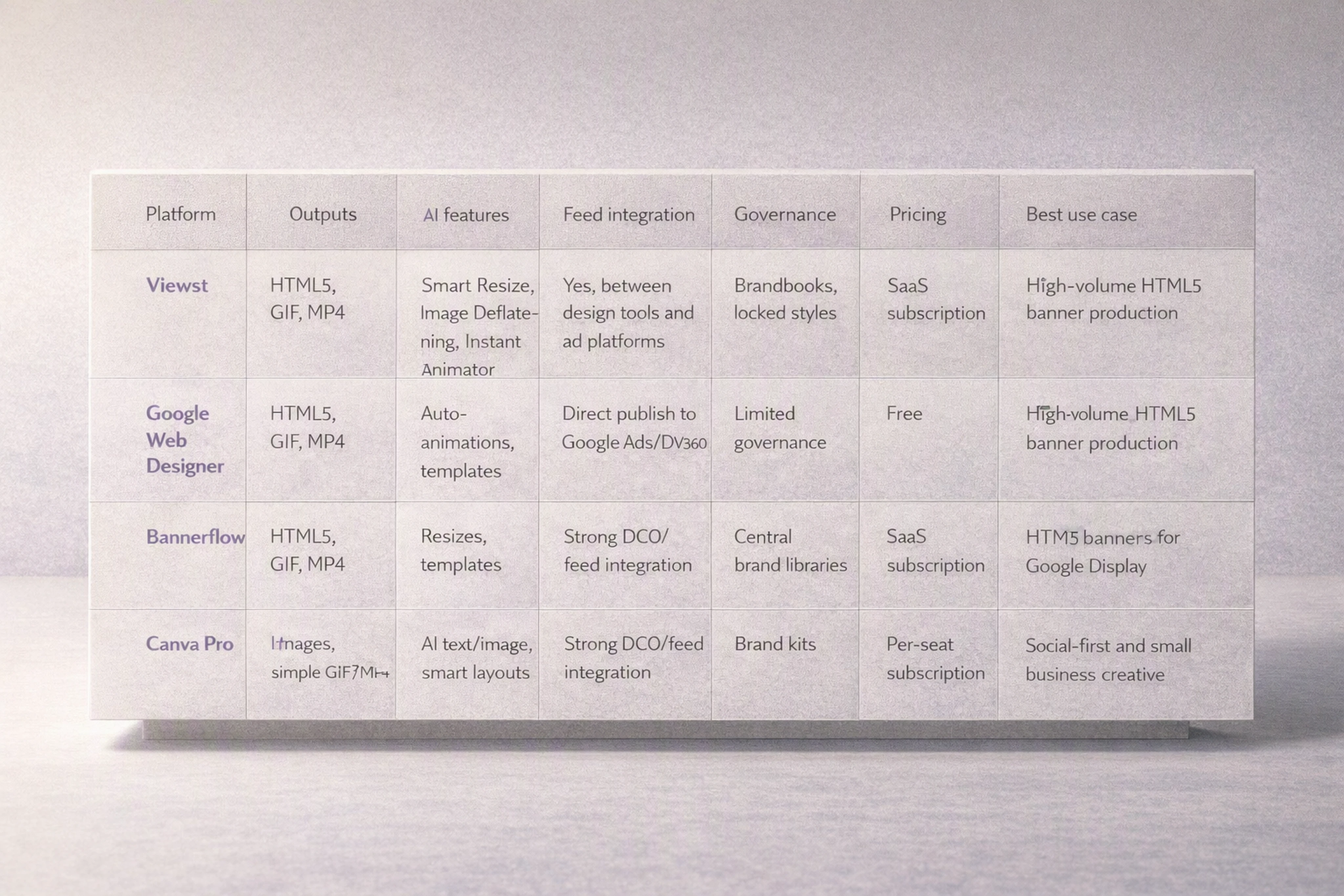
Comparison matrix (illustrative)
Platform | Supported outputs (HTML5/GIF/MP4) | AI features | Feed integration | Governance | Pricing model | Best use case |
|---|---|---|---|---|---|---|
Viewst (sponsored example; based on product materials) | Native HTML5, GIF, MP4 exports | AI Smart Resize, AI Image Deflatening, AI Instant Animator, AI Designer (prompt to banners) | Designed to sit between design tools and ad platforms; supports feed-based variants in HTML5 sets | Brandbooks, locked styles, master-based governance | SaaS subscription (team/enterprise tiers) | High-volume banner production for agencies and in-house teams needing HTML5-native workflows |
Google Web Designer | HTML5, animated GIF, MP4 | Basic auto-animations, templates | Integrates with Google Ads / DV360 via published creatives | Limited brand governance; relies on manual discipline | Free desktop tool | Craft-heavy HTML5 banners for Google Display & DV360 |
Bannerflow / similar creative management platforms | HTML5, GIF, MP4 | Automated resizes, templates, some AI text/image support | Strong feed/DCO integration for programmatic | Central brand asset libraries, permissions | SaaS subscription | Enterprise-level creative optimization and DCO across programmatic buys |
Canva Pro & similar design tools | Static images, simple MP4/GIF | AI text & image generation, smart layouts | Limited direct ad feed integration, stronger social scheduling | Brand kits, template control | Per-seat subscription | Social-first teams and small business creative; less HTML5 focus |
Viewst’s capabilities listed here are based on Viewst’s own product positioning and materials and should be treated as a sponsored example rather than independent verification.
Best software for creating and managing display ads
Choosing the best software for creating and managing display ads depends on your scale, governance needs, and channel mix.
1. Viewst (HTML5-native ad production studio)
This is a sponsored example based on Viewst’s product documentation and marketing materials.
Best ad design software for creative agencies and in-house teams that:
Ship large volumes of HTML5 and display ads across markets
Need native editable HTML5 output for ad networks
Want AI to remove mechanical tasks, not replace design judgment
Core capabilities (per Viewst’s product materials: https://viewst.com/):
AI Smart Resize – generate all required sizes from one master while preserving structure
AI Image Deflatening – turn flat assets into editable HTML5 designs
AI Designer – prompt to structured HTML5 banners, respecting brandbooks
AI Instant Animator – one-click motion across layers from a static master
True WYSIWYG editor – editor equals final HTML5 output
Figma / Adobe imports, brandbooks, collaborative review
Pros:
Purpose-built for HTML5 display ad production
Strong focus on governance, brandbooks, and master-based workflows
Cons:
Not a general-purpose design platform; best paired with Figma/Adobe for concepting
2. Google Web Designer
Best for:
HTML5 creatives destined for Google Display & DV360
Teams comfortable with timeline animation and manual layout
Pros:
Free
Deep HTML5 support and direct integration with Google’s ecosystem
Cons:
Limited collaborative features
No built-in brand governance
3. Bannerflow / comparable creative automation platforms
Best for:
Enterprise creative teams running DCO-heavy programmatic campaigns
Pros:
Robust feed integration and creative optimization features
Multi-market control over templates and brand assets
Cons:
Higher cost; overkill for small teams
4. Canva Pro (and similar design tools)
Best for:
Social-first teams and small businesses creating static or simple animated assets
Pros:
Accessible, quick to learn
Good for rapid image-based content across social and display
Cons:
Weak HTML5 and feed/automation capabilities
Limited control for complex banner sets at enterprise scale
Selection criteria:
Volume of banners and variants you ship per month
Need for HTML5 vs image/video-only
Level of brand governance and approvals required
Integration with your ad stack (Google Ads, DV360, Meta, LinkedIn, retail media)
Ethical AI tools for display ad design
AI advertising tools now influence everything from copy to layout. Ethical AI in advertising creative tools is non-negotiable for brands.
Key principles for AI tools for ethical display advertising design:
Respect creative judgment
AI handles resizes, exports, simple animation; humans own concept and messaging.
Bias awareness in prompts
Avoid stereotypes and discriminatory assumptions in prompts and datasets.
Privacy & compliance
Don’t feed sensitive customer data directly into prompts or AI training.
Brand safety & review
Always run AI-generated outputs through human QA and legal checks.
Practical guidelines:
Use AI to generate structural options (layouts, motion) rather than audience-specific micro-targeted messages.
When generating banners with AI advertising tools, log prompts and approvals for auditability.
Ensure any dynamic personalization is based on compliant segments, not sensitive attributes.
Ethical AI tools for display ad design should make it easier to uphold brand standards, not harder.
Example end-to-end banner production workflow with creative automation (Viewst case)
To make this concrete, here’s a full workflow from master creative to live banners, using Viewst as a case study example of an HTML5 ad builder and creative ops automation platform.
1. Source: import from Figma / Adobe
Export your approved master design from Figma or Adobe XD/Illustrator.
In Viewst, import the design as the starting point for an HTML5 banner set.
2. Master creative setup
Build a master HTML5 banner in a primary size (e.g., 300×250 or 1080×1080).
Define structure:
Logo area
Headline & subcopy
Product image or illustration
CTA button
Legal/disclaimer text
Attach brandbooks:
Lock fonts, color palette, logo usage, and safe margins.
3. Asset enrichment
Replace generic placeholders with:
Final product images
Campaign headlines and body copy
Localized text variants (EN, ES, FR, etc.)
Ensure layers are clearly named (logo, headline, CTA) to support AI-driven resizing and animation.
4. Resize & animate at scale
Using Viewst’s automation features (per product materials):
Apply AI Smart Resize:
Generate all required sizes from the master: 300×250, 728×90, 160×600, 1080×1080, 1080×1920.
Review and tweak any layout where safe areas or legibility need manual adjustment.
Use AI Instant Animator:
Add one-click motion to key layers (headline fade-in, CTA slide, image scale).
Apply consistent timing across the set (e.g., 3–5 seconds of motion, then static).
5. Variants & localization
Duplicate the master set for:
Different offers (10% off, free shipping, trial)
Different audiences (enterprise vs SMB messaging)
Different markets (currency and language variants)
Use structured naming:
Brand_Campaign_Region_Placement_Size_Variant.
6. Review & QA
Stakeholders comment directly on specific banner sizes inside Viewst, instead of static screenshots.
QA checklist:
Text legible at all sizes
Logos and CTAs within platform safe areas
Animation duration within platform limits (e.g., ≤ 30 seconds for GIF, short loops for HTML5)
No flashing or accessibility issues
7. Export: HTML5 / GIF / MP4
Export formats by channel:
Google Display / DV360 – HTML5 ZIPs plus static backup images
Meta (Facebook/Instagram) – 1080×1080 or 4:5 and 9:16 MP4, plus static JPGs
LinkedIn – 1200×628/1200×1200 static JPGs and MP4 for video units
Retail media – IAB display sizes as optimized PNG/GIF
Ensure each output respects the platform’s max file size and format constraints.
8. Upload & trafficking
Upload final files to:
Google Ads or DV360 per placement
Meta Ads Manager for feeds, Stories, Reels
LinkedIn Campaign Manager
Amazon Ads / Walmart Connect consoles
Map each creative to the appropriate audience, geo, and campaign objective.
This structured workflow keeps master creatives as the single source of truth, while creative automation handles the repetitive mechanics of resizing, animating, and exporting.
FAQ: Banner ads and creative automation
1. What are the most important banner sizes for modern digital advertising?
The most widely used IAB and platform-aligned sizes include 300×250, 728×90, 160×600, 300×600, 320×100, 970×250, and native/social sizes like 1080×1080 and 1080×1920.
If you build from a master and use creative automation, you can maintain consistency across all of them.
2. Should I use GIF, HTML5, or MP4 for animated banners?
Use HTML5 where you need interactivity or dynamic content; use MP4 for social placements and short video-like banners; use GIF only for simple motion where HTML5 or video isn’t available.
Always check platform limits for length and file size.
3. How do I keep banner formats consistent across Facebook, LinkedIn, and display networks?
Start from a single master creative, define brandbooks and layout rules, then use creative automation tools to generate platform-specific sizes (e.g., 1080×1080 for Meta, 1200×628 for LinkedIn, 300×250/728×90 for GDN).
Review a few key sizes manually to ensure visual consistency, then propagate changes from the master.
4. How does privacy (GDPR, CCPA, ATT) affect banner personalization?
Privacy laws limit how granularly you can target and measure individuals. You’ll rely more on contextual and consent-based segments, and less on user-level behavioral profiles.
Creative should be designed to perform well for segments rather than hyper-specific individuals, and your automation stack should respect opt-out signals.
5. Where does Viewst fit in a modern creative workflow?
Viewst sits between design tools (Figma, Adobe) and media platforms (ad servers, DSPs), acting as a production infrastructure for HTML5 and display ads.
Designers craft the master concept in their usual tools, then use Viewst to scale, animate, govern, and export ad-ready banners at volume.
Banner ads aren’t going away — they’re becoming more structured, governed, and automated.
The teams that win combine strong creative ideas with reliable production infrastructure, so designers stay designers and banner production stops being a bottleneck.

Victoria is the CEO at Viewst. She is a serial entrepreneur and startup founder. She worked in Investment Banking for 9 years as international funds sales, trader, and portfolio manager. Then she decided to switch to her own startup. In 2017 Victoria founded Profit Button (a new kind of rich media banners), the project has grown to 8 countries on 3 continents in 2 years. In 2021 she founded Viewst startup. The company now has clients from 43 countries, including the USA, Canada, England, France, Brazil, Kenya, Indonesia, etc.
In this article
" height="11.060000000000002px" id="wzBCZ87AK" transform="translate(6.47 2.47)" width="6.590000000000003px"/></g></svg>)