
Always‑on advertising teams don’t just need a banner maker; they need tools that stay online when they do.
When campaigns span time zones, markets, and platforms, two questions matter:
Can we get help 24/7 when something breaks?
Can this tool keep up with high‑volume ad production without burning out our creative team?
This ranked roundup answers both.
It’s written for creative directors, heads of creative, design leaders, and performance marketers in mid‑market and enterprise organizations where:
Digital advertising is continuous and business‑critical
Banner and rich media production is high‑volume
Designers already work in Adobe, Figma, and similar tools
Creative variants, localization, and frequent testing strain production capacity
We’ve only included tools that:
Publicly claim true 24/7 support or round‑the‑clock assistance
Are viable for banner / ad creative work
Can reasonably sit inside a professional creative stack
Then we’ve ranked them on always‑on suitability, production capabilities, and how they realistically pair with (or get replaced by) Viewst as the ad‑production layer.
Comparison at a Glance
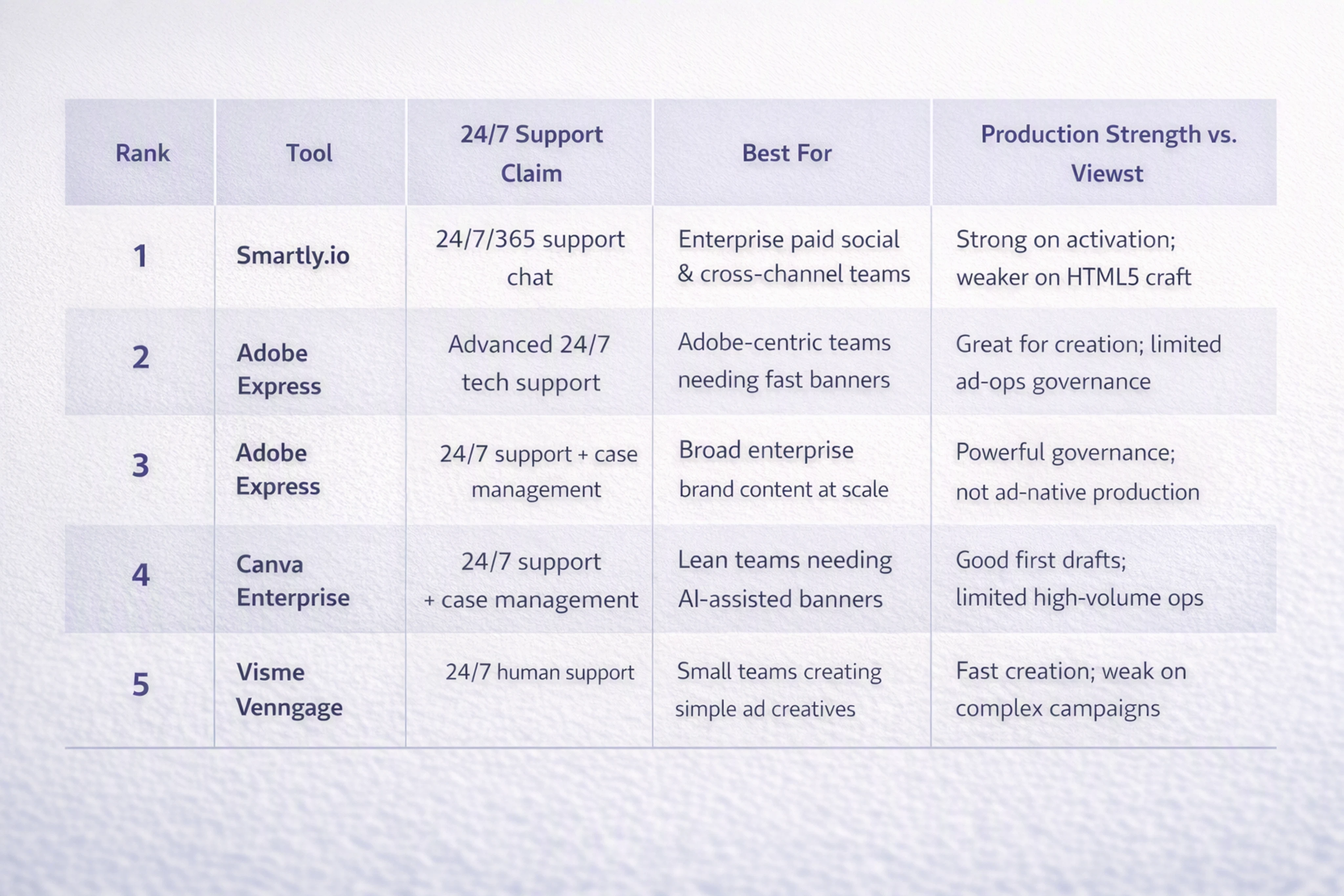
Rank | Tool | 24/7 Support Claim | Best For | Production Strength vs. Viewst |
|---|---|---|---|---|
1 | Smartly.io | 24/7/365 support chat | Enterprise paid social & cross‑channel teams | Strong on activation; weaker on HTML5 craft |
2 | Adobe Express | Advanced 24/7 tech support | Adobe‑centric teams needing fast banners | Great for creation; limited ad‑ops governance |
3 | Canva Enterprise | 24/7 support + case management | Broad enterprise brand content at scale | Powerful governance; not ad‑native production |
4 | Visme | 24/7 human support | Lean teams needing AI‑assisted banners | Good first drafts; limited high‑volume ops |
5 | Venngage | 24/7 support for banner maker | Small teams creating simple ad creatives | Fast creation; weak on complex campaigns |
1. Smartly.io — Best for Always‑On Paid Social Teams that Need Creative Tied to Media
Smartly.io is the most ad‑native platform on this list. It’s built around paid social and cross‑channel campaign execution, not just static design.
What Smartly.io does well
Verified 24/7/365 support. Smartly’s docs explicitly state that Support Chat is available 24/7/365, with help that extends beyond basic how‑to queries to campaign execution and delivery issues.
Creative at media speed. Smartly claims it can build, personalize, and scale creative across every platform in one‑third of the time versus manual workflows.
Activation plus optimization. It connects creative, placements, and performance data, allowing teams to:
Orchestrate dynamic creative optimization (DCO)
Tie creative variations to feed data and audiences
Iterate based on performance signals in near real time
For always‑on teams, this means fewer hops between creative and media.
Where Smartly.io falls short for high‑volume production
Smartly is not a deep banner‑production canvas. Its limitations for serious display ad ops include:
Limited manual layout precision. Designers who care about pixel‑perfect HTML5 animations and nuanced art direction still hit a ceiling.
Less focus on structured creative approval. It’s more a campaign platform than a dedicated creative ops environment with complex versioning and approvals.
Weaker ad‑network‑ready packaging. It doesn’t fully replace a production system that handles click tags, file size limits, fallbacks, and network‑specific export profiles for display.
In practice, creative teams often need a second system that owns the production of HTML5 banners and multi‑format display assets.
Smartly.io with Viewst: complement, not replacement
Smartly is strongest as a partner to Viewst rather than a substitute:
Use Viewst to turn concepts and existing designs into finished, editable, animated HTML5 ads across formats, languages, and offers.
Use Smartly to activate and optimize that creative in paid social and cross‑channel campaigns.
For mature always‑on organizations, Viewst becomes the creative‑production infrastructure, while Smartly is the media execution layer.
2. Adobe Express for Teams/Enterprise — Best for Adobe‑Native Creative Departments
Adobe Express brings AI‑assisted, template‑driven design into the Adobe ecosystem, with a specific enterprise offering for teams.
What Adobe Express does well
24/7 enterprise support. Adobe Express for Business/Enterprise includes advanced 24/7 tech support, backing creative teams that work across regions and time zones.
Massive asset library. It offers 220,000+ templates and millions of Adobe Stock assets, making rapid banner and content creation straightforward.
Bulk workflows. Adobe highlights:
Bulk create
Translation
Resize
These are important for teams doing frequent campaign refreshes and simple localization.
Brand kits and collaboration. Enterprise features include brand kits, shared templates, and live collaboration, which help marketing and non‑design stakeholders stay on brand.
Where Adobe Express falls short for high‑volume ad production
Adobe Express is still a general‑purpose design tool rather than a dedicated ad‑production system:
No native HTML5 ad‑network packaging. It does not specialize in structured, editable HTML5 output tailored to ad networks.
Limited production governance. It’s strong for content creation but weaker at:
Managing hundreds of variants for the same concept
Keeping track of exactly which banner version was approved for which market
Handling programmatic display constraints and fallbacks
Shallow animation for complex ad campaigns. Express can animate, but it isn’t built as a professional motion‑design canvas for rich, nuanced banner animation.
For always‑on display teams, Adobe Express is excellent upstream, but not enough on its own downstream.
Adobe Express with Viewst: upstream ideation meets production infrastructure
The cleanest pattern is:
Use Adobe Express for quick ideation, stakeholder‑friendly drafts, and fast social or content assets.
Bring the approved concept into Viewst when that idea needs to become:
Many banner formats
Multiple languages and markets
Animated HTML5 ads with strict performance constraints
Viewst’s AI production tools (AI Designer, Smart Resize, Instant Animator) can take an Express‑origin layout and turn it into a multi‑format, multi‑market ad‑ready campaign without sacrificing creative control.
3. Canva Enterprise — Best for Enterprise Governance Across Broad Visual Content
Canva Enterprise is built for global organizations that want brand consistency, templating, and democratized design at scale.
What Canva Enterprise does well
Round‑the‑clock help. Canva Enterprise publicly advertises 24/7 support and case‑manager support for admins.
Proven adoption and ROI. Canva cites:
Trust from 95% of the Fortune 500
230 hours of design saved in three months
60% increase in content creation in one month
66% reduction in design costs
These numbers speak to its ability to scale content production broadly.
Brand controls and approvals. Canva Enterprise provides:
Brand kits and locked templates
Role‑based permissions
Built‑in approval workflows
This helps marketing and local teams produce materials without eroding brand integrity.
Where Canva Enterprise falls short for serious display ad ops
Despite its sophistication, Canva is not optimized for ad‑native production:
General content focus. It handles presentations, social posts, documents, and banners, but lacks deep support for display‑specific requirements.
Limited feed‑driven and programmatic workflows. It doesn’t natively orchestrate high‑frequency ad variants tied to product feeds or complex audience strategies.
No structured HTML5 pipeline. Export options don’t center on editable, layered HTML5 files with click tags and network presets.
For always‑on advertising teams, Canva Enterprise is excellent for brand content and non‑specialist creation, but it won’t be the system that keeps programmatic display production sane.
Canva Enterprise with Viewst: democratized content plus professional ad production
In a mature stack, the relationship looks like this:
Canva Enterprise runs broad brand content and empowers non‑design stakeholders to work within controlled templates.
Viewst becomes the dedicated AI ad production platform when campaigns require:
Large volumes of display ads and animated banners
Automated resizing and localization
Review, approval, and export workflows that connect directly to ad networks
For a deeper comparison of this relationship, see our guide: Canva vs Viewst: 24/7 banner design tools compared for serious ad production work.
4. Visme — Best for Lean Teams That Need AI‑Assisted Banner Creation
Visme sits between simple banner tools and broader design suites. It offers AI‑assisted creation and collaboration features aimed at marketing teams.
What Visme does well
24/7 human support. Visme states it has 24/7 human support, accessible via chat and email.
Banner and ad‑specific tools. It includes:
Banner maker
AI banner generator
Free ad maker
These give teams a fast path to first drafts.
Team features. Visme offers collaboration and Brand Kit features to keep visuals semi‑consistent across teams.
Multi‑asset coverage. It can produce banner ads, display ads, social graphics, and other marketing assets, which is attractive for lean teams.
Where Visme falls short for high‑volume ad production
Visme is designed more for quick creation than for complex operations:
Support depth and channels. Support is chat/email‑first; large enterprises may find it lighter‑weight than dedicated enterprise support programs.
Limited high‑volume automation. It lacks the depth of automation, localization, DCO, and version control that always‑on creative ops need.
No ad‑native export controls. It isn’t a production system tuned to HTML5 ad constraints, click tags, and network‑specific settings.
Visme is excellent for teams that need a helpful canvas and AI tools, but it isn’t built to be an ad‑production infrastructure.
Visme with Viewst: starter tool vs. scaling platform
Visme is a solid entry‑level solution. As creative demand grows, Viewst can take over:
Use Visme for lightweight banners, social assets, and quick experiments.
Introduce Viewst once:
Banner work becomes campaign‑critical
Localization volumes increase
Designers need fine‑grained control over animation, layouts, and HTML5 exports
Viewst’s automation (Smart Resize, Instant Animator, Image Deflatening) frees designers from repetitive work while keeping every layer editable for professional refinement.
5. Venngage — Best for Small Teams Creating Simple Banner Ads with Round‑the‑Clock Help
Venngage is known for infographics and marketing visuals, but it also offers banner and ad creation capabilities with explicit 24/7 support.
What Venngage does well
Explicit 24/7 banner support. Venngage’s banner maker page claims support is available around the clock and explicitly calls it 24/7 support.
Templates and scale. It cites:
10,000+ templates
5 million+ professionals using the platform
This gives small teams a wide starting point for banners and other marketing assets.
AI‑driven creation. Venngage highlights:
AI banner generation
AI ad generation
AI marketing design
These tools help lean teams produce creative quickly, especially when they lack full‑time designers.
Where Venngage falls short for complex always‑on campaigns
Venngage is the lightest‑weight option in this roundup for serious ad operations:
Focused on quick design, not production chains. It’s great for simple banners, flyers, and ads, but not for multi‑market, multi‑variant campaign production.
No structured review and approval for large creative orgs. The workflows aren’t tailored to enterprise‑grade creative operations.
Limited ad‑native automation. It doesn’t address display‑specific constraints, HTML5 exports, or production governance at scale.
For always‑on teams with heavy programmatic or retail media presence, Venngage is best as a stopgap or sidecar, not the core production engine.
Venngage with Viewst: sidecar tool until operations mature
A typical trajectory:
Early‑stage or small teams use Venngage to create banners quickly with minimal setup.
As campaigns grow in complexity and volume, Viewst replaces Venngage in the ad‑production stack, offering:
One master creative adapted across every format without rebuilding from scratch
Automated resizing, localization, and animation
Review, approval, and delivery workflows tuned to real advertising environments
How Viewst Fits Beside These 24/7 Tools
Every tool in this list solves part of the problem for always‑on advertising teams:
Smartly ties creative to media execution
Adobe Express and Canva Enterprise democratize on‑brand content
Visme and Venngage make AI‑assisted banners easy for lean teams
What they don’t solve fully is the production infrastructure problem:
Turning one master creative into hundreds of ad‑ready variants across formats and markets
Keeping HTML5 layers editable for future campaigns
Managing review and approval workflows that map to real creative orgs
Exporting campaign‑ready files with click tags, file size limits, and network presets
That’s the gap Viewst is built to close.
Viewst is an AI ad production platform that:
Moves campaigns from an initial idea or existing design to finished, editable, animated ads
Lets teams design, resize, localize, animate, review, approve, and export in one connected workflow
Produces native, editable HTML5 output, keeping every element accessible for future changes
Respects designer expertise by using AI to automate repetitive tasks, not replace creative judgment
For always‑on ad teams, the practical pattern is:
Use one of these 24/7 tools for support coverage and upstream creation or downstream activation
Use Viewst as the production backbone, connecting creative decisions to reliable, scalable ad output across campaigns
You can see how this works in practice and explore the platform at viewst.com.
Recommendations by Team Size and Maturity
Instead of naming a single winner, here’s how to pick the right stack for your team.
Small Teams / Early‑Stage Startups
Characteristics:
1–3 people touching creative
Limited budgets
Need fast banners and social assets more than complex campaigns
Good fits:
Venngage or Visme for quick banner creation with 24/7 support
Step up to Viewst once you’re:
Localizing campaigns regularly
Running programmatic display at meaningful scale
Feeling production bottlenecks around resizing and animation
Growing Teams / Mid‑Market Companies
Characteristics:
Established marketing team and at least a few designers
Programmatic display and paid social are important growth channels
Need more formats, more variants, and more markets
Good fits:
Adobe Express or Canva Enterprise for broad content and stakeholder‑friendly creation
Viewst as the ad‑production infrastructure to:
Turn approved concepts into multi‑format display campaigns
Automate resizing and localization
Maintain brand systems and governance across variants
Mature Creative Ops / Enterprise Organizations
Characteristics:
Dedicated creative operations or production leads
Continuous, high‑volume, business‑critical digital advertising
Pressure to scale creative testing without continually adding headcount
Good fits:
Smartly.io for activation and performance workflows in paid social and cross‑channel
Canva Enterprise or Adobe Express for broad brand content and non‑designer creation
Viewst as the central AI ad production platform, connecting:
Brand systems and reusable asset libraries
AI production tools and designer oversight
Review, approval, and production‑ready export
In this environment, Viewst doesn’t compete with 24/7 support tools; it orchestrates the ad production layer they depend on.
FAQ: Banner Design Tools with 24/7 Support for Always‑On Ad Teams
1. Do always‑on advertising teams really need 24/7 support?
If you run campaigns across time zones or rely on always‑on programmatic, yes. Issues with exports, brand kits, or campaign settings don’t wait for business hours.
24/7 support ensures:
Designers and marketers can get help when working late or from different regions
Production issues (missing assets, failed exports, layout glitches) get resolved quickly
Campaign activation doesn’t stall due to tool problems
That said, support alone won’t fix production bottlenecks. You also need an infrastructure that minimizes manual work.
2. What’s the difference between a banner design tool and an ad‑production platform?
A banner design tool focuses on:
Creating individual banners or small sets
Templates, AI assists, and quick layouts
Basic export formats
An ad‑production platform focuses on:
Turning one master creative into many formats and variants
Automation for resizing, localization, and animation
Structured review and approval workflows
Production‑ready HTML5 output with ad‑network‑specific settings
Viewst is an ad‑production platform; tools like Canva or Visme are banner design tools.
3. How does Viewst work alongside tools like Canva or Adobe Express?
Most teams don’t replace Canva or Adobe Express. They add Viewst to handle the production work they can’t manage in general design tools.
Typical workflow:
Draft concepts in Canva/Adobe Express for stakeholder review.
Approve a master creative direction.
Import or recreate the master creative in Viewst.
Use Viewst’s AI tools to resize, localize, and animate.
Review and approve inside Viewst.
Export production‑ready HTML5 ads for your media and campaign platforms.
4. Why is editable HTML5 output important for always‑on campaigns?
Editable HTML5 output matters because:
Campaigns rarely stay static; offers, messaging, and formats change
Designers need to adjust animation, layout, and copy without rebuilding from scratch
Networks have specific technical requirements that may change over time
With structured, layered HTML5 files, you can:
Reuse creative foundations across campaigns
Make precise changes quickly
Keep production throughput high without sacrificing craft
5. When should a team move from a basic banner maker to an ad‑production platform?
Signs you’ve outgrown basic banner tools:
You’re producing dozens or hundreds of variants for each campaign
Localization and translation are frequent and time‑sensitive
Designers spend more time resizing and exporting than designing
You struggle to track which version is approved for which market
At that stage, an ad‑production platform like Viewst becomes less a “nice‑to‑have” and more necessary infrastructure for your creative operations.

Victoria is the CEO at Viewst. She is a serial entrepreneur and startup founder. She worked in Investment Banking for 9 years as international funds sales, trader, and portfolio manager. Then she decided to switch to her own startup. In 2017 Victoria founded Profit Button (a new kind of rich media banners), the project has grown to 8 countries on 3 continents in 2 years. In 2021 she founded Viewst startup. The company now has clients from 43 countries, including the USA, Canada, England, France, Brazil, Kenya, Indonesia, etc.
In this article
" height="11.060000000000002px" id="wzBCZ87AK" transform="translate(6.47 2.47)" width="6.590000000000003px"/></g></svg>)