Common Pitfalls in AI-Assisted Banner Production — Creative Automation for Display Advertising (and How to Actually Avoid Them)
Common Pitfalls in AI-Assisted Banner Production — Creative Automation for Display Advertising (and How to Actually Avoid Them)
Explore
Explore
•
•
Victoria Duben
Victoria Duben
•
•
•
•
•
•
— min read
— min read
— min read

TL;DR
AI-assisted banner production can unlock 10x more content at lower cost, but only if you treat AI as governed production infrastructure, not a toy generator.
This guide covers the most common pitfalls in creative automation for display advertising—over-templating, broken brand consistency, ignored QA—and gives you practical governance, onboarding, and QA checklists tailored for HTML5 banner workflows.
AI is now embedded in most creative automation tools for display advertising.
IAB reports that more than 60% of ad executives say their companies already use AI to create ads, and 58% plan to increase its use for creative generation in the next year (Interactive Advertising Bureau, "AI Adoption Is Surging in Advertising. But Is the Industry Prepared for Responsible AI?", 2024, US-focused, https://www.iab.com/insights/ai-adoption-is-surging-in-advertising-but-is-the-industry-prepared-for-responsible-ai/).
But AI incidents are already common.
Over 70% of marketers said they have experienced at least one AI-related incident—such as off-brand content, factual errors, or rights issues—while fewer than 35% plan to increase brand-integrity or governance investment (IAB, same report, US, 2024).
This gap between adoption and governance shows up sharply in banner production, especially when teams are chasing creative automation for high-volume banner production.
This article breaks down:
The most common pitfalls in AI-assisted banner production
How to avoid brand drift and over-templating
Concrete governance and QA practices for HTML5 display ads
Onboarding checklists you can plug into your current workflow
Throughout, we’ll use Viewst’s perspective as a dedicated HTML5 ad production platform that sits between design and media.
Pitfall #1: Treating AI as a content generator, not a governed production layer
The biggest failure mode is using AI as a free-for-all content generator.
IAB’s US research shows:
70%+ of marketers report an AI-related incident
Only about one-third plan to invest more in AI governance
58% plan to increase AI use for creative generation anyway (IAB, 2024, US, https://www.iab.com/insights/ai-adoption-is-surging-in-advertising-but-is-the-industry-prepared-for-responsible-ai/)
In other words, adoption is outrunning controls.
Why this breaks banner production
In high-volume HTML5 production:
Every variation needs to inherit from a master creative
Local markets need controlled flexibility
Ad servers and DSPs have strict technical specs
If AI generates banners in disconnected tools with no master asset and no brand rules, you get:
Inconsistent fonts, logos, and messaging
No audit trail for what changed and why
Difficult rollback when something goes wrong
How to avoid it
Anchor everything on a master creative
Build one HTML5 master that encodes layout, hierarchy, and core messages.
Use AI (like Viewst’s Smart Resize or Instant Animator) to derive all sizes and motions from that master, instead of inventing each ad from scratch.
Define AI’s job explicitly
AI handles: resizes, simple copy variants, animation defaults, asset deflatening.
Humans own: concept, visual direction, hierarchy, and final sign-off.
Document this in a short internal policy.
Treat AI as infrastructure, not inspiration
Use AI tools embedded in your production stack (e.g., Viewst between Figma/Adobe and ad servers) rather than standalone “toy” apps.
Ensure they can enforce brandbooks, versioning, and approvals.
Pitfall #2: Brand inconsistency from disconnected tools
Frontify’s global guidance on AI for brand management notes that the old model—brand teams reviewing every single asset manually—"doesn’t scale" in the AI era and stresses the need for a single governed source of truth for assets and rules (Frontify, "AI for Brand Management", 2023, global, https://www.frontify.com/en/guide/ai-for-brand-management).
When AI tools operate outside that source of truth, you risk brand drift at scale.
Typical symptoms
Region-specific banners use different typefaces
Colors drift from the core palette
AI-generated imagery doesn’t match brand photography style
Local teams tweak layouts directly in non-governed tools
How to maintain brand consistency with AI tools
Centralize brandbooks inside your production platform
Lock brand colors, typography, and logo usage at the template level.
Ensure AI features can only select from approved style tokens.
Use brand-aligned templates instead of loose prompts
Adobe’s enterprise guidance emphasizes brand-aligned templates, locked elements, and pre-approved content as the foundation for AI production (Adobe, "Adobe GenStudio for Performance Marketing", 2024, global, https://business.adobe.com/products/genstudio/performance-marketing.html).
Mirror this: master HTML5 templates become the only starting point.
Govern local adaptations
Give markets controlled fields they can change (offer, price, CTA) while keeping layout and key visuals locked.
Use a system like Viewst that can enforce brandbooks and limit what AI can alter.
Pitfall #3: Over-templating and creative fatigue
Over-templating is when automation becomes so rigid that every banner looks the same.
BCG’s global report on GenAI in marketing (commissioned with Adobe) found that when used effectively, brands can cut up to 40% of non-working spend and achieve up to a 10x increase in content volume (Boston Consulting Group & Adobe, "How GenAI Is Shaping the Future of Creativity in Marketing", 2024, global, https://business.adobe.com/assets/pdfs/resources/sdk/bcg-gen-ai-report/how-genai-is-shaping-the-future-of-creativity-in-marketing.pdf).
But that 10x volume is dangerous if all variants are near-identical.
Why over-templating happens
Templates are locked so tightly there’s no room for concept nuance
AI is asked to "fill the boxes" with minor copy tweaks
Teams rely on a single layout for every campaign and audience
The result: performance plateaus, and younger consumers—already skeptical of AI ads—tune out.
IAB’s US consumer research shows that less than half of Gen Z and Millennial respondents felt positive about AI-generated ads, and only 38% agreed brands using AI ads were "creative" (Interactive Advertising Bureau, "Why Young Consumers Avoid Gen AI Ads", 2024, US, https://www.iab.com/insights/why-young-consumers-avoid-gen-ai-ads/).
Preventing over-templating in ad automation
Separate creative concept from production template
Develop 2–3 distinct master concepts per campaign.
Each concept gets its own HTML5 master and AI automation setup.
Use AI for variation, not sameness
Let AI propose multiple animation options or copy angles.
Run structured A/B tests on layouts, not only copy.
Build experimentation into your brandbook
Define “playground” areas where designers can experiment.
Keep core identity elements locked, but allow variation in secondary visuals, motion patterns, or microcopy.
Viewst’s AI Instant Animator, for example, can apply motion patterns across layers in one click while still letting designers tweak details per key concept.
Pitfall #4: Ignoring HTML5 QA and platform constraints
Even before AI, HTML5 display ads failed QA regularly.
Google’s documentation for HTML5 creatives provides a baseline:
DV360 caps total downloaded creative size at 5 MB
Google Ad Manager typically caps extracted HTML5 bundles at 1 MB, with up to 100 files (Google, "HTML5 Ads Requirements", 2024, global guidance, https://support.google.com/displayvideo/answer/10261241?hl=en and https://support.google.com/richmedia/answer/2672562?hl=en).
Creatives must include at least one click tag, use SSL-compatible assets, and follow publisher-specific specs.
DV360 limits animation to 30 seconds and disallows autoplay audio (same Google DV360 HTML5 guidance, 2024).
When AI accelerates production, it also accelerates QA failures if you don’t adapt your checks.
Common AI-era QA failures
AI-generated images bloat file size beyond DV360’s 5 MB cap
Missing or misconfigured click tags
Non-SSL assets (mixed content) that break rendering
Animation exceeding 30 seconds or looping incorrectly
How to build AI-aware QA into your process
Automate technical checks where possible
Use a platform that validates file size, file count, and click tags before export.
Run local tests in a single root folder structure, as Google recommends.
Standardize HTML5 folder and click-tag conventions
See the appendix for a reference root-folder structure and click-tag snippet.
Add a QA step dedicated to AI side effects
Specifically check: file size, animation duration, and resource paths after AI resizes or auto-animates.
Viewst’s native HTML5 output and true WYSIWYG editor simplify this: what you see in the editor is exactly what will run, reducing "it worked locally" surprises.
Pitfall #5: No governance, no audit trail
Regulators and industry bodies are moving toward risk-based governance.
The IAB’s 2026 AI Transparency and Disclosure Framework recommends targeted disclosure when AI materially affects authenticity, identity, or representation, instead of labeling every AI touchpoint (Interactive Advertising Bureau, "AI Transparency & Disclosure Framework", 2026, global, https://www.iab.com/news/iab-releases-industrys-first-ai-transparency-and-disclosure-framework-to-guide-responsible-advertising-in-a-generative-ai-landscape/).
NIST’s AI Risk Management Framework, used widely in US enterprises, organizes AI risk practices around four functions: govern, map, measure, and manage (National Institute of Standards and Technology, "AI Risk Management Framework", 2023, US, https://www.nist.gov/itl/ai-risk-management-framework/nist-ai-rmf-playbook).
But many creative teams still run AI in ad-hoc tools with no audit trail.
Why an audit trail matters for AI-assisted ads
Compliance: you can show how content was generated and approved.
Accountability: you know which user or model made a change.
Debugging: you can trace back issues to prompts, model versions, or variants.
Minimum viable governance for AI-assisted banner production
Define roles and responsibilities
Who can generate AI variants?
Who must approve before a creative goes live?
Who owns QA sign-off per campaign?
Log key metadata for each AI-assisted change
See the appendix for an audit trail schema.
Align disclosures with risk
Follow IAB’s risk-based approach: disclose when AI materially alters people, identity, or representations in a way that could mislead.
For standard HTML5 banners that only use AI for resizes or animation, internal governance may be sufficient.
Viewst is designed as governed production infrastructure: master assets, versioning, and approvals live in the same environment as AI tools, making audit trails easier to maintain.
AI Banner Production QA Checklist
This AI banner production QA checklist focuses on HTML5 display ads and major platforms like Google DV360 and Google Ad Manager.
Use it as a final gate before upload.
File size and file count
Ensure total downloaded creative size ≤ 5 MB for DV360 (Google DV360 HTML5 Requirements, 2024, global).
Ensure extracted ZIP ≤ 1 MB and ≤ 100 files for Google Ad Manager HTML5 workflow (Google Ad Manager HTML5 Guidelines, 2024, global).
Folder structure and assets
Single root folder for each creative.
No nested ZIPs inside the main ZIP.
All assets referenced with relative paths.
All external resources (if allowed) are HTTPS/SSL-compatible.
Click tags and tracking
At least one click tag implemented (e.g., Enabler or standard JavaScript clickTag variable as per publisher requirements).
Click area covers the intended interactive region.
No hard-coded URLs; use ad server click macros.
Animation and interactions
Total animation duration ≤ 30 seconds for DV360 (Google DV360 policy, 2024).
No autoplay audio.
No prohibited behaviors (e.g., fake UI elements, system-like dialogs, depending on publisher rules).
AI-specific checks
Confirm AI-generated images are optimized (compressed, appropriate resolution).
Re-check file paths after AI Smart Resize or auto-layout.
Confirm animation timings and easing after AI Instant Animator runs.
Brand and legal
Fonts and colors match brandbook.
Legal copy and disclaimers are visible at all sizes.
Regulatory requirements (e.g., APR, pricing disclosures) are present where needed.
Onboarding Checklist for AI Creative Automation Platforms
When you adopt AI creative automation tools for display advertising, a structured onboarding plan prevents chaos.
Use this onboarding checklist for AI creative automation platforms to get your first 90 days right.
Define scope and success metrics
Choose 1–2 campaigns or markets as pilots.
Set measurable goals (e.g., reduce production time per banner set by 40%, increase number of variants per campaign by 3x).
Map your current workflow
Identify where assets enter (Figma, Adobe, DAM).
Identify handoff points to media (ad servers, DSPs).
Document current review and approval steps.
Set up master creatives and brandbooks
Import master layouts from Figma or Adobe into your AI-enabled HTML5 platform.
Configure brandbooks—colors, typography, logos—as locked elements.
Tag templates by campaign, region, or product line.
Configure AI features with guardrails
Enable AI Smart Resize, Image Deflatening, or Instant Animator only on templates that are production-ready.
Limit who can generate AI variants (e.g., senior designers, creative ops).
Pre-define prompt patterns for safe reuse.
Establish governance and approvals
Decide when human-in-the-loop approval is mandatory (e.g., before new copy variants, localization, or legal changes).
Configure approval workflows directly in the production platform.
Align with NIST’s "govern" function by documenting roles, escalation paths, and risk thresholds (NIST, ARMF, 2023, US).
Train teams and update playbooks
Run short training sessions for designers, PMs, and media teams.
Update internal SOPs to include AI-specific QA checks.
Build a shared glossary so everyone uses the same language for templates, variants, and master creatives.
Monitor, measure, and refine
Track production time, QA issues, and rework rates before and after adoption.
Capture lessons from incidents and feed them back into prompts, templates, or rules.
Viewst’s positioning as HTML5-native infrastructure—between design tools and media platforms—makes it easier to embed these onboarding practices without replacing your existing design stack.
Creative Automation Platform Comparison for Banner Ads
This section provides a high-level creative automation platform comparison for banner ads.
It’s focused on HTML5, high-volume production, and governance features.
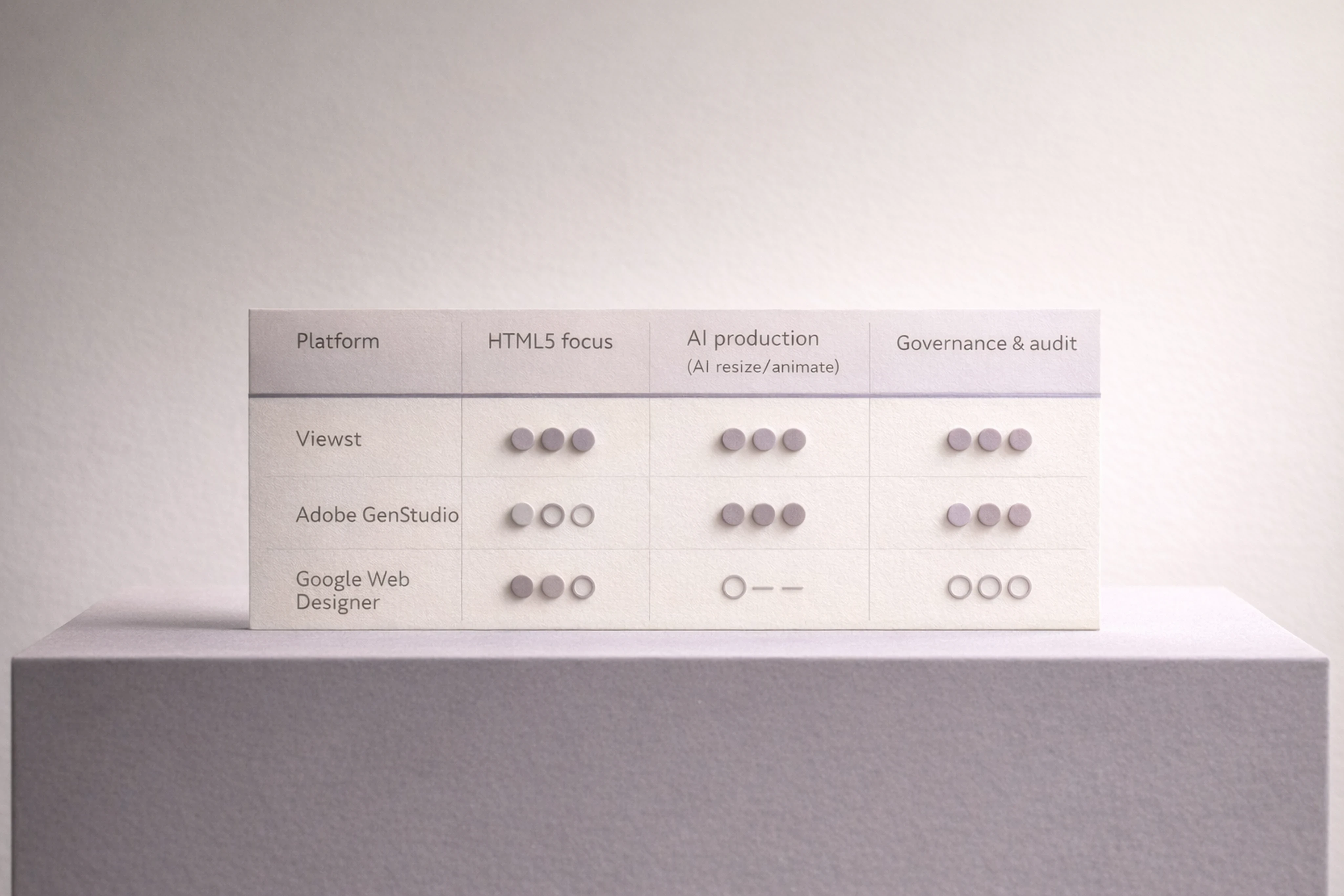
| Platform | Primary Strength | HTML5 Focus | AI for Production (resize/animate) | Governance / Audit Trail | Best For |
|----------------------|-----------------------------------------------|------------|-------------------------------------|--------------------------------------|---------------------------------------------|
| Viewst | HTML5-native ad production infrastructure | Yes | Yes (Smart Resize, Instant Animator, Image Deflatening, AI Designer) | Strong: brandbooks, approvals, versioning | High-volume agencies, in-house teams, enterprise brands needing scale + brand control | | Adobe GenStudio | Integrated enterprise content + governance | Partial (HTML5 via integrations) | Yes (variant generation, formatting) | Strong: lockable templates, brand checks | Enterprises already standardized on Adobe stack | | Google Web Designer | Free HTML5 authoring tool from Google | Yes | Limited automation; no advanced AI | Weak: manual governance, no full audit trail | Teams needing basic HTML5 compliance for Google inventory | | Canva | Simple templating and quick social/display | Partial (limited HTML5 export options) | Yes (basic resize and AI generation) | Moderate: brand kits, some approvals | Small teams and non-technical marketers |
Key takeaway: if you need governed AI production for HTML5 banners at scale, prioritize tools that:
Are HTML5-native
Offer AI for production (not just image generation)
Provide brandbooks, approvals, and audit trails
That’s precisely the gap Viewst is designed to fill.
Best Software for Creating and Managing Display Ads
The "best software for creating and managing display ads" depends on your use case—concept design, HTML5 production, or media trafficking.
Below is a pragmatic breakdown.
1. Concept and design exploration
Tools:
Figma
Adobe Photoshop / Illustrator
Best when:
You’re exploring visual directions and layouts.
You need deep control over illustration, photography, or UI-like layouts.
2. HTML5 ad production platforms
Tools:
Viewst (HTML5-native, AI-assisted production)
Google Web Designer
Adobe Animate (for complex motion, less governance-oriented)
Best when:
You need to scale HTML5 banners across dozens of sizes and markets.
You’re exporting to ad servers and DSPs with strict specs.
You want AI to handle resizing, animation, and versioning, with human QA.
3. Governance-heavy creative automation suites
Tools:
Adobe GenStudio
Frontify (brand management + asset governance)
Best when:
You’re an enterprise with heavy compliance needs.
You want lockable templates, brand kits, and automated brand checks.
4. Simpler templating for smaller teams
Tools:
Canva
Basic in-platform builders from ad networks
Best when:
Volume and risk are low.
You need quick turnaround but can tolerate limited HTML5 capabilities.
Selection criteria for creative automation tools for display advertising:
HTML5-native support and click-tag handling
AI features for production (resize, animate, deflattening) rather than generic image generation
Brandbooks and locked templates
Integrated review and approvals
Audit trail and export logs
Viewst’s differentiation:
Native editable HTML5 output instead of flat images
AI optimized for production tasks (Smart Resize, Image Deflatening, Instant Animator)
Brand control via locked brandbooks and governance
Integrated collaboration and review inside the production environment
Appendix A: Sample AI Governance Policy for Banner Production
Use this lightweight policy as a starting point for governance for AI-assisted ad production.
1. Purpose
Define how AI may be used in banner production to increase speed while preserving brand integrity, compliance, and creative quality.
2. Scope
Applies to all AI-enabled tools used in creating, resizing, animating, or localizing HTML5, GIF, or MP4 display ads.
3. Acceptable AI uses
Resizing banners from a master creative
Generating layout-safe copy variants within approved messaging frameworks
Animating existing designs using pre-approved motion patterns
Deflattening static assets into editable HTML5 structures
4. Prohibited AI uses (without special approval)
Generating logos or core brand marks
Creating synthetic humans or realistic likenesses of individuals
Generating legal copy, financial disclosures, or regulatory text without legal review
5. Human-in-the-loop
All AI-assisted creatives must be reviewed by an approved designer before export.
All new copy variants must be reviewed by a copy lead.
All region-specific adaptations must be reviewed by a regional owner.
6. Logging and audit trail
Every AI-assisted change must be logged with user, timestamp, prompt (or action), model version, and variant ID.
7. Disclosure
For standard banners, internal governance is sufficient.
For high-risk content (synthetic humans, altered identity, or sensitive categories), follow IAB 2026 guidance on transparency and disclosure.
Appendix B: Audit-Trail Schema for Automated Ad Creatives
Here’s a practical audit trail schema for AI-assisted banner production.
Each record should capture:
Record ID
Unique identifier for the log entry.
Variant ID
ID of the specific banner variant (e.g., campaign_code + size + locale).
User ID
Who initiated the AI action (designer, PM, etc.).
Timestamp
ISO 8601 datetime of the AI action.
Action Type
e.g.,
AI_RESIZE,AI_ANIMATE,AI_COPY_VARIANT,AI_DEFLATTEN.
Model Version
Version or name of the AI model used.
Prompt / Parameters
The text prompt or parameters passed (e.g., "resize from 300x250 to 728x90").
Source Asset ID
Reference to the master creative or previous variant.
Output Summary
Short description of change (e.g., "new EN-US copy variant with promo=20% off").
Approver ID
Who approved the output for production.
Approval Timestamp
When approval was granted.
Deployment Reference
Ad server creative ID / placement IDs where the variant is used.
Viewst-style production platforms can embed this directly into their project history, so teams don’t need a separate logging system.
Appendix C: Sample HTML5 Root-Folder Structure and Click Tag Example
A clean HTML5 root folder is essential for reliable serving across DSPs and ad servers.
Example folder structure
campaign_summer_sale/
  index.html
  main.js
  styles.css
  images/
    logo.png
    product1.jpg
    bg.jpg
  fonts/
    brand-regular.woff2
    brand-bold.woff2
Guidelines:
One HTML file (
index.html) per creative.No nested ZIPs; zip the
campaign_summer_salecontents directly.All resources referenced with relative paths (no absolute URLs unless explicitly required).
Basic click-tag implementation example
This is an example aligned with Google Web Designer and DV360 standards.
<script>
  var clickTag = "https://example.com";

  function handleClick() {
    window.open(clickTag, "_blank");
  }
</script>

<body onclick="handleClick()">
  <!-- banner content here -->
</body>
Always adapt to the exact clickTag implementation required by your ad server or publisher.
FAQ: Practical Questions About AI-Assisted Banner Production
1. When should we require human sign-off in AI-assisted workflows?
Require sign-off when:
A new creative concept or layout is introduced
Copy or language is changed (especially legal, pricing, or promotions)
Assets are localized for new markets or languages
Any AI-generated imagery involves humans, sensitive categories, or regulated products
For low-risk tasks—like resizing from a master creative—automated release may be acceptable if QA checks are robust.
2. What should we log in an audit trail for AI-generated ads?
Log at least:
User ID and timestamp
Model version and action type
Prompt or parameters
Source and output variant IDs
Approver ID and approval timestamp
Ad server or placement IDs where the creative runs
This aligns with NIST’s "govern" and "manage" functions and supports internal audits or external inquiries.
3. How do we handle local law and regulatory differences in AI workflows?
Maintain a matrix of regulatory requirements by market (e.g., APR disclosure rules, alcohol ads, health claims).
Tag templates with allowed markets.
Require regional approval before deploying AI variants in regulated markets.
Use AI to propose variants, but keep legal/regulatory copy under human control.
4. How can we avoid over-templating when using AI automation?
Maintain multiple master concepts per campaign.
Use AI to explore motion and micro-variations, not to clone the same layout everywhere.
Regularly review performance data to retire stale templates.
Give designers a defined “playground” for experimentation within brand-safe boundaries.
5. Where does Viewst fit in our existing stack with Figma and ad servers?
Viewst sits between design and media:
Import design systems and master creatives from Figma or Adobe.
Use Viewst’s AI features (Smart Resize, Image Deflatening, Instant Animator, AI Designer) to produce HTML5, GIF, or MP4 variants at scale.
Export production-ready assets directly to ad servers or DSPs, with brandbooks, QA, and approvals embedded.
That means designers stay in their preferred design tools, while Viewst handles the non-creative suffering of banner production—formats, resizes, and exports—under consistent governance.
TL;DR
AI-assisted banner production can unlock 10x more content at lower cost, but only if you treat AI as governed production infrastructure, not a toy generator.
This guide covers the most common pitfalls in creative automation for display advertising—over-templating, broken brand consistency, ignored QA—and gives you practical governance, onboarding, and QA checklists tailored for HTML5 banner workflows.
AI is now embedded in most creative automation tools for display advertising.
IAB reports that more than 60% of ad executives say their companies already use AI to create ads, and 58% plan to increase its use for creative generation in the next year (Interactive Advertising Bureau, "AI Adoption Is Surging in Advertising. But Is the Industry Prepared for Responsible AI?", 2024, US-focused, https://www.iab.com/insights/ai-adoption-is-surging-in-advertising-but-is-the-industry-prepared-for-responsible-ai/).
But AI incidents are already common.
Over 70% of marketers said they have experienced at least one AI-related incident—such as off-brand content, factual errors, or rights issues—while fewer than 35% plan to increase brand-integrity or governance investment (IAB, same report, US, 2024).
This gap between adoption and governance shows up sharply in banner production, especially when teams are chasing creative automation for high-volume banner production.
This article breaks down:
The most common pitfalls in AI-assisted banner production
How to avoid brand drift and over-templating
Concrete governance and QA practices for HTML5 display ads
Onboarding checklists you can plug into your current workflow
Throughout, we’ll use Viewst’s perspective as a dedicated HTML5 ad production platform that sits between design and media.
Pitfall #1: Treating AI as a content generator, not a governed production layer
The biggest failure mode is using AI as a free-for-all content generator.
IAB’s US research shows:
70%+ of marketers report an AI-related incident
Only about one-third plan to invest more in AI governance
58% plan to increase AI use for creative generation anyway (IAB, 2024, US, https://www.iab.com/insights/ai-adoption-is-surging-in-advertising-but-is-the-industry-prepared-for-responsible-ai/)
In other words, adoption is outrunning controls.
Why this breaks banner production
In high-volume HTML5 production:
Every variation needs to inherit from a master creative
Local markets need controlled flexibility
Ad servers and DSPs have strict technical specs
If AI generates banners in disconnected tools with no master asset and no brand rules, you get:
Inconsistent fonts, logos, and messaging
No audit trail for what changed and why
Difficult rollback when something goes wrong
How to avoid it
Anchor everything on a master creative
Build one HTML5 master that encodes layout, hierarchy, and core messages.
Use AI (like Viewst’s Smart Resize or Instant Animator) to derive all sizes and motions from that master, instead of inventing each ad from scratch.
Define AI’s job explicitly
AI handles: resizes, simple copy variants, animation defaults, asset deflatening.
Humans own: concept, visual direction, hierarchy, and final sign-off.
Document this in a short internal policy.
Treat AI as infrastructure, not inspiration
Use AI tools embedded in your production stack (e.g., Viewst between Figma/Adobe and ad servers) rather than standalone “toy” apps.
Ensure they can enforce brandbooks, versioning, and approvals.
Pitfall #2: Brand inconsistency from disconnected tools
Frontify’s global guidance on AI for brand management notes that the old model—brand teams reviewing every single asset manually—"doesn’t scale" in the AI era and stresses the need for a single governed source of truth for assets and rules (Frontify, "AI for Brand Management", 2023, global, https://www.frontify.com/en/guide/ai-for-brand-management).
When AI tools operate outside that source of truth, you risk brand drift at scale.
Typical symptoms
Region-specific banners use different typefaces
Colors drift from the core palette
AI-generated imagery doesn’t match brand photography style
Local teams tweak layouts directly in non-governed tools
How to maintain brand consistency with AI tools
Centralize brandbooks inside your production platform
Lock brand colors, typography, and logo usage at the template level.
Ensure AI features can only select from approved style tokens.
Use brand-aligned templates instead of loose prompts
Adobe’s enterprise guidance emphasizes brand-aligned templates, locked elements, and pre-approved content as the foundation for AI production (Adobe, "Adobe GenStudio for Performance Marketing", 2024, global, https://business.adobe.com/products/genstudio/performance-marketing.html).
Mirror this: master HTML5 templates become the only starting point.
Govern local adaptations
Give markets controlled fields they can change (offer, price, CTA) while keeping layout and key visuals locked.
Use a system like Viewst that can enforce brandbooks and limit what AI can alter.
Pitfall #3: Over-templating and creative fatigue
Over-templating is when automation becomes so rigid that every banner looks the same.
BCG’s global report on GenAI in marketing (commissioned with Adobe) found that when used effectively, brands can cut up to 40% of non-working spend and achieve up to a 10x increase in content volume (Boston Consulting Group & Adobe, "How GenAI Is Shaping the Future of Creativity in Marketing", 2024, global, https://business.adobe.com/assets/pdfs/resources/sdk/bcg-gen-ai-report/how-genai-is-shaping-the-future-of-creativity-in-marketing.pdf).
But that 10x volume is dangerous if all variants are near-identical.
Why over-templating happens
Templates are locked so tightly there’s no room for concept nuance
AI is asked to "fill the boxes" with minor copy tweaks
Teams rely on a single layout for every campaign and audience
The result: performance plateaus, and younger consumers—already skeptical of AI ads—tune out.
IAB’s US consumer research shows that less than half of Gen Z and Millennial respondents felt positive about AI-generated ads, and only 38% agreed brands using AI ads were "creative" (Interactive Advertising Bureau, "Why Young Consumers Avoid Gen AI Ads", 2024, US, https://www.iab.com/insights/why-young-consumers-avoid-gen-ai-ads/).
Preventing over-templating in ad automation
Separate creative concept from production template
Develop 2–3 distinct master concepts per campaign.
Each concept gets its own HTML5 master and AI automation setup.
Use AI for variation, not sameness
Let AI propose multiple animation options or copy angles.
Run structured A/B tests on layouts, not only copy.
Build experimentation into your brandbook
Define “playground” areas where designers can experiment.
Keep core identity elements locked, but allow variation in secondary visuals, motion patterns, or microcopy.
Viewst’s AI Instant Animator, for example, can apply motion patterns across layers in one click while still letting designers tweak details per key concept.
Pitfall #4: Ignoring HTML5 QA and platform constraints
Even before AI, HTML5 display ads failed QA regularly.
Google’s documentation for HTML5 creatives provides a baseline:
DV360 caps total downloaded creative size at 5 MB
Google Ad Manager typically caps extracted HTML5 bundles at 1 MB, with up to 100 files (Google, "HTML5 Ads Requirements", 2024, global guidance, https://support.google.com/displayvideo/answer/10261241?hl=en and https://support.google.com/richmedia/answer/2672562?hl=en).
Creatives must include at least one click tag, use SSL-compatible assets, and follow publisher-specific specs.
DV360 limits animation to 30 seconds and disallows autoplay audio (same Google DV360 HTML5 guidance, 2024).
When AI accelerates production, it also accelerates QA failures if you don’t adapt your checks.
Common AI-era QA failures
AI-generated images bloat file size beyond DV360’s 5 MB cap
Missing or misconfigured click tags
Non-SSL assets (mixed content) that break rendering
Animation exceeding 30 seconds or looping incorrectly
How to build AI-aware QA into your process
Automate technical checks where possible
Use a platform that validates file size, file count, and click tags before export.
Run local tests in a single root folder structure, as Google recommends.
Standardize HTML5 folder and click-tag conventions
See the appendix for a reference root-folder structure and click-tag snippet.
Add a QA step dedicated to AI side effects
Specifically check: file size, animation duration, and resource paths after AI resizes or auto-animates.
Viewst’s native HTML5 output and true WYSIWYG editor simplify this: what you see in the editor is exactly what will run, reducing "it worked locally" surprises.
Pitfall #5: No governance, no audit trail
Regulators and industry bodies are moving toward risk-based governance.
The IAB’s 2026 AI Transparency and Disclosure Framework recommends targeted disclosure when AI materially affects authenticity, identity, or representation, instead of labeling every AI touchpoint (Interactive Advertising Bureau, "AI Transparency & Disclosure Framework", 2026, global, https://www.iab.com/news/iab-releases-industrys-first-ai-transparency-and-disclosure-framework-to-guide-responsible-advertising-in-a-generative-ai-landscape/).
NIST’s AI Risk Management Framework, used widely in US enterprises, organizes AI risk practices around four functions: govern, map, measure, and manage (National Institute of Standards and Technology, "AI Risk Management Framework", 2023, US, https://www.nist.gov/itl/ai-risk-management-framework/nist-ai-rmf-playbook).
But many creative teams still run AI in ad-hoc tools with no audit trail.
Why an audit trail matters for AI-assisted ads
Compliance: you can show how content was generated and approved.
Accountability: you know which user or model made a change.
Debugging: you can trace back issues to prompts, model versions, or variants.
Minimum viable governance for AI-assisted banner production
Define roles and responsibilities
Who can generate AI variants?
Who must approve before a creative goes live?
Who owns QA sign-off per campaign?
Log key metadata for each AI-assisted change
See the appendix for an audit trail schema.
Align disclosures with risk
Follow IAB’s risk-based approach: disclose when AI materially alters people, identity, or representations in a way that could mislead.
For standard HTML5 banners that only use AI for resizes or animation, internal governance may be sufficient.
Viewst is designed as governed production infrastructure: master assets, versioning, and approvals live in the same environment as AI tools, making audit trails easier to maintain.
AI Banner Production QA Checklist
This AI banner production QA checklist focuses on HTML5 display ads and major platforms like Google DV360 and Google Ad Manager.
Use it as a final gate before upload.
File size and file count
Ensure total downloaded creative size ≤ 5 MB for DV360 (Google DV360 HTML5 Requirements, 2024, global).
Ensure extracted ZIP ≤ 1 MB and ≤ 100 files for Google Ad Manager HTML5 workflow (Google Ad Manager HTML5 Guidelines, 2024, global).
Folder structure and assets
Single root folder for each creative.
No nested ZIPs inside the main ZIP.
All assets referenced with relative paths.
All external resources (if allowed) are HTTPS/SSL-compatible.
Click tags and tracking
At least one click tag implemented (e.g., Enabler or standard JavaScript clickTag variable as per publisher requirements).
Click area covers the intended interactive region.
No hard-coded URLs; use ad server click macros.
Animation and interactions
Total animation duration ≤ 30 seconds for DV360 (Google DV360 policy, 2024).
No autoplay audio.
No prohibited behaviors (e.g., fake UI elements, system-like dialogs, depending on publisher rules).
AI-specific checks
Confirm AI-generated images are optimized (compressed, appropriate resolution).
Re-check file paths after AI Smart Resize or auto-layout.
Confirm animation timings and easing after AI Instant Animator runs.
Brand and legal
Fonts and colors match brandbook.
Legal copy and disclaimers are visible at all sizes.
Regulatory requirements (e.g., APR, pricing disclosures) are present where needed.
Onboarding Checklist for AI Creative Automation Platforms
When you adopt AI creative automation tools for display advertising, a structured onboarding plan prevents chaos.
Use this onboarding checklist for AI creative automation platforms to get your first 90 days right.
Define scope and success metrics
Choose 1–2 campaigns or markets as pilots.
Set measurable goals (e.g., reduce production time per banner set by 40%, increase number of variants per campaign by 3x).
Map your current workflow
Identify where assets enter (Figma, Adobe, DAM).
Identify handoff points to media (ad servers, DSPs).
Document current review and approval steps.
Set up master creatives and brandbooks
Import master layouts from Figma or Adobe into your AI-enabled HTML5 platform.
Configure brandbooks—colors, typography, logos—as locked elements.
Tag templates by campaign, region, or product line.
Configure AI features with guardrails
Enable AI Smart Resize, Image Deflatening, or Instant Animator only on templates that are production-ready.
Limit who can generate AI variants (e.g., senior designers, creative ops).
Pre-define prompt patterns for safe reuse.
Establish governance and approvals
Decide when human-in-the-loop approval is mandatory (e.g., before new copy variants, localization, or legal changes).
Configure approval workflows directly in the production platform.
Align with NIST’s "govern" function by documenting roles, escalation paths, and risk thresholds (NIST, ARMF, 2023, US).
Train teams and update playbooks
Run short training sessions for designers, PMs, and media teams.
Update internal SOPs to include AI-specific QA checks.
Build a shared glossary so everyone uses the same language for templates, variants, and master creatives.
Monitor, measure, and refine
Track production time, QA issues, and rework rates before and after adoption.
Capture lessons from incidents and feed them back into prompts, templates, or rules.
Viewst’s positioning as HTML5-native infrastructure—between design tools and media platforms—makes it easier to embed these onboarding practices without replacing your existing design stack.
Creative Automation Platform Comparison for Banner Ads
This section provides a high-level creative automation platform comparison for banner ads.
It’s focused on HTML5, high-volume production, and governance features.
| Platform | Primary Strength | HTML5 Focus | AI for Production (resize/animate) | Governance / Audit Trail | Best For |
|----------------------|-----------------------------------------------|------------|-------------------------------------|--------------------------------------|---------------------------------------------|
| Viewst | HTML5-native ad production infrastructure | Yes | Yes (Smart Resize, Instant Animator, Image Deflatening, AI Designer) | Strong: brandbooks, approvals, versioning | High-volume agencies, in-house teams, enterprise brands needing scale + brand control | | Adobe GenStudio | Integrated enterprise content + governance | Partial (HTML5 via integrations) | Yes (variant generation, formatting) | Strong: lockable templates, brand checks | Enterprises already standardized on Adobe stack | | Google Web Designer | Free HTML5 authoring tool from Google | Yes | Limited automation; no advanced AI | Weak: manual governance, no full audit trail | Teams needing basic HTML5 compliance for Google inventory | | Canva | Simple templating and quick social/display | Partial (limited HTML5 export options) | Yes (basic resize and AI generation) | Moderate: brand kits, some approvals | Small teams and non-technical marketers |
Key takeaway: if you need governed AI production for HTML5 banners at scale, prioritize tools that:
Are HTML5-native
Offer AI for production (not just image generation)
Provide brandbooks, approvals, and audit trails
That’s precisely the gap Viewst is designed to fill.
Best Software for Creating and Managing Display Ads
The "best software for creating and managing display ads" depends on your use case—concept design, HTML5 production, or media trafficking.
Below is a pragmatic breakdown.
1. Concept and design exploration
Tools:
Figma
Adobe Photoshop / Illustrator
Best when:
You’re exploring visual directions and layouts.
You need deep control over illustration, photography, or UI-like layouts.
2. HTML5 ad production platforms
Tools:
Viewst (HTML5-native, AI-assisted production)
Google Web Designer
Adobe Animate (for complex motion, less governance-oriented)
Best when:
You need to scale HTML5 banners across dozens of sizes and markets.
You’re exporting to ad servers and DSPs with strict specs.
You want AI to handle resizing, animation, and versioning, with human QA.
3. Governance-heavy creative automation suites
Tools:
Adobe GenStudio
Frontify (brand management + asset governance)
Best when:
You’re an enterprise with heavy compliance needs.
You want lockable templates, brand kits, and automated brand checks.
4. Simpler templating for smaller teams
Tools:
Canva
Basic in-platform builders from ad networks
Best when:
Volume and risk are low.
You need quick turnaround but can tolerate limited HTML5 capabilities.
Selection criteria for creative automation tools for display advertising:
HTML5-native support and click-tag handling
AI features for production (resize, animate, deflattening) rather than generic image generation
Brandbooks and locked templates
Integrated review and approvals
Audit trail and export logs
Viewst’s differentiation:
Native editable HTML5 output instead of flat images
AI optimized for production tasks (Smart Resize, Image Deflatening, Instant Animator)
Brand control via locked brandbooks and governance
Integrated collaboration and review inside the production environment
Appendix A: Sample AI Governance Policy for Banner Production
Use this lightweight policy as a starting point for governance for AI-assisted ad production.
1. Purpose
Define how AI may be used in banner production to increase speed while preserving brand integrity, compliance, and creative quality.
2. Scope
Applies to all AI-enabled tools used in creating, resizing, animating, or localizing HTML5, GIF, or MP4 display ads.
3. Acceptable AI uses
Resizing banners from a master creative
Generating layout-safe copy variants within approved messaging frameworks
Animating existing designs using pre-approved motion patterns
Deflattening static assets into editable HTML5 structures
4. Prohibited AI uses (without special approval)
Generating logos or core brand marks
Creating synthetic humans or realistic likenesses of individuals
Generating legal copy, financial disclosures, or regulatory text without legal review
5. Human-in-the-loop
All AI-assisted creatives must be reviewed by an approved designer before export.
All new copy variants must be reviewed by a copy lead.
All region-specific adaptations must be reviewed by a regional owner.
6. Logging and audit trail
Every AI-assisted change must be logged with user, timestamp, prompt (or action), model version, and variant ID.
7. Disclosure
For standard banners, internal governance is sufficient.
For high-risk content (synthetic humans, altered identity, or sensitive categories), follow IAB 2026 guidance on transparency and disclosure.
Appendix B: Audit-Trail Schema for Automated Ad Creatives
Here’s a practical audit trail schema for AI-assisted banner production.
Each record should capture:
Record ID
Unique identifier for the log entry.
Variant ID
ID of the specific banner variant (e.g., campaign_code + size + locale).
User ID
Who initiated the AI action (designer, PM, etc.).
Timestamp
ISO 8601 datetime of the AI action.
Action Type
e.g.,
AI_RESIZE,AI_ANIMATE,AI_COPY_VARIANT,AI_DEFLATTEN.
Model Version
Version or name of the AI model used.
Prompt / Parameters
The text prompt or parameters passed (e.g., "resize from 300x250 to 728x90").
Source Asset ID
Reference to the master creative or previous variant.
Output Summary
Short description of change (e.g., "new EN-US copy variant with promo=20% off").
Approver ID
Who approved the output for production.
Approval Timestamp
When approval was granted.
Deployment Reference
Ad server creative ID / placement IDs where the variant is used.
Viewst-style production platforms can embed this directly into their project history, so teams don’t need a separate logging system.
Appendix C: Sample HTML5 Root-Folder Structure and Click Tag Example
A clean HTML5 root folder is essential for reliable serving across DSPs and ad servers.
Example folder structure
campaign_summer_sale/
  index.html
  main.js
  styles.css
  images/
    logo.png
    product1.jpg
    bg.jpg
  fonts/
    brand-regular.woff2
    brand-bold.woff2
Guidelines:
One HTML file (
index.html) per creative.No nested ZIPs; zip the
campaign_summer_salecontents directly.All resources referenced with relative paths (no absolute URLs unless explicitly required).
Basic click-tag implementation example
This is an example aligned with Google Web Designer and DV360 standards.
<script>
  var clickTag = "https://example.com";

  function handleClick() {
    window.open(clickTag, "_blank");
  }
</script>

<body onclick="handleClick()">
  <!-- banner content here -->
</body>
Always adapt to the exact clickTag implementation required by your ad server or publisher.
FAQ: Practical Questions About AI-Assisted Banner Production
1. When should we require human sign-off in AI-assisted workflows?
Require sign-off when:
A new creative concept or layout is introduced
Copy or language is changed (especially legal, pricing, or promotions)
Assets are localized for new markets or languages
Any AI-generated imagery involves humans, sensitive categories, or regulated products
For low-risk tasks—like resizing from a master creative—automated release may be acceptable if QA checks are robust.
2. What should we log in an audit trail for AI-generated ads?
Log at least:
User ID and timestamp
Model version and action type
Prompt or parameters
Source and output variant IDs
Approver ID and approval timestamp
Ad server or placement IDs where the creative runs
This aligns with NIST’s "govern" and "manage" functions and supports internal audits or external inquiries.
3. How do we handle local law and regulatory differences in AI workflows?
Maintain a matrix of regulatory requirements by market (e.g., APR disclosure rules, alcohol ads, health claims).
Tag templates with allowed markets.
Require regional approval before deploying AI variants in regulated markets.
Use AI to propose variants, but keep legal/regulatory copy under human control.
4. How can we avoid over-templating when using AI automation?
Maintain multiple master concepts per campaign.
Use AI to explore motion and micro-variations, not to clone the same layout everywhere.
Regularly review performance data to retire stale templates.
Give designers a defined “playground” for experimentation within brand-safe boundaries.
5. Where does Viewst fit in our existing stack with Figma and ad servers?
Viewst sits between design and media:
Import design systems and master creatives from Figma or Adobe.
Use Viewst’s AI features (Smart Resize, Image Deflatening, Instant Animator, AI Designer) to produce HTML5, GIF, or MP4 variants at scale.
Export production-ready assets directly to ad servers or DSPs, with brandbooks, QA, and approvals embedded.
That means designers stay in their preferred design tools, while Viewst handles the non-creative suffering of banner production—formats, resizes, and exports—under consistent governance.

Victoria is the CEO at Viewst. She is a serial entrepreneur and startup founder. She worked in Investment Banking for 9 years as international funds sales, trader, and portfolio manager. Then she decided to switch to her own startup. In 2017 Victoria founded Profit Button (a new kind of rich media banners), the project has grown to 8 countries on 3 continents in 2 years. In 2021 she founded Viewst startup. The company now has clients from 43 countries, including the USA, Canada, England, France, Brazil, Kenya, Indonesia, etc.
In this article
" height="11.060000000000002px" id="wzBCZ87AK" transform="translate(6.47 2.47)" width="6.590000000000003px"/></g></svg>)