
Why Ad Creative Operations Needs a Production Pipeline
For high‑volume display campaigns, creative work behaves less like one‑off design and more like a content supply chain.
Adobe’s content supply chain guidance treats campaign execution as a connected system: briefs become records, workflows are tracked, and approvals link directly to activation. Gannett, for example, scaled from 50–70 to 120–150 campaigns per month and saved 389 workdays by centralizing workflow and standardizing processes.
If you’re managing dozens of HTML5 banner sets, markets, and test variants, you need similar rigor.
This article offers a practical blueprint for creative ops leaders to build a scalable ad production pipeline — with clear SLAs, roles, and workflows — and shows where an HTML5 ad production platform like Viewst fits in.
The Goal: A Repeatable Ad Production Pipeline
A scalable ad production pipeline should:
Convert briefs into structured, trackable work
Standardize templates and brand rules across formats
Eliminate manual resizing and mechanical tasks
Keep approvals inside the production environment
Maintain version control and audit trails
Hand off ready‑to‑serve HTML5 creatives to media with zero chaos
For enterprise marketers, this isn’t optional. Deloitte’s content supply chain model cites illustrative gains like 80% faster speed‑to‑market and up to 75% cost savings on creative/production staffing when teams industrialize their workflow.
Step 1: Standardize Intake With a Creative Brief Template
The most scalable pipelines start with a standardized brief.
Adobe’s workflow planning materials recommend treating briefs as structured records tied to deadlines, dependencies, and goals. That’s even more critical for display and HTML5 campaigns.
What a Creative Brief Template for Display Ads Should Capture
At minimum, your brief for banner production should include:
Campaign context
Objective, target audience, markets, flight dates, KPIs.Channel + spec details
Platforms (Google Ads, DV360, retail media, direct buys)
Creative types (HTML5, static, GIF, MP4)
Size list (e.g., 300×250, 728×90, 160×600, 300×600, 320×50, and any custom formats)
Messaging architecture
Priority hierarchy: primary headline, secondary message, CTA variants, legal copy.Brand + asset inputs
Brandbook link, logos, product imagery, fonts, color tokens, layout templates.Testing and personalization plan
Number of variants, audiences per variant, required dynamic fields.Operational details
Stakeholders, approvers, required languages, dependencies (landing pages, tracking tags).
Intake SLAs: Set Expectations Early
Define clear SLAs around intake:
Brief completeness check (traffic manager / creative ops)
SLA: within 24 business hours of submission
Outcome: brief accepted with timelines, or returned with specific gaps
Scope confirmation (creative lead + media lead)
SLA: within 48 business hours
Outcome: agreed size list, variant count, and delivery milestones
Codify this in a creative ops SLA template so stakeholders know that incomplete briefs slip timelines — not the production team.
Step 2: Build a Template System Around a Master Creative
Once intake is standardized, templates do the heavy lifting.
Viewst’s core belief is that master creative should be the single source of truth. All sizes and variations inherit structure from this master.
Why Template Systems Matter
Template‑driven workflows enable:
Faster scaling
AI Smart Resize in Viewst can generate all required HTML5 sizes from one master, dramatically reducing manual layout work.Consistent brand execution
Locked brandbooks ensure typography, colors, and spacing are enforced across all formats.Governed local adaptations
Local markets can adapt copy or imagery without breaking global layout and brand rules.
Practical Template Types for Banner Ad Production
For high‑volume pipelines, create:
Global brand templates
Master layouts for evergreen offers, product launches, and brand campaigns.Performance testing templates
Structures specifically designed for A/B testing headlines, CTAs, and offer framing.Vertical‑specific templates
Tailored compositions for SaaS, fintech, e‑commerce, automotive, etc.Localized variants
Templates with flexible text containers, localization notes, and legal copy blocks.
With Viewst, these templates live as editable HTML5 assets; AI Image Deflatening can even turn flat legacy assets into editable templates, so you’re not rebuilding everything from scratch.
Step 3: Define Roles and Ownership Across the Pipeline
Adobe’s creative ops guidance emphasizes assigning a single owner for request triage. That same clarity should extend through your entire pipeline.
Core Roles in a Scalable Ad Production Workflow
For mid‑market to enterprise teams, a robust setup often includes:
Traffic / Creative Operations Lead
Owns intake, triage, resourcing, SLAs
Coordinates between creative, brand, media, and localization
Creative Director / Design Lead
Owns master creative direction and quality
Approves templates and key layouts
Production Designer / HTML5 Specialist
Builds master banners and template systems
Owns animation, file specs, and export readiness
Performance Marketing / Media Lead
Owns sizing requirements, ad platform constraints, and tracking needs
Localization / Market Lead
Owns language accuracy and market‑specific tweaks
Brand Governance / MarTech Ops
Owns brandbooks, permissions, and integrations with asset management
Role Definitions + RACI
Document who is Responsible, Accountable, Consulted, and Informed for:
Brief acceptance and scoping
Template creation and updates
Variant production and animation
Brand and legal review
Final technical QA and handoff to media
This keeps decisions moving even when stakeholders are busy.
Step 4: Design an Approval Workflow That Lives in the Production Environment
Bynder and Frontify both position approval workflows, role‑based permissions, and rights tracking as central to brand governance. For ads, these workflows must be tightly integrated with the actual creatives.
Approval Stages for Banner Ad Production
A robust ad approval workflow for campaigns typically includes:
Master creative approval
Owner: Creative Director
SLA: 1–2 business days
Scope: key visual, layout, messaging hierarchy
Template + brandbook approval
Owner: Brand governance lead
SLA: 2–3 business days
Scope: locked styles, typography, color tokens, logo usage
Variant / market approval
Owner: Market lead + performance marketing
SLA: 2–3 business days
Scope: copy accuracy, offer alignment, audience fit
Final pre‑flight approval
Owner: Media lead + production designer
SLA: within 24 hours of asset delivery
Scope: spec compliance, click tags, file weight, animation limits
IntelligenceBank reports a median of 3 hours to approve assets and around 40.4 hours to approve linked campaign + task briefs in their customer benchmarks. Use these as directional baselines and adjust SLAs to your org’s speed‑to‑market needs.
Keep Feedback Inside the Production Studio
Fragmented feedback — screenshots in email, Slack threads, annotated decks — kills velocity.
Best practice:
Use a platform like Viewst where comments, previews, and sign‑offs live directly in the banner set.
Route approvals based on roles (CD → brand → market → media).
Tie status changes ("in review", "approved", "ready for export") to actual creative versions.
This significantly reduces the 71% of creatives who, according to Adobe’s State of Creativity 2024 report, struggle with project management and coordination.
Step 5: Implement Version Control and Governance
Version control is no longer a nice‑to‑have. With multi‑market campaigns and AI‑assisted production, it’s a risk control.
Bynder and Frontify both emphasize version history, side‑by‑side comparison, and audit‑ready documentation. Your banner pipeline needs the same rigor.
Minimum Viable Version Control for Ad Creatives
Set standards for:
Naming conventions
Campaign + market + size + variant (e.g.,SUMMER24_US_300x250_VARIANT-A_HTML5_v03).Single source of truth
Master creative lives in one system; variations are derived, not rebuilt.Locked brand elements
Colors, fonts, logo lockups, legal blocks are governed centrally.Change logs
Who changed what, when, and why — especially for last‑minute offer shifts.
Viewst’s brandbooks and synchronized updates enforce these rules across HTML5 sets. When copy changes in the master, all derived sizes can update automatically, eliminating off‑template edits and rogue fonts.
Step 6: Optimize Handoffs Between Designers, Developers, and Media Teams
The handoff process between designers and developers (or media ops) is one of the highest‑friction points in the ad production pipeline.
IAB Tech Lab treats HTML5 ads like mini web pages that need packaging and testing. Google DV360 adds hard constraints: HTML5 files must be packaged as ZIPs, ≤5 MB browser‑downloaded size, ≤100 HTTP calls, and ≤25 cookies per ad.
Define a Standard Handoff Checklist
For every campaign, make sure:
Technical spec compliance is verified
Click tags implemented correctly
File size under limits
Animation duration and loops conform to platform rules
Delivery format is standardized
HTML5 ZIPs labeled with campaign + size
Backup images (JPG/PNG) where required
GIF or MP4 versions for channels that don’t support HTML5
Tracking is validated
UTM parameters (if landing pages are baked in)
Correct click‑through URLs
Consistent naming conventions for reporting
Ownership and timing are clear
Designer: owns creative + animation quality
Media ops: owns trafficking, platform upload, and QA in live environments
Using a native HTML5 ad production platform like Viewst removes the "designer hands PSDs to developer" step entirely; the editor equals output, so creatives export directly as production‑ready HTML5.
Step 7: Use Creative Automation to Remove Repetitive Work
Adobe’s 2024 State of Creativity report found that 44% of creatives spend half their week on repetitive tasks, and 50% cite labor‑intensive production work.
This is where creative automation tools for display advertising deliver immediate ROI.
Automation Capabilities That Matter for Display Ads
When comparing creative automation platforms, prioritize:
Smart resizing around a master creative
Viewst’s AI Smart Resize generates all sizes from one layout, then lets designers refine each banner.Automated animation
Viewst’s AI Instant Animator applies motion across layers in one click, freeing designers from timeline micro‑editing.Structured AI generation, not random images
Viewst’s AI Designer turns prompts into structured, editable HTML5 banners — not flat images — so your brand system still governs the output.Image deflatening
AI Image Deflatening converts flat assets into editable layers, extending the life of legacy creatives.
Ethical AI in this context means respecting brand control and creative judgment: AI handles mechanical work, while designers own concept and craft.
Example: A Scalable Banner Ad Production Workflow
Here’s how a practical, scalable workflow comes together when powered by Viewst.
Intake
Request enters via standardized creative brief template
Creative ops triage within 24 hours, confirm scope and deadlines
Master creative + template setup
Design lead creates master in Figma or Adobe
Import into Viewst; define brandbook, locked styles, and templates
Automated scaling and animation
Use AI Smart Resize to generate required HTML5 sizes
Apply AI Instant Animator for baseline motion; designers fine‑tune keyframes
Review and approvals inside Viewst
Creative director approves master set
Brand and legal review styling and copy
Market leads sign off localized variants directly in the platform
Version control and updates
Offer or copy change in master instantly syncs to all sizes
Version history tracks changes and approvals
Export and handoff to media
Export HTML5 ZIPs, GIF, and MP4 variations that meet DV360 and ad server specs
Media ops receive a clean package and trafficking notes
Reporting and optimization
Performance marketers run A/B tests using predefined template variants
Insights flow back into master templates and brandbooks for future campaigns
This turns banner ad production into infrastructure, not perpetual firefighting.
Operational Metrics and SLAs to Track
To prove value and continuously improve, define a small set of pipeline metrics.
Recommended KPIs:
Average time from brief acceptance to master creative approval
Benchmark: IntelligenceBank sees ~1 hour for Master Creative Brief approvals.Average time from brief to first live impression
Goal: shrink this using automation and integrated approvals.Number of campaigns per month per project manager
Spotify’s creative ops team doubled PM capacity after centralizing workflows.Share of creative time spent on repetitive tasks
Aim to reduce the 44% share reported by Adobe through Viewst‑powered automation.Percentage of assets approved on first round
IntelligenceBank reports 78% approval rates across marketing assets; aim for similar or higher by tightening brief quality and brand governance.
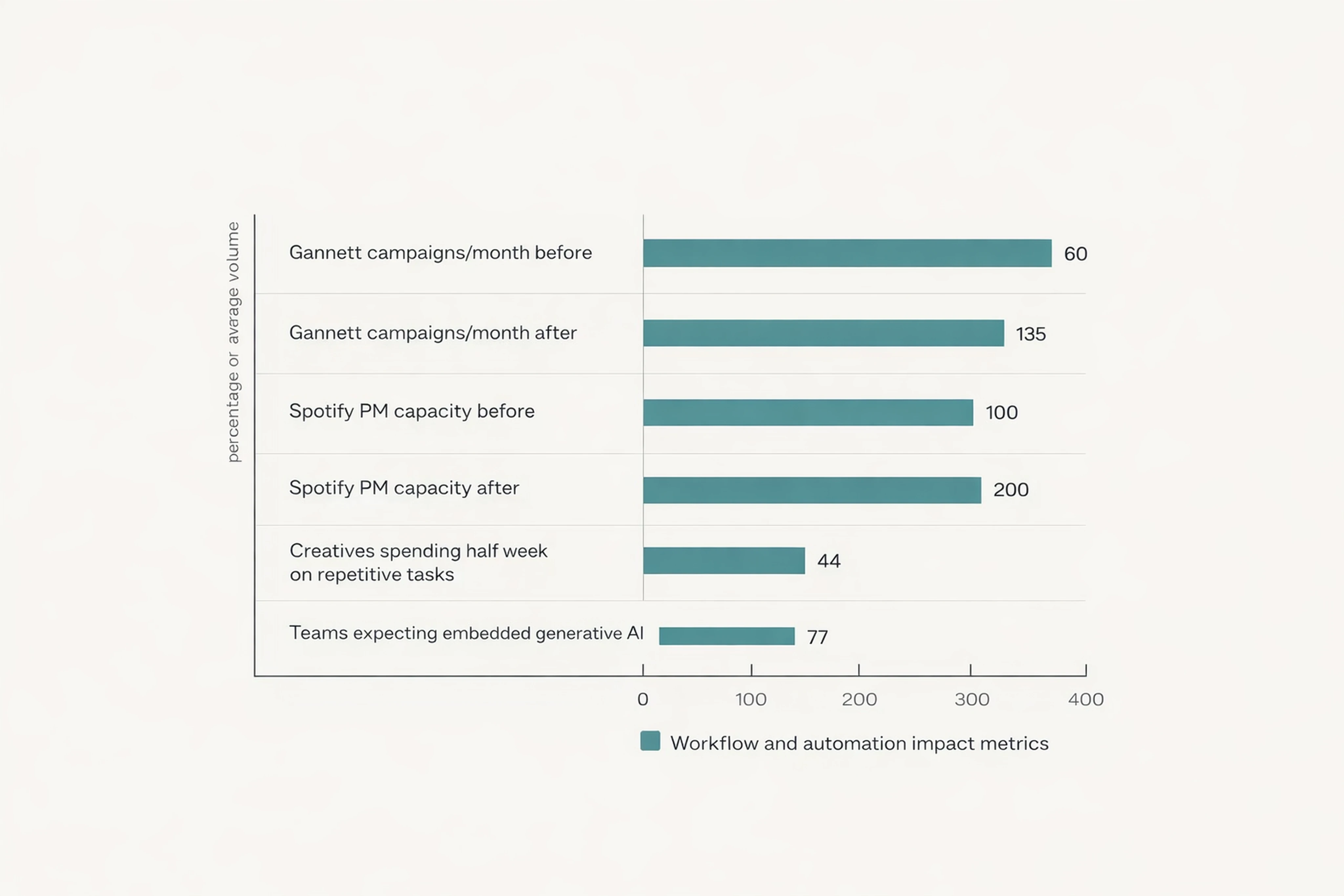
These numbers help you argue for investment in creative operations tooling and talent.
How Viewst Fits Into the Ad Production Pipeline
Viewst is built as an HTML5‑native ad production platform for teams under real pressure: high volumes, tight timelines, multi‑market campaigns.
In the blueprint above, Viewst acts as the production studio layer between design tools (Figma, Adobe) and media platforms (DV360, ad servers, retail media):
Imports master designs and brandbooks
Automates resizing, animation, and HTML5 rendering
Enforces brand governance across all formats
Hosts collaboration, comments, and approvals inside the creative sets
Exports ad‑network‑ready HTML5, GIF, and MP4 files with true WYSIWYG fidelity
For Heads of Creative, Design Directors, and Creative Ops leads, this is how you remove non‑creative suffering from the team — without compromising craft or control.
FAQ: Ad Creative Operations and Scalable Production Pipelines
1. What is an ad production pipeline?
An ad production pipeline is the end‑to‑end process that converts campaign briefs into ad‑ready assets: intake, templating, design, animation, approvals, exports, and handoffs to media.
It treats creative operations like a content supply chain with defined roles, SLAs, and governance.
2. How do I reduce repetitive tasks in banner ad design?
Use creative automation tools that work around a master creative.
Platforms like Viewst automate resizing, basic animation, and repetitive exports while keeping designers in control of layout, brand style, and messaging.
3. What SLAs should I set for creative ops?
Typical SLAs include 24–48 hours for brief triage and scope confirmation, 1–3 days for master creative and template approvals, and 24 hours for pre‑flight technical QA.
Adjust based on your campaign volumes and speed‑to‑market targets.
4. How does version control work for ad creatives?
Version control combines naming conventions, master‑first workflows, brandbooks, and change logs.
In Viewst, all banner sizes inherit from a master; updates propagate across the set, and approvals attach to specific versions.
5. What makes an HTML5 ad production platform different from general design tools?
General design tools focus on creating visuals; HTML5 ad production platforms focus on rendering, animating, and packaging ad‑ready assets.
Viewst outputs native HTML5 ZIPs, enforces ad platform specs, and integrates approvals and automation — turning banner production into reliable infrastructure rather than manual, fragmented work.

Victoria is the CEO at Viewst. She is a serial entrepreneur and startup founder. She worked in Investment Banking for 9 years as international funds sales, trader, and portfolio manager. Then she decided to switch to her own startup. In 2017 Victoria founded Profit Button (a new kind of rich media banners), the project has grown to 8 countries on 3 continents in 2 years. In 2021 she founded Viewst startup. The company now has clients from 43 countries, including the USA, Canada, England, France, Brazil, Kenya, Indonesia, etc.
In this article
" height="11.060000000000002px" id="wzBCZ87AK" transform="translate(6.47 2.47)" width="6.590000000000003px"/></g></svg>)